Try it on your own data
Every report in this article is in the free plan. One snippet for web and apps, up to 10 sites.
Start freeChat etiquette is the writing habits that get a visitor to an answer in the fewest round-trips: confirm the question, state the wait, give the next step once. Below: good and bad examples for opening, waiting, transferring and closing, a full 11-to-6-message rewrite, and a 50-chat audit you can recompute.
What you will learn
- Etiquette is fewer round-trips, not more pleasantries: confirm the question, state the wait, give the next step once.
- Write for the four moments — open, wait, transfer, close — with a rule and a template for each.
- Audit 50 chats on five 0/1 items; the sample went from 42% to 79.6%, and CSAT from 3.6 to 4.3.
What chat etiquette actually means
Chat etiquette is the set of writing habits that gets a visitor to an answer in the fewest round-trips. It is not a list of pleasantries. The rule this guide keeps returning to: confirm the question, say how long the wait will be, and give the next step once. Everything below serves that.
A practical test for any message you are about to send, in three parts. Does it confirm what the visitor actually asked? Does it say how long they will wait, if they must wait? Does it give one clear next step? A message that fails all three is filler; delete it.
One opener pair shows the difference.
Instead of: "Hello! Welcome to Acme Support. How may I assist you today?" Write: "Hi — I see you're on the billing page for order #4821. Is this about the duplicate charge?"
The second opener already knows the page and the likely issue, so the visitor answers "yes" instead of re-typing the problem. That is etiquette doing work, not manners. The four moments every chat moves through — opening, waiting, transferring, closing — each get a rule and a template below.
Opening: confirm the question, then greet
The first agent message should name the visitor's situation before it greets. A generic "How can I help?" forces the visitor to explain from scratch; a context-aware opener lets them confirm. Greet in the same breath, not as a separate round-trip.
Three pairs, from generic to specific.
Instead of: "Hi there! How can I help you today?" Write: "Hi Sam — I see order #4821 on the billing page. Is this about the two charges?"
Instead of: "Welcome to Acme. Please describe your issue in detail." Write: "Hi — I can see you just tried to reset your password twice. Did the email not arrive?"
Instead of: "Hello, valued customer. What can I do for you?" Write: "Hi — you're on the integrations page. Want me to check whether your plan includes the Slack connector?"
Each good opener uses something the agent can already see — the current page, the order, the recent action — and ends with a yes/no question the visitor can answer in one word. For more openers by situation, see live chat scripts.
Waiting: say how long, then check back
Silence is the most common etiquette failure. The visitor cannot tell whether you are working or gone. The rule: if a lookup will take more than two minutes, say so and give a time; if that time will slip, re-announce before it passes.
Two pairs.
Instead of: "Please bear with me." (then four minutes of silence) Write: "I'm checking the payment log for order #4821; about 2 minutes. I'll update you if it runs longer."
Instead of: "Are you still with me?" Write: "Still on it — the billing system is slow today. I'll have an answer by 3:40, or I'll tell you what's delaying it."
A wait-update template you can adapt: "I'm {doing what} for {issue}; about {time}. I'll update you by {time} either way." Fill the braces before sending. Track the first reply separately from the resolution; see first response time.
When the delay is your fault, apologise once, plainly, and move on; a paragraph of apology costs the visitor another round-trip. For wording that does not sound like a template, see better ways to say sorry.
Transferring: send the story with the visitor
A transfer should never make the visitor repeat themselves. The receiving agent needs the story, not just the transcript. Send a four-line summary with the handoff.
One pair.
Instead of: "Please hold while I transfer you to billing." Write: "I'm bringing in our billing team. They can see this chat and the refund I already checked — you won't need to repeat anything."
The four-line transfer-summary template:
- Issue: {one sentence, with the order or account id}
- Checks already done: {what you verified}
- Promised update: {time you told the visitor}
- Next owner: {team or person}
Line 3 is the one teams skip, and it is the one that stops the visitor asking "any update?" twice. If you cannot name a next owner, the transfer is not ready.
Closing: confirm solved, then close
Close only after the visitor confirms the answer worked. The rule splits on outcome: resolved means confirm and close; unresolved means next step, owner and time, and never close.
One pair.
Instead of: "Thanks for contacting Acme. Have a great day!" (issue still open) Write: "The duplicate $49 charge is refunded; it shows in 3–5 business days. Anything else on order #4821?"
A closing template: "{Resolution in one line}. {Next step and when, if anything is still open}. Anything else on {issue}?" For resolved chats the last line is the confirmation; for unresolved ones it is the owner and the time. The wider service workflow is in live chat customer service.
| Moment | Write this | Not this |
|---|---|---|
| Opening | "Hi — I see order #4821 on the billing page. Is this about the duplicate charge?" | "Hello! How can I help you today?" |
| Waiting | "I'm checking the payment log; about 2 minutes. I'll update you if it runs longer." | "Please bear with me." (then silence) |
| Transferring | "I'm bringing in billing. They can see our chat; you won't need to repeat anything." | "Please hold while I transfer you." |
| Closing | "Refund issued; 3–5 business days. Anything else on this order?" | "Thanks for contacting us. Have a great day!" (unresolved) |
One line per moment; the full pairs and templates are in each section above.
Tone and length: human, not canned
Keep each message to two to four sentences, one idea per sentence. Longer reads as a wall; shorter reads as a burst. Nielsen Norman Group's 1997 study found concise writing raised measured usability by 58%, scannable layout by 47% and objective tone by 27% — and all three together by 124%. Chat is the shortest form of web writing, so the same rules apply with less room for error.
Tone is not fixed. NN/g describes four tone dimensions — formal vs casual, serious vs funny, respectful vs irreverent, matter-of-fact vs enthusiastic — and Mailchimp's style guide puts it simply: your voice stays the same, your tone changes with the reader's situation. A billing error gets matter-of-fact and respectful; a feature question can be casual.
Three policy-speak rewrites.
Instead of: "Per our records, the transaction in question has been processed in accordance with applicable terms." Write: "I can see the charge went through on Tuesday. Here's the receipt."
Instead of: "We apologise for any inconvenience this matter may have caused." Write: "Sorry — that refund was late. I've pushed it through now."
Instead of: "Kindly be advised that your request is currently under review." Write: "I'm checking this with billing. I'll have an answer by 3:40."
Emojis follow one rule: match the brand and the situation, and never let an emoji carry an instruction or an apology. Default to none in billing or error chats; one is fine after the issue is resolved. If you would not say it aloud at a counter, do not type it.
Saved replies help with speed, but a library of them is its own job — naming, placeholders, retiring the unused ones. That is covered in canned responses; here the point is only to edit the first line before you send.
What not to do
Six habits ruin a chat faster than any missing pleasantry. The table gives the habit, why it costs the visitor, and what to do instead.
| Don't | Why it costs the visitor | Instead |
|---|---|---|
| Send five short messages in a row | Reads as panic; buries the answer in notifications | One message, 2–4 sentences |
| WRITE IN ALL CAPS | Reads as shouting | Normal case; bold the one key detail |
| Close an unresolved chat | Visitor has to start over | Next step + owner + time, then keep it open |
| Argue, or say "calm down" | Escalates; wastes round-trips | Acknowledge the feeling, state the fix |
| Use sarcasm or jokes in a complaint | Misreads across cultures and screens | Plain, respectful wording |
| Paste a wall of policy text | Visitor scans and misses the answer | One sentence + a link to the detail |
Multilingual visitors
Let the visitor write in their own language and reply in yours; two-way translation shows each side their own language. Three steps keep it clean.
- Switch, don't guess. Use translation so the visitor reads their language and you read yours; keep the original visible to the agent.
- Write sentences that survive translation. Short, literal, no idioms or sarcasm — "touch base" becomes nonsense in another language.
- Confirm the specifics. Repeat numbers, dates and names back, because those are what translation mangles first.
A translation-safe example.
Instead of: "We'll touch base once the refund lands." Write: "The refund will appear on your card in 3–5 business days."
The second sentence translates cleanly into any language; the first does not. For setting up two-way translation, see two-way translation support.
One chat, rewritten: 11 messages down to 6
Sample data. The same double-charge question (order #4821), resolved the same way, before and after the rules above. Every message is numbered so the count is recomputable.
Before — 11 messages:
- Visitor: "hi"
- Agent: "Hello! Welcome to Acme Support. How may I assist you today?"
- Visitor: "i think i was charged twice for order 4821"
- Agent: "I'm sorry to hear that. Could you please confirm your order number and the email used at checkout?"
- Visitor: "4821. sam@example.com"
- Agent: "Thank you. Please bear with me while I look into this."
- Agent: "Are you still with me?"
- Visitor: "yes, still here"
- Agent: "I can see the duplicate charge. I have refunded the second $49 charge; it shows on your statement in 3–5 business days."
- Visitor: "ok thanks"
- Agent: "You're welcome! Is there anything else I can help you with today? Have a great day!"
After — 6 messages:
- Visitor: "i think i was charged twice for order 4821"
- Agent: "Hi Sam — I see order #4821 and two $49 charges on it. Let me check the payment log; about 2 minutes."
- Agent: "Confirmed: the second $49 charge was a duplicate. I've refunded it; it shows in 3–5 business days, and a confirmation goes to sam@example.com."
- Visitor: "great, thanks"
- Agent: "Glad that's sorted. Anything else on this order?"
- Visitor: "no, that's all"
Same refund, same 3–5 business days, same confirmation email — but the visitor typed three messages instead of five, and never re-stated the order number or email the agent could already see. Eleven messages became six. That is the thesis in one conversation: etiquette is fewer round-trips to the same answer.
Audit 50 chats with a 5-item scorecard
One rewritten chat proves the rule; a scorecard keeps a whole team consistent. Score each chat 0 or 1 on five items — one per moment, plus tone and length. Fifty chats × five items = 250 points.
The rubric:
| Item | Pass (1) when… |
|---|---|
| Opening | The first agent message names the issue or page, not a generic greeting |
| Waiting | Any lookup over two minutes has a stated time, re-announced if it slips |
| Transfer | The next agent gets the four-line summary; the visitor never repeats |
| Closing | Resolved chats confirm; unresolved chats end with next step + owner + time |
| Tone & length | Every agent message is 2–4 sentences, plain, no bursts or caps |
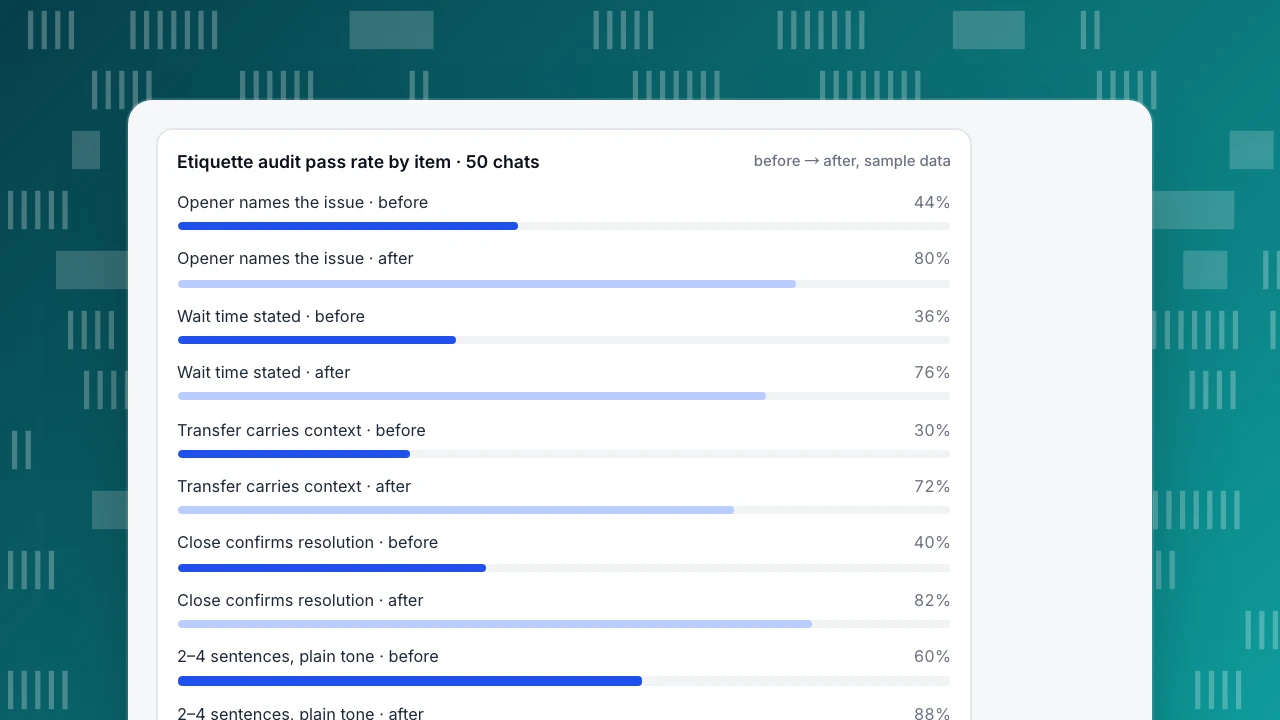
Sample data. Before the rules, the 50 chats passed 22 + 18 + 15 + 20 + 30 = 105 of 250 points (42%). After a month of using the templates, they passed 40 + 38 + 36 + 41 + 44 = 199 of 250 (79.6%). The chart shows each item's pass rate before and after.
Satisfaction moved with it. Of 25 rated chats, the score sum was 90 before (90 ÷ 25 = 3.6 on a 1–5 scale) and 108 after (108 ÷ 25 = 4.32, about 4.3). Fewer round-trips, higher scores — the thesis again: etiquette is the visitor getting the answer with less effort, and the audit is how you prove it to your team.
Etiquette audit pass rate by item · 50 chats
before → after, sample dataHow to do this in TapCub
Take the same double-charge visitor from the rewrite, now on your billing page. Here is that chat worked inside TapCub, step by step.
- Open with context. In Live chat › Inbox, the side panel shows the visitor's current page, landing page, referrer and the last two days of browsing, because chat and analytics share one visitor ID; View in analytics opens the full profile. The agent can see the visitor is on the billing page, so the opener names that page and asks about the charge instead of "How can I help?". The order number still comes from the visitor, unless your site identifies logged-in users with
tapcub.login. - Insert, then edit. Keep the wait-time line and the closing template in Live chat › Canned replies, as site-level rows everyone can use or personal rows only you see. In the inbox composer, type / and the shortcut, and the reply fills the box; nothing is sent until you edit the first line and press send. The use count on each row shows which lines nobody sends. Building the library itself is covered in canned responses.
- Transfer with the story. Transfer from Live chat › Inbox and write the four-line summary in the handoff note, which only agents see; the visitor sees a system line. The next agent reads the note, the transcript and the same visitor panel, so the visitor never repeats the order number.
- Another language. With Two-way auto translation on in Live chat › Chat settings › Greeting & translation, the agent writes in their own language and the visitor reads only the translation; the original is visible only to the agent. Translation is included from the Pro plan up. Write translation-safe sentences anyway, because the visitor never sees what you typed.
- Sample and score. Live chat › Reports shows the average satisfaction score (1–5, one rating per conversation within 24 hours of resolving), plus first response and resolution rate, and Agent workload breaks satisfaction down per agent. Open 50 chats from the Resolved list in the inbox, where each shows its score, and grade them on the five items by hand.
The boundary matters: the rubric above is a manual audit, not a feature. TapCub does not auto-score etiquette and has no NPS or CES survey builder, and the widget has no pre-chat form, so ask for an email inside the conversation. TapCub gives you the context, the editable replies, the translation and the satisfaction numbers; the scoring is your team's job.
FAQ
How fast should live chat agents respond?
Aim to acknowledge within the first minute and give a time for anything longer. If a lookup will take more than two minutes, say so and re-announce if it slips. Visitors tolerate a stated wait far better than silence; the first reply matters more than the final answer's speed.
Should agents use emojis in live chat?
Match the brand and the situation, and never let an emoji carry an instruction or an apology. Default to none in billing or error chats; one is fine once the issue is resolved. If you would not say it aloud at a counter, leave it out.
How do you handle an angry customer on live chat?
Acknowledge the feeling in one plain sentence, then state the fix and the time. Do not argue, say "calm down", or paste policy text. Apologise once if it is your fault, give the next step, and keep the chat open until the visitor confirms it is resolved. Wording ideas: empathy statements.
How do you use canned replies without sounding robotic?
Insert the reply, then edit the first line to name the visitor's specific order, page or issue before sending. Keep replies to two to four sentences with placeholders for the details. A saved reply that still mentions the customer's situation reads as human, not canned.
What should you do when a customer goes silent?
Send one check-in with a time ("Still here — I'll have an answer by 3:40"), then wait. Do not send repeated pings. If there is no reply after a reasonable window, leave the next step and owner in the chat and keep it open rather than closing it unresolved.
Sources
- Moran, K. (2016). The Four Dimensions of Tone of Voice. Nielsen Norman Group.
- Morkes, J. & Nielsen, J. (1997). Concise, SCANNABLE, and Objective: How to Write for the Web. Nielsen Norman Group.
- Mailchimp. Voice and Tone. Mailchimp Content Style Guide.
- Qualtrics. What Is Customer Satisfaction? A Definitive Guide.
Was this article helpful?
We use your answers to fix and expand this page.
Couldn’t send. Please try again in a minute.
Thanks for the feedback. We’ll use it to improve this page.You’ve already sent feedback on this page. Thanks.

Growth Strategist
Explores acquisition channels, activation, and conversion experiments, turning data insights into actionable growth hypotheses and evaluation methods.