Try it on your own data
Every report in this article is in the free plan. One snippet for web and apps, up to 10 sites.
Start freeCCBot is Common Crawl's crawler, and the free dataset it builds is a documented training source for GPT-3, LLaMA and BLOOM. Blocking it is one robots.txt line — but it only shapes future snapshots. Published WARC files and already-trained models stay as they are. Here is how to verify, block and check it.
What you will learn
- CCBot builds Common Crawl's free public dataset; GPT-3, LLaMA (67% English CommonCrawl) and BLOOM (38% OSCAR) document training use
- Disallow: / shapes future snapshots only — published WARC files are immutable and already-trained models are unaffected
- Verify with reverse DNS (*.crawl.commoncrawl.org) and ccbot.json prefixes; after a block, expect robots.txt checks to continue
What CCBot is
CCBot is the crawler of Common Crawl, a 501(c)(3) nonprofit that has built a free, public archive of the web since 2008. Its user agent is CCBot/2.0 (https://commoncrawl.org/faq/). It is an AI crawler for a public dataset, not a search index or an answer engine: it fetches pages for a dataset anyone can download, and the foundation says it adds billions of new pages each month (opt-out registry post).
That purpose sets the boundary this guide keeps returning to: blocking CCBot shapes future datasets, not released ones.
Common Crawl and the dataset
CCBot runs on Nutch and Hadoop (FAQ). Each crawl is published as WARC files (raw responses) plus WAT (metadata) and WET (extracted text) derivatives, free to download from S3 at s3://commoncrawl/. Snapshots are named CC-MAIN-YYYY-WW and appear roughly every 4–5 weeks; the archive itself dates to 2008 (get-started). It crawls a random subset of the web, not every page of your site (FAQ). The foundation says the archive is cited by more than 10,000 papers (opt-out registry post).
Downstream use is documented in the papers themselves:
- GPT-3: its training mix included Common Crawl, filtered and deduplicated as described in the paper's data appendix (arXiv 2005.14165).
- LLaMA: English CommonCrawl made up 67% of its pretraining data, drawn from five dumps from 2017–2020 (arXiv 2302.13971).
- BLOOM: 38% of the ROOTS corpus came from OSCAR 21.09, which is derived from the February 2021 Common Crawl snapshot (arXiv 2211.05100).
The boundary matters here: published WARC files are immutable, so removal requests filter subsequent crawls rather than rewriting released snapshots; for existing data, Common Crawl says removed URLs are made inaccessible through its public tools and indices (transparency post, 2025-11-04).
| Target | After you block CCBot |
|---|---|
| Future crawls and CC-MAIN snapshots | Excluded — CCBot reads robots.txt first and honors Disallow |
| Published snapshots (e.g. CC-MAIN-2026-43) | Unchanged — WARC files are immutable; removals filter only subsequent crawls |
| Models already trained (e.g. on 2017–2020 dumps) | Unaffected — their training data was fixed before your rule existed |
| AI answer-engine citations | No direct effect — CCBot is a dataset crawler, not an answer engine |
Boundary per Common Crawl's transparency post (2025-11-04) and FAQ, checked 2026-11-15.
robots.txt rules
CCBot reads robots.txt before fetching, does not execute JavaScript or use cookies, honors Crawl-delay, and respects nofollow (FAQ). Rules live in the robots.txt at the root of each host, so a rule on example.com does not cover blog.example.com. To keep your pages out of future snapshots:
To slow it down instead of blocking, replace the Disallow line with Crawl-delay: 2 (seconds between requests). Two things to expect after a block: CCBot keeps periodically checking robots.txt, so those fetches continue (FAQ); and a rules file does not retract content already collected — for that, Common Crawl points to its opt-out ledger and info@commoncrawl.org (opt-out registry post).
User-agent: CCBot
Disallow: /

# Slow it down instead of blocking:
# User-agent: CCBot
# Crawl-delay: 2
Verify that a request is really CCBot
User agents are trivially faked, and Common Crawl explicitly warns about requests that only claim to be CCBot (CCBot page). Verify with forward-confirmed reverse DNS:
host 18.97.14.84
# 84.14.97.18.in-addr.arpa domain name pointer 18-97-14-84.crawl.commoncrawl.org.
host 18-97-14-84.crawl.commoncrawl.org
# 18-97-14-84.crawl.commoncrawl.org has address 18.97.14.84
The reverse name must end in .crawl.commoncrawl.org and resolve forward to the same IP. For a shortcut, match the source address against the published prefix list in ccbot.json (five prefixes, creationTime 2026-08-11). IPv6 addresses have no reverse DNS, so the prefix list is the practical check there. Requests from outside those prefixes are not Common Crawl, whatever the user agent says.
Check your own data
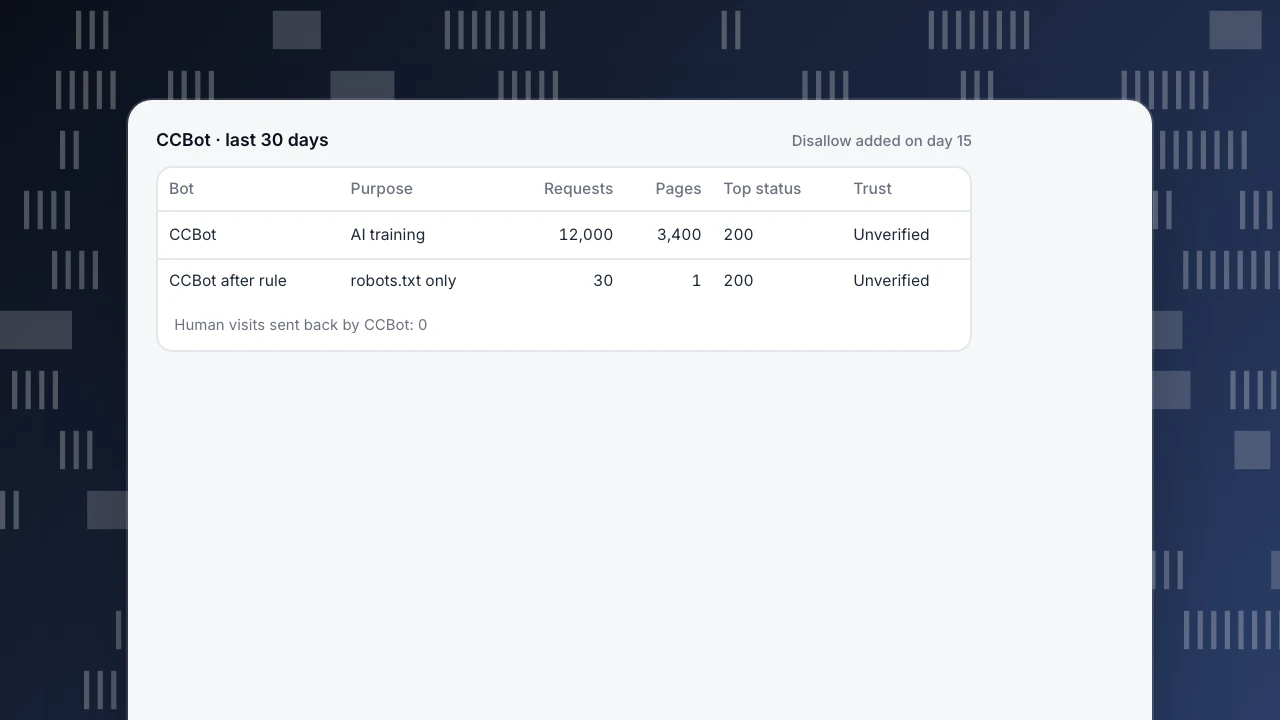
Sample data, one 30-day window: CCBot made 12,000 requests across 3,400 distinct pages and sent back 0 human visits. That is 12,000 ÷ 30 = 400 requests per day, a reads-to-visits ratio of 12,000 : 0 — corpus collection, not a traffic source.
Add Disallow: / on day 15 and the second half changes: roughly 6,000 page fetches disappear (400 × 15), leaving about 30 robots.txt checks (2 per day × 15 days). Those remaining checks are expected behavior, not a violation. Read the status codes with the counts: mostly 200s means your pages are entering the archive; a wall of 403s means something upstream is already blocking.
Because CCBot does not run JavaScript, page-script analytics undercounts it; complete numbers come from server logs.
CCBot · last 30 days
Disallow added on day 15| Bot | Purpose | Requests | Pages | Top status | Trust |
|---|---|---|---|---|---|
| CCBot | AI training | 12,000 | 3,400 | 200 | Unverified |
| CCBot after rule | robots.txt only | 30 | 1 | 200 | Unverified |
Human visits sent back by CCBot: 0
Decide per goal
- Keep content out of future datasets:
Disallow: /. One line covers every future snapshot and its downstream users. - Stay in the public archive: allow it (the default). Even then, only a random subset of your pages is crawled.
- Reduce load without opting out:
Crawl-delay: 2. - Remove already-collected content: robots.txt cannot do this; use the opt-out ledger.
- Protect AI answer citations: CCBot is not an answer crawler, so blocking it has no direct effect on citations — those run through answer-engine crawlers such as PerplexityBot and OpenAI's OAI-SearchBot (covered in GPTBot). Google's separate AI-use token is Google-Extended.
The timeline makes the boundary concrete. Block on 2026-11-15: the published CC-MAIN-2026-43 snapshot stays unchanged (WARC files are immutable); the next snapshot, roughly 4–5 weeks later (illustratively CC-MAIN-2026-47), excludes your site; and models trained on the 2017–2020 dumps are unaffected. Blocking changes what gets collected next, not what has already been released.
CCBot in TapCub
Run the sample month above through TapCub:
- Collect server records first. CCBot does not execute JavaScript, so a page script never sees it. Send server-side access records or import access logs through the API (setup); without them CCBot's row stays empty. Recognised bots are kept out of human visitors and conversions by default.
- Read the ledger. In Web analytics › Bots, the AI & agents tab holds the AI content ledger. Common Crawl sits in the training column: 12,000 reads, 0 visitors sent back, marked no return. Training crawlers and answer engines are counted in separate columns, so CCBot shows as pure reading. The Most-read pages list on the same tab shows which of your 3,400 pages it read most.
- Check the row. On the All bots tab, CCBot has operator Common Crawl, purpose AI training, requests, pages, top status code, last seen, trust and detection layers matched. TapCub runs no DNS check for CCBot, so trust shows Unverified for genuine and fake requests alike; separate them with the reverse-DNS or ccbot.json check above. If a row is wrong, Report false positive.
- Block, then check compliance. The Rule file generator on Monitoring › Crawler compliance has a Block all AI training crawlers preset whose list includes CCBot. Two weeks after you publish the Disallow, the page should list no fetches made while blocked; CCBot's row on All bots should drop to robots.txt checks only. Page fetches from addresses inside ccbot.json would be a real violation.
What TapCub does not do: it measures and does not block crawlers for you, and it cannot remove your content from Common Crawl's published datasets or from models already trained on them.
FAQ
What is CCBot?
Common Crawl's crawler. Common Crawl is a 501(c)(3) nonprofit that has published a free web archive since 2008; CCBot fetches pages for that dataset, not for a search index. Its user agent is CCBot/2.0 (https://commoncrawl.org/faq/). The dataset is free to download and reuse.
How do I block CCBot?
Add User-agent: CCBot and Disallow: / to the robots.txt at the root of each host. CCBot reads the file before fetching and keeps checking it periodically afterwards, so robots.txt requests continue while page fetches stop. To slow it down instead, use Crawl-delay: 2.
Does CCBot follow robots.txt?
Yes. Common Crawl's FAQ says CCBot reads robots.txt first, honors Crawl-delay and respects nofollow. It does not execute JavaScript or use cookies. It also keeps checking robots.txt after a block. Confirm in your own logs: after a block, only robots.txt fetches should remain.
Is CCBot used for AI training?
CCBot builds the dataset; the training use is documented in papers. GPT-3's data appendix describes filtering Common Crawl; LLaMA reports 67% English CommonCrawl from five 2017–2020 dumps; BLOOM's ROOTS corpus is 38% OSCAR 21.09, from the February 2021 snapshot. All three figures come from the papers' own descriptions.
Does blocking CCBot remove my content from already-trained models?
No. Published WARC files are immutable and removal requests only filter subsequent crawls, per Common Crawl's transparency post. A model trained on earlier dumps keeps what it learned; your Disallow line only affects future collection. For already-collected data, use Common Crawl's opt-out ledger.
How do I verify a CCBot request?
Do forward-confirmed reverse DNS: the IP must resolve to a name ending in .crawl.commoncrawl.org that resolves back to the same IP, or match the prefixes in ccbot.json. A CCBot user agent alone proves nothing. IPv6 addresses have no reverse DNS, so use the prefix list there.
See also
Was this article helpful?
We use your answers to fix and expand this page.
Couldn’t send. Please try again in a minute.
Thanks for the feedback. We’ll use it to improve this page.You’ve already sent feedback on this page. Thanks.

Solutions Engineer
Covers SDKs, API integrations, and data implementation, with an emphasis on validation, system interoperability, and troubleshooting.