Try it on your own data
Every report in this article is in the free plan. One snippet for web and apps, up to 10 sites.
Start freePerplexityBot is Perplexity's answer-engine crawler: it reads pages so Perplexity search can surface and link your site, and Perplexity says it is not used to crawl content for AI foundation models. Block it and you lose one possible citation source in Perplexity answers — so decide with reads versus visitors sent back.
What you will learn
- PerplexityBot is an answer-engine crawler, not a training crawler — blocking it removes one possible citation source from Perplexity answers
- Perplexity-User fetches on user request and generally ignores robots.txt; the two agents have independent settings (up to 24 h to apply)
- Decide with your own numbers: visitors sent back ÷ reads (sample: 120 ÷ 8,000 = 1.5%); sustained ≈0 for 2–3 months is the signal to disallow
What PerplexityBot is
PerplexityBot is the crawler Perplexity uses to surface and link websites in search results on Perplexity, its AI answer engine. Perplexity's documentation says it is "not used to crawl content for AI foundation models": it reads pages so answers can cite them, not to build a training corpus (Perplexity crawlers, checked 2026-11-15). Its user agent is Mozilla/5.0 (compatible; PerplexityBot/1.0; +https://perplexity.ai/perplexitybot).
Block PerplexityBot and your pages stop being read for answers, so you lose one possible citation source inside Perplexity. Whether that trade is worth it, your own logs can answer: how many pages it reads versus how many visitors it sends back.
Perplexity's two agents
Perplexity documents two agents, each with its own robots.txt setting; changing one does not change the other, and updates can take up to 24 hours to apply (official docs).
- PerplexityBot is the automatic answer-engine crawler. It surfaces and links sites in Perplexity search results and is not used to crawl content for AI foundation models. It respects robots.txt.
- Perplexity-User fetches a page when a user asks Perplexity a question, and may link that page in the answer. It is not used for automatic crawling or for collecting training content, and Perplexity says it generally ignores robots.txt. Its user agent identifies itself as
Perplexity-User/1.0.
"Blocking Perplexity" is therefore two decisions: one rules-file group for the crawler, and server-side access control if you also want to limit user-initiated fetches. The table after this section compares them.
| Agent | What it does | robots.txt |
|---|---|---|
| PerplexityBot | Crawls to surface and link sites in Perplexity search results; not used to crawl content for AI foundation models | ✓ Follows robots.txt; allow or disallow |
| Perplexity-User | Fetches pages on a user's question and may link them in the answer; not for automatic crawling or training collection | ~ Generally ignores robots.txt |
Source: Perplexity crawler docs, checked 2026-11-15. Settings are independent; changes take up to 24 hours.
robots.txt rules
Each agent gets its own group. The default — no rules — allows PerplexityBot, which is what you want if your pages should be eligible as sources in Perplexity answers. To opt out, disallow it; the code block after this section shows both versions.
Two caveats from the official documentation. First, the settings are independent and changes take up to 24 hours to propagate, so do not judge a rule by the next hour of logs. Second, Perplexity-User generally ignores robots.txt; restricting it takes access controls on your server, not a rules file.
A robots.txt allow is not enough if you run a WAF or bot protection — see the verification section. The same allow-or-opt-out split applies to training crawlers such as GPTBot and ClaudeBot, but their purpose is training rather than answers, so the arithmetic below comes out differently.
User-agent: PerplexityBot
Allow: /

# To opt out, use this group instead:
# User-agent: PerplexityBot
# Disallow: /
Verify that a request is really PerplexityBot
User-agent strings can be faked. Perplexity publishes the IP ranges for each agent as JSON files and describes them as the source of truth, updated regularly: perplexitybot.json (13 IPv4 /32 prefixes when checked on 2026-11-15) and perplexity-user.json (10 prefixes). Match the source IP of a request against the file for the agent named in its user agent; a "PerplexityBot" request from an address outside the list is not Perplexity. Unlike Applebot, Perplexity documents no reverse-DNS verification — user agent plus published IP is the documented method.
If you use a WAF, allow-list the published IPs together with the user agent; Perplexity's guidance covers Cloudflare WAF and AWS WAF IP sets with a UA match. Note that Cloudflare Bot Fight Mode can challenge legitimate PerplexityBot traffic even when robots.txt allows it, and Perplexity's documentation notes it cannot be skipped with custom rules.
Check your own data: reads vs visitors sent back
The allow-or-block question is arithmetic: how many pages does the crawler read, and how many human visitors arrive from Perplexity answers that cite you? Sent-back visitors are people clicking a citation link in an answer — count them separately from crawler reads.
Sample data, one month:
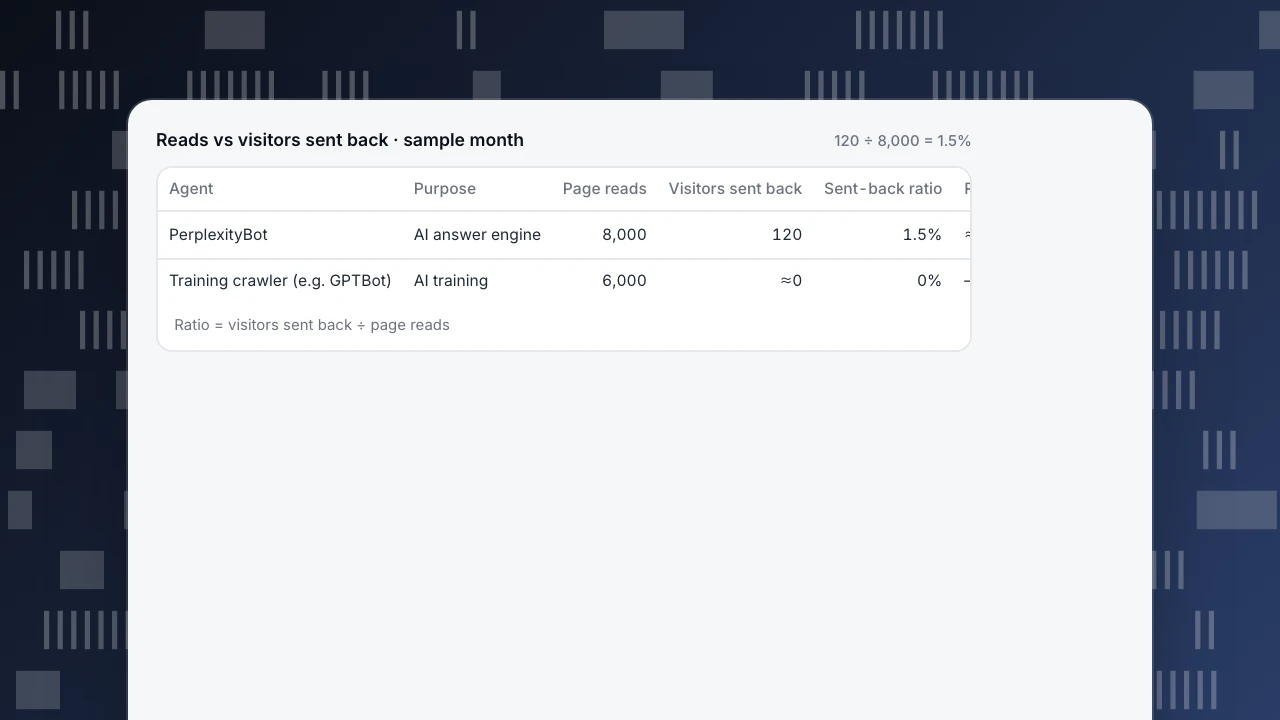
- PerplexityBot reads 8,000 pages and sends back 120 visitors. Ratio = 120 ÷ 8,000 = 1.5%; cost per visitor = 8,000 ÷ 120 ≈ 67 reads.
- A training crawler (say, GPTBot) reads 6,000 pages and sends back ≈0 visitors. Ratio = 0 ÷ 6,000 = 0%.
The answer engine's reads can buy citations and referral traffic; the training crawler's reads return none. A crawler that does not run JavaScript never triggers a page script, so a script-only tool can undercount reads; complete numbers come from server logs. The table after this section puts the two side by side.
Reads vs visitors sent back · sample month
120 ÷ 8,000 = 1.5%| Agent | Purpose | Page reads | Visitors sent back | Sent-back ratio | Reads per visitor |
|---|---|---|---|---|---|
| PerplexityBot | AI answer engine | 8,000 | 120 | 1.5% | ≈67 |
| Training crawler (e.g. GPTBot) | AI training | 6,000 | ≈0 | 0% | — |
Ratio = visitors sent back ÷ page reads
Decide per goal
- You want citations in Perplexity answers and the ratio stays above zero: allow PerplexityBot. Reads are the cost of being a citable source; 1.5% in the example means roughly 67 reads per visitor, a modest price for a channel that also builds visibility.
- The ratio sits at ≈0 for two to three months and you do not want your content used: disallow it, and accept the cost — one fewer possible citation source in Perplexity answers.
- Training crawlers: their sent-back ratio is ≈0 by design, so decide on whether you consent to training use, not on traffic.
- Server load: rate-limit at the server rather than blocking a crawler that sends visitors back.
Whatever you choose, a rules file only states your wish; check actual fetches to know it is honoured. Related: AI crawler ledger, AI visibility and AI crawler.
PerplexityBot in TapCub
The example above, 8,000 reads for 120 visitors, is the account TapCub's Bots report keeps. Here it is step by step:
- Collect every read. With only the page script, TapCub sees only bots that run JavaScript. To count every PerplexityBot read, send server-side access records or import access logs through the API (setup). Recognised bots are kept out of human visitors, sessions and conversions by default.
- Read the ledger. In Web analytics › Bots, the AI & agents tab holds the AI content ledger: per operator, reads with training crawlers and answer engines in separate columns, human visitors sent back, and a ratio written as N reads to 1 visitor. In the sample, the Perplexity row shows 8,000 answer-engine reads and 120 visitors, about 67 : 1. That column also counts Perplexity-User fetches; on the All bots tab, PerplexityBot (purpose AI search) and Perplexity-User (AI agent) are separate rows, so you can see how much of the 8,000 is the crawler.
- Flip to the visibility view. The AI visibility tab divides the other way: Crawl→visit is AI-referred visits ÷ AI crawls, 1.5% in the sample. Its By AI brand table repeats the comparison per brand, and Cited pages lists the landing pages that received AI-referred visits, so you know which articles earn the clicks.
- Compare the training row. A training crawler such as GPTBot sits in the training column with 6,000 reads and ≈0 visitors. Perplexity's row is the one whose reads buy visitors, which is the "allow" case in the decision list above.
- Verify after a change. If you disallow PerplexityBot, wait 24 hours, then open Monitoring › Crawler compliance: it lists fetches made while blocked globally and fetches of disallowed paths. TapCub runs no DNS check for Perplexity, so trust shows Unverified; match source IPs against perplexitybot.json yourself.
What TapCub does not do: it does not block crawlers or publish robots.txt for you, and it cannot tell you which Perplexity answer cited your page or whether one will. Visits sent back are human sessions whose source is an AI assistant, not a count of citations.
FAQ
What is PerplexityBot?
Perplexity's answer-engine crawler. It reads pages so Perplexity search can surface and link your site in answers; Perplexity's documentation says it is not used to crawl content for AI foundation models. It is one of two Perplexity agents, each with its own robots.txt setting.
How do I block PerplexityBot?
Add a group with User-agent: PerplexityBot and Disallow: / to the robots.txt at the root of each host. Changes can take up to 24 hours to apply. Perplexity-User generally ignores robots.txt, so limiting user-initiated fetches takes server-side access controls instead.
Does blocking PerplexityBot remove my site from Perplexity answers?
It removes one possible citation source: PerplexityBot can no longer read your pages to surface and link them in answers. Perplexity-User can still fetch a page when a user asks about it and may link it in the response, so a citation is not impossible — but you have opted out of the automatic reading that makes pages eligible.
Does Perplexity-User follow robots.txt?
Perplexity's documentation says Perplexity-User generally ignores robots.txt because its fetches are initiated by users asking questions. If you need to restrict it, use access controls on your server rather than a rules file, and verify requests against perplexity-user.json.
Is PerplexityBot used to train AI models?
No. Perplexity's documentation states PerplexityBot is not used to crawl content for AI foundation models; its purpose is to surface and link sites in Perplexity search results. Training crawlers such as GPTBot are a separate category with a different purpose and a different allow-or-block calculation.
How long do robots.txt changes take to apply?
Perplexity says each agent's setting is independent and changes can take up to 24 hours to propagate. Check your logs a day after editing the file before judging whether the rule works, and verify fetches against the published IP files.
See also
- GPTBot: OpenAI's Four Crawlers and How to Control Each One
- ClaudeBot: Anthropic's AI Crawler and How to Control It
- AI Visibility: How to Measure AI Crawlers and Citations
- AI Crawler: Definition and Types
- AI Crawler Ledger: Reads vs Visitors Sent Back
- Applebot: Search Crawling and the Applebot-Extended Training Switch
Was this article helpful?
We use your answers to fix and expand this page.
Couldn’t send. Please try again in a minute.
Thanks for the feedback. We’ll use it to improve this page.You’ve already sent feedback on this page. Thanks.

Solutions Engineer
Covers SDKs, API integrations, and data implementation, with an emphasis on validation, system interoperability, and troubleshooting.