Try it on your own data
Every report in this article is in the free plan. One snippet for web and apps, up to 10 sites.
Start freeSemrushBot is not one crawler but a family of ten Semrush agents, each with its own robots.txt token and purpose. This guide covers what each agent does, per-goal robots.txt rules, what Semrush actually publishes for verification, a worked 30-day example, and how to decide SEO reads versus SemrushBot-OCOB separately.
What you will learn
- SemrushBot is ten independent robots.txt tokens, not one crawler — decide per token, not per name
- Keep SEO data, opt out of AI content use: allow SemrushBot/SiteAuditBot/SplitSignalBot, Disallow SemrushBot-OCOB; Crawl-delay caps at 10 s (SI: 1 s)
- Verify per agent: no IP list for SemrushBot/OCOB (don't IP-block); SiteAuditBot 85.208.98.128/25 and SemrushBot-SI 85.208.98.0/24 are published; check the split in your own data
What SemrushBot is
SemrushBot is the crawler Semrush sends out to discover and collect new and updated web data for its tools; the main token builds the link index behind Backlink Analytics (Semrush bot documentation). In logs it appears as a user agent like SemrushBot/7~bl (observed strings).
SemrushBot is not one crawler but a group: ten separate robots.txt tokens, each feeding a different tool. One of them — SemrushBot-OCOB — serves the Content Toolkit rather than classic SEO data, so decide per token, not for the name as a whole. Basics: what a bot is.
The Semrush crawler family
The official bot page lists ten tokens, each allowed or blocked independently:
- SemrushBot — Backlink Analytics, the webgraph of links.
- SiteAuditBot — Site Audit: on-page SEO, technical and usability issues.
- SemrushBot-BA — Backlink Audit.
- SemrushBot-SI — On Page SEO Checker and similar tools.
- SemrushBot-SWA — URL checks for the SEO Writing Assistant.
- SplitSignalBot — SplitSignal SEO A/B testing.
- SemrushBot-FT — Plagiarism Checker and similar duplication checks.
- RyteBot — tools provided by Ryte.com.
- SemrushBot-ESI — Semrush Enterprise Site Intelligence services.
- SemrushBot-OCOB — Content Toolkit per Semrush; TapCub's AI content ledger classifies its reads as AI training. Two labels, two sources.
Most tokens feed SEO and site-quality data; decide OCOB separately if your concern is AI content use. GPTBot works the same way: per-token settings.
| robots.txt token | Purpose (per Semrush) | In TapCub |
|---|---|---|
| SemrushBot | Backlink Analytics — the webgraph of links | Recognised · SEO |
| SiteAuditBot | Site Audit — on-page SEO, technical and usability issues | Recognised · SEO |
| SemrushBot-BA | Backlink Audit | — |
| SemrushBot-SI | On Page SEO Checker and similar tools | — |
| SemrushBot-SWA | URL checks for the SEO Writing Assistant | — |
| SplitSignalBot | SplitSignal SEO A/B testing | Recognised · SEO |
| SemrushBot-OCOB | Content Toolkit (TapCub ledger: AI training) | Recognised · AI training |
| SemrushBot-FT | Plagiarism Checker and similar duplication checks | — |
| RyteBot | Tools provided by Ryte.com | — |
| SemrushBot-ESI | Semrush Enterprise Site Intelligence services | — |
Source: semrush.com/bot/, checked 2026-11-15. Tokens are independent. TapCub recognition confirmed for four tokens only; OCOB's official purpose is Content Toolkit — the AI-training label is TapCub's classification.
robots.txt rules for each Semrush agent
robots.txt lives at the root of each host; every subdomain needs its own file. The code below keeps SEO data and opts out of the Content Toolkit crawler: SemrushBot allowed with a 10-second delay, SiteAuditBot and SplitSignalBot allowed, SemrushBot-OCOB disallowed. Swap in another token to block another tool — there is no family-wide switch. Basics: robots.txt Disallow.
Details from the bot page that change the outcome:
- The file must return HTTP 200. A 4xx means SemrushBot assumes no restrictions; a 5xx stops it crawling your entire site; 3xx is handled.
- Changes take up to one hour or 100 requests to be discovered.
- SemrushBot supports Crawl-delay up to 10 seconds; higher values are cut to 10.
Crawl-delay: 10= one request per 10 seconds = 6 per minute; writing 30 buys nothing. With no delay set, SemrushBot adapts to server load. - SemrushBot-SI only accepts a crawl-delay of 1 second; higher values make the On Page SEO Checker ignore the page (KB 375).
User-agent: SemrushBot
Allow: /
Crawl-delay: 10

User-agent: SiteAuditBot
Allow: /

User-agent: SplitSignalBot
Allow: /

User-agent: SemrushBot-OCOB
Disallow: /
Verify SemrushBot requests
A user-agent string is a claim, not proof. What you can check differs per agent:
- SemrushBot and SemrushBot-OCOB: Semrush publishes no IP list and no reverse-DNS method, and says not to block by IP because it uses no consecutive IP blocks (bot page). Match the token, treat it as unverified, and weigh behaviour: a link-following site-wide crawl fits; a single hit on a login endpoint does not.
- SiteAuditBot: the Site Audit FAQ publishes subnet 85.208.98.128/25, used by Site Audit only, on ports 80 and 443 (Site Audit set-up errors FAQ). Match log source addresses against it.
- SemrushBot-SI: KB 375 lists 85.208.98.53 and 85.208.98.0/24 for whitelisting (KB 375).
If a Semrush token ignores your rules, send the log excerpt to bot@semrush.com (Semrush's bot support contact).
Check your own data
Count each token's fetches before deciding. Sample data, one site, 30 days:
- SemrushBot: 4,800 requests, 1,150 pages.
- SiteAuditBot: 2,300 requests, 640 pages.
- SplitSignalBot: 420 requests, 90 pages.
- SemrushBot-OCOB: 1,900 requests, 460 pages.
SEO subtotal: 4,800 + 2,300 + 420 = 7,520 requests (1,150 + 640 + 90 = 1,880 pages). Family total: 7,520 + 1,900 = 9,420 requests (2,340 pages). Human visits sent back from Semrush tools: 0 — pure reads, not traffic.
After Disallow: / for OCOB, the next 30 days show 60 requests on 1 page, mostly robots.txt fetches: down 1,840 (−96.8%), while the SEO tokens stay at 7,520.
Why the split matters: 12,000 human visits and 300 conversions give 300 ÷ 12,000 = 2.5%. Mix the 9,420 bot requests into the denominator and it reads 300 ÷ 21,420 ≈ 1.4% — about 1.1 points of dilution without losing one real visitor.
A crawler that does not run JavaScript never triggers a page script, so script-only analytics can miss it; complete counts need server-side records or a log import.
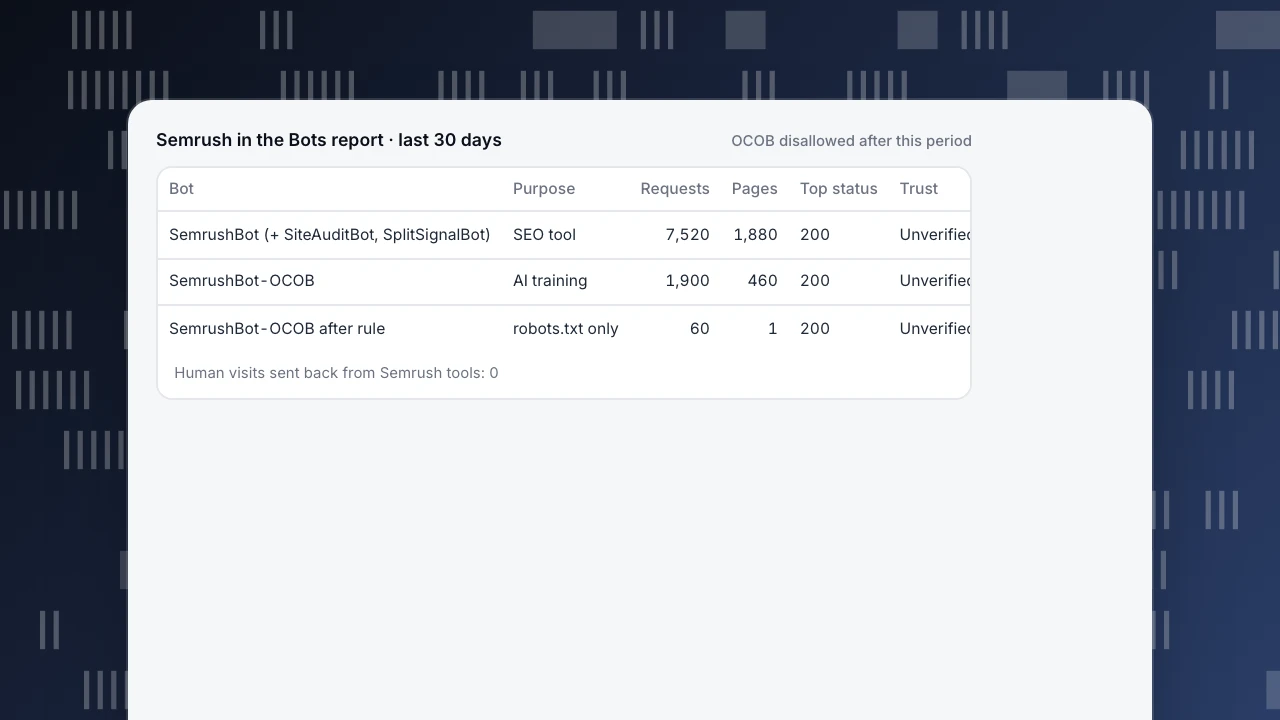
Semrush in the Bots report · last 30 days
OCOB disallowed after this period| Bot | Purpose | Requests | Pages | Top status | Trust |
|---|---|---|---|---|---|
| SemrushBot (+ SiteAuditBot, SplitSignalBot) | SEO tool | 7,520 | 1,880 | 200 | Unverified |
| SemrushBot-OCOB | AI training | 1,900 | 460 | 200 | Unverified |
| SemrushBot-OCOB after rule | robots.txt only | 60 | 1 | 200 | Unverified |
Human visits sent back from Semrush tools: 0
Decide per goal
| If your goal is… | Then… |
|---|---|
| Accurate data in Semrush tools | Allow the SEO tokens you use (SemrushBot, SiteAuditBot, SplitSignalBot, …); blocking them removes your pages from those tools' data. |
| Keep content out of AI content tools | Disallow SemrushBot-OCOB only; the SEO tokens keep working. |
| Less server load | Set Crawl-delay up to 10 for SemrushBot instead of blocking everything. |
| Protect Google rankings | No change needed: Semrush agents are not search-engine crawlers; blocking them changes Semrush tool data, not Google indexing. |
One family, separate decisions: keep the SEO reads you benefit from, opt out of the rest — then check your fetch data, because a rule is a wish until a crawler honours it. Related: AI crawler.
SemrushBot in TapCub
The example site, 9,420 family requests in 30 days, splits and decides like this in TapCub:
- See the split TapCub can make. In Web analytics › Bots, open the All bots tab. TapCub shows two Semrush rows: SemrushBot, purpose SEO tool, which also covers the SiteAuditBot and SplitSignalBot user agents (7,520 requests in the sample), and SemrushBot-OCOB, purpose AI training (1,900). Each row has requests, pages, top status code, last seen, trust and the detection layers matched. The 4,800 / 2,300 / 420 split inside the SEO row comes from your raw logs, not from TapCub.
- Read the AI content ledger. On the AI & agents tab, the AI content ledger lists reads per operator, with training crawlers and answer engines in separate columns. OCOB's 1,900 reads sit under Semrush as training reads, with 0 human visitors sent back. The SEO row is not an AI crawler and stays out of the ledger. That is the decision in one view: keep the SEO tokens for accurate Semrush data; disallow OCOB if you don't want content in AI content tools.
- Publish and recheck. Add the OCOB
Disallow, wait about an hour or 100 requests, then confirm on All bots: OCOB 1,900 → 60, SEO row unchanged. Monitoring › Crawler compliance compares real fetches with your rules and lists fetches made while blocked globally, fetches of disallowed paths, and fetches sooner than the declared delay. OCOB, as an AI crawler, also appears on Monitoring › Crawl health; the SEO row does not. - Read trust correctly. TapCub runs no DNS check for Semrush agents, so trust shows Unverified, which does not mean spoofed. Use the published subnets above where they exist. If a row is wrong, Report false positive.
What TapCub does not do: it measures and does not block; rules stay in your robots.txt and on your server. It does not recognise the other six Semrush tokens by name. With only the page script you see only bots that run JavaScript; complete counts and the compliance check need server-side collection or a log import through the API. More: bots and AI crawlers.
FAQ
What is SemrushBot?
SemrushBot is the main crawler in Semrush's ten-agent family, collecting web data for tools such as Backlink Analytics. The name is also used loosely for the whole family, which includes SiteAuditBot, SplitSignalBot and SemrushBot-OCOB. Each token has its own purpose and its own robots.txt setting.
How do I block SemrushBot?
Add one group per token to robots.txt at the root of each host, for example User-agent: SemrushBot-OCOB with Disallow: /. The file must return HTTP 200, and each subdomain needs its own copy. Changes take up to one hour or 100 requests to be picked up.
Does blocking SemrushBot affect my Google rankings?
No. Semrush agents collect data for Semrush tools; they are not search-engine crawlers and do not decide Google indexing or rankings. Blocking them only changes what appears in Semrush tools — your backlink or audit data there may go stale or disappear.
Can I verify SemrushBot by IP or reverse DNS?
Only partly. Semrush publishes no IP list or reverse-DNS method for SemrushBot and OCOB and says not to block by IP. SiteAuditBot has a published subnet, 85.208.98.128/25; SemrushBot-SI lists 85.208.98.53 and 85.208.98.0/24. For the rest, the user agent is a claim, not proof.
Does SemrushBot support Crawl-delay?
Yes, up to 10 seconds; higher values are cut to 10, so Crawl-delay: 10 means at most 6 requests per minute. Without a delay, SemrushBot adapts to server load. SemrushBot-SI is the exception: the On Page SEO Checker only accepts 1 second and ignores pages above it.
What is SemrushBot-OCOB — is it AI training?
Semrush documents OCOB's purpose as the Content Toolkit; TapCub classifies its reads as AI training in the AI content ledger. The labels come from different sources. The practical step is the same: if you don't want content feeding AI content tools, disallow this token separately from the SEO agents.
See also
Was this article helpful?
We use your answers to fix and expand this page.
Couldn’t send. Please try again in a minute.
Thanks for the feedback. We’ll use it to improve this page.You’ve already sent feedback on this page. Thanks.

Solutions Engineer
Covers SDKs, API integrations, and data implementation, with an emphasis on validation, system interoperability, and troubleshooting.