Try it on your own data
Every report in this article is in the free plan. One snippet for web and apps, up to 10 sites.
Start freeAhrefsBot is Ahrefs' SEO crawler: it reads your links and content for Ahrefs users, including competitors, and sends back no visitors, so the allow-or-block call rests on your own Ahrefs usage and server load, not traffic. Here is what both Ahrefs crawlers do, how to write robots.txt rules, verify requests and decide.
What you will learn
- AhrefsBot feeds Ahrefs' link index and Yep search; in the sample it made 41,800 requests and sent back 0 visitors
- AhrefsBot and AhrefsSiteAudit are separate crawlers; both obey robots.txt and Crawl-delay, but the delay covers HTML only
- Decide by your own Ahrefs usage and server load, not traffic; verify by rDNS (ahrefs.com / ahrefs.net) or the official IP JSON
What AhrefsBot is
AhrefsBot is the crawler Ahrefs uses to build its link index and to feed Yep, Ahrefs' search engine. It is not an AI-training crawler. Its user agent is Mozilla/5.0 (compatible; AhrefsBot/7.0; +http://ahrefs.com/robot/), and the version number may change (Ahrefs Bots).
If it fills your logs, Ahrefs users — possibly your competitors — are looking up your backlinks or auditing your site. AhrefsBot sends you no visitors: it reads your pages and links for someone else's report. The allow-or-block question is therefore not about traffic; it is about whether you use Ahrefs yourself and what your server can absorb.
Ahrefs' two crawlers
Ahrefs documents two crawlers with different jobs:
- AhrefsBot builds the link index behind Ahrefs' SEO tools and feeds the Yep search index. Its user agent token is
AhrefsBot/7.0. - AhrefsSiteAudit runs on-demand Site Audit projects for verified site owners. It has desktop and mobile user agents, both carrying
AhrefsSiteAudit/6.1, and crawls at no more than 30 URLs per minute. It obeys robots.txt by default; verified owners can ask Ahrefs to override that for their own audit (Ahrefs Bots).
Both obey robots.txt and Crawl-delay, and both back off automatically when your server returns 4xx or 5xx responses (such as an HTTP 500 error). The comparison table summarises the differences.
| Crawler | User agent | Purpose | robots.txt / Crawl-delay | Rate & exceptions |
|---|---|---|---|---|
| AhrefsBot | AhrefsBot/7.0 | Ahrefs link index + Yep search | Obeyed; Crawl-delay applies to HTML only | Backs off on 4xx/5xx; no rate cap published |
| AhrefsSiteAudit | AhrefsSiteAudit/6.1 (desktop + mobile) | On-demand Site Audit for verified owners | Obeyed by default; verified owners may request an override | Max 30 URLs/min; backs off on 4xx/5xx |
Source: Ahrefs Bots page and help article 78158, checked 2026-11-15. Crawl-delay limits HTML fetches only; JS-rendered asset requests are exempt.
robots.txt rules
No rule means allow: both crawlers only follow links and always fetch with GET (help article 78158). Three common settings:
- Allow (default): leave robots.txt alone, or write
User-agent: AhrefsBotwithAllow: /. - Block everything:
User-agent: AhrefsBotwithDisallow: /; add a separateAhrefsSiteAuditgroup to stop audits too. - Slow it down:
Crawl-Delay: 10asks for one HTML request every 10 seconds, i.e. 6 per minute.
The robots.txt snippet at the end of this section keeps AhrefsBot allowed but slowed, and keeps Site Audit out of a private area.
Two official caveats. First, Crawl-delay applies to HTML pages only: when AhrefsBot renders JavaScript, its concurrent asset fetches are not limited by the delay. Second, if your robots.txt has errors, Ahrefs says the crawler keeps crawling — a broken rules file is not a block. Changes take effect before the next scheduled crawl, not instantly.
User-agent: AhrefsBot
Crawl-Delay: 10

User-agent: AhrefsSiteAudit
Disallow: /private/
Verify that a request is really AhrefsBot
User agents are trivially faked, so check the source address, not the string:
- Reverse DNS: the hostname must end in
ahrefs.comorahrefs.net. Forward-resolve that hostname afterwards and confirm it maps back to the original IP. - Official IP lists: Ahrefs publishes its crawler ranges as JSON at crawler-ip-ranges and crawler-ips (IP ranges help). Match log source addresses against the lists; if you whitelist by IP, cover all published ranges.
Requests claiming AhrefsBot from outside those ranges are not Ahrefs. Count verified and unverified requests separately before drawing conclusions — the unverified ones should not drive your decision.
Check your own data
Before deciding, measure reads against visitors sent back. Sample data, last 30 days:
- AhrefsBot: 38,400 requests across 6,200 pages.
- AhrefsSiteAudit: 3,400 requests across 1,150 pages.
- Combined: 38,400 + 3,400 = 41,800 requests; 6,200 + 1,150 = 7,350 pages.
- Human visitors arriving from ahrefs.com or yep.com: 0. Visitors per read: 0 ÷ 41,800 = 0; there is no reads-per-visitor ratio to compute, because nothing came back.
Now the load side. A full-site audit covering all 7,350 pages, at Site Audit's cap of 30 URLs per minute, takes 7,350 ÷ 30 = 245 minutes ≈ 4.1 hours per audit. Add Crawl-Delay: 10 and HTML requests drop to 6 per minute: 7,350 ÷ 6 = 1,225 minutes ≈ 20.4 hours — five times longer, with JS-rendered asset fetches exempt.
The arithmetic makes the thesis concrete: 41,800 reads bought zero visitors. Traffic is not a reason to allow AhrefsBot; the deciding variables are your own Ahrefs usage and your server's headroom.
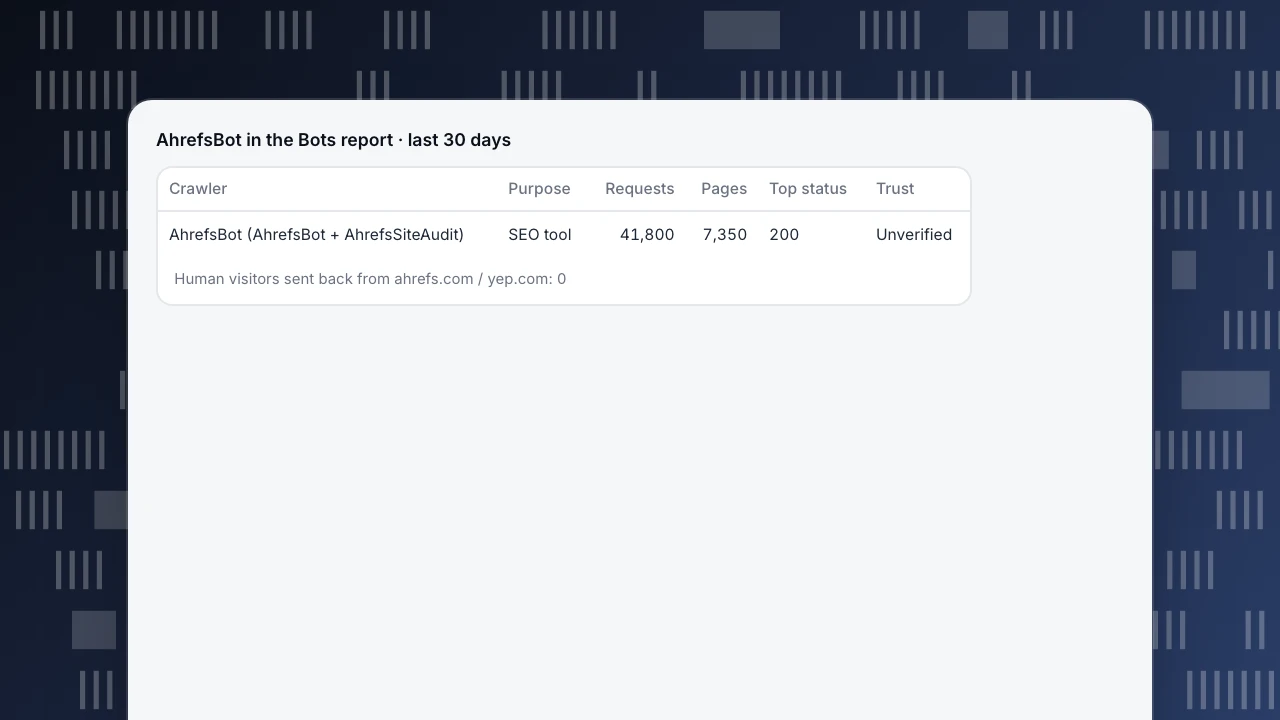
AhrefsBot in the Bots report · last 30 days
| Crawler | Purpose | Requests | Pages | Top status | Trust |
|---|---|---|---|---|---|
| AhrefsBot (AhrefsBot + AhrefsSiteAudit) | SEO tool | 41,800 | 7,350 | 200 | Unverified |
Human visitors sent back from ahrefs.com / yep.com: 0
Decide per goal
| Your goal | Setting | Trade-off |
|---|---|---|
| You use Ahrefs (backlinks, Site Audit) | Allow both crawlers | None; your own backlink data and audits stay fresh |
| You don't use Ahrefs | Blocking costs little — no reports of your own go stale | You lose the indirect Yep channel |
| Competitors run Site Audit on you | Disallow: sensitive paths for AhrefsSiteAudit | Public pages still appear in their audits |
| Server load is tight | Crawl-Delay: 10 (HTML only); 4xx/5xx already triggers backoff | Your data in Ahrefs refreshes more slowly |
| You want Yep search coverage | Allow AhrefsBot | None; Yep is a separate search channel |
| No crawling at all | Disallow: / for both crawlers | Your own Ahrefs backlink and audit data stops updating |
One nuance from the official page: AhrefsBot also feeds the Yep index, so allowing it can bring indirect search visitors from Yep — that is Yep's traffic, not the crawler returning visits (Ahrefs Bots).
The sample makes the rule plain: AhrefsBot brings no traffic, so allow it for your own Ahrefs data or Yep coverage, throttle it for load, and block it if neither matters. A robots.txt rule only states your wish; check actual fetches to know it is honoured. For blanket blocks see robots.txt Disallow: /; for crawl-volume trade-offs see crawl budget.
AhrefsBot in TapCub
The sample's question, 41,800 reads and zero visitors, allow or block, runs through three pages in TapCub:
- Find the row. Open Web analytics › Bots and switch to the All bots tab. TapCub matches both user agents, AhrefsBot and AhrefsSiteAudit, to one AhrefsBot row with operator Ahrefs and purpose SEO tool: 41,800 requests in the sample, plus pages, top status code, last seen, trust and the detection layers matched. For the 38,400 / 3,400 split, filter your raw logs by user agent. TapCub runs no DNS check for Ahrefs, so trust shows Unverified; that does not mean spoofed, so use the reverse-DNS or IP-list check above. If a row is wrong, Report false positive.
- Check both sides of the trade. Recognised bots are kept out of human visitors, sessions and pageviews by default, so the 41,800 requests neither inflate your visitor count nor dilute your conversion rate. AhrefsBot is an SEO tool, not an AI crawler, so it does not appear in the AI content ledger. For visitors sent back, look in Web analytics › Sources for referrals from ahrefs.com or yep.com; in the sample there are none.
- Publish the rule, then check it was honoured. After you add the
Crawl-DelayorDisallowgroup, open Monitoring › Crawler compliance. It fetches your robots.txt and lists, per crawler and path, fetches made while blocked globally, fetches of disallowed paths, and fetches sooner than the declared delay.
What TapCub does not do: it measures crawling and does not block it. The block lives in robots.txt or on your server; adding a crawler to TapCub's exclusion rules only stops TapCub counting it. AhrefsBot does not appear on Monitoring › Crawl health, which covers search engines and AI crawlers. With only the page script you see only bots that run JavaScript; complete counts, status codes and the compliance check need server-side collection or a log import (bots and AI crawlers).
FAQ
What is AhrefsBot?
Ahrefs' SEO crawler. It collects links and content for the Ahrefs link index and feeds Yep search. It sends you no visitors and is not an AI-training crawler.
Does AhrefsBot follow robots.txt and Crawl-delay?
Yes, per Ahrefs' official docs — but Crawl-delay limits HTML fetches only; concurrent asset requests during JavaScript rendering are exempt. If robots.txt has errors, the crawler keeps crawling.
How do I verify a request is really AhrefsBot?
Reverse-DNS the source IP: the hostname must end in ahrefs.com or ahrefs.net. Or match the IP against Ahrefs' published JSON ranges (crawler-ip-ranges / crawler-ips). Anything outside is not Ahrefs.
Does blocking AhrefsBot hurt my SEO or AI visibility?
It does not change Google rankings or AI answers, and costs you no crawler traffic — it sent none. Your own Ahrefs backlink and audit data stops updating; Yep indexing is a separate trade-off.
AhrefsBot vs AhrefsSiteAudit?
AhrefsBot builds the link index and feeds Yep. AhrefsSiteAudit runs on-demand audits for verified owners, has desktop and mobile user agents, and is capped at 30 URLs/min. Control them with separate robots.txt groups.
See also
Was this article helpful?
We use your answers to fix and expand this page.
Couldn’t send. Please try again in a minute.
Thanks for the feedback. We’ll use it to improve this page.You’ve already sent feedback on this page. Thanks.

Solutions Engineer
Covers SDKs, API integrations, and data implementation, with an emphasis on validation, system interoperability, and troubleshooting.