Try it on your own data
Every report in this article is in the free plan. One snippet for web and apps, up to 10 sites.
Start freeAmazonbot is Amazon's crawler for improving its products and services, and Amazon's documentation says what it reads may be used to train Amazon AI models. Read that official purpose before you allow it, then use your own data to see what it reads. This guide covers the three Amazon agents, robots.txt rules, IP verification and a worked example.
What you will learn
- Amazon documents three independent agents: Amazonbot (may train Amazon AI models), Amzn-SearchBot (Alexa search, no generative AI training) and Amzn-User (live user fetches, no training)
- Disallow Amazonbot and allow Amzn-SearchBot to opt out of training while staying eligible for Alexa search; rules can lag up to 30 days
- Verify requests against Amazon's published IP files, then judge by your own reads and visits sent back — not by the crawler's name
What Amazonbot is
Amazonbot is Amazon's crawler for improving its products and services. Amazon's own documentation says this "helps us provide more accurate information to customers and may be used to train Amazon AI models" (Amazon crawler documentation, updated 2026-10-26). Its user agent contains Amazonbot/0.1; the version number may change, and older strings carry a link to developer.amazon.com/support/amazonbot, which now redirects to the same documentation page.
The purpose is written in Amazon's own explanation: read that before you allow the crawler, then use your data to see what it actually reads. Amazonbot is one of three agents Amazon documents, and each setting is independent — blocking Amazonbot does not block Alexa search, and allowing search does not allow training.
Amazon's three documented agents
The table below uses only Amazon's own wording. Three details matter when you write rules:
- Each agent's setting is independent, and changes may take about 24 hours to be reflected in Amazon's systems.
- If your robots.txt does not name Amzn-SearchBot but allows other search bots, Amzn-SearchBot crawls according to the directives given to those other search bots.
- Amzn-User fetches live pages on a user's behalf — for example, up-to-date answers to Alexa queries — so it may not follow all robots.txt directives.
| Agent | What Amazon says it does | AI training? | robots.txt note |
|---|---|---|---|
| Amazonbot | Improve products and services; may be used to train Amazon AI models | May be used | ✓ Disallow to opt out of training |
| Amzn-SearchBot | Improve search experiences such as Alexa | No generative AI training | If unnamed, follows rules given to other search bots |
| Amzn-User | Fetch live pages for user actions, e.g. Alexa queries | No generative AI training | ~ May not follow all robots.txt directives |
Source: Amazon crawler documentation, updated 2026-10-26, checked 2026-11-15. Each setting is independent (~24 h).
robots.txt rules
The rule above opts out of Amazon AI training while keeping your content eligible for Alexa search. Amazon's robots.txt policy adds five details:
- Rules are read per host. Amazon's crawlers look for example.com/robots.txt and site.example.com/robots.txt separately, so publish the file on every host you want to control.
- They may use a cached copy from the last 30 days, so a new rule can lag. Re-check real fetches some time after publishing.
- If robots.txt cannot be fetched, they behave as if it does not exist — an unreachable rules file means everything is allowed.
- The crawl-delay directive is not supported; rate limiting belongs on your server.
- They respect link-level rel=nofollow and the page-level meta tags noarchive ("do not use the page for model training"), noindex and none.
Amzn-User may not follow all directives, so restricting it takes access controls on the server rather than a rules file.
User-agent: Amazonbot
Disallow: /

User-agent: Amzn-SearchBot
Allow: /
Verify that a request is really Amazonbot
User agent strings can be faked. Amazon publishes the IP addresses of each agent; all three files were fetched and parsed on 2026-11-15:
- Amazonbot IP file: 1,292 IPv4 addresses under the key
ipv4Prefix, creationTime 2026-09-08. - Amzn-SearchBot IP file: 816 /32 prefixes under the key
ip_prefix— a different key name, so a parser must accept both — creationTime 2026-09-08. - Amzn-User IP file: 1,023 addresses under
ipv4Prefix, creationTime 2025-11-04, older than the other two; re-fetch before relying on it.
Match the source address of each request against the file for the agent named in the user agent. Requests claiming Amazonbot from addresses outside the list are not Amazon. A 2024 AWS re:Post community answer suggests reverse DNS into crawl.amazonbot.amazon subdomains with a forward check (re:Post); the current official documentation points to the IP files instead.
Check your own data
Count what Amazonbot actually reads before you decide. Sample data: 30 days, a demo project with server-log import, because a page script only sees crawlers that run JavaScript.
Verified Amazonbot made 4,800 reads: 2,880 on product pages (2,880 ÷ 4,800 = 60%), 1,440 on blog posts (30%) and 480 on docs (10%). Distinct pages: 480 product + 360 blog + 120 docs = 960, or 5.0 reads per page overall (4,800 ÷ 960).
| Path category | Reads | Share | Distinct pages | Reads per page |
|---|---|---|---|---|
| /products/ | 2,880 | 60% | 480 | 6.0 |
| /blog/ | 1,440 | 30% | 360 | 4.0 |
| /docs/ | 480 | 10% | 120 | 4.0 |
Product pages are re-read most: 2,880 ÷ 480 = 6.0 reads per page versus 1,440 ÷ 360 = 4.0 on the blog. Human visits sent back from Amazon: 6. That is 6 ÷ 4,800 = 0.125%, about zero — a content consumer, not a traffic channel.
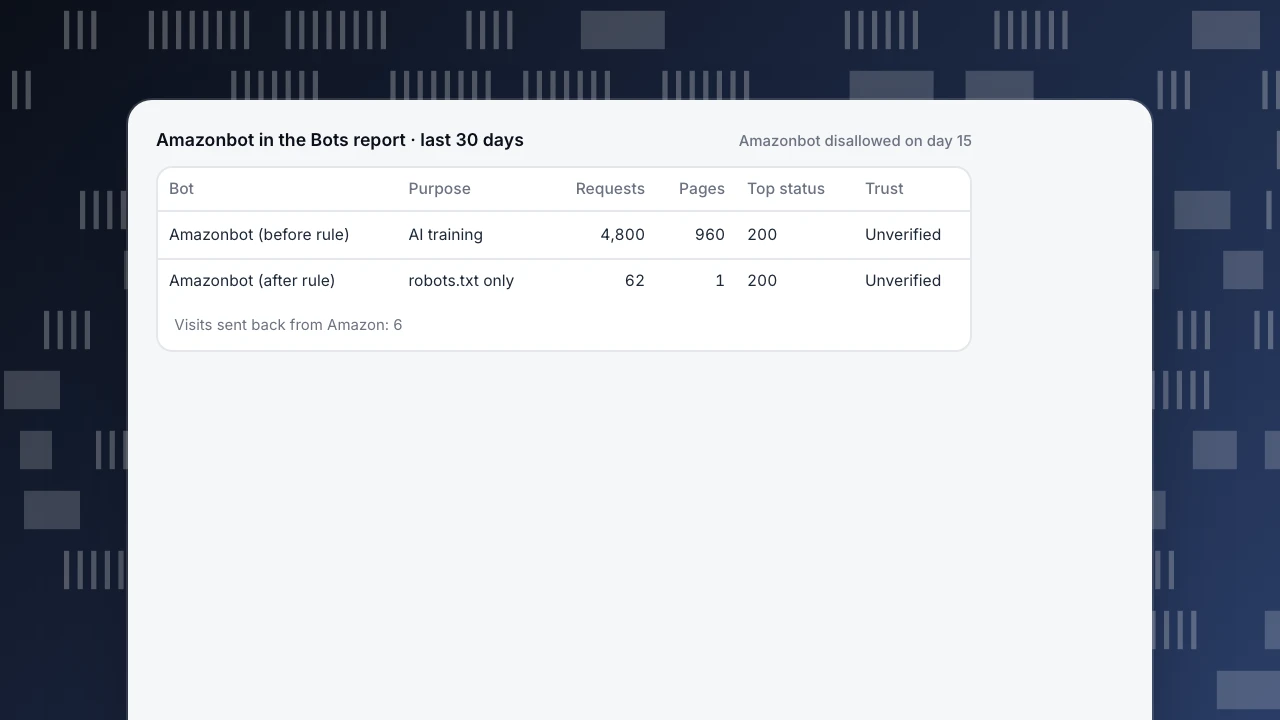
A Disallow rule went live on day 15. Afterwards, verified Amazon IPs made 62 fetches, all of /robots.txt, and 0 content pages. That is expected: the crawler still reads the rules file. Content fetches continuing from verified IPs would be a compliance problem; "Amazonbot" requests from other IPs are not Amazon at all.
Amazonbot in the Bots report · last 30 days
Amazonbot disallowed on day 15| Bot | Purpose | Requests | Pages | Top status | Trust |
|---|---|---|---|---|---|
| Amazonbot (before rule) | AI training | 4,800 | 960 | 200 | Unverified |
| Amazonbot (after rule) | robots.txt only | 62 | 1 | 200 | Unverified |
Visits sent back from Amazon: 6
Decide per goal
Read the official purpose first, then your data. Amazon says Amazonbot may train Amazon AI models; the example shows heavy product-page reads and almost no traffic sent back. Against that:
- Out of training, still eligible for Alexa search: disallow Amazonbot, allow Amzn-SearchBot.
- Visible in Amazon and Alexa experiences: allow both, and make sure key pages return 200 to them.
- Middle ground: allow crawling but add noarchive to selected pages — Amazon defines it as "do not use the page for model training".
- Lower load: crawl-delay is not supported; rate-limit on the server and contact amazonbot@amazon.com.
One official variable: the documentation says allowing Amazonbot may make you eligible for Amazon Content Partners — a +1% affiliate commission boost on eligible sales, hosting credits and AI traffic tools. Weigh that against your read distribution and send-back ratio; do not allow a training crawler for the incentive alone.
robots.txt only states your wish; checking actual fetches is how you know it is honoured. The same read-first approach works for GPTBot and Bytespider; for the terms, see AI crawler and bot.
Amazonbot in TapCub
The example above, step by step in TapCub:
- Collect server records. With only the page script, TapCub sees only bots that run JavaScript. Send server-side access records or import access logs through the API so all 4,800 reads are counted (setup). Recognised bots are counted separately by default, so Amazonbot's reads never inflate human visitors or conversion denominators.
- Read the ledger. In Web analytics › Bots, the AI & agents tab holds the AI content ledger. Amazon sits in the training column with 4,800 reads against the human visitors sent back; the ledger writes the ratio as N reads to 1 visitor, so 6 visitors is 4,800 ÷ 6 = 800 : 1. A ratio like that is normal for a training crawler; read it as "content consumer", not as lost traffic.
- See what it reads. Amazonbot is an AI crawler, so it appears on Monitoring › Crawl health; open its row for the pages it fetched most. TapCub does not group one crawler's reads by path prefix, so add up /products/, /blog/ and /docs/ from that list or from your logs. On the All bots tab, the Amazonbot row (operator Amazon, purpose AI training) shows requests, pages, top status code, last seen, trust and detection layers matched. TapCub runs no DNS check for Amazon, so trust shows Unverified; separate genuine requests with Amazon's IP files.
- Block, then check compliance. The Rule file generator on Monitoring › Crawler compliance has a Block all AI training crawlers preset whose list includes Amazonbot; keep your own
Allowgroup for Amzn-SearchBot. After publishing the Disallow, the same page compares robots.txt with real fetches and lists fetches made while blocked and fetches of disallowed paths. Allow for the 30-day cache before calling a fetch a violation.
What TapCub does not do: it measures and does not block; enforcement is robots.txt plus server rate limiting. Of Amazon's three documented agents, TapCub recognises Amazonbot by name; Amzn-SearchBot and Amzn-User have no rows of their own.
FAQ
What is Amazonbot used for?
Amazon's documentation says Amazonbot is used to improve Amazon's products and services, helping provide more accurate information to customers, and that what it reads may be used to train Amazon AI models. That is the official purpose; this guide does not speculate beyond it.
How do I block Amazonbot?
Add a group with User-agent: Amazonbot and Disallow: / to the robots.txt at the root of each host. Keep Amzn-SearchBot allowed if you want to stay eligible for Alexa search. Amazon's crawlers may use a cached copy up to 30 days old, so re-check real fetches after publishing.
Does blocking Amazonbot remove my site from Alexa?
No. Alexa search eligibility comes from Amzn-SearchBot, which has its own independent robots.txt setting; disallowing Amazonbot opts out of the training crawler only. If your robots.txt does not name Amzn-SearchBot but allows other search bots, it follows those search-bot rules.
Is Amazonbot used for AI training?
Amazon's documentation says what Amazonbot reads "may be used to train Amazon AI models", and disallowing it in robots.txt signals that you opt out. The other two agents, Amzn-SearchBot and Amzn-User, are explicitly documented as not crawling content for generative AI model training.
Does Amazonbot follow robots.txt?
Amazon says its listed agents respect the Robots Exclusion Protocol, including user-agent and allow/disallow directives, rel=nofollow and the noarchive meta tag. They do not support crawl-delay. Amzn-User is the exception: because its fetches can be user-initiated, it may not follow all robots.txt directives.
How do I verify a request is really Amazonbot?
User agents can be faked, so match the request's source IP against the official IP file for the agent named in the user agent: 1,292 addresses for Amazonbot, 816 for Amzn-SearchBot and 1,023 for Amzn-User (parsed 2026-11-15). Requests from outside those lists are not Amazon.
See also
Was this article helpful?
We use your answers to fix and expand this page.
Couldn’t send. Please try again in a minute.
Thanks for the feedback. We’ll use it to improve this page.You’ve already sent feedback on this page. Thanks.

Solutions Engineer
Covers SDKs, API integrations, and data implementation, with an emphasis on validation, system interoperability, and troubleshooting.