Try it on your own data
Every report in this article is in the free plan. One snippet for web and apps, up to 10 sites.
Start freeA good FAQ site is built from questions customers actually asked, written in their words, grouped by topic and answered in the first sentence. Count real conversations instead of guessing: in a sample of 50 chats, nine repeated questions covered 86% of volume. Below: where to find them, a worked count and how to check the page works.
What you will learn
- Take questions from chat transcripts and support messages, not from a brainstorm
- Keep a question when it repeats at least three times in 50 chats; nine entries covered 86% of the sample
- Put the answer in the first sentence, then measure whether repeat questions fall
What makes an FAQ page worth keeping
An FAQ page earns its place when a visitor can find their own question, in their own words, and get the answer in the first sentence. Four tests separate a working FAQ from a pile of questions:
| Test | Passes when | Fails when |
|---|---|---|
| Real phrasing | The question reads like something a customer typed | It reads like a department name ("Shipping policy") |
| Direct answer | The first sentence answers; detail follows | The answer starts with background or a sales line |
| Findable | Questions are grouped by topic and the page can be searched or scanned in seconds | One long list of 60 items in no order |
| Honest | Limits and known problems are stated | Every answer ends in "contact us" |
Nielsen Norman Group makes the same point about the source: use questions people actually ask, in their vocabulary, and give factual, candid answers instead of marketing copy (sources). Invented questions ("Why is our product so easy to use?") fail the first test and teach readers to skip the page.
One thing no longer needs your attention: markup. Google's documentation log says the FAQ rich result stopped appearing in Google Search from 7 May 2026, so there is no longer a search-result expansion to design the page around. Write the page for the reader who is already on your site and stuck.
Where the real questions come from
The best source is what customers already asked you, because it is already phrased the way they talk and already ranked by how often it happens. Ranked by how useful each source usually is:
| Source | What it gives you | Watch out for |
|---|---|---|
| Chat transcripts | Exact wording, frequency, the page the visitor was on | Agents' replies hide the question inside a long thread; read the visitor's first message |
| Offline messages and support email | Questions people were willing to wait for an answer to | Skews toward problems, away from pre-purchase doubts |
| Site search queries | What visitors looked for and did not find | Short keywords, not full questions |
| Sales and pre-sales calls | Objections and comparison questions | Small sample, often one person's memory |
| Agents' own list | The questions they are tired of answering | Opinion until counted; verify against transcripts |
Treat a question that keeps arriving as a signal, not only as content. NN/g recommends sending questions that reveal usability or product problems to the team that can fix them, instead of answering them in the FAQ indefinitely. "How do I reset my password?" asked weekly is an FAQ entry today and a design bug to fix tomorrow.
Worked example: sorting 50 conversations into FAQ entries
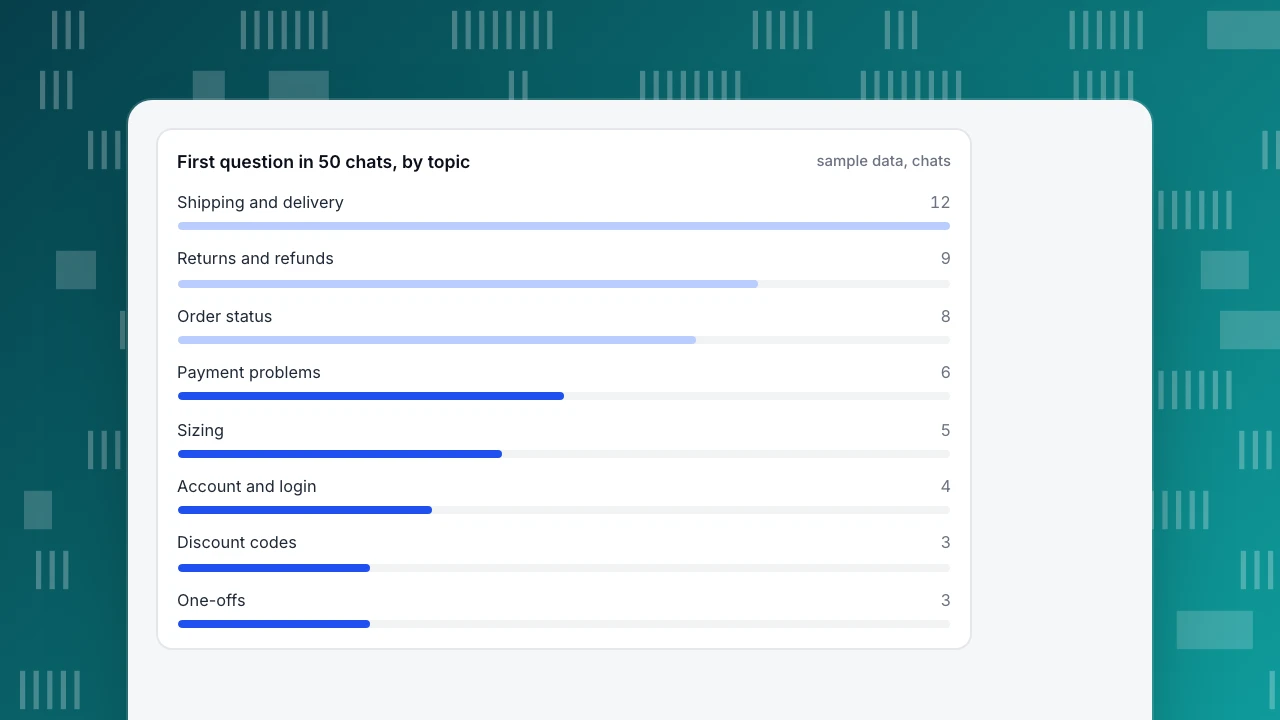
Sample data: 50 resolved chats from a small online shop, each tagged with the visitor's first question. First pass, by topic:
| Topic | Chats | Share of 50 |
|---|---|---|
| Shipping and delivery | 12 | 24% |
| Returns and refunds | 9 | 18% |
| Order status | 8 | 16% |
| Payment problems | 6 | 12% |
| Sizing | 5 | 10% |
| Account and login | 4 | 8% |
| Discount codes | 3 | 6% |
| One-offs | 3 | 6% |
The three biggest topics (12 + 9 + 8 = 29 chats) are 58% of the sample. Second pass, one level down. Inside each topic, group chats that ask the same question:
| Question (customer's wording) | Chats |
|---|---|
| Where is my order? | 6 |
| How long does delivery take? | 7 |
| Do you ship to my country? | 5 |
| How do I return something? | 5 |
| When will I get my refund? | 4 |
| Why was my card declined? | 4 |
| Which size should I order? | 5 |
| I can't log in | 4 |
| Does this code stack with other offers? | 3 |
| Can I change my address after ordering? | 2 |
| Which payment methods do you take? | 2 |
| Three one-off questions | 3 |
The rule used here is a rule of thumb, not a standard: a question asked at least three times in 50 chats (6%) gets an entry; twice goes on a watch list; once is ignored unless it is urgent. Nine questions pass: 7 + 6 + 5 + 5 + 5 + 4 + 4 + 4 + 3 = 43 chats, which is 43 ÷ 50 = 86% of everything asked. Two questions (4 chats) wait on the watch list, and three one-offs (3 chats) are dropped. 43 + 4 + 3 = 50, so every chat is accounted for.
Two readings of the same table matter. First, nine entries cover most of the volume, so a first FAQ of nine to twelve items is enough; the long tail is what a human answers. Second, "Where is my order?" (6 chats) is a problem to solve rather than a page to write: an order-tracking link in the confirmation email removes the question, and the FAQ entry only points to it.
First question in 50 chats, by topic
sample data, chatsHow to write one entry
Each entry has three parts: the question in the customer's wording, an answer whose first sentence settles it, and a next step. Compare two versions of the same entry (sample text):
- Weak: "Delivery. Our logistics partners work hard to bring your order to you. Times vary depending on a number of factors."
- Working: "How long does delivery take? Standard delivery takes 3–5 business days after dispatch; express takes 1–2. Orders placed before 2 pm ship the same day. Track your parcel with the link in your confirmation email."
What changed: the heading is a question, the first sentence has numbers, the cut-off time removes a follow-up question, and the last line sends the reader to the next step. Rules to apply to every entry:
- Use the customer's words, copied from the transcript, lightly cleaned.
- Put the answer in the first sentence; keep the whole entry under about 100 words, and link out for the long version.
- Give numbers, dates and conditions instead of "usually" and "typically".
- State limits ("We do not ship to PO boxes") before the reader finds out the hard way.
- End with one action: a link, a button, or how to reach a person.
How to organise it so people find things
NN/g's guidance on structure is simple. A short or medium FAQ works as a list of questions followed by answers. A long one, or one with complex answers and screenshots, works better as a list of questions that each link to their own page. In both cases, group by topic so visitors can rule out irrelevant sections at a glance.
| FAQ size | Layout | Why |
|---|---|---|
| Up to about 15 entries | One page, grouped by topic, answers visible | Scanning is faster than clicking |
| 15 to 50 entries | Topic groups, collapsible answers, a search box | Keeps the page short without hiding the questions |
| Over 50 entries, or long answers | A short list per topic, each answer on its own page | Pages can be linked from chat, email and search |
Use your own example data to pick the groups: the topic table above gives you eight groups, and the top three should come first. Put the five or six questions with the most chats in a pinned list at the top of the page. Name groups with the words customers use ("Returns and refunds"), not internal labels ("Post-purchase operations").
| FAQ size | Layout | Why |
|---|---|---|
| Up to about 15 entries | One page, grouped by topic, answers visible | Scanning is faster than clicking |
| 15 to 50 entries | Topic groups, collapsible answers, a search box | Keeps the page short without hiding the questions |
| Over 50 entries, or long answers | A short list per topic, each answer on its own page | Pages can be linked from chat, email and search |
Group by the words customers use; put the five or six most-asked questions at the top.
Common mistakes
- Writing the questions you wish customers asked. If a question is not in your transcripts, it is a guess. Start from the counted list.
- Answers that sell. An answer to "Do you charge for returns?" that begins with a brand story fails the direct-answer test.
- Hiding the limits. NN/g notes that candid answers, including what a product cannot do, build trust. A limit hidden in an FAQ turns into a complaint later.
- No owner, no date. Add a "last reviewed" date and one person who owns the page. A wrong answer about refunds costs more than a missing one.
- Treating the FAQ as finished. Customer questions change with every promotion, price change and product launch. Re-sort a fresh batch of 50 chats every month or two.
- Duplicating the agent's script. The FAQ answers what customers ask; what agents ask customers is a different list, covered in customer service questions.
How to tell whether the FAQ is working
Measure the outcome, not the page views. Three checks, all using the same 50-chat method:
- Coverage: the share of chats whose first question matches an FAQ entry. In the example, 43 ÷ 50 = 86% was covered once nine entries existed.
- Repeat volume: after publishing, tag the next 50 chats the same way. If "How long does delivery take?" was 7 and falls to 3, the entry is doing its job (sample figures); if it stays at 7, the entry is hard to find or the answer does not settle the question.
- Escape rate: how often a reader opens an answer and then still starts a chat about it. This is the practical form of ticket deflection: questions answered without a person, not pages viewed.
An FAQ is one part of a knowledge base, which also holds longer help articles. If you want to answer the same questions inside a conversation as well as on a page, see canned responses for agent-side replies and AI help desk for automated answers.
How to do this in TapCub
Take the 50-chat example above and run it on your own conversations. TapCub does not publish a separate FAQ page for your website; its FAQ list lives inside the chat window, and the page on your own site stays yours to publish. What TapCub does is make the "which questions" step quick:
- Draft from real chats. Open Live chat › Knowledge base, go to Draft inbox and click Generate from conversations. It reads visitor questions and agent replies from conversations resolved in the last 30 days and merges them into Q&A drafts. You can run it once every 24 hours per site, and each batch uses 1 AI call.
- Approve, edit, or dismiss. Nothing goes live by itself. Apply the three-chats rule to each draft; approve the ones that pass, rewrite the answer so the first sentence settles it, and dismiss the rest.
- Pin the top five or six. Pinned Q&A entries appear in the visitor-facing FAQ in the chat window. Opening an answer does not create a conversation and does not use AI quota; clicking Not solved, or asking for a person, opens a conversation and passes the question to an agent.
- Keep the exact match. A visitor message that matches a Q&A entry gets your stored answer as written, with no AI call, so the first sentence you wrote is the one they see.
- Fix wrong answers where you see them. In the inbox, click Fix & save on a wrong reply to store the right answer as a Q&A entry.
- Check it monthly. In Live chat › Reports, the knowledge base hit rate shows the share of questions answered by a direct Q&A match or a retrieved answer. Read the conversations that still reach an agent and sort the next batch of 50.
TapCub only drafts and serves replies from the knowledge base; it does not change orders or call other systems, so an answer like "where is my order?" still needs a tracking link that works.
FAQ
What is an FAQ site?
An FAQ site, or FAQ page, is a page of frequently asked questions with direct answers, grouped by topic. It works when the questions come from real customer conversations, the first sentence of each answer settles the question, and visitors can find their topic within seconds.
How many questions should an FAQ page have?
Start with the questions asked at least three times in a batch of 50 chats; in the example that was nine, covering 86% of volume. Add entries when new batches show repeated questions. A longer page is only better if visitors can still find their question quickly.
Do FAQ pages still help SEO?
An FAQ page can still match the way people search because it is written as questions and answers. Google's documentation log says the FAQ rich result no longer shows in Search from 7 May 2026, so do not expect an expanded result. Write for readers and measure whether they stop asking the same question.
How do I find out what to put in an FAQ?
Count what customers actually asked: chat transcripts first, then offline messages, support email and site search. Tag each conversation with the visitor's first question, group the ones that ask the same thing, and write an entry for every question that repeats.
How often should I update an FAQ?
Re-sort a fresh batch of about 50 conversations every month or two, and after any price, shipping or policy change. Add a "last reviewed" date and an owner; an out-of-date answer on refunds or delivery does more harm than a missing one.
See also: Knowledge Management Solutions: How to Keep Answers Accurate After Launch.
Sources
- Nielsen Norman Group. FAQs Still Deliver Value: questions from real users, candid answers, structure by FAQ size, and using support questions as a signal. Checked 2026-11-18.
- Google Search Central. Latest documentation updates: May 2026 deprecation of the FAQ rich result (no longer shown from 7 May 2026) and the June 2026 removal of its documentation. Checked 2026-11-18.
Was this article helpful?
We use your answers to fix and expand this page.
Couldn’t send. Please try again in a minute.
Thanks for the feedback. We’ll use it to improve this page.You’ve already sent feedback on this page. Thanks.

Product Analyst
Focuses on event analysis, conversion funnels, and retention, using clear metric definitions and structured analysis to explain product performance.