Try it on your own data
Every report in this article is in the free plan. One snippet for web and apps, up to 10 sites.
Start freeKnowledge management solutions capture, organise and share what an organisation knows, but how long the answers stay correct depends on maintenance: who updates each entry and how often it is reviewed. A tiered review schedule for 120 customer-facing entries takes about 7.8 hours a month, against 20 hours for reviewing everything monthly. Below: the process, the owners, the metrics and what changes when AI answers from the content.
What you will learn
- The tool stores answers; the process (owner, review interval, retirement) decides whether they are still true
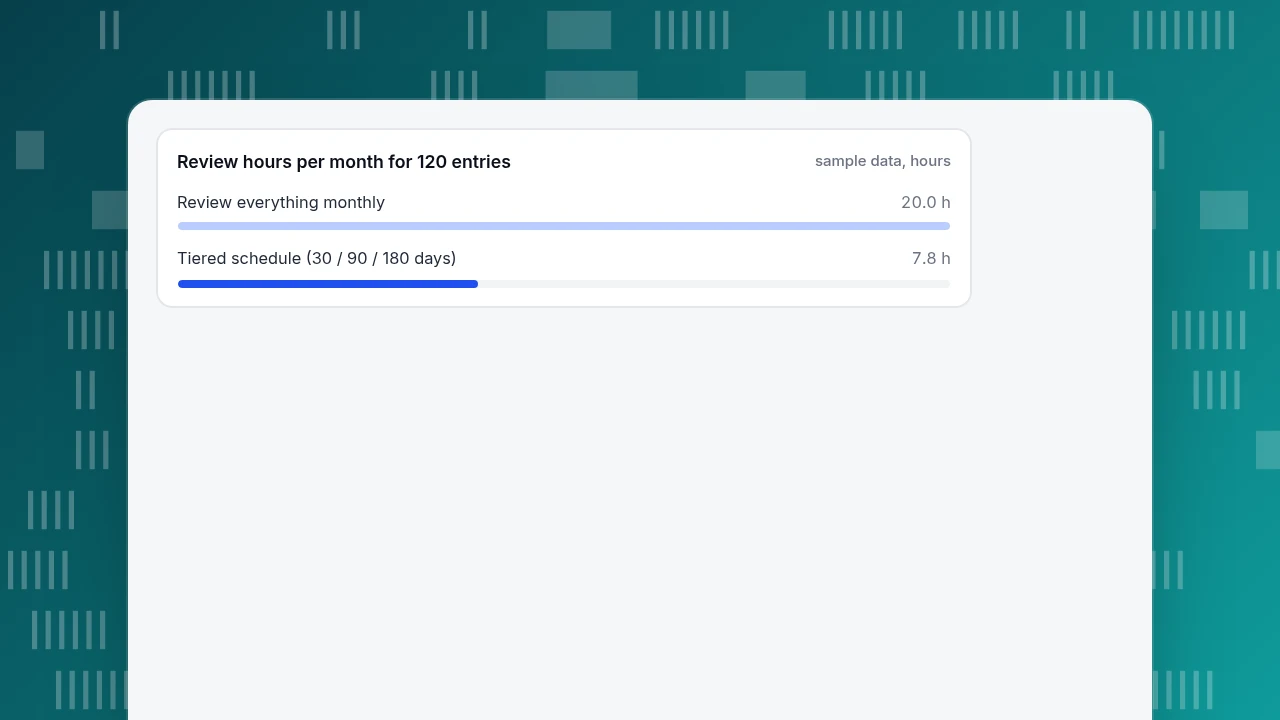
- In the sample, a tiered schedule (30 / 90 / 180 days) took 7.8 review hours a month for 120 entries, against 20 hours reviewing all monthly
- Unanswered questions are the cheapest source of new entries: eight entries lifted the sample hit rate from 67.0% to 74.6%
What do knowledge management solutions actually do?
A knowledge management solution is a system for capturing what an organisation knows, organising it so people can find it, and keeping it correct. The third part is the one most teams under-invest in. ISO 30401:2018, the international standard for knowledge management systems, frames it as a management system for establishing, implementing, maintaining, reviewing and improving how an organisation handles knowledge, and it applies to organisations of any size (source). Notice the verbs: maintaining and reviewing sit beside establishing.
That is the idea behind this guide: the software stores answers, but the process decides whether they are still true. A tool with 500 articles and no owner is worse than a tool with 80 articles that someone reviews, because the 500 look authoritative and some are wrong.
For a short definition of the customer-facing version, see the knowledge base glossary entry; for turning one into a public page, FAQ site.
Which kind of knowledge solution do you need?
"Knowledge management solutions" covers three different jobs. Pick by the question you need to answer:
| Kind | Question it answers | Who reads it | What goes wrong first |
|---|---|---|---|
| Internal wiki / team docs | "How do we do this here?" | Employees | Pages nobody updates after a process changes |
| Customer help centre / FAQ | "How do I do this?" | Customers | Answers that no longer match the product |
| Answer base behind a chatbot or AI | "What do we tell this customer right now?" | Customers, through a bot | Out-of-date answers repeated confidently at scale |
A small team can run all three from one habit set. A large one often splits them across tools, which is fine as long as each has an owner and a review date. If your pain is repeated customer questions, the customer-facing kinds are the ones to start with, and they connect to ticket deflection: the share of questions answered without an agent.
What does a maintenance process look like?
Use a loop of four steps. Each step has one output you can check.
- Capture. Take new knowledge from where it appears: resolved conversations, tickets, product changes, sales objections. Output: a list of candidate topics each week.
- Write. One question or task per entry, in the customer's words, with the answer first. Output: a draft with an owner's name on it.
- Review. A second person checks accuracy, and the owner re-checks on a schedule. Output: a "last reviewed" date.
- Retire. Delete or merge entries that are duplicated, unused or about things you no longer offer. Output: fewer entries, not more.
The Consortium for Service Innovation's Knowledge-Centered Service guide describes the same shape: its Evolve Loop refines high-value articles based on patterns of article reuse and self-service activity, and it treats reuse, reference and the value of the article collection as indicators of value (source). The practical reading: improve what gets used, and do not measure success by how many articles exist.
Who should update entries, and how often should they be reviewed?
Give each kind of content an owner and an interval that matches how fast it changes:
| Content type | Example | Owner | Review every |
|---|---|---|---|
| Pricing, plans, policies | Refund terms, delivery fees | Whoever owns the policy | 30 days, and on every change |
| Product how-to | "How do I export my data?" | Product or support lead | 90 days, and on every release |
| Evergreen background | "What is a tracking pixel?" | Content owner | 180 days |
Two rules keep this honest. An entry without a named owner is deleted or assigned within a month. And a change to the thing it describes triggers a review, regardless of the calendar: a price change reviews every entry that mentions price.
| Content type | Owner | Review every |
|---|---|---|
| Pricing, plans, policies | Whoever owns the policy | 30 days, and on every change |
| Product how-to | Product or support lead | 90 days, and on every release |
| Evergreen background | Content owner | 180 days |
An entry with no named owner is assigned or deleted within a month.
Worked example: how much time does review take?
Sample data: a team has 120 customer-facing entries: 20 on pricing and policy (30-day cycle), 60 how-to entries (90-day cycle) and 40 evergreen entries (180-day cycle).
Reviews needed per month = entries × (30 ÷ interval in days):
- Pricing and policy: 20 × (30 ÷ 30) = 20 reviews.
- How-to: 60 × (30 ÷ 90) = 20 reviews.
- Evergreen: 40 × (30 ÷ 180) = 6.7 reviews.
- Total: 20 + 20 + 6.7 = 46.7 reviews a month.
At 10 minutes per review, that is 46.7 × 10 ÷ 60 = 7.8 hours a month. Reviewing every entry monthly would take 120 × 10 ÷ 60 = 20 hours, so the tiered interval saves about 12 hours a month, and puts the effort where answers go stale fastest. Two or three owners can share it.
If that sounds like a lot, compare it with the alternative: a customer given a wrong refund rule by a stale entry costs more than ten minutes of review.
Review hours per month for 120 entries
sample data, hoursWhich metrics show the knowledge base is working?
Track a few numbers weekly. Start with these:
| Metric | How to calculate | What it tells you |
|---|---|---|
| Hit rate | Questions answered from the knowledge base ÷ all questions | Whether it covers what people ask |
| Unanswered rate | Questions with no matching entry ÷ all questions | Where new entries are needed |
| Overdue rate | Entries past their review date ÷ all entries | Whether the process is keeping up |
| Handoff reasons | Count by reason (no match, model cannot answer, visitor asked for a person) | What kind of gap you have |
| Reuse | Times each entry answers a question | Which entries to improve first, which to retire |
Sample data: in a month the knowledge base saw 1,000 questions. 540 matched a Q&A entry directly and 130 were answered from a document, so the hit rate is (540 + 130) ÷ 1,000 = 67.0%. The other 330 went to a person, with these reasons: 190 no knowledge match, 60 model could not answer, 50 visitor asked for a person, 20 agent took over and 10 turn limit reached.
The 190 "no knowledge match" questions, 19% of all questions, are the work list. Suppose the eight most repeated of them account for 76 questions (40% of the 190). Writing eight entries should turn those 76 into hits next month: (670 + 76) ÷ 1,000 = 74.6%. A gain of 7.6 points from eight new entries is a better use of an hour than re-reading answers that already work.
What changes when AI answers from the knowledge base?
Maintenance matters more, because an AI assistant repeats what the knowledge base says with a confident voice and at volume. In Moffatt v. Air Canada (2024 BCCRT 149), a Canadian tribunal held the airline responsible for incorrect information its chatbot gave about a fare policy, ruling that it makes no difference whether information comes from a static page or a chatbot (source). The principle for your process is simple: what is in the knowledge base is what you are telling customers.
So for any knowledge base that feeds an AI, add three rules:
- Policy entries get the shortest review interval, since wrong policy answers are the costly ones.
- Test before you publish. Ask the questions customers ask and read the replies.
- Let wrong answers become entries. When an agent corrects a bad reply, store the corrected answer so it is not repeated.
What mistakes make a knowledge base decay?
- Counting entries as progress. More articles is not more knowledge; the KCS guide counts reuse, not volume.
- No owner. An entry everyone can edit and nobody owns goes stale.
- Writing from the product's point of view. Entries named after features do not match how customers phrase questions.
- Never retiring. Duplicates and outdated entries make search worse and the right answer harder to find.
- Reviewing everything equally. Policy changes in weeks; background changes in years.
- Ignoring the unanswered list. The questions with no match are the cheapest source of new entries.
- Treating launch as the finish. The work starts after publication.
How do you maintain a knowledge base in TapCub?
Here is how the team in the example would run the loop in TapCub. TapCub's knowledge base is for customer-facing answers in live chat; it is not an internal wiki.
- Capture from real chats. In Live chat › Knowledge base, open the draft inbox and click Generate from conversations. It takes visitor questions and agent replies from conversations resolved in the last 30 days and merges them into Q&A drafts; a site can generate once every 24 hours. Nothing goes live by itself: approve a draft to make it a Q&A entry, or dismiss it.
- Write the right kind of entry. A Q&A entry is sent as written when the question matches and does not use an AI call, which suits policy answers. A Document entry is split into passages of about 600 characters and the model drafts a reply from them, which suits background.
- Test before it goes live. Playground runs the same path as a real chat, spends no quota and creates no conversation.
- Read the numbers. Live chat › Reports shows the knowledge base hit rate: the share of questions answered by a direct Q&A match or a retrieved answer. In Live chat › Inbox, each handoff is labelled with its reason (no knowledge match, model cannot answer, visitor asked, turn limit, agent took over), which is the breakdown in the example.
- Fix as you go. On a wrong answer in the inbox, click Fix & save to store it as a Q&A entry; the next time that question comes in, the stored answer is sent without asking the model. Pinned Q&A entries also appear in the visitor-facing FAQ, where opening an answer does not start a conversation.
TapCub's documentation does not describe per-entry owners, review dates or reminders, so keep the owner and review-interval sheet yourself, in whatever tool the team already uses. The number of entries depends on your plan.
FAQ
What is a knowledge management solution?
A system for capturing what an organisation knows, organising it so people can find it, and keeping it accurate. The software stores the content, but the process decides its quality: who writes, who reviews, how often, and when entries are retired. ISO 30401 treats knowledge management as a management system, not a tool.
How do you maintain a knowledge base?
Run a loop of capture, write, review and retire. Give every entry an owner, review fast-changing content (policies, pricing) monthly and stable content twice a year, and review on any change to the thing described. Use unanswered questions as your list of new entries, and retire duplicates.
How often should a knowledge base be reviewed?
Match the interval to how fast content changes: about 30 days for pricing and policy, 90 days for product how-to, 180 days for evergreen background, plus a review whenever the product or policy changes. In the sample, that tiered schedule took 7.8 hours a month for 120 entries, against 20 hours for monthly review of all.
What metrics measure knowledge management?
Hit rate (questions answered from the knowledge base ÷ all questions), unanswered rate, overdue-review rate, handoff reasons and per-entry reuse. In the sample, 670 of 1,000 questions were answered (67.0%), and the 190 with no match were the list of entries to write.
How does AI change knowledge management?
It raises the stakes of maintenance, because AI repeats the knowledge base's content confidently and at volume. A tribunal has held a company responsible for what its chatbot told a customer. Shorten review intervals for policy entries, test replies before publishing and store corrections so a wrong answer is not repeated.
Sources
- ISO. ISO 30401:2018 Knowledge management systems: Requirements: scope as a management system for establishing, implementing, maintaining, reviewing and improving knowledge management. Checked 2026-11-19 via search results.
- Consortium for Service Innovation. KCS v6 Practices Guide: The Evolve Loop: reuse, reference and value of the collection as indicators of value. Verified 2026-11-19.
- Civil Resolution Tribunal of British Columbia. Moffatt v. Air Canada, 2024 BCCRT 149: responsibility for information given by a chatbot. Verified 2026-11-15.
Was this article helpful?
We use your answers to fix and expand this page.
Couldn’t send. Please try again in a minute.
Thanks for the feedback. We’ll use it to improve this page.You’ve already sent feedback on this page. Thanks.

Product Experience Specialist
Writes about product experience, practical workflows, and growth, turning complex processes into clear steps for everyday decisions.