Try it on your own data
Every report in this article is in the free plan. One snippet for web and apps, up to 10 sites.
Start freeAn NLP chatbot uses natural language processing to understand what a person means in a free-form message, instead of matching buttons or exact keywords. It classifies the intent, scores its own confidence and answers or hands off. The useful question is where it should stop. Below: how it reads a message, how to test the threshold, what goes to a person.
What you will learn
- Treat the confidence threshold and the no-match path as the boundary, and set them with data
- Hand off by rule anything that involves money, exceptions or a request for a person
- Test on real labelled messages and price a wrong answer; the highest answer rate is not the best result
What is an NLP chatbot, and how does it differ from a rule-based bot?
An NLP chatbot uses natural language processing to work out what a person means by a message, instead of matching it against a fixed script. A rule-based bot reacts to exact buttons or keywords: if the message contains "refund", send the refund menu. An NLP bot reads "I want my money back for the blue one" and maps it to the same refund request, even though the word "refund" never appears.
That flexibility has a price. A rule-based bot is wrong in predictable ways (it does not understand), while an NLP bot can be wrong in confident ways (it understood something else). So the useful question is not how clever the language model is, but where the bot should stop and a person should take over, and how you check that line is in the right place. This guide covers how the bot reads a message, how to set and test that line, and what to track afterwards. The different kinds of bot are compared in types of chatbots, and the jobs they suit in chatbot use cases. It does not go into algorithm details; for the decision you need, the mechanics below are enough.
| Rule-based bot | NLP bot | |
|---|---|---|
| Input handled | Buttons, exact keywords | Free-form sentences |
| Typical failure | "Sorry, I didn't understand" | A confident answer to the wrong question |
| Set-up work | Write every path by hand | Write example phrases and answers |
| Main control | Which paths exist | Where it stops and hands off |
How an NLP chatbot understands a message
Most NLP chatbots do three things with a message, and each one gives you a lever.
- Intent classification. The bot decides what the person wants, such as "track an order" or "change address". Intents are defined with example phrases. Google's Dialogflow documentation describes an intent as a category for what the user wants in one turn, defined by training phrases, and recommends at least 10 to 20 phrases per intent depending on complexity.
- Entity extraction. The bot pulls out the details it needs, such as an order number or a date, from the same message.
- A confidence score. The classifier scores how well the message matches each intent. In Dialogflow CX the score runs from 0.0 to 1.0: if the top intent meets the classification threshold it matches, and if none does, a no-match event fires.
The levers follow from this. Training phrases decide what the bot can recognise. The threshold decides how sure it must be before it answers. The no-match path decides what happens when it is not sure. The threshold and the no-match path are the boundary, and most quality problems are settings on that boundary, not problems with the language model.
Where to draw the line: what should go to a person
Sort questions by what a wrong answer costs, not by how easy they are to recognise. The bot should answer when the answer is stable and a mistake is cheap, and hand off when the answer depends on the customer's account or a mistake is expensive.
| Question type | Example | Who answers | Why |
|---|---|---|---|
| Stable policy or how-to | "What are your opening hours?" | Bot | One correct answer, cheap to check |
| Lookup in a live system | "Where is my order?" | Bot only if it can read the system, otherwise person | The answer lives outside the knowledge base |
| Judgement or exception | "Can I return this after 40 days?" | Person | Depends on case and policy discretion |
| Money, safety, legal | "I was charged twice" | Person | A wrong answer costs more than a handoff |
| Upset customer | "This is the third time I've asked" | Person | Tone matters as much as content |
Write the rule as a sentence the team can audit: "The bot answers only questions in the first two rows, and hands off anything it is less than 70% sure about, anything about money, and any customer who asks for a person." A tribunal in British Columbia, in Moffatt v. Air Canada, held an airline responsible for what its website chatbot told a customer and rejected the argument that the bot was a separate entity, so what the bot says is your statement.
How to evaluate an NLP chatbot: a test set and a threshold
Evaluation is cheap if you do it before launch: take real past messages, label the right answer by hand, run them through the bot and count.
Sample data: 500 real customer messages, each labelled with the correct answer. Run at three confidence thresholds. A higher threshold makes the bot answer fewer questions but more of them correctly.
| Threshold | Bot answers | Of those, wrong | Handed to a person | Correct answers |
|---|---|---|---|---|
| 0.5 | 430 (86.0%) | 48 (11.2%) | 70 | 382 (76.4%) |
| 0.7 | 360 (72.0%) | 14 (3.9%) | 140 | 346 (69.2%) |
| 0.9 | 210 (42.0%) | 2 (1.0%) | 290 | 208 (41.6%) |
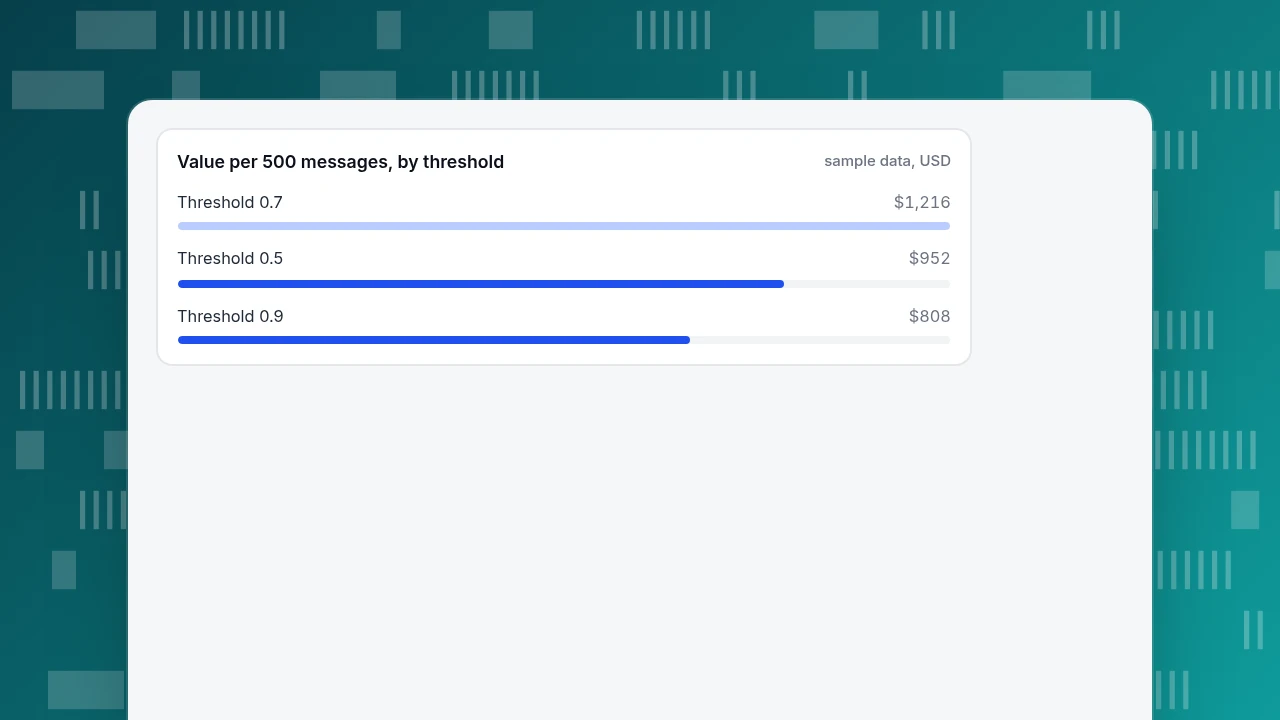
Now put a price on it. Assume a conversation handled by a person costs $4.00 and a wrong answer costs $12.00 on top (the customer comes back, an agent fixes it, goodwill is spent); both are assumptions to replace with your own. Value per 500 messages = correct answers × $4.00 − wrong answers × $12.00:
- Threshold 0.5: 382 × $4.00 − 48 × $12.00 = $1,528 − $576 = $952
- Threshold 0.7: 346 × $4.00 − 14 × $12.00 = $1,384 − $168 = $1,216
- Threshold 0.9: 208 × $4.00 − 2 × $12.00 = $832 − $24 = $808
The middle setting wins on this sample, even though it neither answers the most nor makes the fewest mistakes. At 0.5 the bot is wrong about once in nine answers; at 0.9 it hands 290 of the 500 messages (58.0%) to a person. Change the cost of a wrong answer and the winner moves, which is why you should write the assumption down. For turning savings into an ROI figure see chatbot ROI.
Two cautions. The test set must come from real messages, including the awkward ones, or the result is flattering. And re-run it whenever you change answers or add products, because the best threshold moves with the content.
Value per 500 messages, by threshold
sample data, USDWhat to track after launch
A test set tells you about the past; live numbers tell you whether the line is holding. Track five, each with a clear formula:
- Answer rate = conversations the bot answered ÷ all conversations.
- Wrong-answer rate = wrong answers found in review ÷ conversations the bot answered. This needs a human sample, such as 50 conversations a week.
- Handoff rate = conversations passed to a person ÷ all conversations, split by reason (no matching answer, visitor asked, bot unsure).
- Repeat contact rate = visitors who write again about the same issue within seven days ÷ visitors who got an answer. A high number means answers are accepted but not useful.
- Unanswered questions = the list of messages that ended in no match. This is the to-do list for the next round of training phrases and answers.
Handoff reasons matter more than the total. A handoff because the visitor asked for a person is a design question; a handoff because the bot had no answer is a content question you can fix this week. Counting deflected conversations without excluding repeat contacts overstates success; see ticket deflection for the strict definition.
| Metric | Formula | What a bad number points to |
|---|---|---|
| Answer rate | Answered by bot ÷ all conversations | Too low: missing content or a threshold set too high |
| Wrong-answer rate | Wrong answers in review ÷ answered | Too high: threshold too low or stale answers |
| Handoff rate | Passed to a person ÷ all conversations | Check the reasons before reading the total |
| Repeat contact rate | Same issue again within 7 days ÷ answered | Answers are accepted but not useful |
| Unanswered questions | Messages that ended in no match | The to-do list for new answers |
Wrong-answer rate needs a human sample, such as 50 conversations a week.
Common mistakes with NLP chatbots
- Optimising for the highest answer rate. In the example, 86.0% answered was worth less than 72.0% answered.
- Testing with the questions you wrote. Training phrases written by the team are easier than real messages. Use past customer messages.
- No visible way to a person. Make "talk to a person" always possible; it is a safety valve and a signal.
- Letting the bot answer about money or exceptions. Hand those off by rule, whatever the confidence.
- Never reading transcripts. The wrong-answer rate cannot be measured by a dashboard alone; someone has to read a sample.
- Treating launch as done. Products, prices and policies change; answers go stale. Review the unanswered list weekly.
In TapCub: AI replies with a visible boundary
The example above asks where the bot should stop. This is how TapCub's live chat lets you set and watch that line, and what it deliberately leaves out.
- Put the safe answers in the knowledge base. In Live chat › Knowledge base, add Q&A entries for stable questions. A matching Q&A entry is sent as written and does not use an AI call. Add document entries for longer material; they are split into passages of about 600 characters, found by full-text search, and a model drafts the reply from them.
- Choose the AI mode. In Live chat › Chat settings › AI assistant, pick off, AI answers only when all agents are offline, or AI answers first. When the material is not enough the visitor is passed to a person. The AI only writes replies; it does not change orders or send email.
- Test before you switch on. The Playground in the knowledge base lets you try questions without using quota. Run the labelled messages from your test set through it.
- Read handoffs by reason. In Live chat › Inbox, each handoff is labelled with its reason: no knowledge match, model could not answer, visitor asked, turn limit reached or agent took over. The no-match ones are your content to-do list.
- Track the hit rate. Live chat › Reports shows the knowledge base hit rate, the share of questions answered by a direct Q&A match or a retrieved answer, alongside resolution rate and first response time.
TapCub does not train intent models or expose confidence thresholds: the controls are what you put in the knowledge base, the AI mode and the handoff labels. It does not read or update customer orders either, so questions in the "lookup in a live system" row go to a person. The wrong-answer rate needs a human sample of transcripts. See AI support agent for what an AI agent can safely take over.
FAQ
What is an NLP chatbot?
An NLP chatbot is a bot that uses natural language processing to understand what a person means in a free-form message, rather than matching buttons or exact keywords. It classifies the intent, pulls out details such as an order number and answers or hands off depending on how confident it is.
How does an NLP chatbot work?
It classifies the message into an intent from example phrases, extracts entities, and scores its confidence. If the top intent meets a threshold it answers; if not, it triggers a fallback such as a handoff. Quality depends on the example phrases, the threshold and what happens at the fallback.
How do you evaluate an NLP chatbot?
Label 300 to 500 real past messages with the right answer, run them at several confidence thresholds and count answers, wrong answers and handoffs. Then price a wrong answer against a human-handled conversation. In the sample, a 0.7 threshold gave $1,216 per 500 messages against $952 at 0.5 and $808 at 0.9.
When should a chatbot hand off to a human?
When the answer depends on the customer's account or on judgement, when money, safety or legal issues are involved, when the bot is less than your chosen confidence, or when the customer asks. Write these as rules the team can audit, and exclude them from the bot's scope.
See also: How to Train a Chatbot: Turn 50 Transcripts into Trained Answers.
Sources
- Google Cloud. Intents, Dialogflow CX documentation — training phrases (10 to 20 recommended), the 0.0 to 1.0 confidence score, the classification threshold and the no-match event. Checked 2026-11-19.
- Civil Resolution Tribunal of British Columbia. Moffatt v. Air Canada, 2024 BCCRT 149 — the airline held responsible for information given by its website chatbot. Checked 2026-11-19 through legal summaries (the tribunal site returned 403 to an automated fetch).
Was this article helpful?
We use your answers to fix and expand this page.
Couldn’t send. Please try again in a minute.
Thanks for the feedback. We’ll use it to improve this page.You’ve already sent feedback on this page. Thanks.

Product Analyst
Focuses on event analysis, conversion funnels, and retention, using clear metric definitions and structured analysis to explain product performance.