Try it on your own data
Every report in this article is in the free plan. One snippet for web and apps, up to 10 sites.
Start freeTo train a chatbot, collect 50 recent resolved conversations, tally them by topic, decide which topics have one fixed answer, then write each answer in customers' own words and test on conversations you held out. For most businesses this is curating answers, not training a model. In the example, 35 of 50 conversations (70%) were in scope, and three weekly reviews raised correct answers from 60% to 84% and cut wrong ones from 20% to 4%.
What you will learn
- Training a business chatbot means curating answers and checking them against real conversations, not training a model
- Scope first: in the example 70% of conversations had fixed answers and 30% were handoffs by design
- Judge readiness by the wrong rate on held-out conversations; weekly review cut it from 20% to 4% in the sample
What "training" a chatbot means for a business
For most businesses, training a chatbot does not mean training a language model. It means curating the material the bot answers from, then checking its answers against real conversations and fixing what is wrong. There are two ways the work looks in practice:
- Intent-based bots (rule or classifier driven) are trained with example phrases. Google's Dialogflow documentation says to create "at least 10-20 (depending on complexity of intent) training phrases" per intent, and its machine learning then expands on your list, so you do not need every wording.
- Knowledge-base bots (retrieval plus a language model) are trained with answers and documents. Nothing is learned in the weights; the bot looks up the best-matching material and drafts a reply from it.
Both depend on the same input: what customers actually ask, in their words. That is why the best training data you already own is your chat transcripts. This guide takes 50 transcripts and turns them into trained answers, step by step, with numbers you can reproduce. How to choose between bot types is in NLP chatbot, and what a bot should and should not be allowed to do is in AI support agent.
Step 1: sort 50 transcripts into topics
Pull 50 recent resolved conversations. Read each one and give it one topic label, using the customer's first question rather than the agent's answer. Do not invent a taxonomy first; let the labels emerge, then merge near-duplicates.
Sample data: 50 transcripts from a small online clothing shop.
| Topic | Transcripts | Running total | Running share |
|---|---|---|---|
| Shipping times and cost | 14 | 14 | 28% |
| Returns and refunds | 11 | 25 | 50% |
| Order status | 9 | 34 | 68% |
| Sizing and fit | 6 | 40 | 80% |
| Account and other | 6 | 46 | 92% |
| Discount codes | 4 | 50 | 100% |
Two things stand out. The top two topics already cover 25 of 50 conversations, which is 50%, so the first answers you write will pay for themselves quickly. And the list is a long tail: even the sixth topic is a real question that someone asked.
Keep one thing out of the tally for now: 6 conversations labelled "Account and other" are individual cases such as a changed address. They teach you nothing reusable and they belong with the handoffs in the next step.
| Topic | Transcripts | Running total | Running share |
|---|---|---|---|
| Shipping times and cost | 14 | 14 | 28% |
| Returns and refunds | 11 | 25 | 50% |
| Order status | 9 | 34 | 68% |
| Sizing and fit | 6 | 40 | 80% |
| Account and other | 6 | 46 | 92% |
| Discount codes | 4 | 50 | all |
Sample data: 50 transcripts from a small online clothing shop. Order status and account cases are handoffs by design.
Step 2: decide which topics the bot may answer
A topic is answerable by a bot only if the answer is the same for every customer and lives in a document. If the answer needs a lookup in your order system, the bot cannot give it, and the right behaviour is a clean handoff to a person.
Apply that test to the sample:
- Shipping times and cost (14), returns and refunds (11), sizing and fit (6) and discount codes (4) are policy answers. 14 + 11 + 6 + 4 = 35 of 50, or 70%, are in scope.
- Order status (9) needs the customer's own order. Account and other (6) is individual. Together 15 of 50, or 30%, are handoffs by design.
This split sets your ceiling. A bot that handles 70% of conversation types correctly is already doing well; trying to push to 100% by letting it guess about order status is how it ends up telling a customer something wrong. A British Columbia tribunal held an airline responsible for what its chatbot told a customer about a bereavement fare (Moffatt v. Air Canada, 2024 BCCRT 149, ordering the airline to pay $812.02 in total), and rejected the argument that the chatbot was a separate entity. Whatever the bot says is what you said.
Step 3: write the answers from the real wording
For each in-scope topic, write one answer per distinct question, not one per topic. "How much is shipping?" and "When will it arrive?" are both shipping, but they are different questions with different answers.
Use the transcripts to write the answers:
- Copy the customer's phrasing into the question. If three customers wrote "where's my refund" and none wrote "refund status inquiry", the question you store is the first.
- Take the answer from your policy page, not from the agent's reply. Agents shorten and improvise; the policy page is the source of truth. Link to it.
- State the limits. "Returns are free within 30 days for unworn items" is a better answer than "Returns are free".
- End with the next step. What should the customer do, and who do they talk to if it is not covered?
If you build an intent-based bot, this is where the 10 to 20 phrases come in. With 35 in-scope transcripts for 4 topics, you have about 8 real phrases per topic. Use them as the core and add paraphrases until each intent reaches Google's guidance of at least 10 to 20, varying the wording rather than repeating it. Keep the intents distinct: the same phrase in two intents makes the classifier unable to decide.
Step 4: hold out some transcripts and test
Before launch, take 10 of the 50 transcripts and do not use them to write answers. Replay their first questions against the bot and mark each reply as correct, wrong or handoff. Handoff is a success when the topic is out of scope.
Sample data: first round on 25 fresh conversations.
| Round | Correct | Wrong | Handoff | Correct rate | Wrong rate |
|---|---|---|---|---|---|
| 1 | 15 | 5 | 5 | 60% | 20% |
| 2 | 18 | 3 | 4 | 72% | 12% |
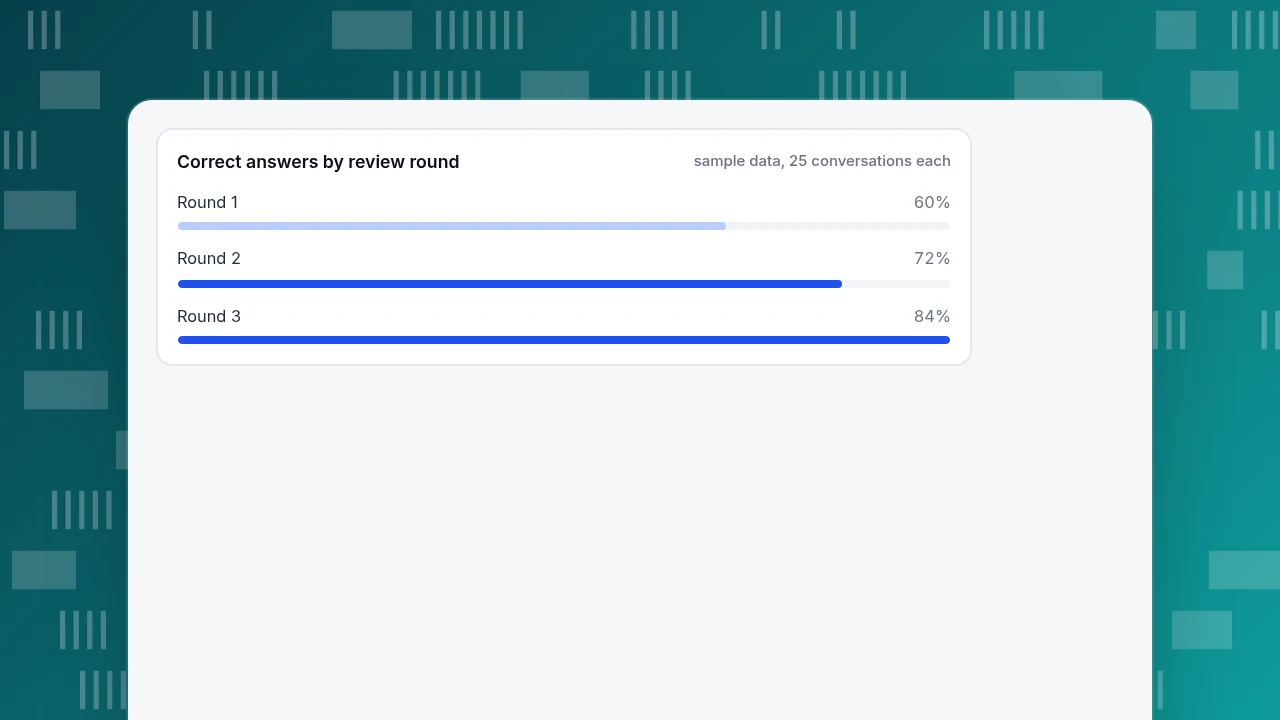
| 3 | 21 | 1 | 3 | 84% | 4% |
Watch the wrong column, not the correct one. A wrong answer costs more than a handoff, because the customer acts on it. Round 1 shows 5 wrong of 25: that is 20% of conversations where the bot was confidently mistaken, which is not ready for customers. Set the launch gate as a wrong rate you can tolerate, decided before you test, rather than a correct rate you hope for.
Correct answers by review round
sample data, 25 conversations eachStep 5: run a weekly review loop
Training does not end at launch; it becomes a loop of reading conversations and fixing them. Each week, take 25 recent bot conversations and sort them:
- Wrong answer: fix or add the question and answer. If the source document was unclear, fix the document first.
- Handoff on an in-scope topic: the bot did not find an answer, so add the wording customers used.
- Handoff on an out-of-scope topic: correct behaviour, leave it.
- Customer repeated the question: the answer was not clear enough, even if it was technically right.
In the sample, three rounds of this took correct answers from 60% to 84% and wrong answers from 20% to 4%. Each round fixed the specific failures it found, rather than rewriting everything. The numbers are illustrative, but the shape is typical: the wrong rate falls fastest at the start, then flattens, and new failures come from new topics (a promotion, a policy change). Add a calendar reminder to update the answers whenever a policy page changes, since a stale answer is a wrong answer.
Step 6: measure what the bot is doing
Four numbers tell you whether training is working:
| Metric | Formula | What it tells you |
|---|---|---|
| Correct rate | Correct ÷ sampled | Quality of answers |
| Wrong rate | Wrong ÷ sampled | Risk |
| Handoff rate | Handoffs ÷ all bot conversations | Coverage, split by in-scope and out-of-scope |
| Repeat rate | Customers who ask again ÷ conversations | Clarity |
Track them on the same sample size each week so they are comparable. If your support volume is below 25 conversations a week, review every one. For the money side of this, chatbot ROI shows how to value resolved conversations, and why only fully resolved ones count.
How to train a chatbot in TapCub
The knowledge base in TapCub live chat works the way the knowledge-base bots above do, so the 50-transcript example maps onto it directly. TapCub trains no model: it stores your answers and documents, and the AI drafts replies from them.
- Turn transcripts into drafts. In Live chat › Knowledge base, choose "generate from history" in the draft inbox. TapCub takes the visitor questions and agent replies from conversations resolved in the last 30 days and merges them into Q&A drafts. You can run it once per 24 hours per site, and each batch uses 1 AI quota. Drafts do nothing until you approve them; ignored drafts are discarded.
- Write the in-scope answers as Q&A pairs. A Q&A pair is sent word for word when the visitor's message matches the normalised question or contains all of its keywords, and it does not use an AI call. Use pairs for the policy answers from Step 3 (shipping, returns, sizing, discount codes).
- Add documents for longer material. Documents are split into chunks of roughly 600 characters; when no Q&A matches, TapCub searches the chunks with full-text search (not a vector database) and the model drafts a reply. If the model judges the material insufficient, the conversation is handed to a person.
- Test without spending quota. The Playground in Live chat › Knowledge base runs the same pipeline and does not use quota or create conversations. Replay your 10 held-out questions there.
- Choose the mode and the limits. In Live chat › Chat settings › AI assistant, pick off, "only when all agents are offline" or "AI first". The default is 6 answers per conversation, adjustable from 1 to 20, after which the conversation goes to a person. Visitors are told they are talking to an AI.
- Review in the inbox. Each handoff in Live chat › Inbox is tagged with its reason (no match, model could not answer, visitor asked, turn limit, agent took over), which is the in-scope versus out-of-scope split from Step 5. When an answer is wrong, use "correct and save", which stores a Q&A pair so the same question is sent verbatim next time.
TapCub's AI only generates replies. It does not look up orders, change anything or call other systems, which is why "order status" stays a handoff in this example. It also does not provide a ready-made correct or wrong rating; you do that sampling yourself with the transcripts.
FAQ
How do I train a chatbot on my own data?
Collect 50 recent resolved conversations, label each by topic, decide which topics have a fixed answer, then write one answer per distinct question from the customers' own wording. Test on held-out conversations and review 25 each week. For most business bots this is curating answers, not training a model.
How many training phrases does a chatbot need?
For intent-based bots, Google's Dialogflow documentation says at least 10 to 20 phrases per intent, depending on complexity, with varied wording; its machine learning expands the list. Knowledge-base bots work from answers and documents instead of phrases.
Can I train a chatbot with my chat transcripts?
Yes, and they are the best source, because they hold customers' real wording. Use them to find topics and phrasing, but write answers from your policy pages, and remove personal data first. Keep some transcripts aside for testing rather than using all 50.
How long does it take to train a chatbot?
A first version covering the top topics can take a day or two once you have transcripts. The review loop is ongoing: the sample here needed three weekly rounds to reach 84% correct and 4% wrong. Plan for time every week after launch.
How do I stop a chatbot giving wrong answers?
Limit it to topics with fixed answers, send everything else to a person, and measure the wrong rate on a weekly sample. A tribunal has held a company responsible for its chatbot's statements, so a wrong answer is your answer.
Sources
- Google Cloud. Dialogflow training phrases: create at least 10-20 (depending on complexity of intent) training phrases per intent; vary the wording. Checked 2026-11-20.
- Civil Resolution Tribunal of British Columbia. Moffatt v. Air Canada, 2024 BCCRT 149: an airline is responsible for information on its chatbot; $812.02 awarded. Checked 2026-11-20.
Was this article helpful?
We use your answers to fix and expand this page.
Couldn’t send. Please try again in a minute.
Thanks for the feedback. We’ll use it to improve this page.You’ve already sent feedback on this page. Thanks.

Product Experience Specialist
Writes about product experience, practical workflows, and growth, turning complex processes into clear steps for everyday decisions.