Try it on your own data
Every report in this article is in the free plan. One snippet for web and apps, up to 10 sites.
Start freeGood bot names tell visitors two things at once: this is a bot, and this is what it does. Charm helps, but identity comes first, and a human-sounding name without a label can hurt trust. Below are five naming rules, when a human name is risky, 30 examples by industry, a three-part opening line and a simple before-and-after test using conversation data.
What you will learn
- Name the bot for its job and make it clear it is a bot; clever comes second
- Use a human first name only with a visible "AI assistant" label; animals, objects and functions avoid the problem
- Judge a name by conversations started per 100 visitors and by handoff rate, changing one thing at a time
What makes a good bot name?
A good bot name does one job: it tells a visitor, in under a second, that this is a bot and what it is for. Charm is a bonus, not the goal. Five rules cover most decisions, and each can be checked with a yes or no.
- It says "bot" or sounds like a tool, not a person. Names like Orderly or Cartie pass; Jennifer from Support does not.
- It hints at the job. A name that points at orders, bookings or billing sets the right expectation about what to ask. A name that points at nothing invites questions the bot cannot answer.
- It is easy to say and spell. Test it by dictating it over the phone. If the listener asks "how do you spell that?", shorten it. One or two syllables, no invented spellings.
- It survives translation. If the chat runs in more than one language, check that the name is not an offensive or comic word in each. A native speaker needs one minute for this, and it avoids a public embarrassment.
- It fits the brand voice, and it can grow. A playful store can have a playful name, but a name tied to a single product line ("Sneaker Sam") becomes wrong the day you add jackets.
When two candidates tie, pick the one that is clearer about its job. A plain functional name is the safer choice: visitors ask it fitting questions from the first message.
Should a chatbot have a human name?
Only if the chat window says clearly that it is an AI. Otherwise, avoid it. There are two reasons, one about customers and one about the law.
Customers. A controlled study by Crolic, Thomaz, Hadi and Stephen found that humanlike chatbots lowered satisfaction when the customer was already angry, because a human-sounding bot raises expectations that it then fails to meet. Calm customers showed a slight preference for the humanlike bot. Since most support chats begin with a problem, the safe default is a name that sets modest expectations.
Law. Two rules worth knowing, neither of which is legal advice:
- California's bot-disclosure statute (Business and Professions Code section 17941) makes it unlawful to use a bot to mislead a person in California about its artificial identity in order to incentivise a sale or influence a vote, and treats a clear and conspicuous disclosure as the way to avoid that.
- The EU AI Act, Article 50(1), requires AI systems that interact directly with people to be designed so that those people are informed they are interacting with an AI, unless that is obvious to a reasonably well-informed person.
Practical rule: if a visitor could reasonably mistake the bot for a person after reading its name, avatar and first message, change one of the three. Naming the bot after an animal, an object or a function (a bear, a "Helper", an "Order Assistant") removes the doubt without any extra copy. If you prefer a first name, add a label next to it, such as "Mia, AI assistant". The first message should say it again in plain words.
30 bot name ideas by industry
These names are invented examples, chosen to pass the five rules above. Check each against your own market before use: search the name with your category, look for trademarks, and say it aloud next to your brand name.
| Name | Where it fits | Why it works |
|---|---|---|
| Cartie | Online store | Points at the cart; friendly, clearly not a person |
| Orderly | Online store | Suggests tracking and tidy orders; sets the right questions |
| Sizey | Fashion | Implies sizing help, the top fashion question |
| Shipwise | Online store | Ties to delivery questions |
| Stockbot | Retail | Plain: answers availability |
| Giftie | Gift shop | Narrow and warm; fits one job |
| Billy | SaaS billing | A short function-first name; pair with a label such as "billing assistant" |
| Setup Scout | SaaS onboarding | Says it helps you get started |
| Docsy | SaaS docs | Points at documentation answers |
| Keyholder | SaaS access | Fits login and permission questions |
| Pingbot | IT or status | Short, technical, honest about being a bot |
| Planbot | SaaS plans | Sets the topic: plans and upgrades |
| Bookie | Hotels, travel | Booking-first; light tone |
| Tripmate | Travel | Warm; implies planning help, not a person |
| Checkin | Hospitality | Matches the moment guests need help |
| Gatekeeper | Events | Ticket and entry questions |
| Routey | Transport | Routes and timetables |
| Menu Mate | Restaurants | Menus, allergens, opening hours |
| Tabletop | Restaurants | Reservations |
| Scholar | Education | Calm, trustworthy; answers course questions |
| Enrolly | Education | Admissions and enrolment |
| Campus Guide | Universities | Descriptive, plain |
| Claimbot | Insurance | Names the highest-stress topic |
| Quotey | Insurance | Quotes and pricing |
| Ledger | Finance | Neutral and serious; avoid cuteness around money |
| Rate Helper | Finance | Descriptive, low risk |
| Rentbot | Real estate | Listings and viewings |
| Homey | Real estate | Warm, but add a label |
| Hired | HR and recruiting | Candidate status questions |
| Nova Assist | Healthcare admin | Neutral; appointments and opening hours only, not medical advice |
Three patterns recur in the list. Function plus "bot" or "assistant" is the lowest-risk choice (Claimbot, Rate Helper). Playful diminutives (Cartie, Quotey) suit consumer brands and fail in finance and healthcare. Neutral nouns (Ledger, Scholar) suit serious topics. If you run AI chat on your own site and want a mascot instead, an animal avoids the human-name problem: AskCub's AI agent is called Cubby, a bear, for that reason.
| Check | Pass if | Fails if |
|---|---|---|
| Identity | Reads as a tool or carries an "AI assistant" label | Real person's name plus job title |
| Job | Hints at orders, bookings, billing or another topic | Generic "Chatbot" or "Support" |
| Say and spell | Understood when dictated over the phone | Invented spelling, three or more syllables |
| Translation | No offensive or comic meaning in your languages | Not checked with a native speaker |
| Future | Still correct if the product range changes | Tied to one product line |
Run every candidate through all five checks; one failure is enough to drop it.
Which names should you avoid?
Reject a candidate if it fails any of these checks:
- A real person's name plus a job title ("Sarah, Customer Support Manager"). It reads as a person, and a visitor who later feels misled has a fair complaint.
- Generic labels such as "Chatbot", "AI Bot" or "Support". They say nothing about the job, and every site uses them.
- Names that overpromise: "Genius", "Expert", "Doctor". A visitor will ask it things it should not answer.
- Look-alikes of well-known brands or assistants. They confuse customers and invite trademark disputes. Search before you commit.
- Humour at the customer's expense, such as sarcasm, puns on "error" or "oops". The first message is read by people with problems.
- Names tied to one product that you may drop or rename.
- Gendered names by default. Nothing about a bot requires a gender, and a female-coded name for a service bot is a choice worth making deliberately.
How do you write the welcome message?
The name gets noticed; the opening line decides whether a visitor types. A reliable opening has three parts, in this order: who is speaking, what it can answer, what happens if it cannot.
"Hi, I'm Cartie, the shop's AI assistant. I can check orders, delivery times and returns. If I can't help, I'll bring in a person."
Notice what the line does. It says "AI assistant" (identity), lists three topics (scope), and names the fallback (escape route). It is 25 words. A shorter version works on small screens, and a longer one rarely helps.
Variants by situation:
| Situation | Opening line pattern | Example |
|---|---|---|
| Humans online | Greet, name scope, mention people | "Hi, I'm the shop's assistant. Ask about orders or sizing; a teammate can join if needed." |
| Humans offline | Say so, promise a reply time | "Our team is offline until 9:00. I can answer common questions now, or you can leave your email." |
| Pricing page | Narrow the scope to the page | "Questions about plans? I can compare them for you." |
| Checkout page | Offer help with the common blockers | "Need help with shipping costs or payment? Ask me here." |
| Returning visitor | Skip the introduction | "Welcome back. Want to continue your order question?" |
Two writing rules: never open with "How may I assist you today?" because it states no scope, and never promise what the bot cannot do. If the bot can only draft replies from your knowledge base, do not say "I can change your order".
How do you test whether a name and welcome work?
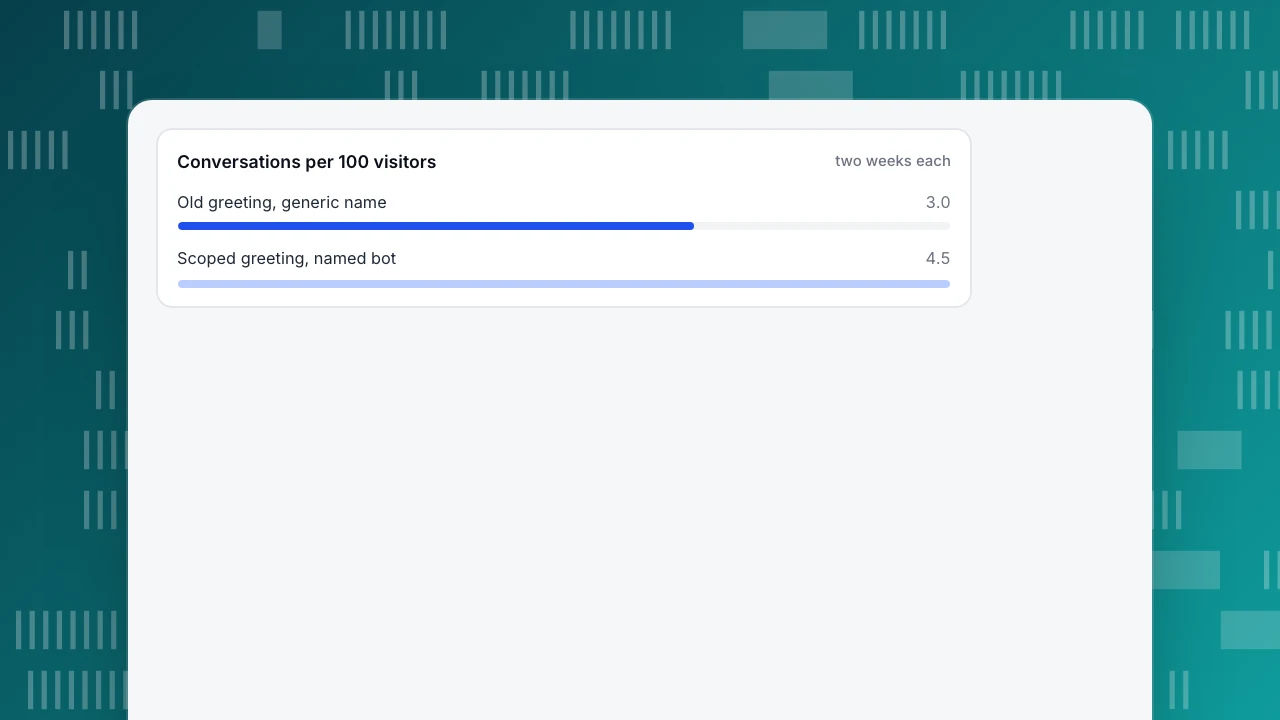
Judge the name by what visitors do, not by what the team likes. Two numbers move first: conversations started per 100 visitors (is the invitation attractive?) and handoff rate (is the bot attracting questions it can answer?). A third, resolution rate, follows, but needs more conversations to settle.
Sample data: a store runs its old greeting ("Hello! How can I help?", bot called "Assistant") for two weeks, then a scoped greeting with a named bot ("Cartie, the shop's AI assistant", listing orders, delivery and returns) for two weeks. The same pages carry the chat in both periods.
| Metric | Old name and greeting | New name and greeting |
|---|---|---|
| Visitors on chat pages | 4,000 | 4,200 |
| Conversations started | 120 | 189 |
| Conversations per 100 visitors | 3.0 | 4.5 |
| Conversations handed to a person | 54 | 66 |
| Handoff rate | 45.0% | 34.9% |
Conversations per 100 visitors rose from 120 ÷ 4,000 × 100 = 3.0 to 189 ÷ 4,200 × 100 = 4.5, a 50% relative increase. Handoff rate fell from 54 ÷ 120 = 45.0% to 66 ÷ 189 = 34.9%, 10.1 points lower. A two-proportion z-test on the start rates gives z of about 3.6, so the difference is larger than chance alone would usually produce.
Three cautions keep this honest:
- It is a before-and-after, not an experiment. Seasonality, a promotion or a traffic mix change can move both numbers. Run both versions in the same weekdays, and note anything else you changed.
- Change one thing at a time. If you change the name and the greeting together, you learn that the pair works, not which half did it.
- A lower handoff rate is good only if answers stay correct. Read a sample of resolved chats; a bot that sounds confident and answers wrongly lowers handoffs for the worst reason.
Conversations per 100 visitors
two weeks eachHow to do this in TapCub
Take the scoped greeting above. In TapCub it comes together in four steps.
- Name and look. Open Live chat › Chat settings › Appearance. Set the brand name, subtitle, colour and logo of the bubble and chat window. An empty brand name falls back to the site name.
- Greeting lines. Open Live chat › Chat settings › Greeting & translation. Write one line for Greeting (agents online) and one for Greeting (agents offline), and the Bubble teaser that pops above the bubble about four seconds after arrival, once per visitor without a conversation. Keep the teaser to the scope sentence.
- The AI assistant. Open Live chat › Chat settings › AI assistant. Change Assistant name and write the AI opening line, sent once before the AI first speaks. TapCub tells the visitor they are talking to an AI before the first reply, and this notice cannot be turned off; AI messages carry an AI label. Write the Handoff message so the fallback you promised in the greeting is true.
- Read the numbers. After a fortnight, open Live chat › Reports for conversations, resolution rate and knowledge base hit rate, and Live chat › Inbox for handoff reasons (no knowledge match, model cannot answer, visitor asked, turn limit, agent took over). For visitors on the chat pages use Web analytics › Pages.
TapCub does not run a split test between two names or greetings, so use the before-and-after method above and record the dates you changed each setting. It also does not suggest names; the list in this article is the starting point.
FAQ
What should I name my chatbot?
Pick a short, easy-to-say name that points at the job, such as Cartie for a shop or Claimbot for insurance, and label it as an AI. Avoid real-sounding human names unless the interface says "AI assistant" beside them.
Do chatbots have to say they are bots?
In some places, yes. California's bot-disclosure statute and Article 50(1) of the EU AI Act both address people being told they are dealing with an AI. Rules differ by country and use case, so check with a lawyer; telling visitors up front is safe everywhere.
Is it better to use a human name or a robot name?
A name that clearly signals a bot or tool is safer. The Oxford study cited below found humanlike chatbots reduced satisfaction among angry customers, who are most support chats. If you use a first name, add "AI assistant" next to it.
How long should a bot's opening message be?
About 20 to 30 words: who is speaking, what it can answer, and what happens if it cannot. Longer messages push the input box down, especially on phones.
How do I know if a new name works?
Compare conversations started per 100 visitors and handoff rate for equal periods before and after the change, change one thing at a time, and read a sample of chats to confirm answers stay correct.
See also: Chatbot Templates: 8 Conversation Scripts and How to Adapt Them.
Sources
- Cammy Crolic, Felipe Thomaz, Rhonda Hadi & Andrew T. Stephen. Blame the Bot: Anthropomorphism and Anger in Customer-Chatbot Interactions. Journal of Marketing 86(1), 2022. Verified 2026-11-18.
- European Union. Artificial Intelligence Act, Article 50: Transparency obligations for providers and deployers of certain AI systems. Paragraph 1 on informing people they interact with an AI. Verified 2026-11-18.
- California Legislature. Business and Professions Code section 17941, added by SB 1001 (2018). Verified via secondary summaries 2026-11-18.
Was this article helpful?
We use your answers to fix and expand this page.
Couldn’t send. Please try again in a minute.
Thanks for the feedback. We’ll use it to improve this page.You’ve already sent feedback on this page. Thanks.

Product Analyst
Focuses on event analysis, conversion funnels, and retention, using clear metric definitions and structured analysis to explain product performance.