Try it on your own data
Every report in this article is in the free plan. One snippet for web and apps, up to 10 sites.
Start freeTo make a sales call script, pick one call type and outcome, then write five parts: opening, discovery questions, a value sentence, objection replies and a close with a date and time. Plan the minutes first: a 15-minute first call gives discovery 7.5 minutes with the buyer doing three quarters of the talking, so seller talk is 47.5%. Gong's data puts won calls at 57% seller talk, so plan low and audit the recording.
What you will learn
- Script the structure and questions, not a speech; give discovery half the call
- Plan seller talk below your target, because live calls drift upward: the sample audit ran 61.6% against a 47.5% plan
- Know which disclosure and calling-hour rules apply before you dial
What should a sales call script do?
A sales call script is a map of the call, not a recording to read aloud: it fixes the order of the conversation, the questions you must ask and the line you use to propose the next step, so the call is consistent without sounding scripted. Write one script per call type, because a cold call, a discovery call and a follow-up have different goals, and give each a single outcome (for example: book a 30-minute demo).
The reason to script the structure is talk time. Gong analysed 326,000 sales calls of at least ten minutes and found that sellers spoke about 60% of the time on average, with 57% on closed-won calls and 62% on lost ones. Its high performers kept the same talk ratio whether they won or lost, while low performers' talk time rose from 54% on won deals to 64% on lost ones. An earlier Gong analysis (2016) described a 43% talking to 57% listening ratio as the best for conversion, and linked talking above 65% to lower win rates. A script that reserves most of the call for the buyer is a way to hold that line under pressure. For sales messaging beyond the call itself, see sales pitch examples.
How long should each section take?
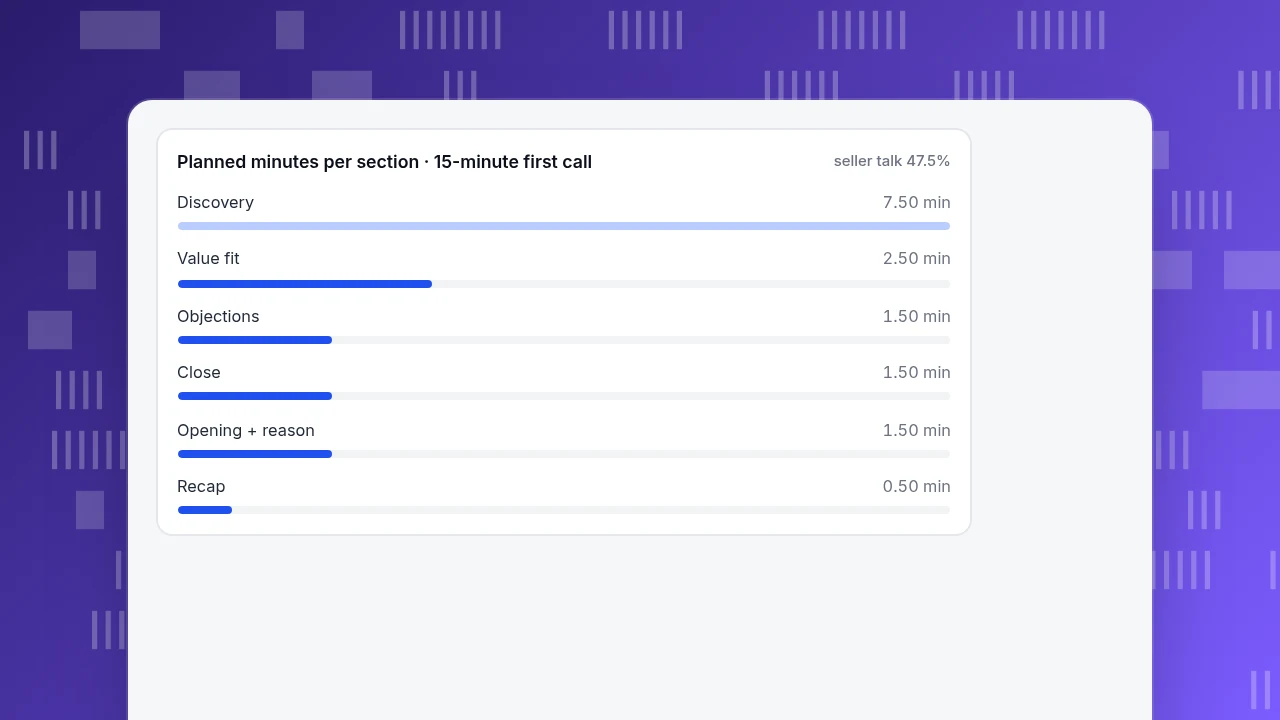
Plan the call in minutes before you plan it in words. A 15-minute first call, with the share of each section the seller talks, looks like this.
Sample data: planned timing for one first call.
| Section | Minutes | Share of call | Seller talk share | Seller minutes |
|---|---|---|---|---|
| Opening | 0.75 | 5.0% | 100% | 0.75 |
| Reason for the call | 0.75 | 5.0% | 100% | 0.75 |
| Discovery | 7.50 | 50.0% | 25% | 1.88 |
| Value fit | 2.50 | 16.7% | 70% | 1.75 |
| Objections | 1.50 | 10.0% | 50% | 0.75 |
| Close | 1.50 | 10.0% | 50% | 0.75 |
| Recap | 0.50 | 3.3% | 100% | 0.50 |
| Total | 15.00 | 100% | 47.5% | 7.13 |
Recompute: 0.75 + 0.75 + 7.50 + 2.50 + 1.50 + 1.50 + 0.50 = 15.00 minutes. Seller minutes = 0.75 + 0.75 + 1.875 + 1.75 + 0.75 + 0.75 + 0.50 = 7.125, and 7.125 ÷ 15 = 47.5%. That is below Gong's 57% for won calls, on purpose: live calls drift upward, so aim lower. Half the call (7.5 minutes) belongs to discovery, with the seller speaking a quarter of it.
Planned minutes per section · 15-minute first call
seller talk 47.5%How do you open the call?
The opening has three jobs in under a minute: say who you are, say why you are calling in terms of something specific to the person, and ask for time. Fill-in lines:
- "Hi {first name}, this is {your name} from {company}."
- "I'm calling because {specific trigger: you downloaded X, your team posted a role for Y, we spoke at Z}."
- "Is now a bad time? I can do two minutes, or call back at {time}."
Replace {specific trigger} with something true and checkable. A vague "I wanted to introduce our solution" is the line most often hung up on.
Check the rules before you dial. In the United States, the FTC's Telemarketing Sales Rule requires a telemarketer to disclose, truthfully, promptly and clearly, the identity of the seller, that the purpose of the call is to sell goods or services, and the nature of the goods or services (16 CFR 310.4(d)). It also bars calls to a person's residence outside 8:00 a.m. to 9:00 p.m. local time without prior consent (310.4(c)), and treats a call as abandoned if no sales representative joins within two seconds of the person's completed greeting, with a safe harbour at 3% of answered calls (310.4(b)). The rule's scope depends on whom you call and what you sell, so confirm with counsel which rules apply to your calls; this is not legal advice.
What discovery questions go in the script?
Discovery takes half the call, so script questions, not statements. Use five, in this order, and write your own wording into each blank:
- Situation. "How are you handling {process} today?"
- Problem. "What's the hardest part of that?"
- Impact. "When it goes wrong, what does it cost you, in time, money or customers?"
- Alternatives. "What have you tried, and why didn't it stick?"
- Decision. "Who else would need to be involved, and what would you need to see to move forward?"
Two rules for discovery: ask one question, then stop talking; and repeat back the answer to the impact question in the buyer's own words, because that sentence becomes your close.
How do you state the value fit?
Use one sentence that ties the buyer's words to a mechanism and a proof. Template:
"You said {their problem} costs you {their impact}. We help {role} do {outcome} by {mechanism}. {One true proof point, such as a customer count or a documented result}."
Keep this to about two and a half minutes of the call (the 2.5 in the timing table) and 70% seller talk. Use only proof you can document; an invented figure does damage on the next call when it is checked.
How do you handle objections?
Prepare one reply pattern per common objection: acknowledge, ask a question, offer a small next step. Do not argue.
| Objection | Reply pattern | Fill-in line |
|---|---|---|
| "Not interested" | Acknowledge, ask what they use now | "Fair enough. Just so I don't waste your time, how are you handling {process} today?" |
| "Send me some information" | Agree, tie it to a time | "Happy to. So it's useful, what should it answer? I'll send it today and call {day} at {time} to check it landed." |
| "It's too expensive" | Ask what it is compared with | "Compared with what? If we cost {X}, what is {their impact} costing you now?" |
| "We already use something" | Ask what is missing | "What would you change about it if you could?" |
| "Bad timing" | Name a date | "When would be better, and what will have changed by then?" |
Treat the first reply as information, not as a rejection. If the buyer repeats the objection after the second pattern, accept it and propose a follow-up date.
| Objection | Reply pattern | Fill-in line |
|---|---|---|
| Not interested | Acknowledge, ask what they use now | Fair enough. How are you handling {process} today? |
| Send me information | Agree, tie to a time | Happy to. What should it answer? I'll call {day} to check it landed. |
| Too expensive | Ask what it is compared with | Compared with what? What is {their impact} costing you now? |
| We already use something | Ask what is missing | What would you change about it if you could? |
| Bad timing | Name a date | When would be better, and what will have changed? |
Treat the first reply as information, not a rejection; after the second pattern, accept it and propose a follow-up date.
How do you close the call?
Close with a specific next step, a date and a time, not "let me know". Three lines, in order of preference:
- "Let's put 30 minutes on the calendar: {day} at {time} works for me. Does that fit?"
- "I'll send {specific item} today. Shall we talk on {day} at {time} to go through it?"
- "It sounds like the timing isn't right. Can I check back on {date}?"
End with a 30-second recap in the buyer's words: the problem, the impact, the agreed next step. Then send the same recap in writing within the hour.
How do you check the script is working?
Record or take notes on five calls and compute the seller share per section.
Sample data: one call against the plan.
| Section | Planned minutes | Actual minutes | Actual seller share | Seller minutes |
|---|---|---|---|---|
| Opening and reason | 1.5 | 2.0 | 100% | 2.00 |
| Discovery | 7.5 | 6.0 | 40% | 2.40 |
| Value fit | 2.5 | 4.0 | 75% | 3.00 |
| Objections | 1.5 | 2.0 | 60% | 1.20 |
| Close and recap | 2.0 | 2.0 | 62.5% | 1.25 |
| Total | 15.0 | 16.0 | 61.6% | 9.85 |
Recompute: 2.0 + 6.0 + 4.0 + 2.0 + 2.0 = 16.0 minutes; seller minutes 2.00 + 2.40 + 3.00 + 1.20 + 1.25 = 9.85; 9.85 ÷ 16 = 61.6%. The call spent 1.5 fewer minutes than planned on discovery and 1.5 more on value fit, and the seller talked 14 points more than planned (61.6% against 47.5%). The fix is concrete: cut the value pitch to 2.5 minutes and add one more discovery question.
How does this look in TapCub?
TapCub does not place calls and has no CRM or lead scoring; it helps you make the opening line specific and measures whether chat leads to goals. Say a visitor starts a chat on your pricing page and agrees to a call.
- Read the visitor before dialling. In Live chat › Inbox, the side panel shows where the visitor came from, the pages viewed in the last two days and past conversations, with one click to the analytics visitor profile. Turn that into the trigger line: "I saw you looked at pricing and the integrations page".
- Ask discovery questions in the chat. Save your five discovery questions as Live chat › Canned replies (type
/to insert, edit before sending) so chat discovery uses the same order as the call. - Get contact details inside the conversation. The chat widget has no pre-chat form, so ask for an email in the conversation, or let the visitor leave an offline message in Live chat › Chat settings › Offline messages when nobody is online.
- Know who it is. If the site calls
tapcub.login, the chat shows the person you are talking to, so you do not ask for an email you already have. - Measure whether chat helps. Live chat › Reports › Conversion attribution compares goal conversion for visitors who chatted with those who only browsed, and warns when fewer than 30 visitors chatted. It is a raw comparison, not proof of cause.
FAQ
How do you make a sales call script?
Pick one call type and one outcome, then write the opening (identity, reason, permission), five discovery questions, one value sentence, a reply for each common objection and a close that names a date and time. Plan the minutes per section and keep seller talk near half.
What should a sales call script include?
An opening, discovery questions, a value statement, objection replies, a close and a short recap. Include a time budget per section and a note on which rules apply to the call.
How long should a sales call be?
First calls in this guide are planned at 15 minutes, with half the time in discovery. Longer is fine if the buyer is talking; the useful measure is the seller's share of talk time, not the clock.
Should you read a sales script word for word?
No. Use the script for order and questions, and let the buyer's answers steer. Read verbatim only the legal disclosures that apply to your calls.
How much should a salesperson talk on a call?
Gong's data shows closed-won calls at 57% seller talk on average and lost calls at 62%; the earlier analysis linked the best conversion to 43% talking and warned about talking above 65%. Plan lower than you expect, because live calls drift upward.
Sources
- Gong. Mastering the talk-to-listen ratio in sales calls — 326,000 calls; 60% average, 57% won and 62% lost; 43:57 from the 2016 analysis. Verified 2026-11-20.
- Legal Information Institute (Cornell Law School). 16 CFR 310.4: Abusive telemarketing acts or practices — disclosures in (d), calling hours in (c), abandoned calls in (b). Verified 2026-11-20.
Was this article helpful?
We use your answers to fix and expand this page.
Couldn’t send. Please try again in a minute.
Thanks for the feedback. We’ll use it to improve this page.You’ve already sent feedback on this page. Thanks.

Product Analyst
Focuses on event analysis, conversion funnels, and retention, using clear metric definitions and structured analysis to explain product performance.