Try it on your own data
Every report in this article is in the free plan. One snippet for web and apps, up to 10 sites.
Start freeAn API is the contract for sending data to a service; an SDK is a library that calls that contract for you, adding queueing, retries and cleaning. For tracking, send page behavior from the browser SDK and money or account events from your server with an idempotency key, because a retry is only safe when the receiver can recognise the same event.
What you will learn
- An SDK usually wraps an API; the real choice is where the call runs and how much plumbing you own
- Send money and account events from your server, where visitors cannot block them, and add an idempotency key such as the order ID
- Send the session ID with server events so they join the visit that caused them
What is the difference between an SDK and an API?
An API is the contract: the address, the fields and the rules for sending data to a service. An SDK (software development kit) is a library, written for a language or platform, that calls that contract for you. For tracking, the SDK usually does the boring parts: it builds the request, queues events, retries failures and cleans values. The raw API gives you the same endpoint with none of that, so you write those parts yourself.
So "SDK or API" is rarely a choice between two systems. It is a choice about where the call is made (a browser, an app or your server) and how much plumbing you want to own. For the definition of an SDK, see SDK; the step-by-step API call is in send events with the HTTP API.
What does the same purchase event look like through each path?
Take one event: a $19.90 purchase for order 1001. Here it is sent three ways.
Browser SDK. The website script is loaded on the page and one line records the event, in the visitor's browser:
tapcub.track('purchase', { revenue: 19.9, currency: 'USD' });HTTP API. Your server posts JSON to the business-event endpoint with a server key:
curl -X POST "https://api.pathclue.com/api/v1/track" \
  -H "Authorization: Bearer wck_…" \
  -H "Content-Type: application/json" \
  -d '{"events":[{"event":"purchase","login_id":"u_123","insert_id":"order-1001","properties":{"revenue":19.9}}]}'
Server SDK. A language library (Node.js, PHP, Python, Java or Go) wraps that same endpoint. You call track and the library queues the event, sends it in batches and retries failures.
The first path runs on a device you do not control. The second and third run on a machine you do. That single difference drives most of the trade-offs in the next section.
How do the paths compare?
| Browser SDK | Server SDK | Raw HTTP API | |
|---|---|---|---|
| Runs where | Visitor's browser | Your server | Anywhere you can send HTTP |
| Credential | Site script on the page, no secret | Secret server key, kept off the page | Secret server key |
| Can the visitor block or fake it? | Yes, a blocker or a script edit can stop or alter it | No: it leaves your server | No, if sent from your server |
| Batching and retry | Handled by the script, not by you | Built in: every 3 seconds or at 200 queued events, up to 5 retries | You write it |
| Duplicate protection | Not the point for page events | Pass your own key such as the order ID | Pass your own key |
| Knows the visit | Yes, same page and session | Only if you pass the session ID | Only if you pass the session ID |
| Best for | Pageviews, clicks, scrolls, form views | Orders, refunds, sign-ups, subscription changes | Languages without an SDK, scripts and back-office jobs |
The server key matters most: TapCub's documentation says orders, payments, refunds and sign-ups belong on your server, where they cannot be blocked or faked.
| Event | Path | Why |
|---|---|---|
| Page view | Browser SDK | Only the page knows it happened |
| Button click or scroll depth | Browser SDK | Interaction data lives in the page |
| Order paid | Server, order ID as key | Moves money; must survive blockers and retries |
| Refund issued | Server, refund ID as key | Happens in a back office |
| Sign-up completed | Server, session ID if available | Confirmed by your database; joins the visit |
| Subscription renewed | Server or raw API from a billing job | No visitor present |
Rule of thumb: if no visitor is present or money changes hands, send it from your server.
What breaks on each path?
Browser. The page can disappear before the request leaves. MDN describes navigator.sendBeacon() as a way to send data without delaying unload, limits queued data to 64 KiB, and says the unload and beforeunload events are unreliable for sending analytics, recommending visibilitychange instead. A good browser SDK follows that advice, but you still cannot guarantee delivery from a device you do not control.
Server and raw API. The failure is the opposite: a request that actually arrived but whose response never made it back. HTTP defines a method as idempotent if repeating it has the same effect as sending it once. RFC 9110 says a client should not automatically retry a non-idempotent request unless it knows the request is effectively idempotent or can detect that the original was never applied. A tracking POST is not idempotent by itself. Without a key you choose, a safe-looking retry adds a second purchase.
Limits exist on every ingestion API. For example, Google's Measurement Protocol caps a request at 25 events and a 130 kB body, and says it is designed primarily for server-side or trusted environments, directing browser tracking to gtag.js or Tag Manager. Whatever you use, read the limits for your own endpoint before you design batches.
Worked example: a flash sale, retries and duplicates
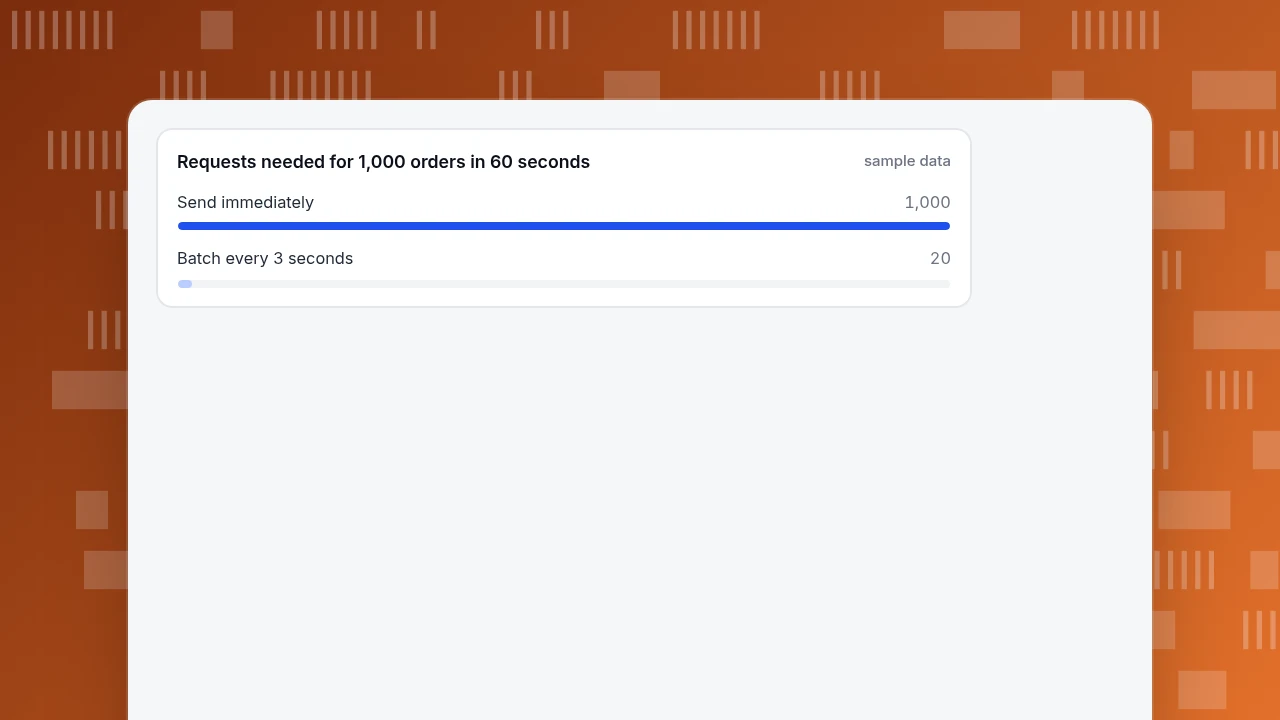
Sample data. An online shop sells 1,000 orders in 60 seconds during a flash sale, each a $19.90 purchase event of about 300 bytes. Assume a server SDK in default batch mode (flush every 3 seconds or at 200 events, at most 1,000 events and 1 MB per request).
- Request count. Orders arrive at 1,000 ÷ 60 = 16.7 a second. In 3 seconds that is about 50 events, far below the 200-event trigger, so the 3-second timer fires first: 60 ÷ 3 = 20 requests of about 50 events. In a send-immediately mode it would be 1,000 requests.
- Request size. 50 events × 300 bytes = 15,000 bytes, about 14.6 KiB, well under the 1 MB per-request limit.
- Retry window. With exponential backoff starting at 0.5 seconds and doubling, five retries wait 0.5 + 1 + 2 + 4 + 8 = 15.5 seconds before giving up, so a short network blip is absorbed without your code doing anything.
- Duplicates. Suppose one batch is accepted by the server but the response times out, and the library resends it. Without an
insert_id, each order in that batch is stored twice. For one order, revenue reads $19.90 × 2 = $39.80 instead of $19.90, and across the 50 orders in that batch $1,990 instead of $995. Withinsert_id: "order-1001"(any key up to 36 characters), the server keeps one event per key and the retry changes nothing.
The lesson is not that servers are risky. It is that a retry is only safe when you give the receiver a way to recognise the same event. The SDK handles queueing, size and retry; you still supply the key.
Requests needed for 1,000 orders in 60 seconds
sample dataHow should you choose?
Use these rules in order.
- Does the event move money or change an account? Send it from your server, with an idempotency key such as the order ID. Never rely on the browser for it.
- Is it something only the page knows (click, scroll, form view, page load)? Use the browser SDK.
- Does your language have a server SDK? Use it instead of writing HTTP calls; it already covers batching, retry and cleaning.
- Is it a script, a back-office job or an unsupported language? Call the API directly, and write the retry logic with the key.
- Do you need both a server event and its page visit? Send the visit's session ID with the server event so they join; without it the server event does not attach to a visit.
Which path fits each common event?
Applying the rules to eight events a typical product records:
| Event | Path | Why |
|---|---|---|
| Page view | Browser SDK | Only the page knows it happened, and a missed one is a small loss |
| Button click or scroll depth | Browser SDK | Interaction data lives in the page |
| Form viewed | Browser SDK | Same reason; do not send what the visitor typed |
| Order paid | Server, with the order ID as key | It moves money and must survive blockers and retries |
| Refund issued | Server, with the refund ID as key | Happens in a back office, not in a visitor's browser |
| Sign-up completed | Server, with the session ID if available | Confirmed by your database; joins the visit that caused it |
| Subscription renewed | Server or raw API from a billing job | No visitor is present at all |
| Nightly import of past records | Raw API or import tool | A batch job, not a live visit |
Notice that the last four never involve a visitor's browser at all. For those, the question "SDK or API" is only about whether your language has a server SDK.
How do you send the same event with TapCub, and check it arrived?
TapCub supports all three paths. The checkout example from above, step by step:
- Put the website script on the site (code in Web analytics › Configuration › SDK code) and record page behavior with
tapcub.track. - For the purchase, create a key in Configuration › Settings › API keys and include the Server track scope. The key starts with
wck_and is shown once. - Send the event with
POST /api/v1/track, from a server SDK or the curl call above. Adddebug=1first: it validates the event and answers per event without storing anything. - Read the response:
acceptedcounts events that passed validation andrejectedcarries a reason, such as a missing event name. Reuse the sameinsert_idif your code retries; a resend does not add a row, and duplicates are recognised for one day after the first copy is stored, so retry promptly. - Open Web analytics › Events or All-platform analytics › Data › Events & properties to see the purchase. Pass the visit's session ID if you want it joined to the pageview; an event without one stays in the event table and is not counted as a new visit. A raw HTTP call has no built-in retry, so write it yourself.
FAQ
Is an SDK better than an API?
Neither is better in general. An SDK is a wrapper around an API that adds queueing, retry and cleaning. Use an SDK when your language has one; call the API directly for scripts or unsupported languages, and add the retry and idempotency key yourself.
Does an SDK use an API?
Usually yes. Server SDKs commonly wrap a single HTTP endpoint. The SDK builds the request, batches events and retries failures; the API is the contract those requests follow.
Should I track purchases in the browser or on the server?
On the server. Browsers can be blocked, altered or closed before the request leaves. A server-side purchase event, with an idempotency key, avoids undercounts from blocking and double counts from retries.
Why do I need an idempotency key?
Because a request can reach the server while its response is lost, and a retry then sends it again. With a key such as the order ID, the server keeps one event per key. Without one, revenue can be counted twice.
Can I use both the SDK and the API in one project?
Yes. Use the browser SDK for page behavior and the server for money events, and send the session ID with the server event so the two join in one visit.
Sources
- MDN Web Docs. Navigator: sendBeacon() method — 64 KiB limit and why
visibilitychangereplacesunload. Checked 2026-11-20. - IETF. RFC 9110, section 9.2.2: Idempotent Methods — definition, and when a client should not retry. Checked 2026-11-20.
- Google. Measurement Protocol reference — example of published request limits: 25 events, 130 kB body. Checked 2026-11-20.
- Google. Send Measurement Protocol events — designed primarily for server-side or trusted environments. Checked 2026-11-20.
Was this article helpful?
We use your answers to fix and expand this page.
Couldn’t send. Please try again in a minute.
Thanks for the feedback. We’ll use it to improve this page.You’ve already sent feedback on this page. Thanks.

Product Experience Specialist
Writes about product experience, practical workflows, and growth, turning complex processes into clear steps for everyday decisions.