Try it on your own data
Every report in this article is in the free plan. One snippet for web and apps, up to 10 sites.
Start freeTo send a follow-up email after no response, wait three to five business days, then write two to four sentences that add one new thing and ask for one easy action. Use an honest subject line and stop after three sends. Below: timing by context, five original samples, a worked sequence showing diminishing returns, and the rules that apply.
What you will learn
- Short, new and one action: a follow-up that repeats the first email gives the reader nothing to answer
- Three follow-ups raised replies from 8.0% to 17.5% in the sample, but the third cost 4.18 hours per reply
- Subject lines must reflect the content, and CAN-SPAM covers business email too
When should you send a follow-up email, and how many?
Send the first follow-up after enough time that silence means something, usually three to five business days, and stop after three. Published advice runs from about three business days to a week for the first nudge, and the experts do not agree on exact intervals, so treat the figures below as a starting point you adjust to the person and the stakes.
| Context | First follow-up | Second | Third | Notes |
|---|---|---|---|---|
| Cold outreach to a prospect | 3–5 business days | 5–7 days later | 2 weeks later | Each one adds something new |
| After a demo or meeting | 2–3 business days | A week later | Stop or pause | They already know you; be brief |
| After sending a quote or proposal | 3 business days | A week later | Two weeks later | Offer to answer one question |
| After a form submission with no reply from you | Same day, then none | The delay is yours to fix | ||
| A request to a busy senior person | A week | Two weeks later | Stop | Make replying a one-word act |
The thesis of this article: a follow-up should be short, bring something new and ask for one clear action. The rest is detail. Tracking what the email did is in email campaign tracking, the same discipline in chat in live chat scripts and turning replies into customers in lead conversion rate.
| Context | First follow-up | Then |
|---|---|---|
| Cold outreach | 3–5 business days | 5–7 days, then 2 weeks |
| After a demo or meeting | 2–3 business days | A week, then stop or pause |
| After a quote | 3 business days | A week, then 2 weeks |
| Form submission you missed | Same day | None: fix the delay |
| Busy senior person | A week | Two weeks, then stop |
Published advice varies from about three business days to a week; adjust to the person and the stakes.
What makes a follow-up work?
Three rules cover most of it:
- Short. The reader decides in a few seconds. Aim for two to four sentences.
- New. Resending the first email with "just checking in" gives the reader nothing to react to. Add one thing that was not in the last message: a result, a deadline, an answer to a likely objection, a smaller ask.
- One action. Ask for a single, easy step, preferably answerable in a word.
| Weak | Stronger |
|---|---|
| "Just following up on my last email." | "I added the one-page summary I mentioned; the setup takes about 20 minutes." |
| "Let me know your thoughts." | "Would Tuesday 10:00 or Wednesday 14:00 work for 15 minutes?" |
| "Did you see my email?" | "Two teams I work with asked about the reporting piece, so I attached an example." |
| "I wanted to circle back." | "Is this still a priority this quarter, or should I check back in March?" |
| Re-sending the same text | A different angle with one new fact |
If you cannot name what is new in the follow-up, wait until you can.
What do good follow-up emails look like?
These five original examples are short on purpose. Replace the brackets with real details.
After cold outreach (second touch)
Subject: Reporting setup for [Company] Hi [Name], one specific thing from my last note: teams like yours usually spend a day a month assembling this report, and the template I attached cuts that to minutes. Worth 15 minutes this week to see if it fits? If not, a one-word "no" is fine.
After a demo
Subject: The two points you raised on Tuesday Hi [Name], you asked about permissions and data export. Both are covered in the attached two-pager. If it helps, I can walk your security lead through it on a 15-minute call. Does Thursday work?
After a quote
Subject: Quote #[number]: one question Hi [Name], the quote is valid until [date]. The most common question at this point is [question], so I have answered it below in two lines. Is there anything else standing between you and a decision?
After a form submission you did not answer in time
Subject: Sorry for the slow reply Hi [Name], your request on [date] should have had an answer within a day, and it did not. Here is what you asked: [answer]. Want me to set up the next step?
To reopen a quiet thread
Subject: Still a priority this quarter? Hi [Name], I do not want to fill your inbox. If this has moved down the list, tell me when to check back and I will. If it is still live, [new fact or option] may be worth a look.
How should the subject line read?
Be honest about what the email is. The FTC's CAN-SPAM guide asks that subject lines reflect the message's actual content, which rules out a fake "Re:" on a message that is not a reply. Patterns that work without tricks:
| Pattern | Example |
|---|---|
| Keep the thread | Re: the original subject, only on a real reply chain |
| Name the new thing | "One-page summary for [Company]" |
| Name the question | "Quote #4821: one question" |
| Name the deadline | "Offer ends Friday: [Company]" |
| Make the ask small | "15 minutes this week?" |
How many follow-ups pay off?
Replies keep arriving on later emails, but each one adds less. Sample data: 200 prospects, one first email and three follow-ups, at three minutes of effort per send.
| Send | Prospects still silent | Replies | Reply rate on those sent | Cumulative replies | Hours spent | Hours per reply |
|---|---|---|---|---|---|---|
| First email | 200 | 16 | 8.0% | 16 | 10.0 | 0.63 |
| Follow-up 1 | 184 | 11 | 6.0% | 27 | 9.2 | 0.84 |
| Follow-up 2 | 173 | 6 | 3.5% | 33 | 8.65 | 1.44 |
| Follow-up 3 | 167 | 2 | 1.2% | 35 | 8.35 | 4.18 |
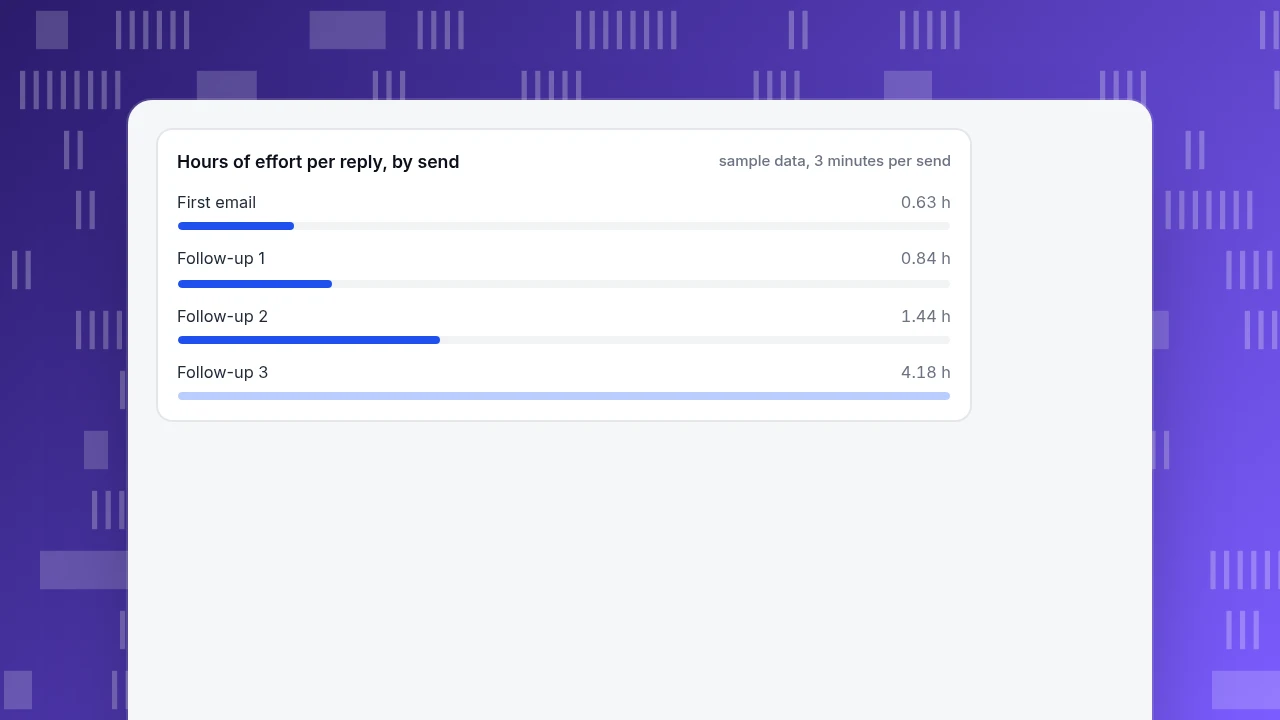
The arithmetic: 11 ÷ 184 = 6.0%, 6 ÷ 173 = 3.5% and 2 ÷ 167 = 1.2%. The silent group shrinks by the replies of each round (200 − 16 = 184, 184 − 11 = 173, 173 − 6 = 167). Total replies are 16 + 11 + 6 + 2 = 35, or 17.5% against 8.0% from the first email alone, so follow-ups more than doubled the result. But the cost per reply rises: 184 × 3 minutes = 9.2 hours for 11 replies is 0.84 hours each, while the third follow-up takes 167 × 3 ÷ 60 = 8.35 hours for 2 replies, 4.18 hours each. That is a five-fold increase for the last step, and it is also the step most likely to annoy: if you track opt-outs, you may see them rise with the third. The reply rates are sample data; the pattern of diminishing returns is the point, and a stop at three is a reasonable default.
Hours of effort per reply, by send
sample data, 3 minutes per sendWhen should you stop, and what do the rules say?
Stop when any of these happens:
- They reply, including with "no" or "not now". Thank them and note when to return.
- They ask to stop or unsubscribe. Honour it.
- The address bounces.
- An out-of-office reply arrives. Reschedule for after they return rather than counting it as silence.
- You have sent three.
A "break-up" email, announcing that you will stop writing, is a matter of style; some teams avoid it because it can read as pressure. Whatever you choose, the legal rules apply to business email too. The FTC's CAN-SPAM guide says there is no exception for business-to-business email, and it requires accurate header information, a clear opt-out and a physical postal address in commercial messages, honouring opt-outs within 10 business days, with penalties of up to $53,088 per separate email in violation. If you send sequences at volume, Gmail's sender guidelines add requirements for those sending more than 5,000 messages a day to Gmail accounts, including one-click unsubscribe, and ask that spam rates stay below 0.30%. This is a summary, not legal advice.
How do you track whether follow-ups work?
Count outcomes rather than activity: replies, meetings booked and deals moved. Add UTM parameters to links in follow-ups, with utm_medium=email and a campaign name, so visits that follow can be counted in your analytics. The standard parameters are utm_source, utm_medium and utm_campaign, as in Analytics Help. Look at replies by touch, as in the table above, and at what the person did on your site afterwards.
What goes wrong with follow-up emails?
- Re-sending the first email. There is nothing new to react to.
- "Just checking in." It asks for effort and offers nothing.
- Several asks in one email. Pick one.
- A fake "Re:". The subject line should reflect the content.
- No stopping rule. Three sends, then stop or pause.
- Following up on your own delay. If you were slow, apologise and answer.
- Judging by opens. Count replies and meetings.
How do you see what follow-ups did on your site with TapCub?
Take the second touch to a prospect with a tagged link. TapCub does not send email or run sequences, and it is not a CRM. It measures what the follow-up brought to your website:
- Tag the link in the follow-up with
utm_source,utm_medium=emailandutm_campaign. In Web analytics › Sources, the UTM tab shows the visitors, sessions, pageviews and bounce rate that came from that campaign. - Define the action you asked for as a goal in Web analytics › Goals, such as a booking-page visit or a form submission, and read the campaign's conversions in the channels table.
- If the prospect signs in or you identify them with
tapcub.login, All-platform analytics › Users › People shows a day-by-day timeline of what they viewed. Check your privacy notice before using browsing history to personalise outreach. - If the prospect starts a chat from your site, Live chat › Inbox shows their source and recent pages, and you can keep a short, specific reply in Live chat › Canned replies to insert with
/and edit before sending. - Replies, meetings and deal stages stay in your mailbox and CRM; TapCub only sees the part that happens on your site.
FAQ
How do I send a follow-up email after no response?
Wait three to five business days, then send two to four sentences that add one new thing and ask for one easy action: a time slot, a yes or no, or a smaller step. Use an honest subject line and stop after three attempts.
How long should I wait before following up?
About three to five business days for a first follow-up is a common starting point; published advice ranges from three days to a week. After a demo or quote, shorter waits of two to three days are normal. Space later follow-ups further apart.
How many follow-up emails should I send?
Up to three is a reasonable default. In the sample, follow-ups lifted replies from 8.0% to 17.5%, but the third cost 4.18 hours per reply against 0.84 for the first. Stop sooner if the person replies, opts out or bounces.
What should I write in a follow-up email?
A short reference to your last message, one new piece of information such as a result, deadline or answer to a likely objection, and one clear ask. Avoid "just checking in" and do not resend your first email unchanged.
Is it legal to send follow-up emails to businesses?
In the United States, the CAN-SPAM Act applies to business-to-business commercial email too: accurate headers, honest subject lines, a physical address and a working opt-out honoured within 10 business days. This is a summary, not legal advice; check the rules for each country you email.
Sources
- Federal Trade Commission. CAN-SPAM Act: A Compliance Guide for Business: requirements, B2B scope, penalty per email. Verified 2026-11-19.
- Google. Email sender guidelines (Gmail Help): bulk-sender requirements including one-click unsubscribe and the 0.30% spam-rate limit. Verified 2026-11-19.
- Analytics Help. Collect campaign data with custom URLs: UTM parameters. Verified 2026-11-19.
Was this article helpful?
We use your answers to fix and expand this page.
Couldn’t send. Please try again in a minute.
Thanks for the feedback. We’ll use it to improve this page.You’ve already sent feedback on this page. Thanks.

Product Experience Specialist
Explores usability, user journeys, and feature adoption through practical examples of onboarding and everyday product use.