Try it on your own data
Every report in this article is in the free plan. One snippet for web and apps, up to 10 sites.
Start freeEmail campaign tracking has two halves. Your email tool sees what happens in the inbox: delivery, opens and clicks. Your analytics tool sees what happens after the click: visits, sign-ups and orders. The second half is what tells you whether an email worked. This guide covers both, a tagging scheme that keeps reports clean and a sample comparing three sends by revenue.
What you will learn
- Opens are no longer reliable; judge emails by clicks and outcomes after the click
- Tag every link with utm_medium=email and a campaign name per send
- Compare sends by goal completions or revenue per recipient, not by click rate alone
Two halves of email tracking
The email tool and your analytics see different parts of the journey:
- Inbox side: delivery, bounces, unsubscribes, opens and clicks. Your email service provider reports these.
- Site side: what people did after clicking, from landing page to purchase. Your analytics reports these, as long as links are tagged.
Most decisions about which emails to send again depend on the site side.
Why opens are not enough
Some mail apps load images, including the tracking pixel, before the person reads the message, to protect their privacy. That makes opens look higher than they are, and in some lists nearly every message looks opened. Treat open rate as rough. Clicks and what follows are much more reliable.
Step 1: Tag every link
Add UTM parameters to every link in every email:
utm_medium=emailon all of them. In TapCub, this decides the channel even if a mail app sends a referrer.utm_sourcefor the list or program, such asnewsletterorlifecycle.utm_campaignfor the send, with a date, such asrestock-2026-10.utm_contentfor the link position, such ashero-buttonorfooter-link.
Most email tools can add these automatically. The free UTM link builder helps you agree on a scheme.
Step 2: Measure after the click
The table lists which metric comes from which tool. In analytics, filter to utm_medium=email and break down by campaign to see sessions and engagement per send, then by goals and revenue.
| Stage | Metric | Measured by |
|---|---|---|
| Inbox | Delivered, bounced, unsubscribed | Email tool |
| Inbox | Opens (approximate) | Email tool, inflated by privacy pre-loading |
| Click | Click rate, clicks per link | Email tool |
| After the click | Sessions, engaged sessions | Analytics, filtered to utm_medium=email |
| Outcome | Sign-ups, orders, revenue | Analytics goals and commerce |
Use the email tool for the inbox and analytics for everything after the click.
Step 3: Compare sends by outcome
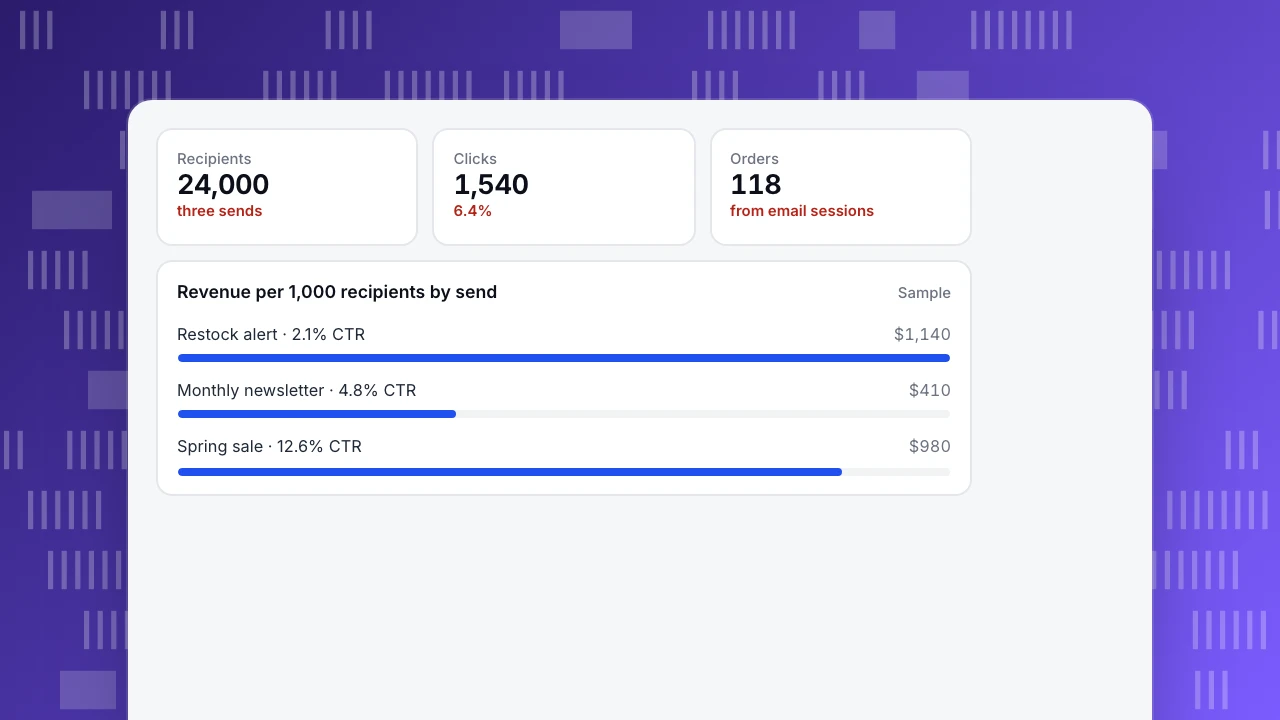
Three sends went to 24,000 recipients in total. The spring sale email had the highest click rate, 12.6%. But revenue per 1,000 recipients tells a different story: the restock alert, with only a 2.1% click rate, earned $1,140, more than the sale. Its clicks came from people who had asked to be told when a product returned.
Use a per-recipient figure, such as revenue or sign-ups per 1,000 recipients, so lists of different sizes compare fairly.
Recipients
24,000
three sends
Clicks
1,540
6.4%
Orders
118
from email sessions
Revenue per 1,000 recipients by send
SampleWhere tracking breaks
- Links without UTM tags, often in footers, signatures or plain-text versions.
- Redirects that drop the query string, for example a link shortener or a login wall.
- Inconsistent names, so one campaign splits into several rows.
- Cross-device journeys: someone reads on a phone and buys later on a laptop. Identifying people at sign-in helps join the two. See conversion paths.
FAQ
How do I track email campaign performance?
Use your email tool for delivery and clicks, and tag every link with UTM parameters so analytics can show visits, goals and revenue for each send.
Are email open rates still useful?
Only as a rough trend. Privacy features in some mail apps load images automatically, which inflates opens.
Why do email clicks not match sessions in analytics?
People close the page before it loads, blockers stop tracking, and some email security scanners click links automatically. Expect analytics sessions to be lower than email clicks.
Was this article helpful?
We use your answers to fix and expand this page.
Couldn’t send. Please try again in a minute.
Thanks for the feedback. We’ll use it to improve this page.You’ve already sent feedback on this page. Thanks.

Growth Strategist
Explores acquisition channels, activation, and conversion experiments, turning data insights into actionable growth hypotheses and evaluation methods.