Try it on your own data
Every report in this article is in the free plan. One snippet for web and apps, up to 10 sites.
Start freeA conversion path is the route from a first click to a completed goal. This guide covers both meanings: the four parts of a path you design, each with one metric, and the paths people actually take, read backward from the goal to find the pages that feed it.
What you will learn
- Design paths in four parts and give each part one metric
- Read real paths backward from the conversion, with pages grouped into templates
- Find the hub page most paths run through and give it the most care
Two meanings of "conversion path"
The term is used in two ways, and both are useful:
- The path you design: the sequence of steps you build to turn a visitor into a lead or customer. Classically a call to action, a landing page, a form and a thank-you page.
- The paths people take: the actual sequences of pages and events that come before a conversion in your analytics. They rarely match the design.
Good conversion work moves between the two: design a path, measure the real ones, then redesign around what people actually do.
The designed path: four parts
Each part has one job and one number that tells you whether it is doing it. The table lists them.
The thank-you page is the part most often wasted. It is the one moment a new lead is paying full attention; use it for the next step (book a time, read the setup guide, invite a colleague) rather than a bare "thanks".
| Part | Its job | Metric |
|---|---|---|
| Call to action | Get the right people to click | Click-through rate from the page or ad |
| Landing page | Make the offer clear and credible | Share who start the form (or click the main button) |
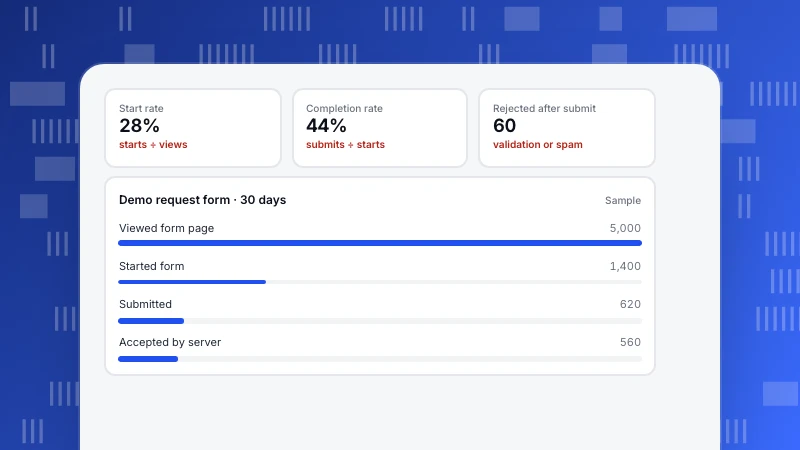
| Form | Collect only what you need | Completion rate: submits ÷ starts |
| Thank-you page | Deliver and offer the next step | Share who take the next step |
Measure each part separately; a weak part hides behind a strong one.
The measured paths: read backward from the goal
Forward paths start at the landing page and fan out into hundreds of branches. For conversion questions it is clearer to start at the conversion and read backward: what came just before the demo request, and before that?
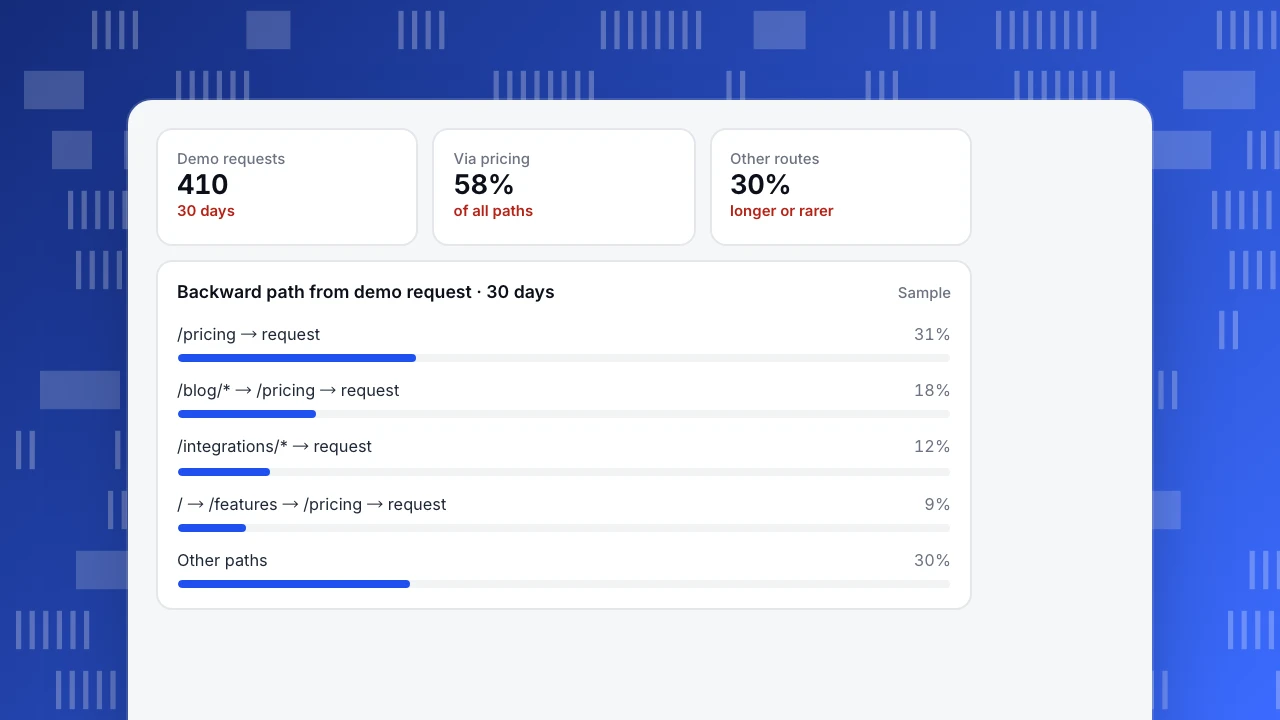
In the sample, a backward path from a demo request over 30 days shows:
- 31% of demo requests came straight from the pricing page.
- 18% came from a blog article, then pricing, then the request.
- 12% came from an integrations page directly, without pricing.
- 9% went home → features → pricing → request.
- 30% took other, longer or rarer routes.
Three things follow. Pricing is the hub: almost every path runs through it, so it deserves the most care. Blog readers do convert, but via pricing, so a clear pricing link in articles matters more than a demo button. And integrations pages convert people who already know what they need; giving them a more visible demo option is a cheap test.
Demo requests
410
30 days
Via pricing
58%
of all paths
Other routes
30%
longer or rarer
Backward path from demo request · 30 days
SampleHow to analyse conversion paths
- Pick one conversion and make it an event or page goal.
- Run a backward path from it: three to five steps, counting sessions, with repeated pages collapsed. In TapCub, the behaviour analysis report runs paths forward from a start or backward from an end, with 2–10 steps and 3–15 nodes per step.
- Group pages into templates (all blog articles as \
/blog/*\) so the paths are readable. - Compare with the designed path. Where do real paths skip, loop or detour?
- Check the cross-session view separately. A path within one session shows navigation; the channels a person used over several weeks is an attribution question.
FAQ
What is a conversion path?
The sequence of steps that leads to a conversion: either the route you design (call to action, landing page, form, thank-you page) or the pages and events people actually go through before converting.
What is the difference between conversion paths and funnels?
A funnel counts how many people pass a fixed set of steps you choose. A path shows which steps people actually took, including ones you did not plan for. Use paths to discover, funnels to measure.
How long should a conversion path be?
As short as the decision allows. A newsletter sign-up can be one step; a high-value B2B demo may need pricing, a case study and integrations first. Measure the real paths before shortening them.
What are top conversion paths?
The most frequent sequences of pages or channels before a conversion. Read them as shares of all conversions, and group pages into templates so similar paths are counted together.
Was this article helpful?
We use your answers to fix and expand this page.
Couldn’t send. Please try again in a minute.
Thanks for the feedback. We’ll use it to improve this page.You’ve already sent feedback on this page. Thanks.

Product Experience Specialist
Explores usability, user journeys, and feature adoption through practical examples of onboarding and everyday product use.