Try it on your own data
Every report in this article is in the free plan. One snippet for web and apps, up to 10 sites.
Start freeMicro conversions are small actions on the way to a purchase or lead. They help only when they predict the main conversion. This guide covers how to pick candidates, test each against your sales data, track the keepers as goals and report them without inflating success.
What you will learn
- Keep only micro conversions that predict the main conversion
- Compare the macro rate of visitors who did each action with the average
- Report micro rates next to the macro rate, never added into it
What micro conversions are for
A macro conversion is the outcome you are in business for: a purchase, a sign-up, a demo request. A micro conversion is a smaller action on the way: opening the size guide, adding to a wishlist, downloading a brochure, starting a form.
They are useful for two reasons. Macro conversions are often too rare to judge a page or a campaign quickly; micro conversions happen ten times as often. And they show where people progress or stall before the final step. But a micro conversion is only worth tracking if people who do it are meaningfully more likely to convert. Otherwise it is just another click count.
Candidates by business type
The table lists common candidates for e-commerce, lead generation and SaaS. Start with five or six that sit on the path to the macro conversion, not with every button on the site. Actions that show a concrete question being answered (size, shipping, pricing, security) are often stronger than general engagement (video plays, scroll depth).
| Business | Micro conversion candidates | Macro conversion |
|---|---|---|
| E-commerce | Size guide, shipping info, wishlist, add to cart, coupon applied | Purchase |
| Lead generation | Pricing page view, brochure download, form started, calculator used | Lead submitted |
| SaaS | Pricing view, docs visit, sign-up started, integration page view | Trial or sign-up |
| Content / media | Second article, newsletter sign-up, return visit within 7 days | Subscription |
Test every candidate before reporting it.
Test which ones predict
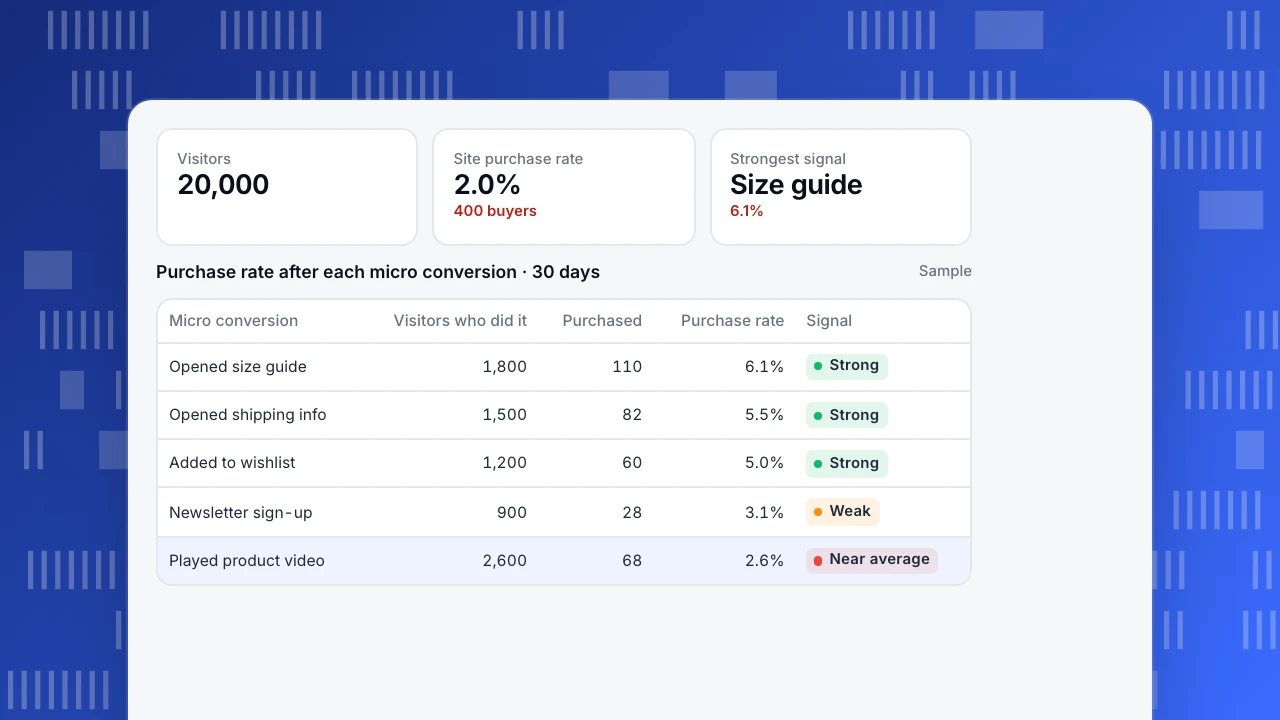
For each candidate, compare the macro conversion rate of visitors who did it with the site average over the same period. In the example, the site converts 2.0% of visitors. Visitors who opened the size guide converted at 6.1% and those who checked shipping information at 5.5%: strong signals. Visitors who played a product video converted at 2.6%, barely above average, so video plays are not worth reporting as a micro conversion.
This comparison shows association, not cause. People who open a size guide were already closer to buying; opening it did not necessarily make them buy. That is fine for choosing which signals to watch. It is not enough to claim that pushing more people to the size guide will raise sales; for that, change the page and compare periods. The same caution applies to live chat.
Visitors
20,000
Site purchase rate
2.0%
400 buyers
Strongest signal
Size guide
6.1%
Purchase rate after each micro conversion · 30 days
Sample| Micro conversion | Visitors who did it | Purchased | Purchase rate | Signal |
|---|---|---|---|---|
| Opened size guide | 1,800 | 110 | 6.1% | Strong |
| Opened shipping info | 1,500 | 82 | 5.5% | Strong |
| Added to wishlist | 1,200 | 60 | 5.0% | Strong |
| Newsletter sign-up | 900 | 28 | 3.1% | Weak |
| Played product video | 2,600 | 68 | 2.6% | Near average |
Track and report them properly
- Track each keeper as a goal, with a clear name, alongside the macro goal.
- Report micro rates next to the macro rate, never instead of it.
- Use them to compare pages and campaigns when macro numbers are too small to separate.
- Re-test twice a year. Site changes can break the link between a micro and a macro conversion.
- Put the keepers in a funnel to see where people drop between them.
Mistakes
- Counting every interaction. Fifty micro goals hide the five that matter.
- Optimising the micro instead of the macro. More newsletter sign-ups are not a win if purchases fall.
- Never validating. A micro conversion chosen by intuition may predict nothing.
- Adding up micro conversions into a "total conversions" number.
Micro conversions in TapCub
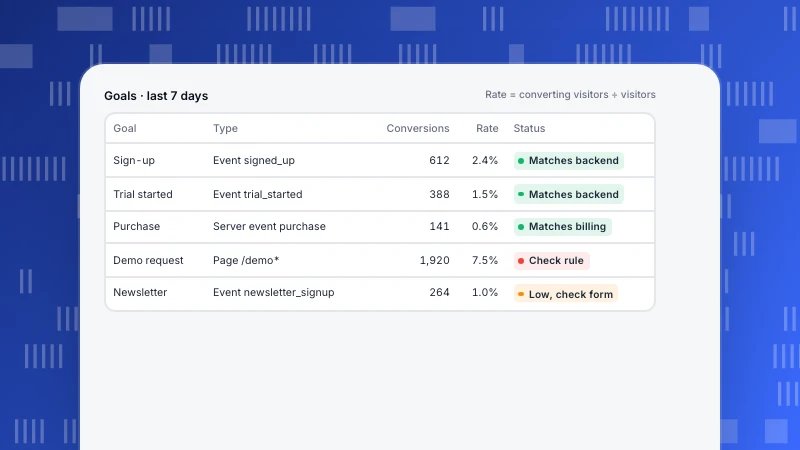
Goals can be page goals (exact, prefix or wildcard) or event goals with property filters, and goal rate is converting visitors ÷ unique visitors, so micro and macro goals sit side by side with the same definition (goals). Several common micro conversions need no code: outbound clicks and file downloads are tracked by default, and form submissions are tracked when you add data-forms="true" to the script, storing the form's id, name and action but not field values. Anything else is one tapcub.track() call (custom events). To test a candidate, apply a segment of visitors who completed it to the macro goal. More in conversion tracking, conversion rate and behavioral analytics.
FAQ
What is a micro conversion?
A small action that usually comes before the main conversion, such as adding to a wishlist, opening a size guide or downloading a brochure.
What is the difference between micro and macro conversions?
A macro conversion is the business outcome, such as a purchase or lead. A micro conversion is a step that tends to come before it.
How do I calculate a micro conversion rate?
Visitors who completed the micro conversion ÷ unique visitors, over the same period as your macro conversion rate.
How many micro conversions should I track?
Five or six that you have tested against the macro conversion. Drop the ones that do not predict it.
Should micro conversions count as conversions in reports?
No. Report them next to the main conversion, and never add them into a single total.
See also: Website conversion.
Was this article helpful?
We use your answers to fix and expand this page.
Couldn’t send. Please try again in a minute.
Thanks for the feedback. We’ll use it to improve this page.You’ve already sent feedback on this page. Thanks.

Data Analyst
Explores traffic sources, conversion funnels, and retention, using clear metric definitions and concrete examples to explain what the numbers mean.