Try it on your own data
Every report in this article is in the free plan. One snippet for web and apps, up to 10 sites.
Start freeA good live chat welcome message tells the visitor in two seconds what the chat is for on this page and ends with an easy next step, in about 100 characters or fewer. Write it per page group, keep the greeting, teaser and invite distinct, and test with a sample sized in advance: moving a 6% reply rate to 8% needs about 2,554 impressions per message.
What you will learn
- Write per page group: 'Comparing plans? Tell me your team size' beats a generic 'How can I help?'
- Keep the first line short: the twelve samples average 86 characters; visitors read at most about 28% of a page's words
- Size the test first: 6% to 8% needs 2,554 impressions per message, about 4.1 weeks for two messages at 5,400 invites a month
What makes a live chat welcome message work?
A welcome message works when the visitor can tell in two seconds what the chat is for and what to do next. That means it is short, it matches the page the visitor is on, and it ends with something easy to answer. There is no single perfect sentence; the right message is the one that fits the page and has been tested against the current one.
People skim, so length matters. In a Nielsen Norman Group analysis of 45,237 page views, visitors had time to read at most 28% of the words on an average page, and realistically about 20% (Nielsen, 2008). That was web text, not chat, but a welcome message sits on top of a page that already has plenty to read. Treat each extra sentence as costing attention.
Four rules cover most of it:
- Say what the chat is for on this page. "Comparing plans?" beats "Welcome!".
- Offer one easy next step. A question the visitor can answer in three words.
- Be honest about who answers. A bot should say so; an offline message should say when someone returns.
- Keep it under about 100 characters for the first line. The examples below average 86.
For what happens after the visitor replies, see live chat scripts; for choosing which pages should trigger an invite at all, see proactive chat invites.
Greeting, teaser and invite: which one are you writing?
"Welcome message" covers three different things in most chat tools, and they need different wording.
| Kind | When the visitor sees it | What it should do |
|---|---|---|
| Greeting inside the open window | After the visitor opens the chat | Set expectations and invite the first question |
| Teaser above the bubble | Shortly after arriving, usually once | Make the bubble worth a click; one short line |
| Invite on a page | After time on a matching page | Offer help on the page's specific problem |
Write the teaser to get a click, the invite to start a conversation about the page, and the greeting to make the first question easy. Mixing them up gives a teaser that tries to say everything or a greeting that repeats what the invite just said.
What do good welcome messages look like, by page type?
Sample messages, grouped by page. They are templates written for this article, not measured winners. Character counts include spaces and were counted for this list.
| Page or situation | Example message | Characters |
|---|---|---|
| Home | Hi! I'm Sam. Ask me anything about the product, or tell me what you're trying to do and I'll point you to the right page. | 121 |
| Pricing | Comparing plans? Tell me your team size and I'll tell you which one fits. | 73 |
| Pricing, invite after 25 seconds | Not sure which plan fits? Two quick questions and I'll recommend one. | 69 |
| Product detail | Wondering if it works with your setup? Tell me what you use and I'll check. | 75 |
| Cart | Questions about delivery or returns before you order? I'm here. | 63 |
| Help or docs | Can't find the answer? Describe what you're stuck on and I'll find the article or help directly. | 96 |
| Blog | Reading about this and want to see it on your own site? Ask me anything. | 72 |
| Account (customers) | Hi again! Something not working in your account? Tell me what you see. | 70 |
| Returning visitor | Welcome back! Pick up where you left off, or ask me a new question. | 67 |
| Offline | We're offline until 9:00 (Eastern). Leave your email and your question and we'll reply by mid-morning. | 102 |
| Offline with an answer | We're offline until 9:00 (Eastern). Shipping to Canada takes 5 to 7 business days. Leave your email for an exact price. | 119 |
| Bot opening line | I'm an AI assistant and I answer from our help articles. Ask me anything, or ask for a person at any time. | 106 |
The mean length of these twelve is 86.1 characters (1,033 ÷ 12) and the longest is 121. Compare two weak ones:
- Generic (32 characters): "Hello! How can I help you today?" It could be on any site and gives the visitor nothing to answer.
- Wall of text (231 characters): "Welcome to our website! We are a provider of solutions for businesses of all sizes, and we are delighted to help with any questions about our products, pricing, shipping, returns, integrations or anything else you might need today." The visitor has to read 38 words to find out the chat is for questions.
| Kind | When the visitor sees it | What it should do |
|---|---|---|
| Greeting in the open window | After the visitor opens the chat | Set expectations and invite the first question |
| Teaser above the bubble | Shortly after arriving, usually once | Make the bubble worth a click |
| Invite on a page | After time on a matching page | Offer help on that page's specific problem |
Write each for its own job; mixing them gives a teaser that says everything or a greeting that repeats the invite.
Which mistakes do welcome messages usually have?
| Mistake | What goes wrong | Fix |
|---|---|---|
| Same message on every page | Irrelevant on most pages | One line per page group (pricing, product, help) |
| Starts with the company | Visitor wants their problem solved | Start with their situation ("Comparing plans?") |
| Asks an open question | "Anything I can help with?" is easy to ignore | Offer a specific choice or a task |
| Pretends to be a person | Trust breaks when the visitor finds out | Say "I'm an AI assistant" when it is one |
| Promises speed it cannot keep | "We reply in seconds" with nobody online | Offline text with a real return time |
| Pushes a discount first | Cheapens the conversation | Use offers only on cart or price pages, and say the condition |
| Never updated | Mentions a sale that ended | Review all messages every quarter |
How should you test a welcome message?
Decide the metric before you change the message, run it long enough to mean something, and change one thing at a time.
Metrics. Use a chain: impressions (how many saw it) → opens (clicked or expanded) → replies (the visitor wrote back) → resolved chats and, where you can, goal conversions among visitors who chatted. The reply rate (replies ÷ impressions) is the most direct single measure of the message itself, because it ignores how many agents you have.
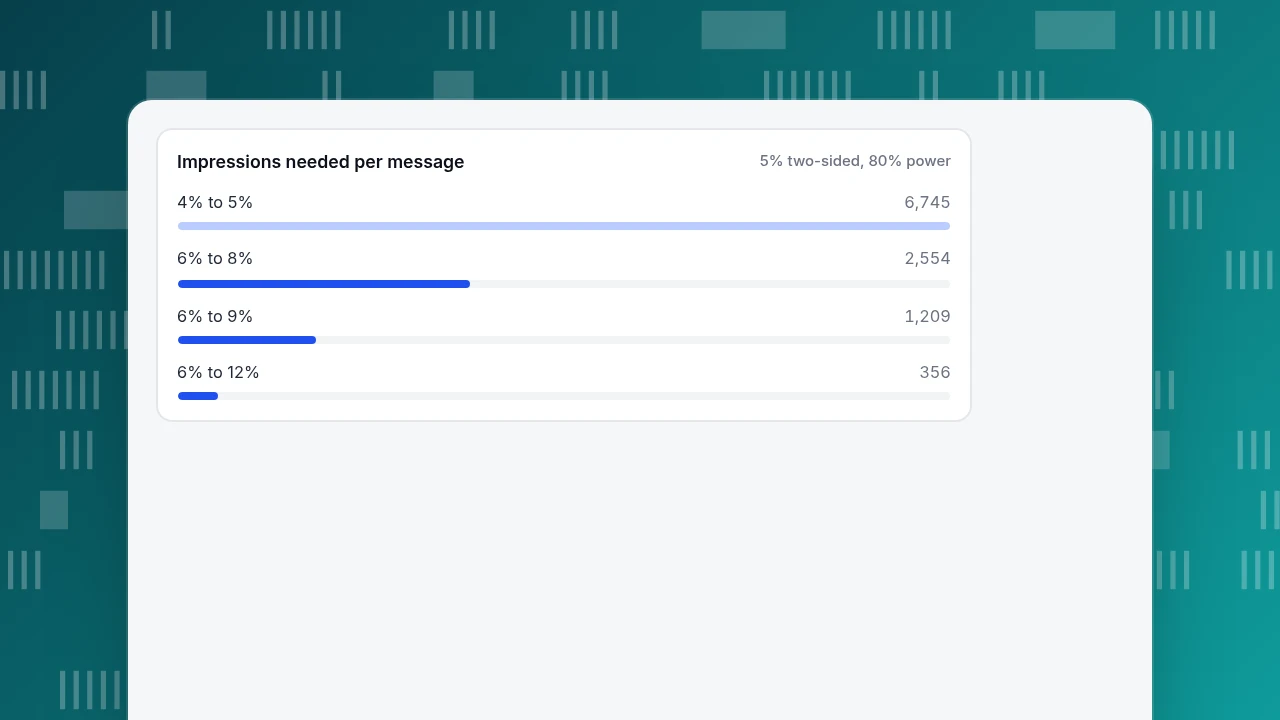
How many impressions do you need? Suppose the current message gets a 6% reply rate and you hope the new one reaches 8%. For a two-proportion comparison with a 5% significance level (two-sided) and 80% power, the standard formula based on the z-test for two proportions (NIST/SEMATECH e-Handbook) gives about 2,554 impressions per message. Other cases, computed the same way:
| Current reply rate | Hoped-for reply rate | Impressions per message |
|---|---|---|
| 6% | 8% | 2,554 |
| 6% | 9% | 1,209 |
| 6% | 12% | 356 |
| 4% | 5% | 6,745 |
Small improvements need big samples. A message that moves the reply rate from 4% to 5% is real money if you have a lot of traffic, but you will not see it with a few thousand impressions.
How long will it take? Sample data: the pricing page shows the invite 5,400 times a month, which is about 1,243 a week (5,400 ÷ 4.345). At 2,554 impressions per message, one message takes 2.1 weeks, and running the two messages one after the other takes about 4.1 weeks.
If you cannot split traffic randomly, run the messages one after the other, and protect the comparison: use whole weeks (so weekdays and weekends are in both), do not change anything else (prices, promotions, page layout) during the test, and write down the start and end dates. A before-and-after comparison is weaker than a random split, so require a clearer win (for example a reply-rate gain of at least 2 points) before you switch.
Decision rule: switch to the new message only if the reply rate is higher over the full planned sample and resolved chats per impression did not fall. A message that gets more replies but less resolution is attracting the wrong conversations.
Impressions needed per message
5% two-sided, 80% powerHow would you run this in TapCub?
Take the pricing-page test above: current message against "Comparing plans? Tell me your team size and I'll tell you which one fits."
- Set the messages. Open Live chat › Chat settings › Proactive invites and create a rule for the pricing path with a dwell time (3 to 600 seconds allowed) and the invite text, up to 300 characters. Greetings for when agents are online or offline, and the bubble teaser (a card above the bubble about 4 seconds after arrival, once), are under Live chat › Chat settings › Greeting & translation. If the AI assistant is on, the AI opening line is sent once before it first speaks.
- Mark the change. Add a note in Configuration › Annotations with the date you switch messages, so the change shows on charts later.
- Read the rule. The invite rule list in Proactive invites records impressions, open rate and reply rate for each rule. Write down the numbers at the end of each test period.
- Check what the chats did. Live chat › Reports shows conversations, resolution rate and the pages where chats started. Live chat › Reports › Conversion attribution compares goal conversion for visitors who chatted against those who did not, and warns when fewer than 30 visitors chatted.
- Keep to one rule per page group (if several rules match a page, only the highest priority fires), and by default each visitor is invited once.
TapCub does not split traffic between two messages, so the test is sequential, as described above. It does not write the message for you either, and it does not decide the winner; the decision rule is yours.
FAQ
What is a good live chat welcome message?
One that fits the page, says what the chat is for and ends with an easy next step, in about 60 to 120 characters. Example: "Comparing plans? Tell me your team size and I'll tell you which one fits."
How long should a chat welcome message be?
Short enough to read in two seconds: about 100 characters for the first line. Visitors read at most about 28% of the words on a page, so extra sentences are mostly skipped.
Should the welcome message be different on each page?
Yes, per page group. A pricing page and a help page need different first lines; the same generic greeting everywhere is the most common mistake.
Should I say a chatbot is a bot?
Yes. Say "I'm an AI assistant" in the opening line and offer a route to a person. Pretending to be human loses trust when visitors notice.
How do I A/B test a welcome message?
Estimate the sample first (6% to 8% needs about 2,554 impressions per message), then run both messages for whole weeks, change nothing else, and compare reply rates and resolved chats.
Sources
- Jakob Nielsen, How Little Do Users Read?, Nielsen Norman Group, 5 May 2008 (checked 2026-11-20).
- NIST/SEMATECH, How can we determine whether two processes produce the same proportion of defectives?, e-Handbook of Statistical Methods (checked 2026-11-20).
Was this article helpful?
We use your answers to fix and expand this page.
Couldn’t send. Please try again in a minute.
Thanks for the feedback. We’ll use it to improve this page.You’ve already sent feedback on this page. Thanks.

Product Experience Specialist
Writes about product experience, practical workflows, and growth, turning complex processes into clear steps for everyday decisions.