Try it on your own data
Every report in this article is in the free plan. One snippet for web and apps, up to 10 sites.
Start freeThe chat features a website itself decides are where the widget shows, how it behaves on a phone, what it does when nobody is online, and what it costs in page speed and accessibility. Show it where visitors hesitate, hide it where interruption costs a sale, and test speed and keyboard access before you roll it out to every page.
What you will learn
- Show chat on pricing, product and help pages; hide or limit it on checkout and keep another contact route
- Measure Interaction to Next Paint before and after: in the sample, 2 of 4 pages crossed the 200 ms line
- Size invites in agent hours: 5,400 invites at a 4% reply rate means 216 chats, about 20.6 paid hours a month
Which chat features does a website itself need?
A website needs chat features that decide what the visitor sees and when: where the widget appears, what it says, how it behaves on a phone, what happens when nobody is online, and what it costs the page in speed and accessibility. The agent-side features (inbox, routing, reports) matter too, but they are covered by team size in live chat features. This guide is the site-side view: the part a visitor and your page actually experience.
Five visitor-facing features carry most of the weight. Use this list to decide what to switch on and what to test.
| Site-side feature | The question it answers | Test before launch |
|---|---|---|
| Widget placement and page targeting | On which pages should the bubble show, and where is it hidden? | Visit checkout, login and a content page |
| Greeting and offline form | What does a visitor see when someone is, or is not, online? | Load the site outside office hours |
| Mobile behaviour | Does the bubble cover buttons or the keyboard on a phone? | Test at a width under 640 px |
| Page speed impact | Does the widget make clicks and taps feel slower? | Compare Interaction to Next Paint before and after |
| Accessibility | Can keyboard and low-vision visitors use it? | Keyboard-only run, 200% zoom |
For the question of which tool to buy, see live chat support software; for installing, see add live chat to your website.
On which pages should the chat show up?
Show chat where visitors hesitate and hide it where interruption costs a sale. Use this table as a starting rule, then adjust it with your own chat data.
| Page type | Bubble | Proactive invite | Reasoning |
|---|---|---|---|
| Home | Show | No | Visitors are browsing; a passive bubble is enough |
| Pricing | Show | Yes, after 20 to 30 seconds | High intent, usually one missing fact |
| Product or plan detail | Show | Optional, after 30 to 45 seconds | Questions about fit or compatibility |
| Help or docs | Show | No | They are already self-serving; offer the bubble as a fallback |
| Blog | Show or hide | No | Low intent; a bubble adds clutter |
| Cart | Show | No | Do not distract; a question can still be asked |
| Checkout and payment | Hide, or show only if you have a good reason | No | Interruption risk; hidden pages should still have a way to contact you |
| Login and account | Show for customers | No | Existing customers have support questions |
Decision rule: if more than a few percent of visitors on a page leave without buying and the leading reason is a question, add the bubble and an invite; if the page is a form you do not want interrupted, hide it and put a "contact us" link next to it.
How many chats will an invite rule produce? Sample data: a pricing page gets 12,000 visitors a month; 45% stay 20 seconds or longer, so 5,400 see the invite (12,000 × 0.45). If 4% reply, that is 216 new chats (5,400 × 0.04). At 8 minutes of agent time per chat and two chats in parallel, 216 × 8 ÷ 60 ÷ 2 = 14.4 staffed hours; at 70% utilisation that is 14.4 ÷ 0.7 = 20.6 paid hours a month. If nobody is staffed to answer those hours, a single invite rule produces a backlog, not leads. For wording and timing, see proactive chat invites.
| Page type | Bubble | Proactive invite |
|---|---|---|
| Home | Show | No |
| Pricing | Show | Yes, after 20 to 30 seconds |
| Product or plan detail | Show | Optional, after 30 to 45 seconds |
| Help or docs | Show | No |
| Blog | Show or hide | No |
| Cart | Show | No |
| Checkout and payment | Hide, or show with good reason | No |
| Login and account | Show for customers | No |
Starting rules, not benchmarks: adjust with your own chat data and always leave another contact route on hidden pages.
What should the widget do on a phone?
A phone has little room, so the bubble can hide the "Add to cart" button or sit on top of a cookie banner. Decide per site, not by default.
- Check overlap on real pages. Load your product page on a phone and look at the bottom corners. If a sticky "buy" bar lives there, move the bubble to the other corner or hide it on mobile.
- If most chat conversions come from desktop, hide on phones. Compare where your chats start in the chat reports before deciding. A bubble on a phone only helps if someone is online to answer it.
- Keep a visible contact route. Hiding the bubble on mobile should not remove all ways to reach you.
- Test the keyboard. When the visitor taps the message field, the on-screen keyboard shrinks the viewport. Send a test message and see that the send button stays visible.
Will the widget slow the page down?
A chat widget is a third-party script, so check it. Google's Core Web Vitals use Interaction to Next Paint (INP), which measures how quickly a page responds to clicks, taps and key presses. At the 75th percentile of page loads, 200 ms or less is good, above 200 up to 500 ms needs improvement, and above 500 ms is poor (web.dev).
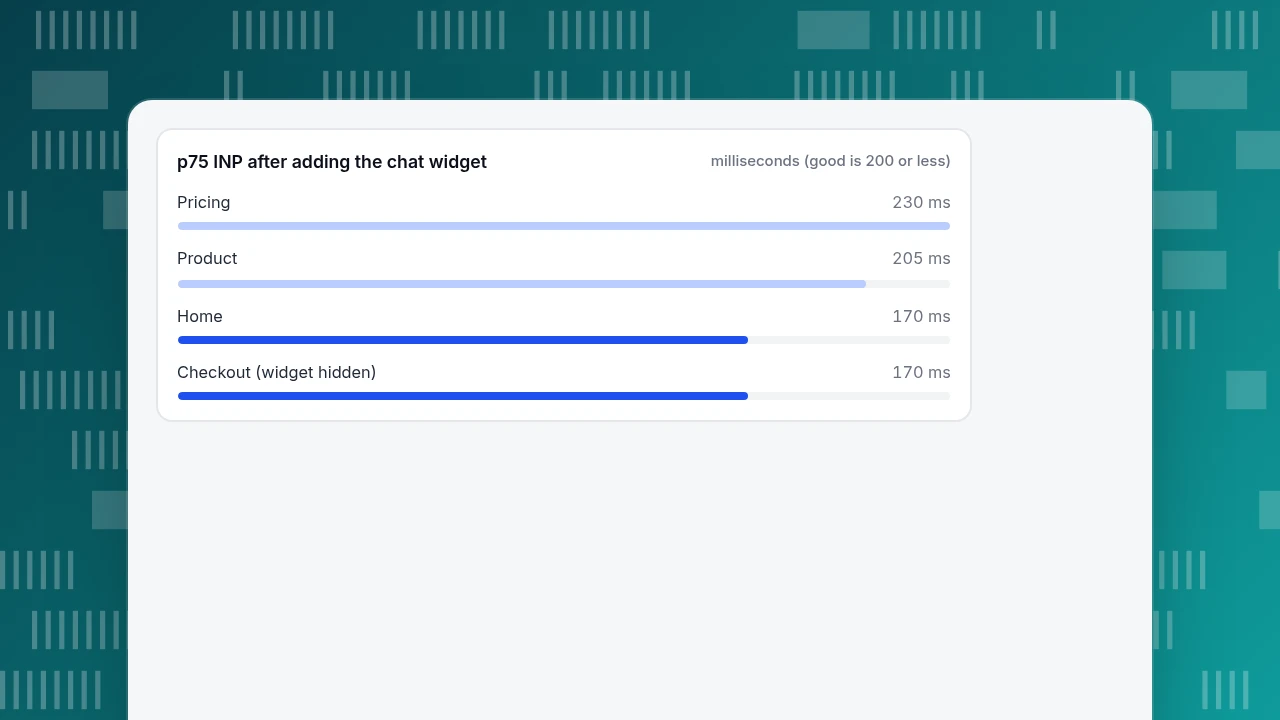
Run a before-and-after test on your key pages with real-user data if you have it. Sample data (p75 INP in milliseconds):
| Page | Before | After widget | Change | Verdict |
|---|---|---|---|---|
| Home | 150 | 170 | +20 | Good |
| Pricing | 180 | 230 | +50 | Needs improvement |
| Product | 190 | 205 | +15 | Needs improvement (crossed 200) |
| Checkout | 170 | 170 | 0 | Good (widget hidden) |
Two of four pages crossed the 200 ms line. The checkout page is unchanged because the widget does not load there, which shows the cost of loading it elsewhere. The fix is not "remove chat" but a ladder: load it on fewer pages; load it after the page is interactive; test with a lighter configuration; or compare vendors on this number. Re-measure after each change. Real-user numbers matter more than lab ones, since field data is what Google evaluates.
p75 INP after adding the chat widget
milliseconds (good is 200 or less)Can every visitor actually use the chat?
Three checks from the W3C's WCAG 2.2 cover most of the widget's accessibility problems:
- Keyboard. Success criterion 2.1.1 (Level A) requires that all functionality be operable through a keyboard interface (W3C). Tab to the bubble, open it, type and send a message, and close it, without touching the mouse.
- Target size. Success criterion 2.5.8 (Level AA) says pointer targets should be at least 24 by 24 CSS pixels, with listed exceptions (W3C). Check the bubble and the close and send buttons.
- Zoom. Success criterion 1.4.4 (Level AA) says text can be resized up to 200% without loss of content or functionality (W3C). Zoom the browser to 200% and confirm the window still works.
Write down the result for each. If a check fails, it is a vendor question; ask before you sign.
What about privacy and safety on the site?
A chat window is a text box on your site; people type sensitive things into it. Check four things:
- Which domains can load it? Restrict it to your own sites so nobody can embed your chat elsewhere.
- Is anything stored before the visitor opens the chat? The better answer is "nothing".
- Can sensitive numbers be masked before storage? For example card numbers.
- Is there a link to your privacy policy in the window, and a retention setting? Know how long conversations are kept and how to export or delete one.
Which site-side features come first for different kinds of sites?
Priorities depend on how many conversations you can handle and what the site sells. Use this as a ranking, then adjust with your own numbers.
| Situation | First | Next | Later |
|---|---|---|---|
| Content site, one person answers | Offline form, hours | Hide on blog pages | Proactive invites |
| Store, small team | Page targeting (hide on checkout), mobile check | Offline form, canned replies | Invites on product pages |
| Software with a pricing page | Bubble plus invite on pricing | Visitor context, reports | Translation |
| Several languages | Widget language and translation | Hours per time zone | Per-language invites |
Whatever the row, run the speed and accessibility checks above before you roll the widget out to every page.
How would this look in TapCub?
Take the pricing-page example: a bubble on every page except checkout, a 25-second invite on pricing and an offline form after hours. Here is how that maps to TapCub, using only what the product does.
- Switch it on. If your site already runs the TapCub analytics script, open Live chat › Chat settings › Appearance, turn on Enable live chat and save. The script lazy-loads the widget after the first pageview response. Set the brand name, colour and bubble position (bottom right or bottom left), and turn on Hide bubble on mobile if you decided to hide it on phones (the rule covers windows narrower than 640 pixels).
- Hide it on checkout. Add
data-chat="false"to the script tag on that page; the widget never loads there. Check Live chat › Chat settings › Install for the test page and the standalone chat link you can place on pages where the bubble is hidden. - Set the invite. In Live chat › Chat settings › Proactive invites, add a rule that matches the pricing path, with a dwell time of 25 seconds (3 to 600 allowed) and text up to 300 characters. The rule list records impressions, open rate and reply rate, so you can retire a line nobody answers. Greetings sit under Greeting & translation, including the offline greeting.
- Cover the offline case. Set Office hours; outside them visitors can leave an email and a question in Offline messages.
- Verify. Reload the site, check that the bubble appears, that
widget.jsloads and that a test message reaches Live chat › Inbox. The Live chat › Chat settings › Privacy page has the sensitive-data masking switch. Chat uses the same allowed-domains list as analytics.
TapCub does not measure your Interaction to Next Paint for the chat widget: use Monitoring › Performance for real-user page performance (Core Web Vitals) on the pages where you load the widget, and compare before and after. TapCub's chat has no pre-chat form; to collect an email, ask in the conversation or use the offline form.
FAQ
What chat features should a website have?
At minimum: a bubble you can show or hide per page, an offline message form, a mobile setting, a keyboard-accessible window and a way to measure its impact on page speed. Add proactive invites and translation once you have capacity.
Should a website chat show on every page?
No. Show it where visitors hesitate (pricing, product, help) and hide it where interruption costs you, such as checkout. Keep another way to contact you on hidden pages.
Does live chat slow down a website?
It can, since a chat widget is a third-party script. Measure Interaction to Next Paint before and after; 200 ms or less at the 75th percentile is good, 200 to 500 needs improvement.
Is a chat widget accessible?
Only if it passes your tests: keyboard operation (WCAG 2.1.1), targets of at least 24 by 24 CSS pixels (2.5.8) and zoom to 200% (1.4.4). Test the vendor's widget yourself.
Do I need a chat feature on mobile?
Test it. If the bubble covers buttons or the keyboard hides the send button, hide it on phones and give another route to contact you.
Sources
- Google, Interaction to Next Paint (INP), web.dev (thresholds checked 2026-11-20).
- W3C, Understanding Success Criterion 2.5.8: Target Size (Minimum), WCAG 2.2 (checked 2026-11-20).
- W3C, Understanding Success Criterion 2.1.1: Keyboard, WCAG 2.2 (checked 2026-11-20).
Was this article helpful?
We use your answers to fix and expand this page.
Couldn’t send. Please try again in a minute.
Thanks for the feedback. We’ll use it to improve this page.You’ve already sent feedback on this page. Thanks.

Product Analyst
Focuses on event analysis, conversion funnels, and retention, using clear metric definitions and structured analysis to explain product performance.