Try it on your own data
Every report in this article is in the free plan. One snippet for web and apps, up to 10 sites.
Start freeThe best live chat for a small business is the one that passes four checks for your team: response when nobody is at a desk, the languages your visitors write in, what AI is allowed to answer and when it hands off, and cost at your team size. The right pick depends on weights from your own chat data, which is why this guide gives tests and worked examples instead of a ranking.
What you will learn
- Coverage, not volume, is the small-team problem: in the sample, 38% of chats started outside business hours
- Price the plan at your agents and at double the volume; in the sample the cheaper plan flipped between one and three agents
- Weight the four criteria from your own data: the same two options tie at 360 vs 365, then split 315 vs 395 once languages matter
What does a small business need from live chat?
A small team does not need the longest feature list; it needs chat that a few people can run without it becoming a second job. Four things decide that, and most of the rest is secondary:
| Criterion | The question to ask | How to test it in a trial |
|---|---|---|
| Response | Can a visitor get an answer when nobody is at a desk? | Send a message at 11 pm and on Sunday; see what the visitor sees |
| Languages | Can your visitors write in their language and you answer in yours? | Chat in a language you do not speak; check what the agent sees |
| AI | Does automation answer from your content, and hand off when it cannot? | Ask a question your content does not cover; watch the handoff |
| Cost | What will it cost at three agents and at double the volume? | Price both cases from the vendor's own pricing page |
This guide takes the four in turn, then shows how to weigh them with your own numbers. It does not rank products: which one is right depends on the weights you give each criterion. For the basics of adding chat to a site, see how to add live chat to a website; for running a chat desk, live chat customer service.
Response: who answers, and when?
Chat volume is rarely the problem for a small business; coverage is. A visitor expects an answer when they are on the site, not when your team is at their desks.
Sample data: a shop is open 9 hours a day and gets 40 chats a day with an average handling time of 8 minutes.
- Work: 40 × 8 = 320 minutes, or 5.3 hours of actual chatting a day.
- If one agent handles two chats at once, that is 5.3 ÷ 2 = 2.7 hours of real effort.
- Yet someone must be available for all 9 hours, so the person is idle about 70% of the time but cannot leave.
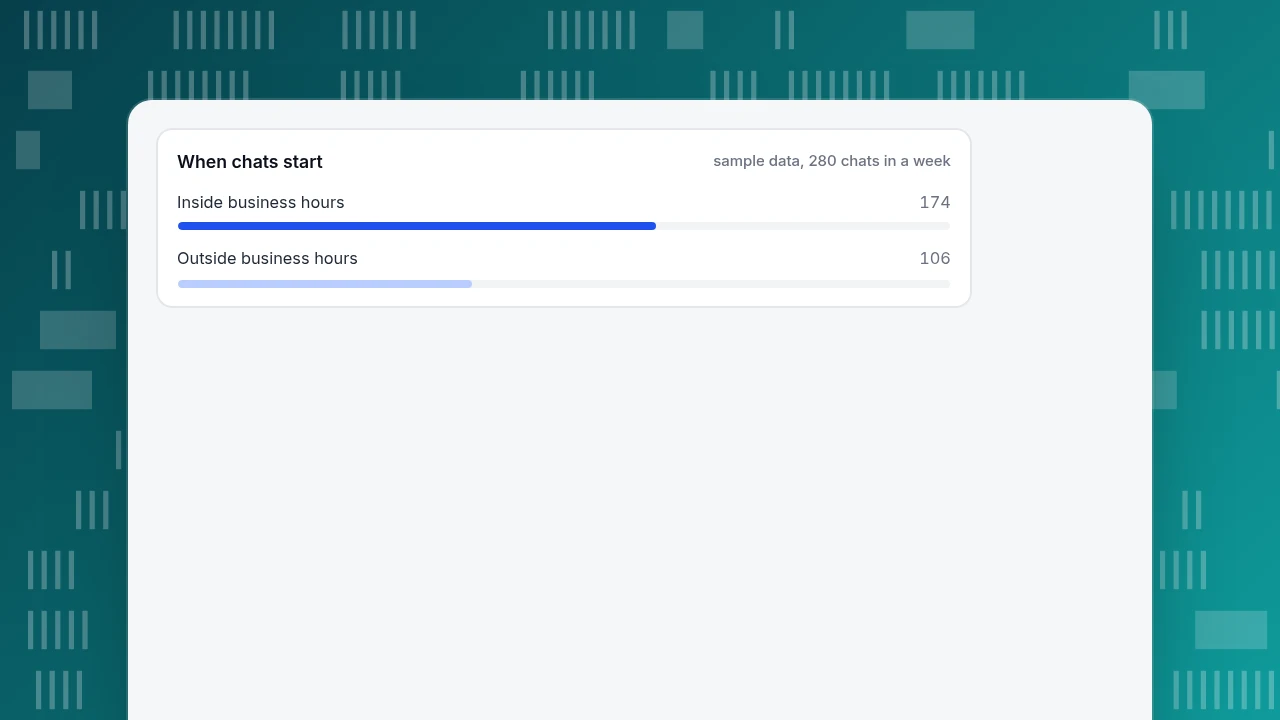
Now the week. Business hours of 9 hours × 5 days = 45 of 168 hours cover only 27% of the week. In the sample, 280 chats start in a week: 174 inside hours and 106 outside them, so 38% of visitors arrive when nobody is there.
Two consequences. First, volume does not justify a team; coverage rules decide whether you need automation or an offline option. Second, test what the visitor sees outside hours: a form that collects an email and question and a team that replies the next morning is acceptable; a chat bubble that goes silent is not.
When chats start
sample data, 280 chats in a weekLanguages: can visitors write in their own?
If your visitors are not all native speakers of your team's language, chat is where it shows first. CSA Research's 2020 survey of 8,709 consumers in 29 countries found that 76% prefer to buy products with information in their own language, 40% never buy from websites in other languages, and 75% are more likely to buy again from a brand whose customer care is in their language (source). It is a survey of consumers across many countries, so read it as a direction, not as your visitors' numbers.
To decide how much it matters for you:
- Count chats and visitors by language over the last 90 days.
- If one non-team language is over about 10% of chats, translation is worth paying for. This threshold is a rule of thumb, not a published figure.
- Check what each side sees. In good two-way translation the visitor sees their language, the agent sees theirs, and the agent can still see the original. Test with a language you cannot read. More in two-way translation support.
- Check what translation costs. Some tools count translated messages against the same usage allowance as AI replies.
AI: what is it allowed to answer?
AI matters most for the hours your team is not there, and it carries the biggest risk. A tribunal in Moffatt v. Air Canada (2024 BCCRT 149) held a company responsible for incorrect information its chatbot gave a customer, ruling that it makes no difference whether information comes from a static page or a chatbot (source).
So the questions to ask are about boundaries, not intelligence:
- Where does it get answers? From content you wrote and can edit, or from the open internet?
- What happens when it does not know? It should hand off to a person, or take a message, not guess.
- Can it take actions? An assistant that only drafts replies is lower risk than one that edits orders or sends email.
- Can you turn it off, and when does it run? At minimum: always, only when nobody is online, or never.
- Does the visitor know it is AI?
Run the test from the table: ask something your content does not cover, and one that is covered, and compare. See also live chat lead generation for using chat to capture contacts safely.
Cost: what will it really cost as you grow?
A price per month hides the unit. The same vendor can charge per agent, per conversation, per AI reply, or a flat fee with an allowance. Price the plan at today's volume and at double.
Sample data (invented prices, not any vendor's): Plan A charges $25 per agent per month plus $0.08 per AI reply. Plan B charges a flat $99 a month with 1,000 AI replies included and $0.10 for each extra one. The shop expects 1,500 AI replies a month.
| Agents | Plan A | Plan B | Cheaper |
|---|---|---|---|
| 1 | 25 + 1,500 × 0.08 = $145 | 99 + 500 × 0.10 = $149 | Plan A (by $4) |
| 3 | 75 + 120 = $195 | $149 | Plan B (by $46) |
| 5 | 125 + 120 = $245 | $149 | Plan B (by $96) |
The cheaper plan flips between one and three agents, so a one-person shop and a three-person shop should choose differently from the same price lists. Add the costs that never show on the pricing page: setup time, writing and updating answers, and reviewing AI replies.
| Agents | Plan A (per agent + AI replies) | Plan B (flat with allowance) | Cheaper |
|---|---|---|---|
| 1 | $145 | $149 | Plan A |
| 3 | $195 | $149 | Plan B |
| 5 | $245 | $149 | Plan B |
Sample data with invented prices; 1,500 AI replies a month. Use your own vendor prices.
How do you compare two options in an afternoon?
Weight the four criteria from your own data, then score each option from 1 to 5 after a one-week trial.
Sample data: two options, scored by a shop whose chats mostly come in English and whose budget is tight, so cost carries weight.
| Criterion | Weight | Option A | Option B |
|---|---|---|---|
| Response | 30 | 4 | 3 |
| Languages | 20 | 2 | 5 |
| AI | 25 | 3 | 4 |
| Cost | 25 | 5 | 3 |
| Weighted total (of 500) | 360 | 365 |
That is a tie: 72 against 73 points out of 100. Now suppose the shop checks its data and finds 35% of chats are in another language. It moves weight: languages 35, cost 10, the rest unchanged. Option A scores 30 × 4 + 35 × 2 + 25 × 3 + 10 × 5 = 315; Option B scores 30 × 3 + 35 × 5 + 25 × 4 + 10 × 3 = 395. The answer changed because the weights did, and that is the point: the weights come from your own chat data, not from a ranking.
Use a one-week trial to check the scores: install, answer during business hours, test the after-hours path, test a handoff, reply from a phone, and read the report.
What mistakes do small teams make when choosing live chat?
- Choosing from a ranking, not from your data. Other lists weigh criteria for other businesses.
- Judging by the free plan. Price at three agents and double the volume before you commit.
- Ignoring after-hours. A third of visitors in the sample arrived when nobody was there.
- Turning on AI without a handoff test. Test a question your content does not cover.
- Skipping the languages check. Count languages before deciding translation is optional.
- Paying for channels you will not use. Start with the website and add others when customers ask.
- No owner. Someone must update answers and read the weekly report.
How would a small business run live chat in TapCub?
Here is the shop in the example setting up chat on the four criteria. TapCub live chat runs on the same script and visitor ID as its analytics.
- Switch it on. If the TapCub analytics script is already on the site, turn on the live chat switch in Live chat › Chat settings › Appearance and the bubble appears without changing site code; otherwise get the code from Live chat › Chat settings › Install. A standalone chat link also exists for email signatures or QR codes.
- Cover the hours. Set office hours in Live chat › Chat settings › Office hours. Outside hours, or when nobody is online, visitors can leave an email and a question (Live chat › Chat settings › Offline messages; statuses New, Replied, Closed). Add agents in Live chat › Agents, where assignment and routing are set.
- Turn on translation. In Live chat › Chat settings › Greeting & translation, two-way translation lets visitor and agent each read their own language; the original is shown only to the agent. AI calls are counted for the month and include translation.
- Choose the AI mode. In Live chat › Chat settings › AI assistant, pick Off, Only when all agents are offline, or AI answers first. The assistant answers from your Live chat › Knowledge base, hands off when material is not enough, and only drafts replies: it cannot change orders or send email. The visitor is told they are talking to an AI.
- Read the weekly numbers. Live chat › Reports shows conversations, resolution rate, first response (human replies only), satisfaction, and the knowledge base hit rate, which shows whether the AI answers are covering real questions.
There is no pre-chat form in TapCub chat: if you need an email, ask for it in the conversation or use the offline message form. TapCub is not a CRM or a multi-channel inbox. The documentation covers the website bubble and the standalone chat link.
FAQ
What is the best live chat for a small business?
The one that fits four things for your team: response (coverage when nobody is at a desk), languages your visitors write in, how AI is limited and handed off, and total cost at your team size. Weight them from your own chat data and trial two options for a week before deciding.
How much does live chat cost for a small business?
It depends on the billing unit: per agent, per conversation, per AI reply, or a flat fee with an allowance. In our sample, the cheaper plan changed between one and three agents. Price your expected agents and volume, then double the volume, and add setup and upkeep time.
Do small businesses need AI in live chat?
If your team cannot answer in every hour your visitors browse, yes, in some form: AI or an offline message form. In the sample, 38% of chats arrived outside business hours. Choose AI that answers only from your content, hands off when unsure and does not take actions.
Can I add live chat to my website without a developer?
Often yes: many tools give a one-line script, and some can be switched on from a dashboard if their analytics script is already installed. Follow the steps in how to add live chat to a website. Test on a phone and in each language you support.
How do I know if live chat is working?
Look at response and outcomes together: first-response time, resolution rate, satisfaction, and whether visitors who chat convert differently from those who do not, remembering that people who chat often already intend to buy. Review weekly for the first month.
See also: Best Live Chat Software: How to Choose and Compare.
Sources
- CSA Research. Consumers Prefer their Own Language: "Can't Read, Won't Buy – B2C" 2020 survey of 8,709 consumers in 29 countries. Verified 2026-11-19.
- Civil Resolution Tribunal of British Columbia. Moffatt v. Air Canada, 2024 BCCRT 149: responsibility for information given by a chatbot. Verified 2026-11-15.
Was this article helpful?
We use your answers to fix and expand this page.
Couldn’t send. Please try again in a minute.
Thanks for the feedback. We’ll use it to improve this page.You’ve already sent feedback on this page. Thanks.

Product Experience Specialist
Writes about product experience, practical workflows, and growth, turning complex processes into clear steps for everyday decisions.