Try it on your own data
Every report in this article is in the free plan. One snippet for web and apps, up to 10 sites.
Start freeA chat SDK is a library you call from your own app to send and receive messages, while a chat widget is a finished interface you embed with one script. Choose the widget if you only need a bubble on a website; choose an SDK when the interface is part of your product or must live in a native mobile app. In our sample five-year model, building cost $63,000 against $3,000 for the widget.
What you will learn
- Widget: finished UI, minutes to launch, vendor maintains it; SDK: you build and maintain the interface
- The sample five-year cost of building is 21 times the widget fee; an SDK is justified by a need, not by savings
- Either route has page-speed and accessibility obligations: test at the 75th percentile and against WCAG 2.2
What is the difference between a chat SDK and a chat widget?
A chat widget is a finished chat interface you embed: one script tag, a bubble in the corner and a window with messages, ready to use. A chat SDK is a software development kit: code you call from your own app to send and receive messages, while you build the interface yourself. One enterprise vendor describes its Chat SDK as a "headless chat SDK to build your own chat widget", and lists the reasons to choose it as fully customizing the interface to match your branding, supporting a React Native mobile app, and adding functionality the standard widget does not offer (Omnichannel Chat SDK README).
Between the two sits a third option that many teams overlook: a widget with a small JavaScript API, where the vendor provides the interface and you control when it opens. For the plain how-to of adding chat to a site, see add live chat to your website; for comparing chat products, see live chat support software. This guide helps you choose the integration style.
A decision table: widget, widget with API, or SDK
| Question | Embedded widget | Widget with a JavaScript API | Chat SDK |
|---|---|---|---|
| Time to a working chat | Minutes to hours | Hours | Weeks |
| Who builds the interface | Vendor | Vendor, you place the trigger | You |
| Branding control | Colour, logo, position | Same, plus your own buttons | Full |
| Native iOS or Android UI | No (web view or link) | No (web view or link) | Yes, if the vendor ships a mobile SDK |
| Message history, attachments, typing, unread counts | Included | Included | You build or wire each one |
| Accessibility | Vendor's responsibility | Vendor's, plus your button's | Yours |
| Maintenance when browsers change | Vendor | Vendor | You |
| Page-weight risk | Third-party script | Third-party script | Your own bundle |
| Best when | The standard bubble is enough | You want your own entry points | The interface is part of your product |
The third column is the one that surprises people. An SDK is not a "better widget". Vendor documentation is explicit that features can be missing: one Chat SDK's feature table lists asynchronous messaging, message history and multiple conversations as unsupported for Android and iOS, while a companion SDK supports them (capabilities table). In the headless SDK from the earlier example, pre-chat surveys need an adaptive-card renderer and attachments need your own implementation, and mobile support comes with extra libraries and polyfills (README).
| Question | Embedded widget | Widget with JavaScript API | Chat SDK |
|---|---|---|---|
| Time to working chat | Minutes to hours | Hours | Weeks |
| Who builds the interface | Vendor | Vendor; you place the trigger | You |
| Native iOS or Android UI | No (web view or link) | No (web view or link) | Yes, if the vendor ships a mobile SDK |
| History, attachments, typing, unread | Included | Included | You build each one |
| Accessibility | Vendor | Vendor plus your button | Yours |
| Best when | The standard bubble is enough | You want your own entry points | The interface is part of the product |
Check each vendor's current documentation; capabilities differ by product.
What building your own chat interface costs
Sample data: a team that chooses an SDK builds the interface and runs it for five years. The hours are assumptions for a mid-sized team; replace them with your own estimate.
| Piece to build | Hours | Cost at $90 an hour |
|---|---|---|
| Message window and bubble | 120 | $10,800 |
| Attachments | 40 | $3,600 |
| Typing and unread indicators | 30 | $2,700 |
| History and reconnect | 40 | $3,600 |
| Offline message form | 30 | $2,700 |
| Push notifications | 40 | $3,600 |
| Accessibility work | 40 | $3,600 |
| Tests across browsers and devices | 60 | $5,400 |
| Total build | 400 | $36,000 |
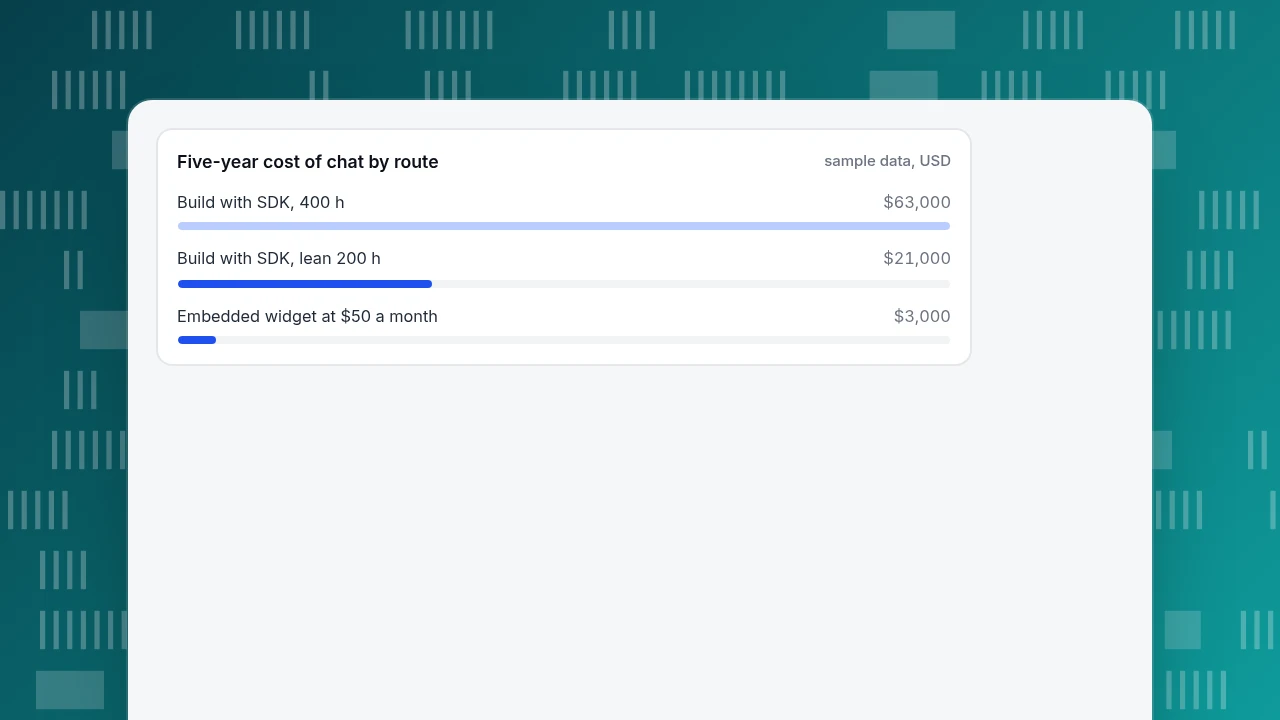
Add upkeep at 15% of the build cost per year, which is $5,400, and the five-year cost is $36,000 + 5 × $5,400 = $63,000. A widget at an assumed $50 a month costs $3,000 over the same period, which is 21 times less. For the SDK to be cheaper over five years, the widget would have to cost more than $63,000 ÷ 60 months = $1,050 a month.
Take a leaner scenario: 200 hours at $60 an hour is $12,000, with upkeep of $1,800 a year and a five-year cost of $21,000. That is still 7 times the widget, and the break-even is $350 a month. In both cases the SDK is justified only if the widget cannot do something you need, not because it is cheaper.
Five-year cost of chat by route
sample data, USDWhat an embedded widget costs your page speed
A third-party script is the usual worry with widgets, and it is a fair one, but it is measurable. Google's Core Web Vitals thresholds, measured at the 75th percentile of page loads and split by mobile and desktop, are Largest Contentful Paint at 2.5 seconds or less, Interaction to Next Paint at 200 milliseconds or less, and Cumulative Layout Shift at 0.1 or less (web.dev). A page passes only if it meets all three.
Run this check before and after you add chat:
- Record LCP, INP and CLS for your five busiest pages with chat off.
- Turn chat on and record them again after the same traffic mix.
- Compare at the 75th percentile, not the average.
- If CLS rises, check that the bubble is positioned fixed so it takes no layout space.
- If INP rises, load the widget after the first interaction or after the page is idle.
An SDK does not remove this cost; its code is in your own bundle, and your team must monitor it.
Accessibility is part of the build decision
With your own interface, accessibility is your responsibility. Three WCAG 2.2 requirements show how concrete that gets:
- Target size. Pointer targets must be at least 24 by 24 CSS pixels, unless an exception applies, such as enough spacing or an equivalent control (criterion 2.5.8, Level AA, W3C).
- Contrast. Interface components and graphics need at least a 3:1 contrast ratio against adjacent colours (criterion 1.4.11, Level AA, W3C).
- Label in name. A control's accessible name must contain the text shown on it (criterion 2.5.3, Level A, W3C).
When you embed a widget, ask the vendor for these test results and check them yourself; when you build, put them in your definition of done.
Six rules for choosing
- If you only need a chat bubble on your website, choose the widget.
- If you need to open chat from your own buttons, choose a widget that exposes an open call; do not build a UI for that.
- If the chat must live inside a native mobile app with native screens, choose an SDK from a vendor that ships a mobile SDK. Otherwise a link or web view is acceptable.
- If the interface is part of your product's brand and you have the staff to maintain it for years, an SDK is reasonable.
- If your own version of the cost table shows build and upkeep many times the widget's fee (21 times in the sample), choose the widget unless it cannot do something you need.
- Whatever you choose, plan to measure it: conversations, response time and conversions, covered below.
Using the widget route in TapCub
Take the plain-bubble case from rule 1. TapCub's chat is a web widget plus a standalone chat page; there is no native iOS or Android chat SDK or headless chat library, so a fully custom interface is not available.
- Turn it on. In Live chat › Chat settings › Appearance, switch on Enable live chat and save. If your site already runs the TapCub analytics script, the bubble loads from that same line; do not add a second script.
- Set the look. On the same page, set brand name, primary colour and bubble position, and optionally hide the bubble on phones (windows narrower than 640 pixels).
- Open it from your own button. Once the bubble has loaded,
window.tapcub.chathasopen(),close()andtoggle(). Check for it first and fall back to the standalone page link, as shown in open the chat from your own button. - Cover the app. The standalone page,
https://chat.askcub.com/YOUR_SITE_KEY, works where you cannot install code, including an app that can only open links (standalone chat link). - Measure the outcome. Live chat › Reports › Conversion attribution compares visitors who chatted with those who did not, and warns when fewer than 30 chatted. See the chat widget for how the pieces fit.
If your requirement is a native in-app chat screen, TapCub does not offer that today; use another approach for the chat itself, and keep TapCub for analytics.
FAQ
What is a chat SDK?
A chat SDK is a software development kit for adding messaging to your own app. It provides the logic to connect, send and receive messages, and often no interface, so you build the screens. Some vendors ship one for the web and others for iOS, Android or React Native.
Is a chat widget the same as a chat SDK?
No. A widget is a ready-made interface you embed with a script; an SDK is a library you build an interface with. A widget is faster to launch and maintained by the vendor, while an SDK gives full control and costs build and upkeep time.
When should I use a chat SDK instead of a widget?
When the chat interface is part of your product: it must look native, live inside a mobile app, or do something the standard widget cannot. If you only need a bubble on a website, a widget is cheaper, as the sample shows: roughly $3,000 against $63,000 over five years.
Does a chat widget slow down my website?
It can, because it is a third-party script. Measure rather than guess: compare LCP, INP and CLS at the 75th percentile with chat off and on. Google's thresholds are 2.5 seconds, 200 milliseconds and 0.1, and a fixed-position bubble usually adds no layout shift.
Can I use my own button with a chat widget?
Often yes, if the widget exposes an open call. In TapCub, tapcub.chat.open() opens the chat from any button once the bubble has loaded. Check that the function exists first, and fall back to the standalone chat page link so the button always does something.
Sources
- Microsoft, Omnichannel Chat SDK README (headless SDK versus live chat widget; React Native; pre-chat surveys and attachments). Checked 2026-11-20.
- Zendesk Developer Docs, Classic Web Widget and SDKs capabilities (feature table for the Chat SDK on Android and iOS). Checked 2026-11-20.
- web.dev, Web Vitals (LCP, INP and CLS thresholds, 75th percentile). Checked 2026-11-20.
- W3C, WCAG 2.2 Understanding 2.5.8 Target Size (Minimum), 1.4.11 Non-text Contrast and 2.5.3 Label in Name. Checked 2026-11-20.
Was this article helpful?
We use your answers to fix and expand this page.
Couldn’t send. Please try again in a minute.
Thanks for the feedback. We’ll use it to improve this page.You’ve already sent feedback on this page. Thanks.

Product Experience Specialist
Writes about product experience, practical workflows, and growth, turning complex processes into clear steps for everyday decisions.