Try it on your own data
Every report in this article is in the free plan. One snippet for web and apps, up to 10 sites.
Start freeA chat script is a prepared message for a recurring situation, such as a greeting, a question, a handoff or a closing, that an agent edits before sending. Good scripts are short, ask for one thing, and always move the conversation forward or hand it to someone who can. Below are 14, grouped by situation, with when to use each.
What you will learn
- Keep scripts under about 30 words, ask for one thing at a time, and change one real detail before sending
- Every script either moves the chat forward or hands it to a person; the CFPB found 80% of people using a chatbot left more frustrated
- In the sample, 150 chats a day with 3 scripted messages each: 225 minutes typed by hand versus 45 minutes with scripts, 180 minutes saved
What a chat script is, and where scripts go wrong
A chat script is a pre-written message for a situation that comes up often: opening a chat, asking for an order number, handing a visitor to a colleague, closing. It is a starting point the agent edits, not a line to paste. The aim is a fast, consistent first draft with the one detail that makes it personal filled in.
Scripts fail in one specific way: they trap people. The US Consumer Financial Protection Bureau's June 2023 report on chatbots in consumer finance found that over 98 million users, about 37% of the US population, interacted with a bank's chatbot in 2022. It also describes "doom loops" of repetitive, unhelpful replies with no route to a person, and cites a survey in which 80% of people who used a chatbot left more frustrated and 78% still needed a human. Nielsen Norman Group's 2018 study of chatbots (eight US participants, so qualitative) found the same pattern from the user's side: people reacted well when a bot admitted it did not understand and offered a way out, and badly to repeated answers.
So the scripts below are organised around one rule: every script either moves the conversation forward or hands it to someone who can. The library has 14 scripts in five groups. Replace the names, links and times with your own. If you also run a bot, the same situations appear in our chatbot templates.
Greeting scripts
A greeting has one job: make the first reply easy. Ask one question the visitor can answer in a few words, and use what you already know about where they are.
| Script | When to use | Why it works |
|---|---|---|
| "Hi, you've reached the support team at Northwind. What can I help you with today?" | Default greeting on any page | Names who is answering and asks an open question |
| "Hi! Looking at plans? Tell me your team size and I'll point you to the right one." | Pricing and plan pages | Uses the page as context and asks for the one fact that decides the answer |
| "We're away until 9:00 AM Eastern. Leave your email and your question and we'll reply first thing." | Outside office hours | Sets a concrete time and asks for both things you need to follow up |
Three rules for greetings. Keep them under 20 words, as all three above are (15, 17 and 17). Do not promise "an instant reply" if there are hours when nobody is online. And never open with a question the visitor already answered by clicking: if they arrived from the pricing page, do not ask what they are interested in.
| Situation | Script (shortened) | When to use |
|---|---|---|
| Greeting | "Hi, you've reached the support team at Northwind. What can I help you with today?" | Default greeting on any page |
| Ask for detail | "To check this, could you send the order number from your confirmation email?" | Before you can answer |
| Handoff to a colleague | "I'm bringing in Priya from billing. I've passed her your order number." | A specialist must take over |
| Handoff to email | "I'll email you by 5:00 PM today. Is that okay, or would you rather wait here?" | The wait is long or needs records |
| Cannot help | "I can't change that from here, and I don't want to guess. Want me to open the request?" | Request outside what chat can do |
| Closing | "Glad that's sorted. Write here and the conversation will reopen." | The visitor confirmed the answer |
Full wording of all 14 scripts is in the article. Names, links and times are placeholders.
Asking and answering scripts
Most of a conversation is two moves: ask for the missing detail, then give the answer with a next step.
Ask for detail: "Thanks. To check this, could you send the order number from your confirmation email?"
Ask for one thing at a time and say why you need it ("to check this"). A list of four questions looks like a form and gets one-word answers.
Send an answer: "Yes, you can change the delivery address until the order ships. Here is how: [link]. Does that work for you?"
Give the answer first, then the link, then a closing question that invites a "no". Ending with "Does that work for you?" makes it easy to say "not quite", which is the reply you want to see before the chat closes, not after.
Hold: "Give me two minutes to check this with our billing team. I'll come back here as soon as I have it."
Always give a time and say where you will answer. A hold with no number reads as being ignored. If the check takes longer than the time you gave, write again at that time even if you have nothing new: "Still checking. Two more minutes."
Handoff scripts
A handoff is where chats go wrong. The visitor has already explained once, and the worst result is making them explain again. A good handoff message has four parts: who is taking over, why, what has already been passed on, and how long it will take.
Handoff to a colleague: "I'm bringing in Priya from billing. I've passed her your order number and what we've covered, so you won't need to repeat anything. She'll reply within 10 minutes."
Handoff to email: "This needs a person to look at your account records. I'll email you at the address you gave by 5:00 PM today. Is that okay, or would you rather wait here?"
The second script matters most because it is the escape hatch Nielsen Norman Group's participants wanted: a way out of the chat that does not mean starting over. It also asks, so the visitor keeps control of the choice.
Before sending either handoff, write an internal note with the order number, the question and what you already tried. The next agent reads the note and the thread, and the visitor's answer to "is that okay?" decides the route.
Only promise a time you can keep. If the specialist's queue is 30 minutes long, say "within 30 minutes" or choose the email route.
Scripts for when you cannot help
Some requests cannot be done in chat: a setting that needs a security review, a refund over an agent's limit, a feature that does not exist. Saying so plainly is better than a confident wrong answer, which is what NN/g participants disliked most.
Cannot help: "I can't change that setting from here, and I don't want to guess. The person who can is on our security team: [link]. Want me to open the request for you?"
Apology: "Sorry, we kept you waiting. Thanks for staying with us. Here is what I found."
Use the apology when the delay was real, and say it once. The pattern in both scripts is the same: say what you cannot do, say who can, and offer to do the next step yourself. A bare "I'm sorry, I can't help with that" ends the conversation without a route forward.
Closing and reopening scripts
A closing script should confirm that the visitor's question is finished, not assume it. Use a different line for each way a chat can end.
| Script | When to use |
|---|---|
| "Glad that's sorted. If anything else comes up, just write here and the conversation will reopen." | The visitor confirmed the answer worked |
| "Thanks, Dana. I've sent your question to our sales team. You'll hear from them by tomorrow noon." | You captured a lead and promised a follow-up |
| "I haven't heard back, so I'll close this chat for now. Write here any time and we'll pick it up." | The visitor went silent after your last message |
| "Welcome back. I can see our earlier chat about your invoice, so you won't need to start again." | A visitor returns to a resolved conversation |
Check one thing before you use the lead-captured script: do the promised time and the sales team's real response time match? A closing line that promises "tomorrow noon" and arrives two days later undoes the whole conversation.
A worked example: what a script library saves
Sample data: the 14 scripts above total 280 words, an average of 20 words each. At an assumed typing speed of 40 words per minute, writing a 20-word message by hand takes 20 ÷ 40 × 60 = 30 seconds. Assume inserting a script and changing one detail takes 6 seconds. A team handles 150 chats a day with three scripted messages in each chat.
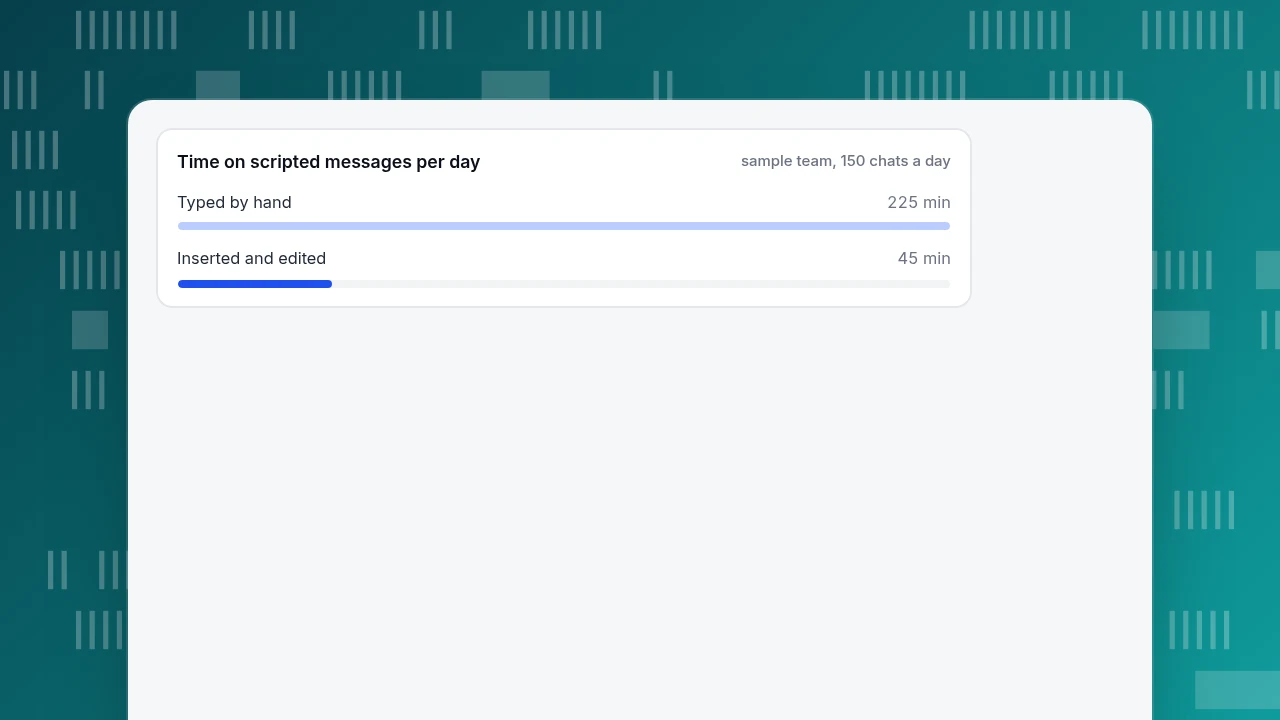
- By hand: 150 × 3 × 30 seconds = 13,500 seconds = 225 minutes a day.
- With scripts: 150 × 3 × 6 seconds = 2,700 seconds = 45 minutes a day.
- Saved: 180 minutes a day, or 66 hours over 22 working days.
The typing speed and the 6 seconds are assumptions; measure your own by timing five agents on five messages. The result is only as good as the scripts, though. The three longest in the library (28 to 31 words) take 42 to 47 seconds to type by hand, so they save the most, but a script that agents rewrite every time saves nothing. If an agent changes more than one sentence, split the script in two or delete it.
Time on scripted messages per day
sample team, 150 chats a dayHow to adapt scripts so they do not sound canned
- Change one detail every time. The name, the order number, the product or the time. A message with a real detail reads as written for the visitor.
- Write two versions of any line you use daily. Agents alternate, and a visitor who writes twice in a day does not get the same sentence.
- Match the visitor's length. If they write six words, do not reply with a paragraph. Cut the script to its first sentence and send the rest only if asked.
- Delete scripts nobody sends. Count how often each one is used each month and retire the bottom of the list. A library of 14 that is used beats 60 that are not.
- Review one handoff a week. Read a transcript where an agent used the handoff script and check that the next agent did not ask for anything already given.
How to set up a script library in TapCub
Take the library above, and put it where agents can reach it in one keystroke.
- Add the scripts as canned replies. In Live chat › Canned replies, create one row per script with a shortcut, a title and the content. The shortcut can be up to 40 characters, the title 80, and the content 4,000 (the canned replies guide covers the rest). Site-level rows are available to every agent; turn on Personal (only visible to me) for lines only you use. The closing lines are good site-level rows; a personal sign-off belongs in a personal row.
- Use them in the Inbox. In Live chat › Inbox, type
/and keep typing the shortcut or the title. Choosing a row fills the box, you can still edit it, and nothing is sent until you send it, which is exactly the edit-one-detail step in the example. - Put the greeting scripts where visitors see them. In Live chat › Chat settings › Greeting & translation, set one line for Greeting (agents online) and one for Greeting (agents offline); outside office hours the offline line is used. Proactive greetings for the pricing page go in Live chat › Chat settings › Proactive invites: match the path, set 3 to 600 seconds of dwell time, and keep the text under the 300-character limit.
- Write handoff notes as Internal notes. Switch the composer to Internal note before a transfer. Notes are visible only to agents and never appear to the visitor, so the next agent sees the order number and what you tried.
- Prune with real numbers. The canned replies list shows a use count, and the proactive invite list shows impressions, open rate and reply rate. Remove the lines nobody sends or answers.
While you chat, the visitor drawer shows the current page, the landing page and the referrer, so you know which greeting to adapt. TapCub provides the place to keep and send scripts; it does not write them for you, so the wording above is yours to change.
FAQ
What is a chat script?
A chat script is a prepared message for a recurring situation, such as a greeting, a request for an order number, a handoff or a closing. Agents use it as a first draft and edit one or two details. Scripts keep answers consistent and fast, but they should never be pasted unchanged into a conversation where the visitor's question differs.
How long should a live chat script be?
Aim for under 20 words for greetings and questions, and under about 30 words for handoffs. The 14 scripts in this article average 20 words and none exceeds 31. If a script needs more, split it into two messages or put the long part behind a link, so the visitor can reply between them.
How do I hand off a chat without making the customer repeat themselves?
Say who is taking over and why, pass on the key facts in an internal note before transferring, and tell the visitor what you passed on and how long the wait is. Offer an alternative such as email if the wait is long. The next agent should be able to reply without asking for anything already given.
Should chat scripts be used by chatbots too?
Yes, with a tighter rule: every bot script needs an exit to a person or another channel. The CFPB report on chatbots describes people stuck in loops with no route to a human, and NN/g's participants reacted well when a bot admitted it did not understand. Write the "I can't help" and handoff scripts first, then the answers.
How many scripts should a team have?
Start with 10 to 15 for the situations in this article, then add one only after you have typed the same message several times. Track how often each is used and retire the ones nobody sends. A short library that agents trust is used; a long one is ignored.
Sources
- Consumer Financial Protection Bureau, Chatbots in consumer finance, 6 June 2023 (last modified 24 October 2024). 98 million users, 37% of the US population in 2022; "doom loops"; survey figures of 80% and 78% as cited in the report. Checked 2026-11-20.
- Nielsen Norman Group, The User Experience of Chatbots, Raluca Budiu, 25 November 2018. Eight US participants; honesty about not understanding and an escape hatch to a human. Checked 2026-11-20.
Was this article helpful?
We use your answers to fix and expand this page.
Couldn’t send. Please try again in a minute.
Thanks for the feedback. We’ll use it to improve this page.You’ve already sent feedback on this page. Thanks.

Product Analyst
Focuses on event analysis, conversion funnels, and retention, using clear metric definitions and structured analysis to explain product performance.