Try it on your own data
Every report in this article is in the free plan. One snippet for web and apps, up to 10 sites.
Start freeLocation-based marketing is sending a message because of where a person is, was or is expected to be, and it needs permission before targeting. Measure it against a holdout of consented people, not by messages opened. Below: the types and how precise each is, a consent checklist from the GDPR text, a recomputed geofence example and a region-level test. This is not legal advice.
What you will learn
- Ask for the coarsest location that serves the purpose; precise and background location is the highest bar
- Treat the system permission prompt as a technical gate, and take the legal question about consent to counsel
- Measure against a holdout: in the sample, cost per incremental visit was $15.00, not the $3.46 a naive count shows
What is location-based marketing, and what types are there?
Location-based marketing is sending or showing a marketing message because of where a person is, was or is expected to be. The label covers methods with very different precision and very different consent needs, so the first job is to say which one you mean.
| Type | What triggers it | Location source | Precision | Needs the person's device location? |
|---|---|---|---|---|
| Geotargeting | The person's region or city | IP address or account address | Country, region, sometimes city | No |
| Geofencing | The device enters a drawn area | Device location services | Tens to hundreds of meters | Yes |
| Proximity marketing | The device is near a beacon or access point | Bluetooth or Wi-Fi signals | Meters | Usually yes, plus the app |
| Local search and listings | Someone searches "near me" | Query plus device or IP location | City to street | Depends on the search service |
| Event or store-radius campaigns | The person lives or works within a radius | Address, past visits | A set distance | Only for visit data |
Two things set the rest of this guide's direction. The more precise the method, the more sensitive the data and the more clearly you need permission. And for most small teams, geotargeting by region captures much of the value with none of the device-location risk. The terms behind the rows are covered in geofencing.
This guide explains how the methods work and how to measure them. It is not legal advice; where a law is quoted, the quote is from the law's own text, and what it means for your business is a question for your counsel.
Where does location data come from, and how precise is it?
Precision depends on the source:
- IP address. The network's registered place, reliable at country level and less so at city level. It describes the connection, not necessarily the person's home. It needs no device permission.
- Device location services. Phone operating systems let apps request location through a permission prompt. Android describes two accuracy levels: approximate, an estimate accurate to about 3 square kilometers, and precise, usually within about 50 meters (160 feet) and sometimes a few meters. If a user grants only approximate location, the app only gets approximate location whatever it declares. Android also separates foreground location (while the app is visible) from background location, which an app needs for features that continuously track the device or use the Geofencing API.
- iOS. An app requests authorization to use location services; the user can grant location only while the app is in use or all the time, and can choose reduced (approximate) accuracy instead of precise.
- Bluetooth and Wi-Fi. Beacons and access points indicate proximity at meter scale, usually through an app.
The practical rule: ask for the coarsest location that serves the purpose. A store locator needs the city; a "you are near the store" message needs precise location and background access, the highest bar for both the OS and the user.
What does consent have to look like before you use precise location?
Precise location can reveal where a person lives, works, worships or receives medical care, which is why regulators treat it carefully. Consent is the first design decision, not a banner added afterward. Under the EU's General Data Protection Regulation, Article 4(11) defines consent as any freely given, specific, informed and unambiguous indication of the person's wishes, by a statement or a clear affirmative action, and Article 7(3) says it must be as easy to withdraw consent as to give it. The European Data Protection Board's Guidelines 05/2020 explain how those words apply in practice.
A checklist drawn from those requirements, to hold against your own flow:
- Specific. The request names location and the purpose ("show offers near this store"), not a bundle of purposes.
- Informed. Before choosing, the person can see who you are, what location data you collect, how precise it is and how long you keep it.
- Affirmative. A tap on an unticked option, not a pre-ticked box or silence.
- Separate from the rest. Location consent is not hidden inside a general terms-of-service acceptance, and the service does not become unusable if the person says no to something it does not need.
- Easy to withdraw. A setting reachable in one or two steps, and your systems actually stop.
- Recorded. You can show when and how each person agreed.
The operating system's permission prompt is a technical gate. Whether it also satisfies the legal standard for consent where you operate is a question for counsel; do not assume that a granted system permission is the same thing.
Related reading: opt-in covers the mechanism, and the GDPR compliance checklist covers the wider program.
| Method | Use it when | Consent need |
|---|---|---|
| Region or city targeting | You sell by market and want local offers | Low: IP-based, no device location |
| Matched-region test | You want lift without device location | Low: uses sessions and orders by region |
| Geofencing | A visit to a place is the goal | High: precise, often background, device location |
| Proximity beacons | In-venue offers at meter scale | High: Bluetooth plus an app |
General guide; where consent is required depends on your law and counsel's advice.
How do you measure whether location-based marketing worked?
A location campaign usually reports impressions and notifications opened. Those are activity. The result you want is extra visits or purchases that would not have happened without it, so measure against a holdout: a random group of consented people who are eligible but do not receive the message.
Sample data: 20,000 consented users in a region, split at random. A $1,800 geofence campaign messages 10,000 of them; 10,000 are held out.
| Group | People | Store visits | Visit rate |
|---|---|---|---|
| Messaged | 10,000 | 520 | 5.2% |
| Held out | 10,000 | 400 | 4.0% |
- Incremental visits: 520 − 400 = 120.
- Relative lift: 5.2% ÷ 4.0% − 1 = 30%. A two-proportion z-test gives z of about 4.1, so the gap is not noise at this size.
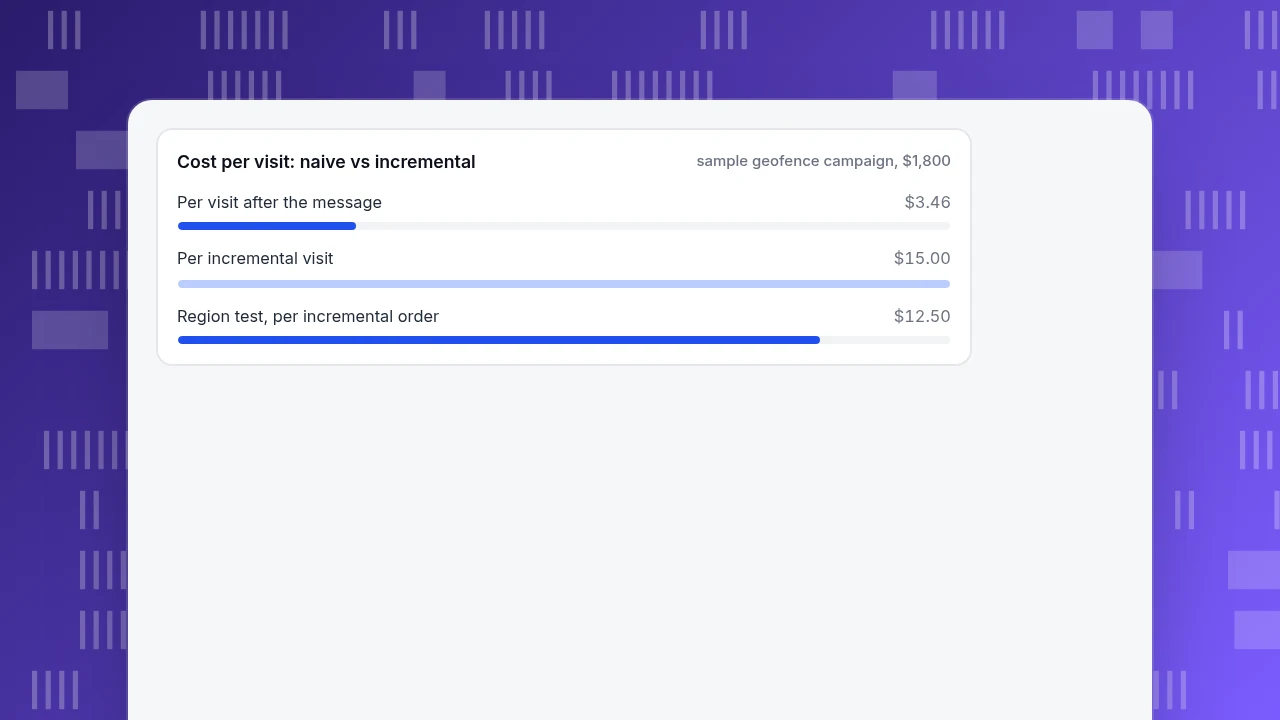
- Cost per visit counted naively: $1,800 ÷ 520 = $3.46.
- Cost per incremental visit: $1,800 ÷ 120 = $15.00.
The naive figure is wrong by more than four times because 400 of the 520 visits would have happened anyway. Add purchases: suppose 78 messaged and 52 held-out people bought. Incremental purchases are 26; at a $45 basket that is $1,170 of revenue against $1,800 spent, a return on spend of 0.65 before margin. Whether that is acceptable depends on margin and on repeat visits, but the decision is now made on what the campaign added, not on what it touched.
Two cautions. Measuring "store visits" itself needs device location data, so it applies only to people who agreed to share it; the results describe that group. And the holdout must be random; comparing messaged users with people who never opted in builds in the same selection bias that inflates most marketing numbers.
Cost per visit: naive vs incremental
sample geofence campaign, $1,800What can you measure at region level, without precise location?
If you do not collect device location, you can still test geography. The method is a matched-region test: run the campaign in one region and compare it with a similar region where nothing changes.
Sample data: two regions with the same baseline. In the four weeks before the campaign, each had 60,000 sessions and 2,000 orders, a 3.33% conversion rate. During the four-week campaign:
| Region | Sessions | Orders | Conversion rate |
|---|---|---|---|
| Campaign region | 60,000 | 2,400 | 4.00% |
| Comparison region | 60,000 | 2,000 | 3.33% |
- Incremental orders: 2,400 − 2,000 = 400.
- Lift: 4.00% ÷ 3.33% − 1 = 20%.
- Spend of $5,000 gives a cost per incremental order of $5,000 ÷ 400 = $12.50.
- At a $50 average order and 40% margin, incremental margin is 400 × $20 = $8,000, a return of $8,000 ÷ $5,000 − 1 = 60% on spend.
The pre-campaign match matters: the two regions had identical rates before, so the gap afterward is more likely to be the campaign. If the regions had differed before, subtract the earlier gap. The usual limits apply: a holiday or a competitor in one region breaks the comparison.
Which mistakes make location-based marketing fail or create risk?
- Collecting precise location when region would do. More precision means more risk and a harder consent request for no extra value.
- Treating the OS permission as the whole job. It is a technical permission; the legal question and your own disclosure are separate.
- Counting touched users as results. A visit by someone who would have come anyway is not a campaign result.
- Messaging too often. A fence that fires every time someone passes the store trains people to turn off notifications.
- Using one region's result for another. Urban and rural, or city and suburb, behave differently.
- Counting bots as visitors. Crawler traffic has no region that matters and lowers every regional conversion rate.
- Keeping data longer than the purpose needs. Location history is the first thing to delete when the campaign ends.
How does TapCub fit into location-based marketing?
TapCub does not track device location, run geofences or send location-triggered messages. It only measures what your own site and app record, and the place it records is coarse. Here is how the region-level test above would be measured.
- Know what place means. Web analytics › Audience shows visitors by country, region and city on a map. The place comes from an IP database, and city is not always present, so use country or region for the matched-region test.
- Decide how much geography to keep. In Configuration › Privacy center, a region rule can set geography to city, country or none. The address is used for geography, then discarded; by default two bytes of it are truncated before a city lookup, and it is not written to the event row.
- Tag each region's campaign. Use a separate UTM campaign value per region on the links in your messages. Web analytics › Sources then shows visitors from each campaign, and a goal in Web analytics › Goals counts the purchases, so you can compute the conversion rates in the table.
- Compare and annotate. Mark the campaign start under Configuration › Annotations, and compare the campaign and comparison regions over the same dates.
Visits to a physical store, notification opens and device-level location are outside TapCub's scope; use the tools that collect them, with the consent steps above.
FAQ
What is location-based marketing?
It is marketing triggered by where a person is, was or is expected to be. Methods range from region targeting using an IP address to geofencing, where a message is triggered when a phone enters a drawn area. The more precise the location, the more sensitive the data and the more clearly consent is needed.
What is the difference between geofencing and geotargeting?
Geotargeting selects people by region, city or address, usually without using the device's location. Geofencing draws an area on a map and acts when a device enters it, which requires the device's location services and the person's permission. Geofencing is the more precise and more sensitive of the two.
Do you need consent for location-based marketing?
For precise device location, you should plan on it, and the standard under the GDPR is consent that is freely given, specific, informed and unambiguous. Region-level targeting from an IP address is a different question. This guide is not legal advice; ask counsel how the rules apply where you operate.
How do you measure location-based marketing?
Use a random holdout of consented people who are eligible but receive no message, and compare visit or purchase rates. In the sample, 5.2% against 4.0% gave 120 incremental visits and a cost per incremental visit of $15.00, not the $3.46 a naive count shows. Without device location, test region against region.
Is location-based marketing effective?
It can be, but the number to look for is the lift over a holdout, not messages opened. Reported effectiveness figures often come from vendors counting touched users, so treat them with caution. Run your own holdout or matched-region test and judge the return on what the campaign added.
Sources
- European Union. Regulation (EU) 2016/679 (General Data Protection Regulation) — Article 4(11) defines consent; Article 7(3) requires withdrawal to be as easy as giving consent. Checked 2026-11-19.
- European Data Protection Board. Guidelines 05/2020 on consent under Regulation 2016/679 — how freely given, specific, informed and unambiguous apply. Checked 2026-11-19.
- Android Developers. Request location permissions — approximate (about 3 square kilometers) versus precise (about 50 meters), foreground versus background location. Checked 2026-11-19.
- Apple Developer Documentation. Requesting authorization to use location services. Checked 2026-11-19.
Was this article helpful?
We use your answers to fix and expand this page.
Couldn’t send. Please try again in a minute.
Thanks for the feedback. We’ll use it to improve this page.You’ve already sent feedback on this page. Thanks.

Product Experience Specialist
Explores usability, user journeys, and feature adoption through practical examples of onboarding and everyday product use.