Try it on your own data
Every report in this article is in the free plan. One snippet for web and apps, up to 10 sites.
Start freeA GDPR compliance checklist is four written answers for every tool on your website: what personal data you collect, why, how long you keep it and how you delete it. Tick-boxes do not satisfy the law, because the controller must be able to demonstrate compliance. For statistics tools, also check what they do before the visitor has consented.
What you will learn
- Four questions per tool, answered in writing: what, why, how long, how to delete; Article 5(2) makes you able to demonstrate it
- Consent and lawful basis are two separate checks: device storage falls under the ePrivacy rule, personal data under an Article 6 basis
- Choose the shortest retention that answers your longest recurring question: 14 months instead of 26 holds 46.2% fewer rows and still supports year-over-year
What a GDPR checklist is really for: four questions
A GDPR compliance checklist is not a form you tick once. It is a set of written answers to four questions about the personal data your website handles:
- What do you collect? Name every data item, such as an email address, an IP address, an identifier in a cookie or a purchase history, and where it goes.
- Why do you collect it? One stated purpose per item, and one lawful basis from Article 6 for each purpose.
- How long do you keep it? A period you can justify. Article 5(1)(e) says identifiable data should be kept no longer than the purposes require.
- How do you delete or return it? A process that works for one person's request within the time the law gives you.
If you can answer all four, in writing, for every tool on your site, you have the core of a compliant setup. If you cannot, no tick-box list will fix it. Article 5(2) makes this an accountability rule: the controller is responsible for complying and must be able to demonstrate it. Regulators ask to see the answers, not the ticks. The fine ceilings give a sense of the stakes: Article 83(5) allows up to €20 million or 4% of worldwide annual turnover, whichever is higher, for breaches of the core principles, lawful bases, consent conditions, data subject rights and international transfers.
This guide is a practical checklist and a self-check for statistics tools. It is not legal advice; your lawyer or data protection officer decides how the law applies to you. For which analytics set-ups tend to be easiest to defend, see GDPR-compliant analytics, and for an interactive version of the list, the privacy compliance checklist tool.
The checklist
Each row is a question you must be able to answer in writing, the article it comes from, and what "done" looks like. The table below covers the website and analytics side. It leaves out employee data, children's data, and sector rules.
The two rows people most often skip are 8 and 9. Transfers outside the EEA and the 72-hour breach clock are easy to ignore until the day you need them.
| Item | Question to answer in writing | Source | Done when |
|---|---|---|---|
| 1. Lawful basis | Which of the six bases covers each purpose? | GDPR Art. 6(1) | One line per purpose, checked by your adviser |
| 2. Privacy notice | Does it say who you are, why, on what basis, who receives the data, transfers, how long, the rights and the right to complain? | Art. 13 | Shown where data is collected; matches your real practice |
| 3. Consent and device storage | Where you rely on consent, can you prove it and is withdrawing as easy as giving it? Does any tool store or read anything on the device? | Art. 7; ePrivacy Art. 5(3) | A consent record per choice and a tested way to change it |
| 4. Purpose and minimisation | Is each data item needed for its stated purpose? | Art. 5(1)(b), (c) | Unneeded fields removed from forms, events and URLs |
| 5. Retention | How long is each category kept, and why? | Art. 5(1)(e) | A period per category and automatic deletion |
| 6. Data subject rights | Can you find, export, correct and erase one person's data within one month? | Art. 12(3), 15 to 22 | A tested process with an owner |
| 7. Processors | Does every vendor that handles personal data have a contract with the required terms? | Art. 28(3) | A signed contract on file per vendor |
| 8. Transfers | Where is data stored or accessed from, and what covers any move outside the EEA? | Art. 44 to 46 | A note per vendor naming the mechanism |
| 9. Records and breaches | Do you keep records of processing, and who notifies the authority within 72 hours? | Art. 30, 33 | A record and a named breach owner |
Covers the website and analytics side only; it leaves out employee data, children's data and sector rules. This is not legal advice.
Lawful basis and consent are two separate questions
Article 6(1) gives six lawful bases: consent, contract, legal obligation, vital interests, public interest and legitimate interests. For a marketing website, the realistic candidates are consent and legitimate interests. Which one fits a given tool is a legal judgement that depends on what the tool does, so write the choice down for each purpose and have your adviser check it.
Do not mix this up with the separate rule for cookies and similar technology. Article 5(3) of the ePrivacy Directive says that storing information on a visitor's device, or reading information already stored there, needs the user's consent, except when it is strictly necessary to provide a service the user asked for. That rule applies whatever GDPR basis you chose for the data afterwards. A tool that writes nothing to the device is outside it; a tool that sets an identifier for analytics is inside it. The practical consequence is a two-step test for every tool: does it store or read anything on the device, and, separately, which basis covers the personal data it collects?
When consent is your basis, Article 7 sets two conditions you can test. You must be able to prove that the person consented, and withdrawing consent must be as easy as giving it. Check that your consent banner has a visible way to change the choice later, and that your records can show who agreed to what and when. For the tooling, see consent management platform.
Self-check: what a statistics tool does with your visitors
Go through your analytics tool with these questions. Answer from the vendor's documentation and from testing, not from the marketing page:
| Question | Why it matters | A defensible answer looks like |
|---|---|---|
| What does it collect before the visitor makes a choice? | Anything before consent has to be justified without it | A short list: page, referrer, coarse location, no persistent identifier |
| Does it set cookies or write to local storage? | Triggers the ePrivacy consent rule | Nothing written, or consent obtained first |
| How does it treat the IP address? | An IP address can be personal data | Truncated or discarded, not stored on the event |
| Is there a persistent identifier across visits? | Makes the data easier to link to a person | None, or only after consent |
| Who processes the data, and where? | Needs a processor contract and a transfer mechanism | A signed contract; the storage region and any transfers are documented |
| How long is raw data kept? | Storage limitation | A set period, with automatic deletion |
| Can you find, export and delete one person's data? | Data subject rights | A request process that works on a test record |
| Does it respect browser signals such as Global Privacy Control? | Honours the visitor's stated preference | Yes, by default |
| Does your own code send personal data into it? | Minimisation | Email addresses and form text are kept out of event properties |
A "no" in the first two rows is not automatically a breach; it means you need consent before the tool runs. A "no" in the last three means a process gap you can fix.
Worked example: what a 14-month retention period saves
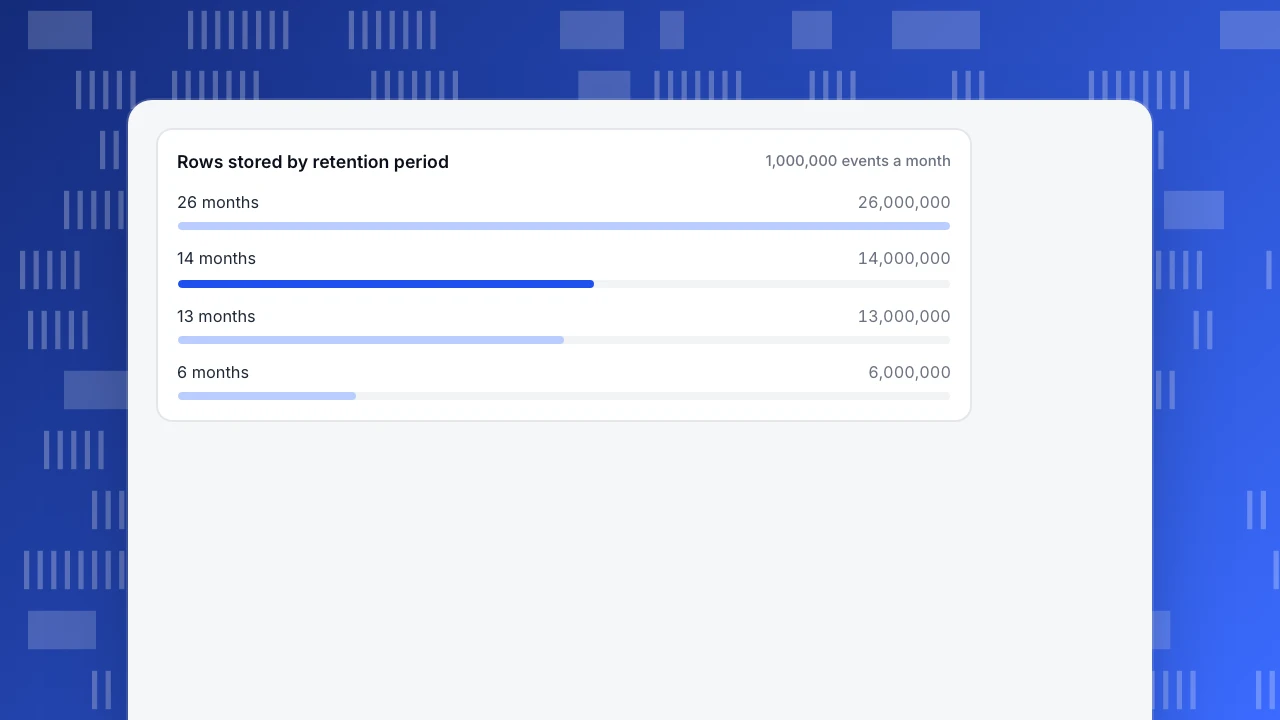
Sample data: a site records 1,000,000 events a month. Once the retention period has been reached, the number of stored rows is simply events per month times months kept.
| Retention | Rows stored | Compared with 26 months |
|---|---|---|
| 26 months | 26,000,000 | 100% |
| 14 months | 14,000,000 | 53.8% |
| 13 months | 13,000,000 | 50.0% |
| 6 months | 6,000,000 | 23.1% |
Cutting from 26 months to 14 removes 12,000,000 rows, 46.2% of what you hold, and the same share of personal data exposed in a breach or a request. The rule for choosing is to keep the shortest period that still answers your longest recurring question. A year-over-year comparison needs at least 13 months, so 14 months supports it with a month's margin, while 6 months does not. Write the reason next to the number. "We keep 14 months so we can compare each month with the same month last year" is a justification a regulator can read; "that is the default" is not.
Rows stored by retention period
1,000,000 events a monthTest what happens before consent
The most common gap in a statistics set-up is behaviour before the visitor has chosen. Test it yourself in ten minutes:
- Open your site in a clean private window, so there are no saved choices.
- Open the browser's developer tools on the network tab, and do not touch the consent banner.
- Load three pages. Write down every request to a third party or to your analytics domain, and what it sends.
- Open the storage tab. List every cookie and local-storage item that has appeared.
- Accept, reload and compare. The difference is what depends on consent.
- Reject, reload and check that the tool's behaviour matches what your privacy notice says.
Keep the notes with the date. They are your evidence for item 3 in the checklist, and the first thing to re-run when you change tools or the banner. For the principle behind keeping the before-consent list short, see data minimization.
Data subject requests and the one-month clock
People can ask what you hold, ask for a copy, correct it, restrict it or have it erased (Articles 15 to 22). Article 12(3) says you must respond without undue delay and within one month of receiving the request; it can be extended by up to two further months for complex or numerous requests, but you must tell the person within the first month and explain why.
Sample dates: a request arrives on 15 January. The first deadline is 15 February. A justified extension, notified before 15 February, can run to 15 April. The clock starts when you receive the request, not when you find the person, so build the finding step to take minutes, not weeks.
Test the process once with your own record. Can you locate it by email, by login ID and by device? Can you export it? Can you delete it, including from backups or exports, or document when backups expire? If any answer is "someone would have to write a query", fix that before a real request arrives.
Vendors, transfers and breaches
Three items sit outside your own code but inside your responsibility:
- Processor contracts. Every tool that handles personal data for you needs a contract under Article 28(3). It must say the processor acts only on your documented instructions, binds its staff to confidentiality, applies appropriate security, follows rules on sub-processors, helps you answer data subject requests, deletes or returns data at the end, and allows audits.
- Transfers outside the EEA. Article 44 says protection must not be weakened when data leaves, and Articles 45 and 46 give the routes: an adequacy decision, or appropriate safeguards. Ask each vendor where data is stored and processed, and by whom.
- Breaches. Article 33(1) asks you to notify the supervisory authority within 72 hours of becoming aware of a personal data breach, unless it is unlikely to risk people's rights. Decide beforehand who decides, who calls the authority and what you will need to say.
Article 30 requires records of processing. Article 30(5) exempts organisations with fewer than 250 staff, unless the processing is likely to risk people's rights, is not occasional, or includes sensitive data. Regular processing of visitor data is usually not occasional, so plan to keep the record and check with your adviser.
Common mistakes
- Treating the checklist as a one-off. Tools, banners and vendors change. Re-run the self-check each time one does, and at least once a year.
- Assuming "no cookies" means "no rules". The ePrivacy consent rule is about device storage, but GDPR still applies to the personal data you collect. Both questions need answers.
- Copying a retention number. A default is not a justification. Tie each period to a purpose.
- Never testing a data subject request. The first real request should not be your first attempt.
- Putting personal data into analytics. Emails in event properties or form text in URLs create data you then have to find and delete. Keep it out.
- Forgetting the vendor chain. The analytics tool is one vendor; the tag manager, chat tool and email platform are others, each needing a contract and a transfer answer.
Doing the analytics items in TapCub
Take the self-check table above and work through it in TapCub. TapCub provides the controls and records; your lawful basis, privacy notice and consent wording stay with you and your adviser.
- Pick the collection tier. In Configuration › Privacy center, tiers run from 1 to 3. Tier 1 is an anonymous aggregate: the salt rotates daily, no persistent ID is kept, and autocapture and identity are dropped. Tier 2, the default, is a cookie-free pseudonym; the script itself writes no cookie. The default region rule for the EEA and the UK is tier 2 with consent required: when there is no analytics consent, the tier falls to 1, and pageviews and custom events are still recorded. Whether your set-up needs consent depends on your configuration and local law, so confirm it with your adviser. The collection tiers help page has the details.
- Check the address handling. The visitor's address is not written on the event. It is used for location and the visitor hash, then discarded; the default truncation is two bytes before the city lookup, and geography can be city, country or none. Global Privacy Control and Do Not Track are honoured by default, which drops the hit to tier 1.
- Set retention. The privacy center has four day counts: event rows, autocapture, person profiles and consent receipts, with starting values of one year (365 days) for events, 90 for autocapture and 730 each for profiles and receipts. The actual value cannot exceed your plan's cap, which is 180 days on the free tier by default. A scheduled job deletes expired rows; daily aggregates contain no personal data and are not deleted on these timers. Set event retention to the period you justified above, if your plan allows it.
- Run a data subject request. In the same page, create a request for a test person. The types are access, export, restrict processing and erasure, found by email, login ID, device ID or person ID. Access and export run immediately; restrict and erasure wait out a cooling-off period, three days at the start, which you can cancel. This is the test from the rights section above.
- Keep personal data out. Strings that look like an email or phone number are replaced with a placeholder by default, and autocapture does not record visible element text.
TapCub acts as your processor for visitor data. A data processing agreement and a list of sub-processors are available on request; ask for them before you sign off the vendor row of your checklist.
FAQ
What is on a GDPR compliance checklist?
At minimum: a lawful basis for each purpose, a privacy notice, valid consent where you rely on it, data minimisation, a retention period, a working process for data subject requests, processor contracts, a plan for transfers outside the EEA, records of processing and a breach procedure. Each should be a written answer, not a tick.
Does GDPR apply to my website?
It applies if you process personal data of people in the EU or EEA, including by offering them goods or services or monitoring their behaviour, wherever your business is based. An IP address or an identifier in a cookie can be personal data. Whether your case is covered is a question for your lawyer.
Do I need consent for website analytics?
It depends on what the tool does and on local law. Under the ePrivacy rules, storing or reading information on a visitor's device generally needs consent unless strictly necessary. Separately, GDPR needs a lawful basis for the personal data collected. Check what your tool stores, then ask your adviser which basis you can rely on.
How long can I keep analytics data under GDPR?
GDPR sets no fixed number. Article 5(1)(e) says identifiable data should be kept no longer than the purposes require, so choose the shortest period that answers your longest regular question and write the reason down. A year-over-year comparison needs at least 13 months.
How quickly must I answer a data subject request?
Without undue delay and at the latest within one month of receiving it, under Article 12(3). For complex or numerous requests you can extend by up to two further months, but you must tell the person within the first month and say why.
Sources
- European Union, Regulation (EU) 2016/679 (GDPR), Articles 5, 6, 7, 12, 13, 28, 30, 33, 44 to 46 and 83. Checked 2026-11-17.
- European Union, Directive 2002/58/EC (ePrivacy), as amended, Article 5(3). Checked 2026-11-17.
- GDPR text by article, for reading each provision cited here: Article 5 and Article 6. Checked 2026-11-17.
Was this article helpful?
We use your answers to fix and expand this page.
Couldn’t send. Please try again in a minute.
Thanks for the feedback. We’ll use it to improve this page.You’ve already sent feedback on this page. Thanks.

Solutions Engineer
Covers SDKs, API integrations, and data implementation, with an emphasis on validation, system interoperability, and troubleshooting.