Try it on your own data
Every report in this article is in the free plan. One snippet for web and apps, up to 10 sites.
Start freeNo analytics tool is GDPR compliant by itself; the regulation applies to how you use it. This checklist covers what to check in any tool, from consent and device storage to personal data, retention and data-subject requests, with references to the regulation text.
What you will learn
- Compliance depends on your setup, not only on the tool you choose
- No device storage helps with ePrivacy consent but GDPR still applies
- Check your own events and URLs for personal data before going live
"GDPR compliant" is not a property of a tool
Many analytics vendors describe their product as GDPR compliant. The regulation applies to you, the controller who decides what is collected and why. A tool can make compliance easier, with less data collected, no device storage and good controls, or harder. It cannot make the decision for you: the same product can be used in a compliant or a non-compliant way.
So the useful question is not "which tool is compliant" but "what does this setup collect, on what basis, for how long, and can we answer requests". The checklist below turns that into questions you can check. It is a working list for teams, not legal advice; have your data protection officer or counsel confirm the conclusions for your situation.
The checklist
The table lists eight questions, the part of the law each relates to, and what to look for. Two different laws are involved: the GDPR covers processing of personal data, and the ePrivacy Directive (Article 5(3)) covers storing or reading information on the visitor's device, which is why cookie banners exist. Read the GDPR text and the ePrivacy Directive on EUR-Lex for the wording.
| Question | Relates to | What to look for |
|---|---|---|
| What data is collected? | GDPR Art. 5(1)(c), minimisation | Only what reports need; no names or emails in events |
| On what basis? | GDPR Art. 6 | Consent or legitimate interest, decided and documented |
| Does it store anything on the device? | ePrivacy Art. 5(3) | Cookies or local storage usually need consent |
| What happens to the address? | GDPR Art. 4(1), 5 | Shortened, not stored, or stored and why |
| How long is data kept? | GDPR Art. 5(1)(e) | A set retention period you can change |
| Can you answer requests? | GDPR Art. 15–20 | Find, export and delete one person's data |
| Who processes it and where? | GDPR Art. 28, Chapter V | Processing terms; location of storage |
| Are browser signals honored? | Good practice | GPC and DNT handling |
A working checklist, not legal advice.
Storage on the device and consent
If the script sets a cookie or writes local storage, ePrivacy rules generally require consent unless the storage is strictly necessary. Some regulators accept audience measurement as an exemption under conditions. The French regulator CNIL, for example, lists conditions such as use limited to audience measurement, trackers living no longer than 13 months and data kept no longer than 25 months (CNIL guidance, in French). Other countries interpret this differently, so check the guidance for the markets you serve.
A tool that stores nothing on the device avoids that part of the question, but it still processes data such as addresses and user agents, so the GDPR questions about basis, minimisation and retention still apply. See cookieless analytics explained, and for TapCub specifically, do I need a consent banner.
Personal data in events
Most leaks of personal data into analytics come from your own site, not the tool: emails in URLs or query strings, names in page titles, user IDs in custom event properties. Before going live, review what your events and URLs actually contain (an analytics audit helps), and turn on any automatic stripping the tool offers.
Retention and data-subject requests
Storage limitation (Article 5(1)(e)) means raw data should not be kept indefinitely. Set a retention period that matches what you actually use; aggregate reports can often outlive raw rows. If you identify people (logins, user IDs), you also need a way to find, export and delete one person's data when they ask (Articles 15 to 20).
A settings example
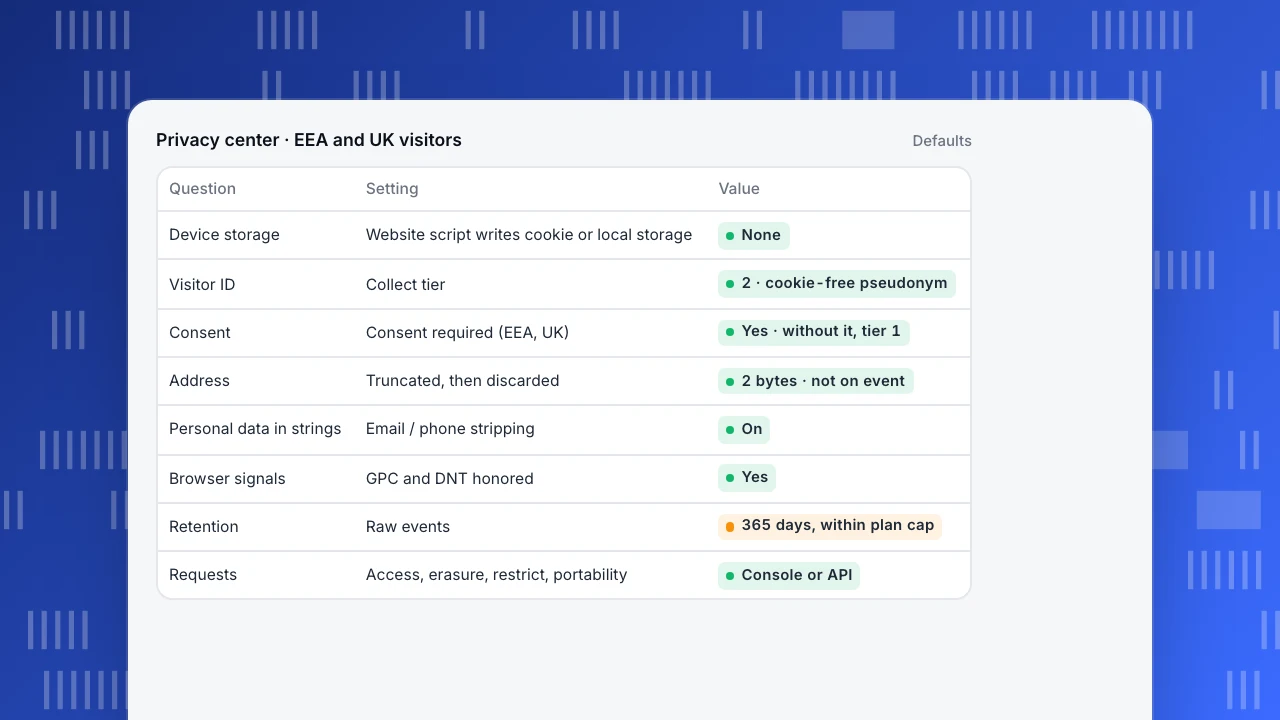
The example shows a typical setup for European visitors: no cookie, a pseudonymous visitor ID, consent required for anything more, the address shortened and then discarded, and browser privacy signals honored. Each line is one question from the checklist answered by a setting.
Privacy center · EEA and UK visitors
Defaults| Question | Setting | Value |
|---|---|---|
| Device storage | Website script writes cookie or local storage | None |
| Visitor ID | Collect tier | 2 · cookie-free pseudonym |
| Consent | Consent required (EEA, UK) | Yes · without it, tier 1 |
| Address | Truncated, then discarded | 2 bytes · not on event |
| Personal data in strings | Email / phone stripping | On |
| Browser signals | GPC and DNT honored | Yes |
| Retention | Raw events | 365 days, within plan cap |
| Requests | Access, erasure, restrict, portability | Console or API |
Doing this in TapCub
New TapCub projects start with anonymous analytics: the website script writes neither a cookie nor local storage. Settings live in the Privacy center, which has three collect tiers: anonymous aggregate, cookie-free pseudonym (the default) and identified. The default region rule for the EEA and the UK is tier 2 with consent required. Without an analytics consent bit, hits fall to tier 1, where pageviews and custom events are still stored but identity, autocapture and device IDs are dropped (privacy & compliance).
The address is not written on the event: it is shortened (2 bytes by default) before the city lookup and then discarded. Email- and phone-like strings are replaced when stripping is on (the default). Global Privacy Control and Do Not Track are honored by default. Retention defaults to 365 days for events within your plan's cap, and data-subject requests (access, erasure, restrict, portability) can be created in the console. The Strict preset rotates the visitor salt daily (privacy choices). More in GDPR and cookieless analytics.
FAQ
Is any analytics tool GDPR compliant by default?
No tool is compliant by itself. Compliance depends on what you collect, your legal basis, retention and how you handle requests. A tool can make that easier.
Do I need a cookie banner for analytics?
If the tool stores or reads anything on the device, ePrivacy rules usually require consent unless an exemption applies in your market. A setup with no device storage avoids that part, but not the GDPR itself.
Is an IP address personal data?
It can be. Check what the tool does with it: whether it is shortened, stored or discarded.
How long should I keep analytics data?
As long as you actually use it. Pick a period, set it in the tool, and keep aggregates if you need long-term trends.
Is this legal advice?
No. Use the checklist to prepare, then confirm with your data protection officer or counsel.
See also: Data residency, Data retention policy.
Was this article helpful?
We use your answers to fix and expand this page.
Couldn’t send. Please try again in a minute.
Thanks for the feedback. We’ll use it to improve this page.You’ve already sent feedback on this page. Thanks.

Solutions Engineer
Covers SDKs, API integrations, and data implementation, with an emphasis on validation, system interoperability, and troubleshooting.