Try it on your own data
Every report in this article is in the free plan. One snippet for web and apps, up to 10 sites.
Start freeKeeping data "just in case" is the default in most companies and a liability under privacy law. This guide covers the legal basis, the seven parts of a retention policy, a sample schedule that separates personal event data from long-lived aggregates, and what happened when one product cut raw event retention from 4.5 years to 13 months.
What you will learn
- GDPR requires keeping personal data no longer than necessary
- Set a period, purpose, owner and end action per data category
- Keep aggregates long and event-level personal data short
- Automate deletion, including exports and backups
- Publish retention periods in your privacy notice
What is a data retention policy?
A data retention policy is a documented set of rules that says, for each type of data an organization holds, how long it is kept, why, where, and how it is deleted or anonymized at the end of that period. It covers customer records, analytics events, logs, backups, emails and files.
Retention policies exist for two opposite reasons: some data must be kept for a minimum time (tax records, contracts), and personal data must not be kept longer than necessary. A good policy satisfies both and is enforced automatically, not just written down.
Why it matters: the legal basis
| Law | What it says about retention |
|---|---|
| GDPR Article 5(1)(e), storage limitation | Personal data must be kept in identifiable form no longer than necessary for the purposes it was collected for |
| GDPR Articles 13 and 14 | You must tell people how long their data is stored, or the criteria used to decide |
| GDPR Article 17, right to erasure | People can ask for deletion when data is no longer necessary |
| California (CCPA as amended by CPRA) | Businesses must disclose how long they retain each category of personal information and not keep it longer than reasonably necessary |
| Tax and accounting laws | Minimum retention for invoices and financial records, often 6 to 10 years depending on country |
Regulators have fined companies specifically for keeping data too long. Beyond fines, every extra month of personal data is more to secure, more to search in a data subject request, and more to lose in a breach.
What a retention policy includes
- Scope: systems and data categories covered (production databases, analytics, logs, backups, SaaS tools, spreadsheets).
- Retention schedule: a table of data category, retention period, legal basis or purpose, owner and end-of-life action (delete, anonymize, archive).
- Triggers: when the clock starts: collection date, last activity, contract end, consent withdrawal.
- Deletion method: automated job, anonymization, or manual process; how backups age out.
- Exceptions: legal holds and how they are approved and lifted.
- Roles: who owns each category, who approves changes, who audits.
- Review cycle: at least yearly, and whenever a new system or purpose appears.
Example retention schedule for analytics data
A schedule for a SaaS company's analytics and related data (sample policy, adapt to your own purposes and laws):
| Data category | Retention | Reason |
|---|---|---|
| Raw analytics events (with pseudonymous ids) | 13 months | Year-over-year comparison needs 12 months plus a buffer |
| Autocaptured clicks and form interactions | 90 days | Used for recent UX debugging only |
| Daily aggregates (no personal data) | Indefinite | Not personal data; needed for long-term trends |
| User profiles of identified users | 24 months after last activity | Re-engagement and support history |
| Consent receipts | 24 months after expiry | Proof of consent if challenged |
| Server access logs with IPs | 30 days | Security investigation window |
| Data exports and ad hoc CSVs | 7 days | Copies are the most common leak |
| Invoices and payment records | Per tax law (often 6–10 years) | Legal obligation, not analytics |
The key design choice is separating event-level data (personal, short retention) from aggregates (not personal, kept long). You keep long-term trends without keeping people.
| Law | Retention rule |
|---|---|
| GDPR Art. 5(1)(e) | No longer than necessary |
| GDPR Arts. 13–14 | Tell people the period |
| GDPR Art. 17 | Erase when no longer needed |
| CCPA / CPRA | Disclose period per category |
| Tax law | Minimum for financial records |
Not legal advice; check the laws that apply to you.
Worked example: what moving from "keep everything" to 13 months does
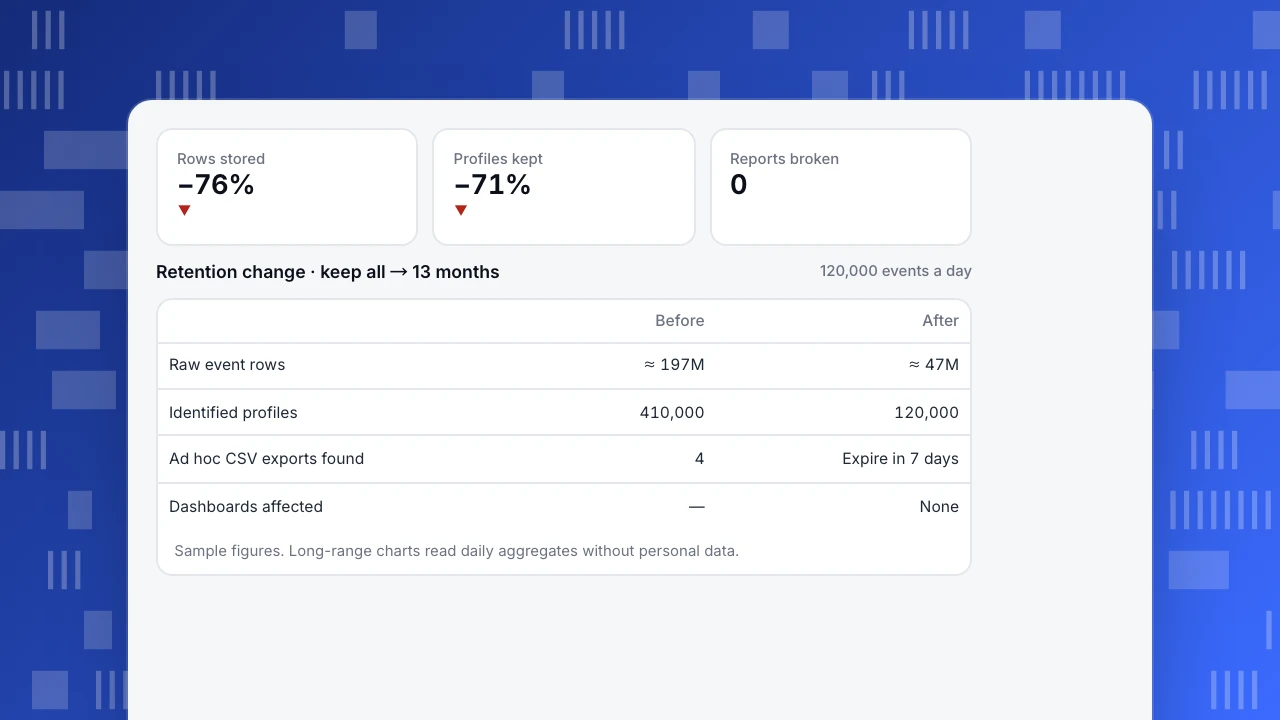
A product sending 120,000 events a day had kept every raw event since launch, 4.5 years (sample figures):
- Rows stored: about 197 million. After moving to 13 months: about 47 million, 76% fewer.
- Identified users with stored history: 410,000, of whom 290,000 had not been active for over two years. After the policy (profiles deleted 24 months after last activity): 120,000.
- Data subject request search: a deletion request previously had to search all 197 million rows plus four ad hoc CSV exports found on a shared drive; now it searches 47 million rows, and exports expire after 7 days.
- Reports affected: none of the regular dashboards. Long-range charts (3+ years) now read from daily aggregates, which carry no personal data.
The company also cut its warehouse storage bill, but the bigger gains were lower breach impact and simpler compliance.
Rows stored
−76%
▼
Profiles kept
−71%
▼
Reports broken
0
Retention change · keep all → 13 months
120,000 events a day| Before | After | |
|---|---|---|
| Raw event rows | ≈ 197M | ≈ 47M |
| Identified profiles | 410,000 | 120,000 |
| Ad hoc CSV exports found | 4 | Expire in 7 days |
| Dashboards affected | — | None |
Sample figures. Long-range charts read daily aggregates without personal data.
How to create a data retention policy
- Inventory data: list every system that stores personal data, including SaaS tools, logs and exports.
- Define the purpose of each category, then the shortest period that serves it. "Might be useful" is not a purpose.
- Check legal minimums with legal or finance for financial, employment and contract records.
- Decide end-of-life actions: delete, anonymize, or aggregate.
- Automate it. Scheduled jobs, product retention settings and storage lifecycle rules. A manual policy is usually not followed.
- Handle backups: let them age out on a fixed cycle; do not restore deleted personal data into production.
- Publish the periods in your privacy notice, as Articles 13 and 14 require.
- Review yearly and log changes.
Common mistakes
- "Keep everything" as the default. The most common and most costly mistake.
- One period for all data. Different categories serve different purposes.
- Forgetting copies: exports, spreadsheets, BI extracts and test databases.
- Deleting aggregates you need. Aggregate first, then delete the event-level data.
- No owner. Policies without owners drift as new tools are added.
Retention settings in TapCub
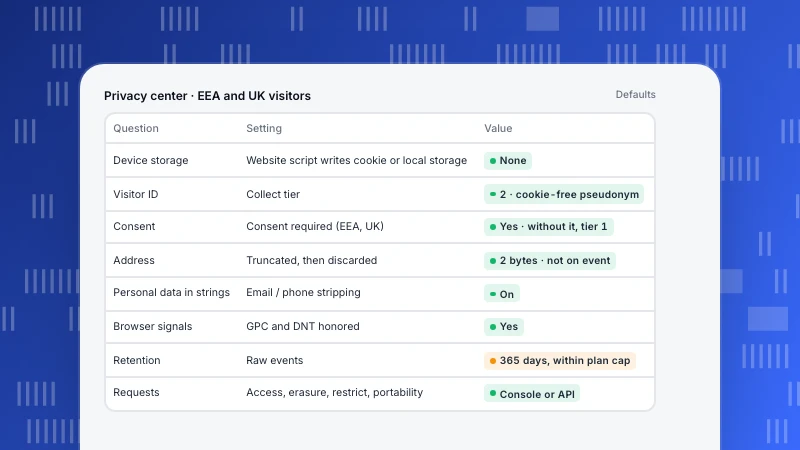
In Configuration › Privacy center › Data minimisation & retention, TapCub sets four periods separately: event rows (default 365 days), autocapture (90 days), person profiles (730 days) and consent receipts (730 days). A scheduled job deletes expired rows. The actual event retention cannot exceed your plan's limit. Daily aggregates contain no personal data and are not deleted on these timers, so long-term trends survive. Tiered decay can clear high-cardinality columns such as properties, referrer URL and title from older events before the deadline while keeping trends and funnels working. IP addresses are truncated at collection and not stored on events. See IP truncation and retention, data export and deletion and handling data subject requests. For the wider approach, see privacy by design.
Sources
- European Union. GDPR Article 5: principles relating to processing of personal data (storage limitation).
- UK Information Commissioner's Office. Principle (e): storage limitation.
- California Civil Code §1798.100 (CCPA/CPRA retention disclosure).
Was this article helpful?
We use your answers to fix and expand this page.
Couldn’t send. Please try again in a minute.
Thanks for the feedback. We’ll use it to improve this page.You’ve already sent feedback on this page. Thanks.

Solutions Engineer
Covers SDKs, API integrations, and data implementation, with an emphasis on validation, system interoperability, and troubleshooting.