Try it on your own data
Every report in this article is in the free plan. One snippet for web and apps, up to 10 sites.
Start freeEvery analytics number has traveled through a pipeline: collected, validated, cleaned, enriched, stored and queried. This guide walks through the six stages and how each one breaks, compares batch and streaming, and sizes a real-looking event pipeline where retries, late mobile events and a missing script each distorted the dashboard until four simple monitors caught them.
What you will learn
- A pipeline has collection, ingestion, processing, storage and serving stages
- Most dashboard errors trace back to one pipeline stage
- Hybrid pipelines stream for realtime and batch-correct late data
- Deduplicate business events on a unique id such as order id
- Monitor freshness, volume, rejects and schema, not only KPIs
What is a data pipeline?
A data pipeline is the set of automated steps that moves data from where it is created to where it is used, transforming it along the way. In analytics, a pipeline takes raw events from websites, apps and servers, checks and cleans them, enriches them (channel, device, location), stores them, and turns them into the tables behind dashboards, alerts and exports.
When a dashboard number looks wrong, the cause is almost always somewhere in the pipeline: an event that never arrived, a duplicate, a late batch, a renamed property. Understanding the stages is the fastest way to debug analytics.
The stages of a data pipeline
| Stage | What happens | Analytics example | Typical failure |
|---|---|---|---|
| Source / collection | Data is generated and sent | Browser script, mobile SDK, server events, CRM | Ad blockers, consent, script not loaded |
| Ingestion | Data is received, validated and queued | Collector endpoint accepts or rejects payloads | Rate limits, invalid payloads, wrong domain |
| Processing / transformation | Cleaned, deduplicated, enriched, joined | Bot filtering, UTM parsing, session building, identity stitching | Duplicates, wrong time zone, schema drift |
| Storage | Written to a database or warehouse | Event table, daily rollups, profiles | Retention limits, partition errors |
| Serving / consumption | Queried by reports, APIs, exports, models | Dashboards, alerts, SQL, raw export | Stale caches, slow queries |
| Orchestration and monitoring | Scheduling, retries, alerts on the pipeline itself | Daily jobs, freshness checks, volume anomaly alerts | Silent failures nobody notices |
| Stage | Example | Typical failure |
|---|---|---|
| Collection | Web script, SDKs, server events | Blocked or missing script |
| Ingestion | Collector validates payloads | Rate limits, invalid payloads |
| Processing | Bots, UTMs, sessions, identity | Duplicates, schema drift |
| Storage | Event table, rollups | Retention, partitions |
| Serving | Reports, SQL, exports | Stale caches |
Monitor the pipeline itself: a broken collector looks like a traffic drop.
Batch vs streaming pipelines
| Batch | Streaming | |
|---|---|---|
| How it runs | On a schedule (hourly, daily) over a chunk of data | Continuously, event by event or in micro-batches |
| Latency | Minutes to hours | Seconds |
| Good for | Daily reports, billing, exports, heavy joins | Realtime dashboards, alerts, fraud, live chat routing |
| Complexity | Lower; easy to re-run | Higher; ordering, late events, exactly-once |
| Typical tools | Airflow, dbt, cron + SQL | Kafka, Kinesis, Flink, Redis streams |
Most analytics products are hybrid: events stream in for realtime views, while batch jobs build daily rollups and correct late data. That is why "today" numbers can shift slightly overnight.
ETL and ELT
The two classic patterns differ in where transformation happens:
- ETL (extract, transform, load): clean and shape data before loading it into the warehouse. Smaller, tidier storage; harder to reprocess history.
- ELT (extract, load, transform): load raw data first, transform inside the warehouse with SQL. Keeps the raw data, so you can rebuild tables when definitions change. Common with modern cloud warehouses.
Worked example: sizing and checking an event pipeline
A SaaS product sends about 120,000 events a day from web and app (sample figures).
Volume. At roughly 0.8 KB per raw JSON event, that is 96 MB a day, about 2.9 GB a month and 35 GB a year uncompressed. JSON event data typically compresses around 8–12× with gzip, so a year of exports is a few gigabytes. Volume is rarely the problem for a site this size; correctness is.
Duplicates. Mobile SDKs retry when the network drops. In one week, 0.6% of purchase events arrived twice. Without a dedupe key, revenue was overstated by 0.6%. Sending the order id with each purchase and deduplicating on it removed the duplicates.
Late data. 1.8% of app events arrived more than an hour late (offline devices syncing). A daily batch that ran at 00:30 and never re-processed undercounted yesterday by that amount. Re-running the previous day's rollup once more after a few hours fixed it.
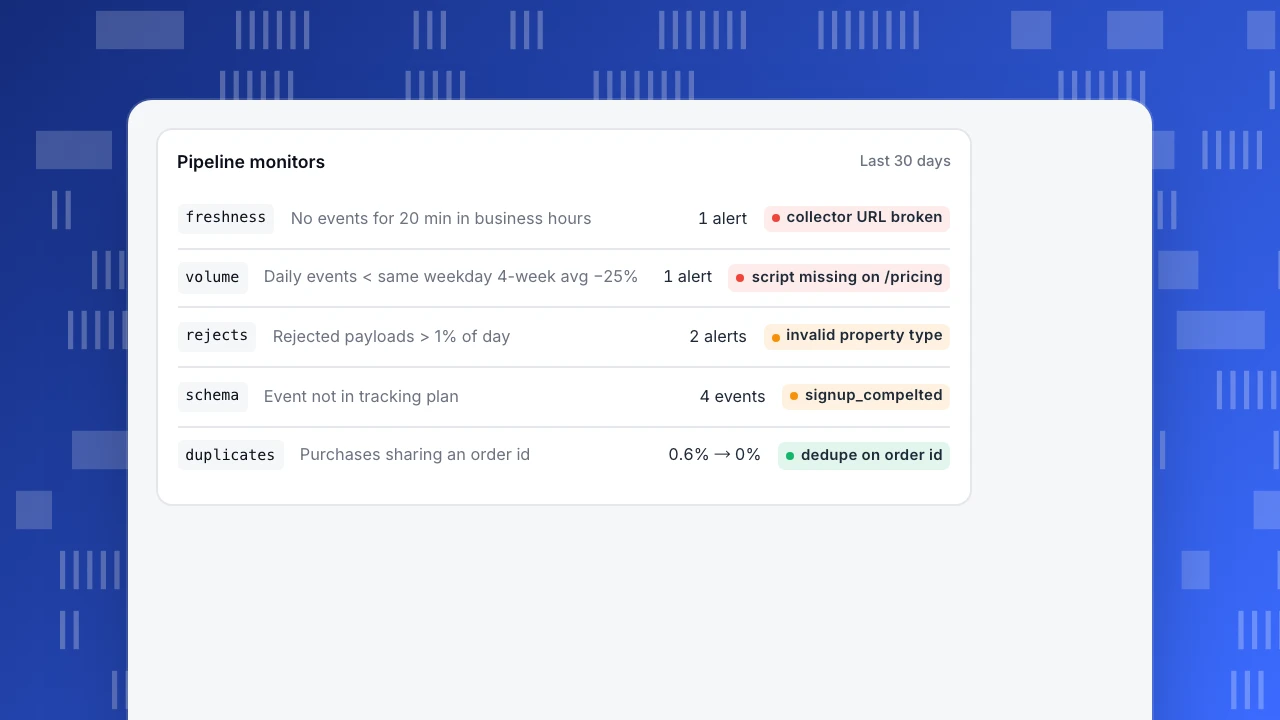
Freshness and volume checks. The team added two monitors on the pipeline itself:
| Check | Rule | What it caught |
|---|---|---|
| Freshness | Alert if no events for 20 minutes during business hours | A deploy that broke the collector URL |
| Volume | Alert if daily events fall more than 25% below the same weekday's 4-week average | A tag manager change that removed the script from pricing pages |
| Rejects | Alert if rejected payloads exceed 1% of the day | A new SDK version sending an invalid property type |
| Schema | Alert on new event names or properties not in the tracking plan | Typos such as signup_compelted |
These are what data observability tools automate: freshness, volume, schema, distribution and lineage.
Pipeline monitors
Last 30 daysfreshnessNo events for 20 min in business hours1 alertcollector URL brokenvolumeDaily events < same weekday 4-week avg −25%1 alertscript missing on /pricingrejectsRejected payloads > 1% of day2 alertsinvalid property typeschemaEvent not in tracking plan4 eventssignup_compeltedduplicatesPurchases sharing an order id0.6% → 0%dedupe on order id
Data pipeline best practices
- Define events before you collect them. A tracking plan and data dictionary prevent most schema problems.
- Make every step idempotent. Re-running a job for the same day should give the same result, not double it.
- Carry a unique id on business events (order id, invoice id) and deduplicate on it.
- Store timestamps in UTC, convert to the reporting time zone at query time.
- Keep raw data for a defined period so you can rebuild derived tables.
- Watch cardinality. Properties with millions of unique values (full URLs with session ids, free text) bloat storage and slow queries.
- Monitor the pipeline, not only the business metrics. A traffic drop and a broken collector look the same on a dashboard.
- Keep personal data out early. Strip emails and tokens at collection; it is far harder later.
How the TapCub pipeline works
- Collection: the web script, mobile and mini-program SDKs, and server-side events. You can also import server logs.
- Ingestion: the collector validates each payload. Rejects happen before storage and are listed on the data quality page by reason and day: domain mismatch, exclusion rule, monthly quota, rate limit, invalid payload and bots.
- Processing: bot detection, channel and UTM parsing, sessions, identity resolution.
- Storage: an event table and a daily person rollup. Default retention is 365 days for events, 90 for autocapture and 730 for profiles and consent receipts.
- Serving: reports, SQL queries, monitors and raw data export as gzipped JSONL (up to 365 days per job; files kept for 48 hours) for your own warehouse.
For purchases, send the order id so retries do not create a second order.
See also: Lakehouse vs warehouse, Data lineage.
Sources
- Kleppmann, M. (2017). Designing Data-Intensive Applications. O'Reilly, chapters 10–11.
- Google Cloud. What is a data pipeline?
- Reis, J. and Housley, M. (2022). Fundamentals of Data Engineering. O'Reilly.
Was this article helpful?
We use your answers to fix and expand this page.
Couldn’t send. Please try again in a minute.
Thanks for the feedback. We’ll use it to improve this page.You’ve already sent feedback on this page. Thanks.

Technical Engineer
Focuses on tracking code, SDKs, and API integrations, with practical guidance on implementation checks and troubleshooting.