Try it on your own data
Every report in this article is in the free plan. One snippet for web and apps, up to 10 sites.
Start freeLead magnet examples work when they answer the question a visitor is asking on that exact page. Match the magnet to the page's intent — awareness, comparison or decision — and judge it by qualified leads, not downloads. Below: 15 examples grouped by intent, a recomputable downloads-versus-qualified-leads example, and how to measure it in TapCub.
What you will learn
- Match the magnet to the page's intent: awareness pages get checklists and cheat sheets, comparison pages get calculators and case studies, decision pages get trials and demos.
- Gate by intent — soft or no email while visitors learn, email plus one qualifying question when they are ready to decide.
- Judge magnets by qualified leads and closed deals, not downloads; in the sample, the calculator drew a third the downloads but closed four times as many.
What is a lead magnet?
A lead magnet is a free, useful resource you offer in exchange for a visitor's contact details — usually an email address. HubSpot describes it as an incentive that rewards a prospect for sharing their information; AWeber frames it the same way: something valuable enough that a visitor willingly trades contact details for it. The exchange only works when the resource answers a question the visitor already has.
Use this three-part test before you build anything:
- It solves one specific problem. Not "everything about marketing" but "the 12 steps to launch your first webinar."
- It can be delivered immediately. A download, a link, a booking — not a promise to send something next week.
- It is worth an email. The visitor would feel short-changed if the only way to get it was to hand over contact details and receive nothing useful.
If a resource fails any one of the three, it is content, not a lead magnet — publish it openly and put a real magnet beside it.
Two counterexamples. A newsletter signup is not a lead magnet: there is no specific resource, only a promise of future emails. A generic, site-wide ebook ("The Ultimate Guide to Our Industry") fails the first test on most pages — a visitor on a pricing page does not want a broad ebook, they want an answer about cost. That mismatch is the point of this article: match the magnet to the page, and measure qualified leads, not downloads.
Match the magnet to the page: three visitor intents
The same visitor moves through three intents as they move through your site, and each intent asks a different question. Pick the magnet that answers the question on that page.
- Awareness — "What is this, and how do I do it?" Blog posts, how-to guides, glossary pages. Give a checklist, cheat sheet, template pack, quiz or email mini-course.
- Comparison — "Which option fits me?" Comparison, review, alternatives and solutions pages. Give a selection comparison sheet, a numeric case study, an ROI calculator, a recorded workshop or a buyer's guide.
- Decision — "Is this the right one, and what happens if I buy?" Pricing, demo, trial and checkout pages. Give a free trial, live demo, free consult, sample project or a first-order offer.
The if-then rule: if you can write down the exact question a visitor is asking on a page, then build the magnet that answers that question — and nothing broader. If you cannot name the question, the page is not ready for a magnet yet.
How do you name the question? Read the page's own title and H1, the search queries that bring people to it, and the questions visitors actually ask in chat or support. A page titled "How to migrate from X" is asking a migration question; a page titled "X vs Y" is asking a fit question. Write that question at the top of your magnet brief before you choose a format.
The table below maps each intent to its pages, formats and gating rule. One magnet per page intent beats one ebook for the whole site.
| Visitor intent | Typical pages | Magnet formats that fit | Gate |
|---|---|---|---|
| Awareness (learning) | Blog posts, how-to guides, glossary | Checklist, cheat sheet, template pack, quiz, email mini-course | Soft or none — email optional |
| Comparison (evaluating) | Comparison, review, alternatives, solutions | Selection sheet, numeric case study, ROI calculator, recorded workshop, buyer's guide | Email — they are shortlisting |
| Decision (ready to act) | Pricing, demo, trial, checkout | Free trial/sandbox, live demo, free consult, sample project, first-order offer | Email + one qualifying question |
Match the magnet to the question the visitor is asking on that page, not to one site-wide ebook.
5 lead magnet examples for awareness pages
These visitors are learning, not ready to buy, so keep the gate light and solve the immediate "how do I" question. The common thread: each resource finishes the task the post started. Effort figures are experience estimates, not benchmarks.
1. One-page checklist. Format: a single-page PDF of the steps from your how-to post. Effort: 2–4 hours (estimate). Fit: blog and how-to pages where the visitor asks "what do I actually do next?" A post on running your first webinar pairs with a "12-step webinar launch" checklist. Gate: soft — preview the steps inline, offer the printable PDF for an email. Metric: the checklist download event as a goal; qualified leads judged in your CRM.
2. Cheat sheet. Format: a one-page reference of shortcuts, formulas or settings. Effort: 2–3 hours (estimate). Fit: tutorial pages where the visitor asks "can I keep this beside me while I work?" Gate: soft — show a blurred preview, full sheet for an email. Metric: cheat-sheet download event as a goal; qualified leads in your CRM.
3. Template or swipe-file pack. Format: editable files (emails, spreadsheets, briefs) the visitor can reuse. Effort: 4–8 hours (estimate). Fit: how-to pages where the visitor asks "can I skip starting from scratch?" Gate: email — templates are high-value, a fair trade. Metric: template-pack download event as a goal; qualified leads in your CRM.
4. Quiz or self-assessment. Format: a short scored quiz that returns a personalised result. Effort: 6–12 hours (estimate). Fit: blog pages where the visitor asks "where do I stand, or which type am I?" Gate: email to see the full result. Metric: quiz-completion event as a goal; qualified leads in your CRM.
5. Email mini-course. Format: a 5-day sequence of short lessons. Effort: 8–16 hours (estimate). Fit: awareness pages where the visitor asks "teach me this over a week." Gate: email — the course is delivered by email by definition. Metric: course-signup form submission as a goal; qualified leads in your CRM.
5 lead magnet examples for comparison pages
These visitors are shortlisting. They will trade an email for something that helps them choose, so make the comparison concrete. The common thread: every resource here reduces the risk of choosing wrong. Effort figures are estimates.
1. Selection comparison sheet. Format: a side-by-side grid of options against the criteria that matter. Effort: 3–6 hours (estimate). Fit: comparison and alternatives pages where the visitor asks "how do these actually differ?" Gate: email. Metric: comparison-sheet download event as a goal; qualified leads in your CRM.
2. Numeric case study. Format: a one-page story with real before/after numbers and the method. Effort: 4–8 hours (estimate). Fit: review and solutions pages where the visitor asks "did this work for someone like me?" Gate: email for the full PDF; teaser numbers inline. Metric: case-study download event as a goal; qualified leads in your CRM.
3. ROI or payback calculator. Format: an interactive spreadsheet or web tool that returns a number from the visitor's inputs. Effort: 8–20 hours (estimate). Fit: comparison and pricing-adjacent pages where the visitor asks "is this worth the money for my size?" A SaaS page pairs with a calculator that turns team size and current spend into a monthly saving. Gate: email to save or export the result. Metric: calculator-use event as a goal; qualified leads in your CRM.
4. Recorded workshop. Format: a 20–40 minute on-demand video walking through a real evaluation. Effort: 6–12 hours (estimate). Fit: comparison pages where the visitor asks "show me how to judge this properly." Gate: email to unlock the recording. Metric: workshop-registration form submission as a goal; qualified leads in your CRM.
5. Buyer's guide PDF. Format: a structured guide to the criteria, pitfalls and questions to ask vendors. Effort: 6–10 hours (estimate). Fit: solutions and comparison pages where the visitor asks "what should I even be checking?" Gate: email. Metric: buyer-guide download event as a goal; qualified leads in your CRM.
5 lead magnet examples for decision pages
These visitors are ready to act, so the gate can be firmer — email plus one qualifying question — because the resource is a step toward buying, not just learning. These offers turn browsing into a concrete next step, which is why a qualifying question is fair here. For the landing-page context behind these offers, see landing page conversion rate; for how trials and demos fit a SaaS pipeline, see SaaS lead generation. Effort figures are estimates.
1. Free trial or sandbox. Format: time-boxed access to the product with sample data. Effort: 1–3 days (estimate) if the product already supports it. Fit: pricing and trial pages where the visitor asks "can I touch it before I commit?" Gate: email plus one qualifying question (team size or use case). Metric: trial-start event as a goal; qualified and closed in your CRM.
2. Live demo. Format: a booked 15–30 minute walkthrough of the part the visitor cares about. Effort: 2–4 hours to set up booking (estimate), plus ongoing delivery. Fit: demo and pricing pages where the visitor asks "show me it working on my problem." A demo page pairs with a booking link for a 20-minute walkthrough of the visitor's exact use case. Gate: email plus a qualifying question to book. Metric: demo-booking form submission as a goal; qualified and closed in your CRM.
3. Free consult or audit. Format: a short call or written review of the visitor's situation. Effort: 2–4 hours setup (estimate), plus delivery time. Fit: service and pricing pages where the visitor asks "what would you do for me specifically?" Gate: email plus a qualifying question. Metric: consult-request form submission as a goal; qualified and closed in your CRM.
4. Sample project or done-for-you example. Format: a small real deliverable produced for the visitor's use case. Effort: 4–10 hours (estimate) per sample. Fit: decision pages where the visitor asks "prove the quality on something like mine." Gate: email plus a qualifying question. Metric: sample-request form submission as a goal; qualified and closed in your CRM.
5. First-order offer or pilot plan. Format: a scoped discount, extended trial or paid pilot with clear terms. Effort: 2–6 hours (estimate) to define terms. Fit: pricing and checkout pages where the visitor asks "what makes trying this low-risk?" Gate: email plus a qualifying question. Metric: offer-claim event as a goal; qualified and closed in your CRM.
Worked example: downloads vs qualified leads
Here is the thesis in numbers. Sample data: one month, one site, three magnets, each shown to 1,000 landing visitors. Every download is gated, so a download is a lead. "Qualified" and "closed" are judged in the CRM, not in analytics — see marketing qualified lead for the definition.
| Magnet (page) | Landing visitors | Downloads (rate) | Qualified (rate of downloads) | Closed | Download to close |
|---|---|---|---|---|---|
| Generic ebook (blog) | 1,000 | 120 (12%) | 12 (10%) | 1 | 0.8% |
| Matched checklist (blog) | 1,000 | 90 (9%) | 18 (20%) | 2 | 2.2% |
| ROI calculator (pricing) | 1,000 | 40 (4%) | 16 (40%) | 4 | 10% |
Recompute it yourself:
- Download rate = downloads ÷ 1,000. Ebook 120 ÷ 1,000 = 12%; checklist 90 ÷ 1,000 = 9%; calculator 40 ÷ 1,000 = 4%.
- Qualified rate = qualified ÷ downloads. Ebook 12 ÷ 120 = 10%; checklist 18 ÷ 90 = 20%; calculator 16 ÷ 40 = 40%.
- Download to close = closed ÷ downloads. Ebook 1 ÷ 120 = 0.8%; checklist 2 ÷ 90 = 2.2%; calculator 4 ÷ 40 = 10%.
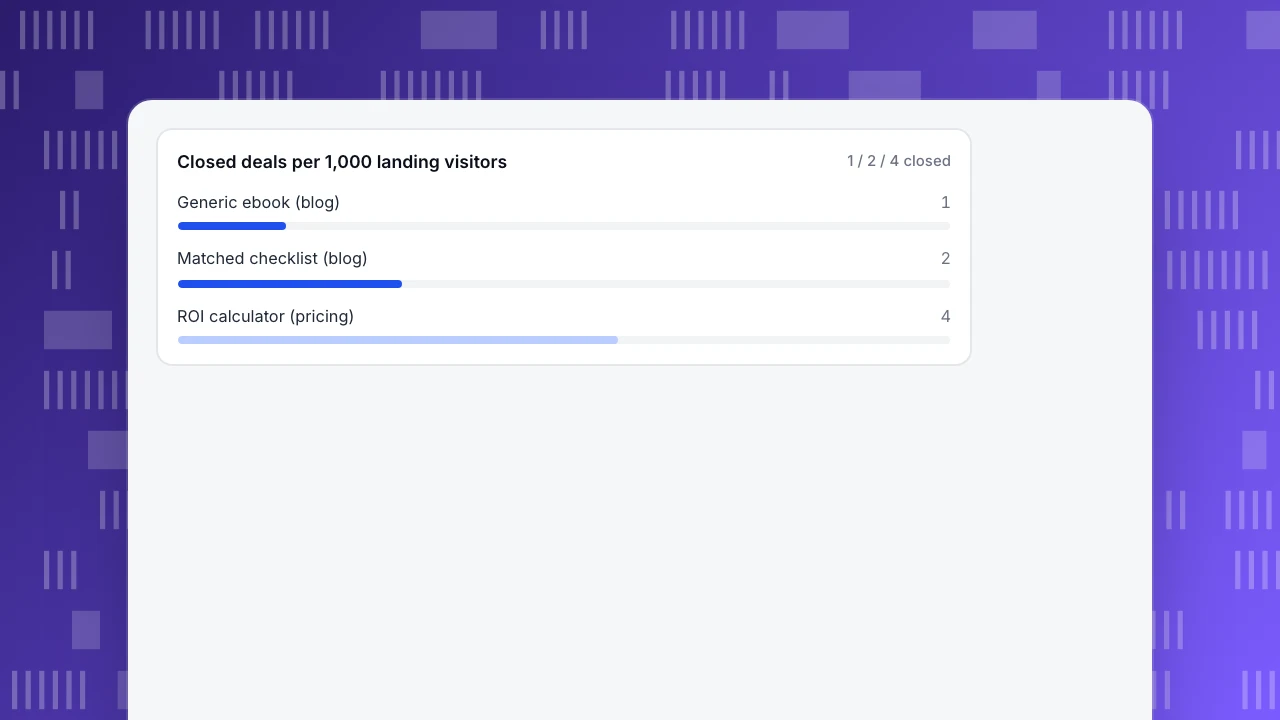
The ebook wins on downloads (120) and loses on everything that matters. The calculator drew one third the downloads (40 vs 120) yet closed four times as many deals (4 vs 1), because it sat on a pricing page answering a cost question and qualified 40% of its leads. Ranking by downloads would have you build more ebooks; ranking by qualified leads and closes tells you to build the calculator. The stage-by-stage arithmetic is covered in lead conversion rate, and keeping the stages separate in lead tracking.
Read the leak, not just the total. The ebook's problem is qualification: 120 people wanted a broad read, but only 12 were worth a sales conversation, because a blog reader is rarely ready to buy. The calculator leaks fewer leads at every stage because the visitor arrived with a cost question and the tool answered it. Same traffic, different intent, different result.
The chart below shows closed deals per 1,000 landing visitors for each magnet.
Closed deals per 1,000 landing visitors
1 / 2 / 4 closedCommon lead magnet mistakes
Five mistakes, each with an if-then fix:
- One ebook for the whole site. If a single broad ebook is gated on every page, then split it by intent: a checklist on how-to pages, a calculator on pricing, a trial on the demo page.
- Email required for everything. If even a top-of-funnel blog reader must hand over an email, then soften the awareness gate (inline preview, optional email) and keep the hard gate for comparison and decision pages.
- An eight-field form. If your form asks for name, company, phone, role, budget, timeline and more, then cut it to an email — or email plus one qualifying question on decision pages.
- No follow-up after the download. If the visitor gets the file and then silence, then deliver instantly and state the next step (a related lesson, a booking link), using your own email tool.
- Counting downloads as success. If your report stops at download totals, then add qualified leads and closed deals from the CRM; a magnet with fewer downloads but more qualified leads is the one to keep.
Each fix moves you from counting downloads to counting qualified leads on the right page.
How to run lead magnets in TapCub
Take the ebook and the pricing-page calculator from the example above. In TapCub you can see which one produces qualified leads without wiring up a separate analytics stack, because chat and analytics share one script and one visitor ID.
- Record the claim as an event and a goal. The website script auto-tracks file downloads, so the ebook and checklist need no extra code. Form submissions (quiz, demo booking, trial) need
data-forms="true"on the form; TapCub then records only the form's id, name and action — never the content, so emails and qualifying answers stay in your own form backend and CRM. See each claim under Web analytics › Events, then define one goal per magnet (a goal is one event or page) under Web analytics › Goals. Setup details: track form submissions. - Read claims by source and landing page. In Web analytics › Goals, select the calculator's goal and the source and entry-page breakdown narrows to it, so you see that its 40 claims come from the pricing page. The goal's conversion rate divides by every unique visitor in the range, so for the example's per-page rate (40 ÷ 1,000 = 4%) divide by that page's visitors in Web analytics › Pages. Because TapCub counts humans and bots separately (Web analytics › Bots), crawlers do not inflate either denominator.
- Hand over the right magnet in chat. Live chat › Chat settings › Proactive invites triggers on a page plus seconds spent — for example, invite on the pricing page after 30 seconds and offer the calculator link or a consult. In Live chat › Inbox, the agent sends the link in the conversation; the side panel already shows the visitor's source, current page and last two days of browsing, because it is the same visitor ID. If the visitor is logged in, identify them with
tapcub.loginand the agent knows who they are without asking. The full chat-to-lead playbook is in live chat lead generation. - Check whether chat helped. Live chat › Reports › Conversion attribution compares visitors who chatted and then reached a goal with those who browsed without chatting, and shows the relative lift (chatted rate ÷ no-chat rate − 1). It warns when fewer than 30 visitors chatted, so you do not over-read a small sample.
- Qualify and close in your CRM. TapCub is not a CRM and does no lead scoring. Move the lead, its source and the conversation into your CRM with a named owner; the qualified and closed numbers in the example come from there.
Two boundaries. The chat widget has no pre-chat form — ask for the email in the conversation, or use Live chat › Chat settings › Offline messages after hours. And TapCub does no email marketing: delivery and follow-up emails run through your own email tool; TapCub only measures the claim.
FAQ
What is a lead magnet?
A lead magnet is a free, useful resource offered in exchange for a visitor's contact details, usually an email. It works when it answers a specific question the visitor already has on that page. The point of this article: match the magnet to the page's intent and judge it by qualified leads, not by how many people downloaded it.
Do lead magnets still work?
Yes, when they are specific. AWeber notes that broad, generic ebooks convert worse than resources that solve one concrete problem. A magnet matched to the page's question still earns emails and qualified leads; a site-wide ebook gated everywhere mostly collects downloads that never become customers. Measure qualified leads to tell the two apart.
Which lead magnet type should a small business start with?
Start with a one-page checklist on your highest-traffic how-to article. It is cheap to build (a few hours), answers the exact question that page already attracts, and needs only a soft email gate. Run one magnet on one page, measure qualified leads for a month, then expand to comparison and decision pages.
How do I deliver a lead magnet automatically?
Show the download link or file immediately after the form is submitted, then send any follow-up lessons through your own email tool. TapCub records the download or form submission as an event and goal so you can measure it, but it does not send emails — delivery and nurture stay in your email platform.
Should every lead magnet require an email address?
No — gate by intent. On awareness pages, use a soft or optional gate so readers can preview the resource; on comparison and decision pages, require an email (plus one qualifying question when they are ready to buy). A hard gate everywhere suppresses top-of-funnel claims; no gate anywhere leaves you with downloads you cannot follow up.
Sources
- Romanchuk, J. (2025). What is a lead magnet? 20 lead magnet ideas and examples (+ step-by-step). HubSpot — lead magnet definition and offer-creation steps. Verified 2026-11-15.
- Meeker, A. (2026). 63 Lead Magnet Ideas and Examples (And How to Build Your Own). OptinMonster — 63 format examples, audience awareness stages and distribution. Verified 2026-11-15.
- Tinney, S. (2026). What Are Lead Magnets? Types, Strategies, and the Best Examples. AWeber — six types with examples and FAQ; generic ebooks convert worse than specific problem-solvers. Verified 2026-11-15.
- Kovalenko, O. (2021, updated 2025). 10+ Lead Magnet Ideas for Businesses (+Examples to Inspire Yours). Tidio — 11 ideas with brand examples. Verified 2026-11-15.
Was this article helpful?
We use your answers to fix and expand this page.
Couldn’t send. Please try again in a minute.
Thanks for the feedback. We’ll use it to improve this page.You’ve already sent feedback on this page. Thanks.

Product Experience Specialist
Explores usability, user journeys, and feature adoption through practical examples of onboarding and everyday product use.