Try it on your own data
Every report in this article is in the free plan. One snippet for web and apps, up to 10 sites.
Start freeEvery cancellation comes with a reason, but most companies either do not ask or count the answers without weighting them by revenue. This guide lists the common cancellation reasons, shows how to design a survey that is fair to customers, and walks through a quarter where the most frequent reason was not the most expensive one.
What you will learn
- Separate voluntary cancellations from failed-payment churn
- Ask one main-reason question with six to eight options
- Never let the survey block or hide cancellation
- Weight reasons by lost revenue, not count alone
- Match save offers to the reason: pause, downgrade, onboarding
What are cancellation reasons?
Cancellation reasons are the explanations customers give when they end a subscription: too expensive, not using it, missing a feature, switching to a competitor, and so on. Collected consistently, usually with a short survey in the cancellation flow, they turn churn from a single number into a list of problems you can fix and customers you can still keep.
Churn rate tells you how many customers leave. Cancellation reasons tell you why, which ones are preventable, and what each reason costs in revenue.
The most common cancellation reasons
Across subscription products, the same categories come up again and again:
| Reason | What it usually means | Preventable? |
|---|---|---|
| Not using it enough | The customer never formed a habit or reached the core value | Often, through onboarding and activation |
| Too expensive | Price is higher than the value they get, or budget was cut | Sometimes: downgrade, annual discount, smaller plan |
| Missing feature | The product does not do something they need | Sometimes: roadmap, workaround, integration |
| Switched to a competitor | Another product fits better or is cheaper | Sometimes; learn which competitor and why |
| Temporary need or project ended | Seasonal use, finished project | Often: pause instead of cancel |
| Technical problems or bugs | Reliability, performance, integration failures | Yes |
| Poor support experience | Slow or unhelpful answers | Yes |
| Business closed or changed | Company shut down, merged, changed direction | Rarely |
Separate these voluntary cancellations from involuntary churn: subscriptions that end because a card payment failed and was not recovered. Involuntary churn has no "reason" from the customer and is fixed with payment retries, card updaters and reminder emails, not with product changes.
| Reason | Save offer |
|---|---|
| Temporary need | Pause for 1–3 months |
| Too expensive | Downgrade or annual discount |
| Not using it | Onboarding check-in before renewal |
| Missing feature | Workaround or roadmap follow-up |
| Competitor | Ask which one and why |
Offers must be optional; cancelling stays one click away.
How to design a cancellation survey
- One required question, one optional. "What's the main reason you're cancelling?" with single-choice options, then an optional free-text box.
- Six to eight mutually exclusive options plus "Other." More options produce noise; fewer hide important reasons.
- Ask for the main reason, not all reasons, so each cancellation counts once.
- Follow up by reason. If "Switched to a competitor," ask which one. If "Missing feature," ask which feature.
- Never block cancellation. The survey must be skippable, and the cancel button must stay easy to find. Many jurisdictions regulate cancellation flows; California's Automatic Renewal Law, for example, requires that consumers who sign up online can cancel online.
- Store the reason with the subscription record (plan, MRR, tenure, acquisition channel), so you can analyze it later.
Worked example: a quarter of cancellation reasons
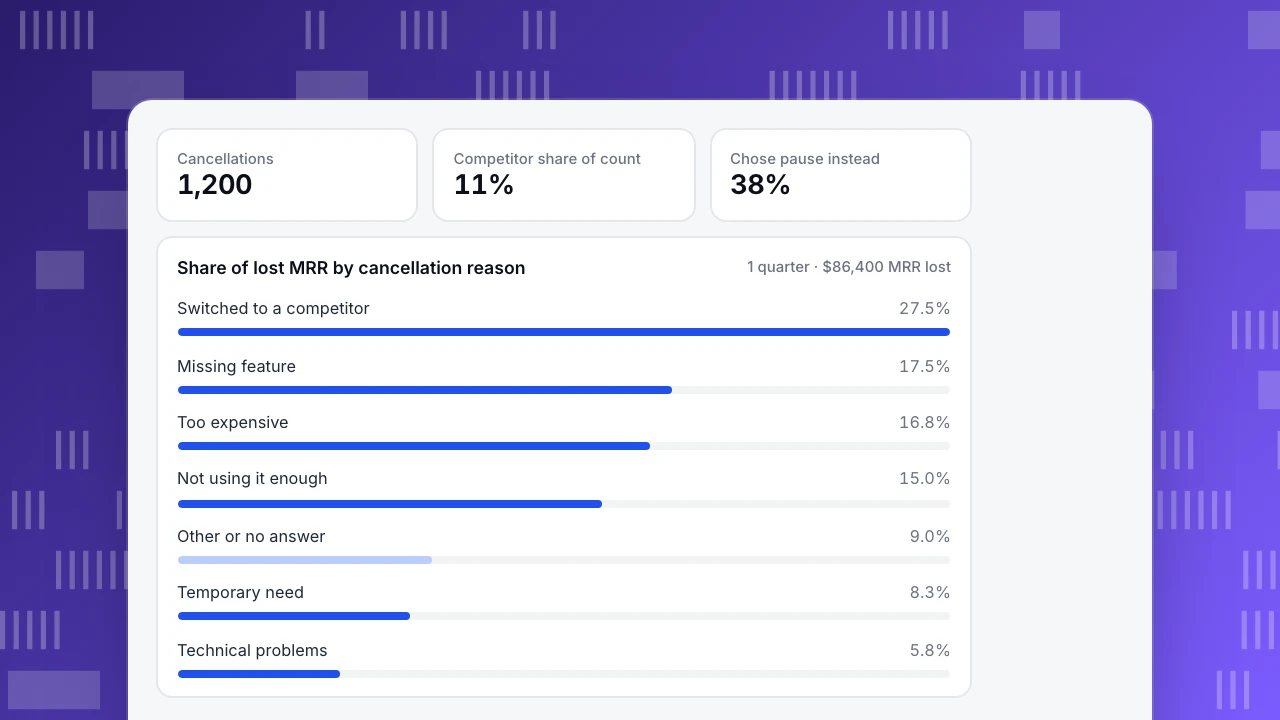
A B2B SaaS product recorded 1,200 voluntary cancellations in one quarter, each with a main reason and the account's monthly recurring revenue (MRR) (sample figures):
| Main reason | Cancellations | Share | Average MRR | MRR lost | Share of MRR lost |
|---|---|---|---|---|---|
| Not using it enough | 324 | 27% | $40 | $12,960 | 15.0% |
| Too expensive | 264 | 22% | $55 | $14,520 | 16.8% |
| Missing feature | 168 | 14% | $90 | $15,120 | 17.5% |
| Switched to a competitor | 132 | 11% | $180 | $23,760 | 27.5% |
| Temporary need | 120 | 10% | $60 | $7,200 | 8.3% |
| Technical problems | 72 | 6% | $70 | $5,040 | 5.8% |
| Other or no answer | 120 | 10% | $65 | $7,800 | 9.0% |
| Total | 1,200 | 100% | $72 | $86,400 | 100% |
Counting cancellations, "not using it" was the top problem. Weighting by revenue changed the priority: competitor switches were 11% of cancellations but 27.5% of lost MRR, because they were larger accounts. The follow-up question showed that 70% of them named the same competitor and the same missing integration.
What the team did:
- Larger accounts: built the missing integration, the top item in both the "competitor" and "missing feature" follow-ups.
- Temporary need: offered a 3-month pause; 38% of these customers chose it instead of cancelling.
- Too expensive: offered a downgrade to a smaller plan; 21% accepted, keeping on average 45% of their previous MRR.
- Not using it: routed accounts with no key activity in 14 days into an onboarding check-in before renewal, because by the time of cancellation it was usually too late.
Cancellations
1,200
Competitor share of count
11%
Chose pause instead
38%
Share of lost MRR by cancellation reason
1 quarter · $86,400 MRR lostHow to analyze cancellation reasons
- Weight by revenue, not just by count.
- Cut by tenure. Cancellations in the first 90 days are usually onboarding problems; later ones are value, price or competition.
- Cut by plan and acquisition channel. A reason concentrated in one channel can point to a mismatch between ads and product.
- Read the free text monthly. Tag recurring themes and add them as options when they grow.
- Track the trend. Re-run the table every quarter and check whether the fixes moved their reason.
Tracking cancellation reasons in TapCub
Send a subscription_cancelled event with properties such as reason, plan and mrr when a customer cancels, and identify the user so the event joins their history (Track custom events, Identify users). In All-platform analytics › Behavior › Behavior analysis, break subscription_cancelled down by reason, and compare cohorts or segments of cancelled users (Create user segments). The B2B / SaaS industry pack under Business › Industry packs includes the subscription events and churned subscriptions and churned MRR metrics. Related reading: Customer churn analysis, Churn rate vs retention rate and Subscription analytics.
See also: Pareto analysis.
See also: Customer needs analysis.
Sources
- California Business and Professions Code, §17602 (Automatic Renewal Law, online cancellation).
Was this article helpful?
We use your answers to fix and expand this page.
Couldn’t send. Please try again in a minute.
Thanks for the feedback. We’ll use it to improve this page.You’ve already sent feedback on this page. Thanks.

Product Adoption Consultant
Explores customer onboarding, live conversations, and self-service, turning common usage questions into practical guidance and improvements.