Try it on your own data
Every report in this article is in the free plan. One snippet for web and apps, up to 10 sites.
Start freeBounce rate and exit rate both describe people leaving, but they divide by different things and answer different questions. This guide puts them side by side, works through a per-page example, and shows which pages each one is meaningful for.
What you will learn
- Bounce rate divides by entries; exit rate divides by every pageview of the page
- Read bounce rate on landing pages and exit rate on mid-journey pages
- Check entry counts before trusting a page bounce rate, and definitions before comparing tools
Two different questions
Bounce rate and exit rate are often confused because both describe people leaving. They answer different questions:
- Bounce rate of a page: of the sessions that started on this page, how many left without doing anything else? It is about first impressions.
- Exit rate of a page: of all the views of this page, how many were the last page of the session? It is about where journeys end.
Every bounce is also an exit, but most exits are not bounces: someone can browse five pages and leave from the sixth.
Side by side
The difference is the denominator. Bounce rate divides by entries (sessions that started on the page). Exit rate divides by pageviews (every time the page was seen, at any point in a session). That is why a page can have a low bounce rate and a high exit rate, or the other way round.
What counts as "doing something else" also varies. In TapCub a bounce is a session with one pageview and no custom event. In GA4, bounce rate is the share of sessions that were not engaged, the inverse of engagement rate (Google Analytics Help). Compare tools only after checking their definitions. More in bounce rate.
| Bounce rate | Exit rate | |
|---|---|---|
| Question | Did sessions that started here leave right away? | How often is this page the last one? |
| Formula | Bounced sessions ÷ entries | Exits ÷ pageviews |
| Applies to | Sessions that began on the page | Every view of the page |
| Fits | Landing pages, articles, ads | Checkout steps, pricing, forms |
| High is fine on | Single-answer articles | Thank-you and confirmation pages |
| Watch out for | Few entries; tool definitions | End pages; seasonality |
Every bounce is an exit; most exits are not bounces.
Worked example
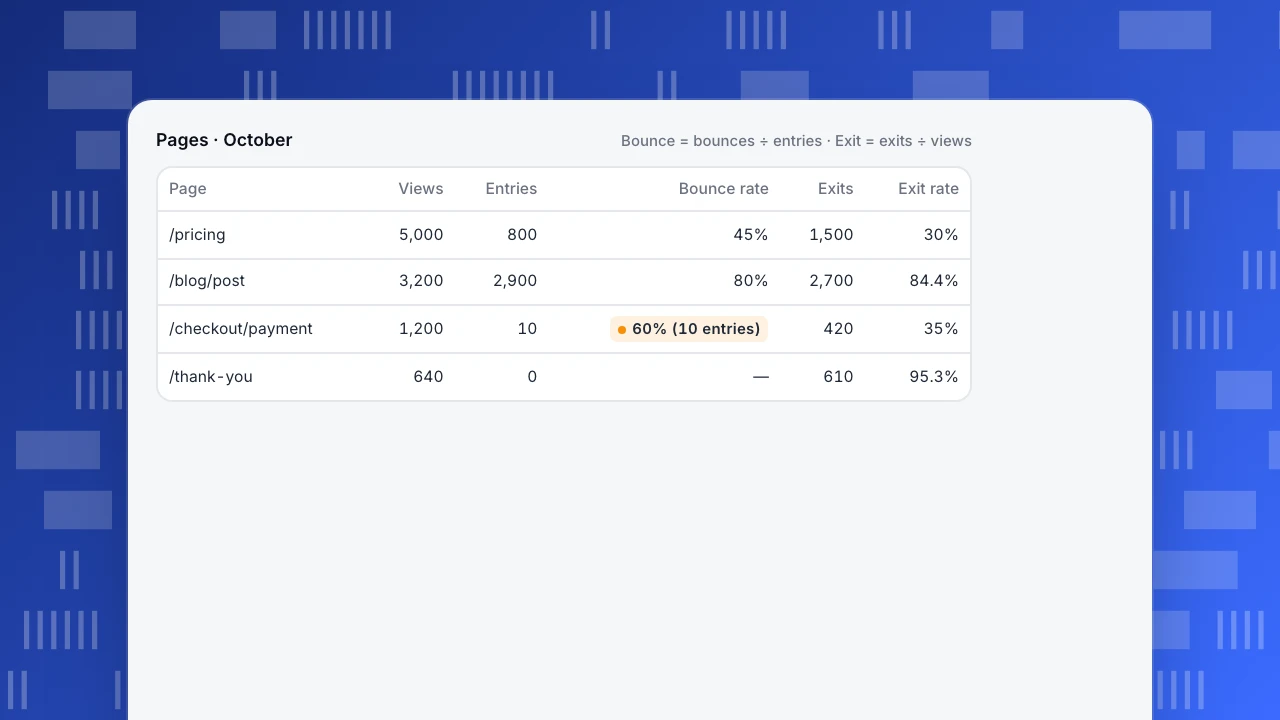
The example lists four pages for one month:
- /pricing: 800 sessions started there and 360 bounced, so bounce rate is 45%. It was viewed 5,000 times and 1,500 of those were exits, so exit rate is 30%. Most visitors arrive from other pages and continue.
- /blog/post: 2,900 entries, 2,320 bounces: 80% bounce. 3,200 views, 2,700 exits: 84.4% exit. A typical article: people read and leave.
- /checkout/payment: only 10 entries, so the 60% bounce rate means nothing. The 35% exit rate on 1,200 views is the number that matters: a third of people who reach payment leave there.
- /thank-you: almost no one enters there, so bounce rate is blank. A 95.3% exit rate is expected; the journey is complete.
Pages · October
Bounce = bounces ÷ entries · Exit = exits ÷ views| Page | Views | Entries | Bounce rate | Exits | Exit rate |
|---|---|---|---|---|---|
| /pricing | 5,000 | 800 | 45% | 1,500 | 30% |
| /blog/post | 3,200 | 2,900 | 80% | 2,700 | 84.4% |
| /checkout/payment | 1,200 | 10 | 60% (10 entries) | 420 | 35% |
| /thank-you | 640 | 0 | — | 610 | 95.3% |
Read by page purpose
Neither number is good or bad on its own. Read it against what the page is for:
- Landing and article pages: bounce rate matters, since most sessions start there. A high bounce rate on an article that answers the question can be fine; pair it with time on page or scroll depth.
- Middle-of-journey pages (pricing, product, cart, checkout steps): exit rate matters. A rising exit rate here is a leak; build a funnel to see the step-to-step drop.
- End pages (confirmation, thank-you, download complete): high exit rate is the goal.
- Navigation pages (home, category): both should be low; people should move on.
Common mistakes
- Reading bounce rate on pages few sessions start on. Ten entries is not a rate. Check the entries column first.
- Treating exit rate as failure. Every session ends somewhere. Compare exit rate with the page's purpose and with its own past.
- Comparing bounce rate across tools without checking whether events or engagement count.
- Averaging page rates. A site-wide bounce rate is bounced sessions ÷ all sessions, not the average of page bounce rates.
For which engagement measures to put next to these, see engagement metrics and analytics metrics.
Bounce and exit in TapCub
TapCub's bounce rate is bounced sessions divided by sessions, where a bounce is one pageview and no custom event (metrics). Automatic events such as outbound clicks and downloads do not prevent a bounce; a custom event you send does.
The Pages report shows, for each visited page, pageviews, visitors, entries, exits, average time, bounce rate and downstream pageviews (later pageviews in the same session); the Entry pages and Exit pages tabs show entering sessions and exits with exit rate (pages). Page bounce rate uses that page's entries; exit rate uses its pageviews. To follow a drop between steps, build a funnel. For the terms, see entry and exit pages.
FAQ
What is the difference between bounce rate and exit rate?
Bounce rate is single-page sessions ÷ sessions that started on the page. Exit rate is exits from the page ÷ all views of the page.
Can exit rate be higher than bounce rate?
Yes, and often is on pages people reach mid-journey, such as checkout steps. It can also be lower, on pages that are mostly entered and then left.
Is a high exit rate bad?
Only on pages meant to lead somewhere, like pricing or checkout. On a thank-you page a high exit rate is expected.
How is bounce rate calculated?
Sessions with one pageview and no interaction ÷ sessions, for the site or for sessions starting on one page. The exact meaning of "no interaction" depends on the tool.
Which matters more for SEO pages?
Bounce rate, because search visitors enter on those pages. Read it with time on page: a quick answer can mean a satisfied reader.
See also: Find exit pages.
Was this article helpful?
We use your answers to fix and expand this page.
Couldn’t send. Please try again in a minute.
Thanks for the feedback. We’ll use it to improve this page.You’ve already sent feedback on this page. Thanks.

Data Analyst
Explores traffic sources, conversion funnels, and retention, using clear metric definitions and concrete examples to explain what the numbers mean.