Try it on your own data
Every report in this article is in the free plan. One snippet for web and apps, up to 10 sites.
Start freeUser segmentation splits people into groups that behave differently, so you can understand each group and treat it differently. Textbook examples are often about ad audiences. This guide gives twelve segments a product or growth team can build from event data, each with the rule behind it and what to do with it, and a sample showing what two segments reveal.
What you will learn
- Good segments are defined by behaviour you can measure, not guesses about who people are
- Every segment needs an action: a message, a test or a product change
- Check segment size and refresh rules so a segment stays meaningful
What a useful segment looks like
A segment is a group of people who share a rule, such as "signed up in the last 7 days" or "purchased twice". A useful segment has three things:
- A clear rule based on data you collect.
- A difference that matters: the group behaves differently from others.
- An action: something you will do differently for it.
Four types of segmentation
- Behavioural: what people did. The most useful for product teams.
- Lifecycle: where people are in their relationship with you: new, activated, at risk.
- Value: how much people spend or how often. RFM (recency, frequency, monetary) is a common model.
- Context: device, country, channel of first visit.
12 examples
The table lists twelve segments, their rules and what to do with each. Most can be built from a handful of events: sign-up, a key action, purchase, and pageviews.
| Segment | Rule | What to do with it |
|---|---|---|
| New this week | First seen in the last 7 days | Onboarding messages |
| Activated | Did the key action within 7 days of sign-up | Compare retention with not activated |
| Stuck in setup | Signed up, did not finish setup in 3 days | Guided help or a check-in email |
| Power users | Active on 4+ days a week | Beta features, interviews |
| At risk | Was active weekly, no activity for 14 days | Win-back message |
| Feature adopters | Used feature X at least 3 times | Measure if X improves retention |
| Trial, high intent | Visited pricing twice in trial | Sales follow-up |
| First-time buyers | Exactly one purchase | Second-order offer |
| Repeat buyers | Two or more purchases | Loyalty programme |
| Cart abandoners | Added to cart, no purchase in 24 h | Reminder |
| Mobile-only | All sessions on mobile | Check mobile experience |
| Came from campaign X | First visit with utm_campaign = X | Judge the campaign on later behaviour |
Rules are examples; adjust windows to your product.
A worked example
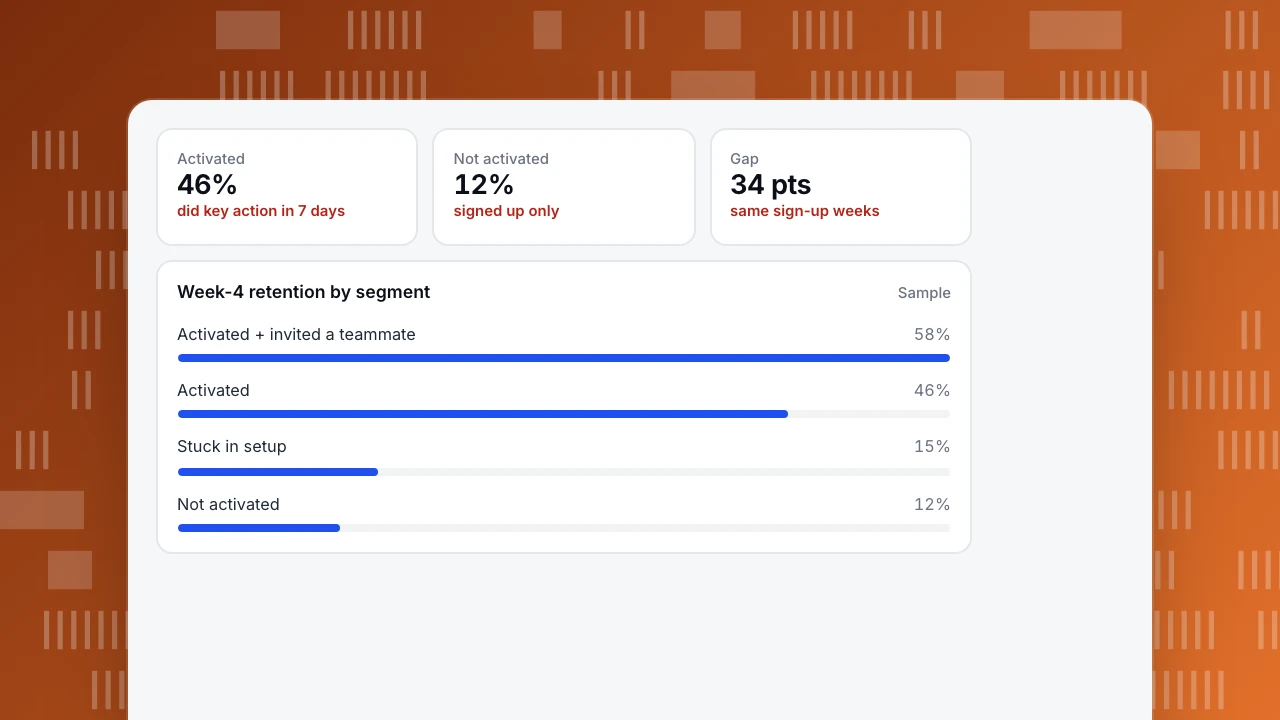
A software team builds four segments from people who signed up in the same four weeks, then compares their week-4 retention:
- Not activated: 12%.
- Stuck in setup: 15%.
- Activated (key action within 7 days): 46%.
- Activated and invited a teammate: 58%.
The gap between activated and not activated is 34 points. The team focuses onboarding on the key action and adds an invite prompt, then tracks the share of new users in the activated segment each week.
Activated
46%
did key action in 7 days
Not activated
12%
signed up only
Gap
34 pts
same sign-up weeks
Week-4 retention by segment
SampleKeeping segments useful
- Refresh rules regularly. In TapCub, rule segments refresh daily or on demand, and live segments add people as events arrive.
- Set an expiry so people who stopped matching leave. TapCub segments can drop members after a set number of days without new activity.
- Check size. A segment of 30 people swings by chance; combine or widen it.
- Avoid overlap confusion. If segments overlap, say so when comparing them.
- Keep personal data out of segment names and exports you share.
For value-based segments, TapCub's RFM segments sort buyers into ten buckets, from champions to hibernating. More on analysis in customer segmentation analysis.
FAQ
What are examples of user segments?
New users, activated users, power users, at-risk users, first-time and repeat buyers, cart abandoners and users from a specific campaign.
What is the difference between segmentation and cohorts?
Cohorts group people by when they started. Segments group them by a rule about who they are or what they did. You can combine them.
How many segments should I have?
Start with five to ten that each lead to an action. Add more only when a question needs them.
See also: User status segmentation.
Was this article helpful?
We use your answers to fix and expand this page.
Couldn’t send. Please try again in a minute.
Thanks for the feedback. We’ll use it to improve this page.You’ve already sent feedback on this page. Thanks.

Product Analyst
Focuses on event analysis, conversion funnels, and retention, using clear metric definitions and structured analysis to explain product performance.