Try it on your own data
Every report in this article is in the free plan. One snippet for web and apps, up to 10 sites.
Start freeA sign up flow is every step between clicking "Sign up" and holding a working account: the page, the form, verification and the handoff into the product. Each required field or check adds a drop-off point, but measure before you cut: record one event per step and fix the step that loses the most people first.
What you will learn
- Track one event per step, from the sign up page to the first key action
- In the sample, fixing verification is worth 234 active users; deleting a field, 42
- Field error events show which rule stops people; never log what they type
What is a sign up flow?
A sign up flow is the sequence of screens between a visitor clicking "Sign up" and that person holding a working account: the sign up page, the form, any verification step, and the handoff into the product. It ends where onboarding begins. What happens after the account exists, such as checklists, tours and first-use guidance, is covered in app onboarding.
The sign up page is one screen; the flow is everything that screen sets in motion. That difference matters because most teams redesign the page and never look at the steps after it. A form can convert well and still feed a verification step that quietly loses a third of the people who completed it.
The argument of this article: every required field, rule and confirmation adds a place to drop out, but you should measure before you delete anything. Record one event per step, find the step that loses the most people, and fix that one first. Guessing usually picks the wrong step.
The elements of a sign up flow, and what each one costs
Every element in a sign up flow buys you something: data, security, fewer fake accounts, a better first session. Each one also costs some share of the people who started. The table lists the common elements with that trade-off and a sensible default.
Two principles sit behind the defaults:
- Ask for what you need now, not what you might want later. Company size, job title and "how did you hear about us" can be asked inside the product once the person has seen some value. Nielsen Norman Group's form usability guidelines start with "keep it short": cut fields that can be derived, collected later or left out.
- Never make a security step harder than the risk requires. NIST's digital identity guidelines (SP 800-63B-4) tell services not to impose composition rules such as mixing character types, not to force periodic password changes, and to allow password managers and autofill. A password rule that rejects "correct horse battery staple" because it lacks a digit adds friction without adding security.
| Element | What it costs | What it buys | Sensible default |
|---|---|---|---|
| Extra fields (company, role) | Each one is another reason to stop | Segmentation data | Ask inside the product later |
| Password rules | Errors and retries | Account security | Length rule plus blocklist, no composition rules |
| Email verification | An inbox between the user and the product | Real addresses, less spam | Let people in first, confirm within days |
| Social login or SSO | Some users refuse to link accounts | No password, no verification step | Offer it first if it activates better |
| Bot check | Extra step for real people | Fewer fake accounts | Only when abuse is measurable |
| Credit card up front | Many visitors leave | Fewer, more committed trials | Only for paid-only products |
| Onboarding questions | Delay before first value | Personalised first session | One or two, skippable |
Defaults are starting points; your funnel decides which element to change first.
Instrument the flow before you change it
You cannot find the leaky step without one event per step. A minimal plan for a web sign up flow:
| Event | Fires when | Properties worth keeping |
|---|---|---|
signup_page_view | The sign up page loads (a pageview is enough) | Source, landing page |
signup_started | The first field receives input | Method shown (email, Google, SSO) |
signup_field_error | Validation rejects a field | Field name, rule that failed |
signup_submitted | The account is created | Method used |
email_verified | The verification link or code is accepted | Minutes since submit |
first_key_action | The person does the thing your product is for | Which action |
Rules that keep the data trustworthy:
- Never send the values people type. The field name and the rule that failed ("password", "too short") are enough to find the problem. Email addresses and passwords do not belong in analytics events.
- Send
signup_submittedfrom the server when the account is actually created, so a double click or a failed request does not count as a sign up. - Decide what "first key action" means before launch. It is the step that turns a sign up into a user, sometimes called the aha moment. Without it you will optimise for accounts that never get used.
- Write the plan down with owners and required properties, so the events survive the next redesign. A tracking plan is the usual place.
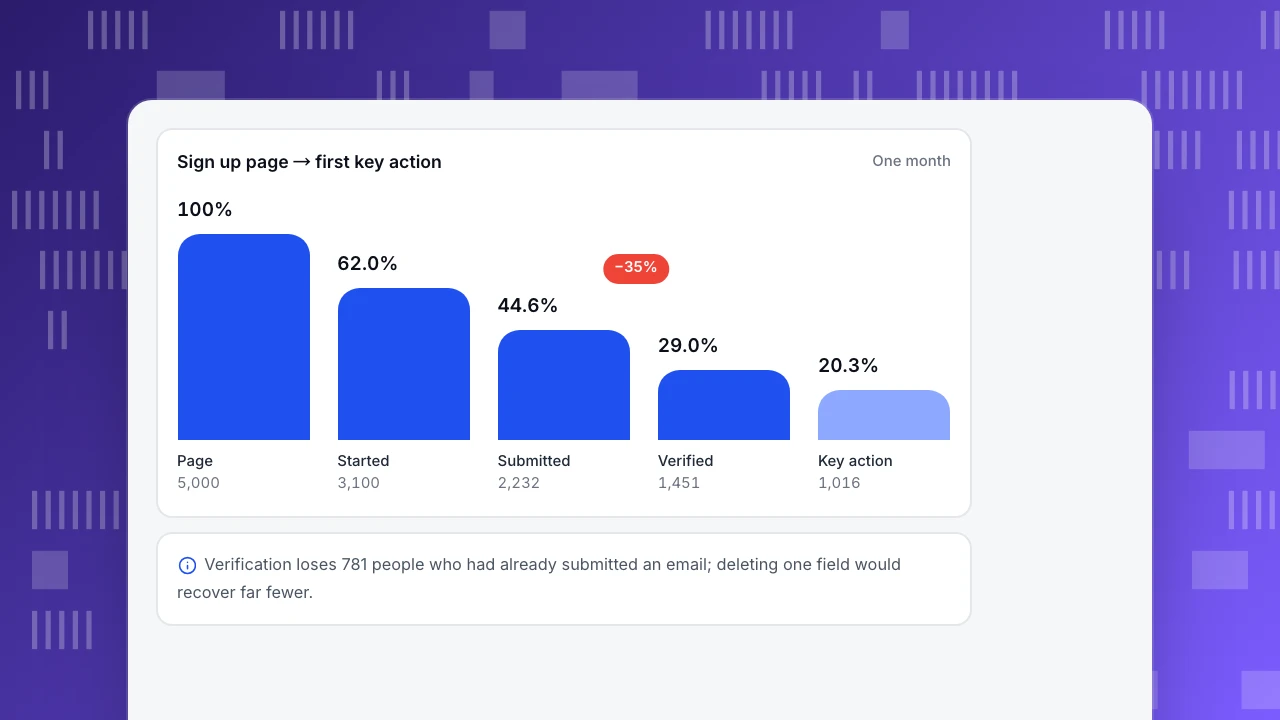
A worked funnel: 5,000 visits to the sign up page
Sample data: one month for a SaaS product with email and password sign up and email verification required before first use.
| Step | People | Rate from previous step | Lost at this step |
|---|---|---|---|
| Visited sign up page | 5,000 | — | — |
| Started the form | 3,100 | 62.0% | 1,900 |
| Submitted | 2,232 | 72.0% | 868 |
| Verified email | 1,451 | 65.0% | 781 |
| First key action | 1,016 | 70.0% | 435 |
Overall, 1,016 ÷ 5,000 = 20.3% of visitors become active users.
Suppose the team's first idea was to delete the optional-looking "company size" field, and that this lifts the submit rate from 72% to 75%. Then 3,100 × 75% = 2,325 submit, 2,325 × 65% ≈ 1,511 verify and 1,511 × 70% ≈ 1,058 reach the key action: 42 more active users.
Now take the step the funnel points to. Verification loses 781 people who had already handed over an email address. If letting people into the product before verifying (and asking them to confirm within a few days) raises that step from 65% to 80%, then 2,232 × 80% ≈ 1,786 verify and 1,786 × 70% ≈ 1,250 reach the key action: 234 more active users, more than five times the field deletion.
The 1,900 people who never start the form look like the biggest loss, and they matter. But many of them are reading the page to decide whether to sign up at all; that is a question for the page's message and the pricing, not the form. The people lost after submitting are different. They wanted an account and the flow stopped them.
Sign up page → first key action
One monthPage
5,000
Started
3,100
Submitted
2,232
Verified
1,451
Key action
1,016
Find the field that loses people
The funnel shows which step leaks. Field error events show why. Sample data from the same month:
- 744 of the 3,100 people who started the form (24.0%) hit at least one password error. Of those, 387 submitted (52.0%).
- The other 2,356 never saw a password error, and 1,845 of them submitted (78.3%).
If the 744 had submitted at the same 78.3%, about 583 would have finished instead of 387, so 196 more submissions. Carried through verification (65%) and the key action (70%), that is about 89 more active users. A password rule is costing twice as much as the company size field.
What to do with a finding like this:
- Show the rule before people type, not after they fail it.
- Replace composition rules with a length rule and a blocklist check, in line with NIST SP 800-63B-4, which also asks services to tell users why a password was rejected.
- Allow paste and password managers. NIST requires verifiers to allow password managers and autofill. WCAG 2.2 success criterion 3.3.8 (Accessible Authentication, Minimum) says a step that relies on remembering or transcribing a password needs a mechanism such as paste or a password manager to be accessible.
- Keep the error message specific. "Use at least 15 characters" beats "Invalid password". Nielsen Norman Group lists highly visible, specific error messages among its top form recommendations.
Email verification: before or after access?
Verification protects you from typos, fake accounts and spam. It also puts an inbox between the person and your product, which is where the sample funnel loses 35% of its submissions. Three designs, from most to least friction:
| Design | What happens | Use it when |
|---|---|---|
| Verify before access | The account is locked until the link is clicked | Regulated products, or when abuse is expensive |
| Access first, verify within N days | The person uses the product now; a banner asks for confirmation | Most SaaS and consumer products |
| Code in the same screen | A six-digit code is typed in without leaving the flow | Mobile apps and short flows |
Whichever you choose, track the minutes between signup_submitted and email_verified. If most verifications happen within five minutes and almost none after an hour, people who do not verify quickly are lost, and a reminder after a day will not bring many back. Check the resend rate too; a high one often means the email lands in spam.
Social login and single sign-on
"Continue with Google" removes the password field and the verification step at once, which is why it often converts better. It also has costs: some people do not want to link accounts, work products need SSO for company domains, and you get less control over the email address you receive.
Measure instead of assuming. Add the method as a property on signup_submitted, then compare the share of each method that reaches the first key action. Rules for reading it:
- If social sign up converts better to the key action, make it the first button and keep email as the alternative.
- If social sign ups submit more often but activate less, you may be getting curious clicks; check whether those accounts come back.
- If most of your traffic is from work email domains, SSO matters more than consumer social buttons.
Test a redesign without fooling yourself
Sign up rates move with campaigns, seasons and launches. To know whether a change worked:
- Compare the step you changed. A new password rule should move the started-to-submitted rate. If the total moved and that step did not, something else did it.
- Compare equal periods with similar traffic. Four weeks against four weeks, with no big launch in one of them, and mark the change date on your charts.
- Count enough people. With about 2,000 submissions a month, a two-point change in a step rate is a few dozen people. A randomised A/B test answers faster and more reliably; run one in your testing tool if traffic allows.
- Follow the cohort past sign up. A change that lifts sign ups but lowers the share who reach the first key action has not helped. The free trial conversion rate and onboarding metrics tell you whether the new users stay.
Common sign up flow mistakes
- Optimising the page and ignoring the steps after it. In the sample, verification lost almost as many people as the form.
- Deleting fields by gut feeling. Field error events show which field actually stops people.
- Counting accounts instead of active users. A sign up that never reaches the first key action is not a win.
- Logging what people type. Field names and rule names are enough, and safer.
- Changing several steps at once. You will not know which change did what.
- Ignoring the first session. The first-time user experience decides whether the new account is used again; general sources of friction are covered in user friction.
How to measure your sign up flow in TapCub
The 5,000-visit example above, step by step in TapCub.
- Register the events first. In All-platform analytics › Data › Tracking plan, add the six events with their properties, mark the required ones and set the status to Developing. After release, turn on Live verification (24 h) to see how many times each event arrived and how complete its required properties are, then move the status to Accepting and Live. Guide: create a tracking plan.
- Send the steps. On the website, call
tapcub.track('signup_started', { method: 'email' })and the other events from your code. If you only need to know that the form was submitted,data-forms="true"on the script records form submissions with the form's id, name and action, never the values typed (track form submissions). - Build the funnel. In All-platform analytics › Behavior › Behavior analysis, add a funnel from the sign up page view to
first_key_action. Each step shows its count, the rate versus the previous step, the drop-off and the median time from the previous step, and the largest drop, verification in the sample, is marked. Break it down by themethodproperty to compare email and Google, and click a step to see who dropped there. - Know who signed up. Once the account exists, call
tapcub.loginwith your user ID (the site needs identified mode). The person then appears in All-platform analytics › Users › People with a day-by-day timeline of what they did before and after signing up (identify users). - Watch a handful of drop-offs. Session replay in All-platform analytics › Behavior › Session replay is off by default. When turned on, input values are masked by default and password fields are never recorded, so you can watch how people move through the form without seeing what they typed.
TapCub measures the flow. It does not send verification emails or run A/B tests; those stay in your authentication system and testing tool.
FAQ
What is a sign up flow?
A sign up flow is the sequence of steps from clicking "Sign up" to holding a working account: the sign up page, the form, any verification and the handoff into the product. It ends where onboarding starts. Measuring it means recording one event per step so you can see where people drop out.
How many fields should a sign up form have?
As few as you need to create the account, often just an email and a password, or one social button. Everything else can be asked later inside the product. Before deleting fields, check field error events: one strict rule can cost more sign ups than several optional fields combined.
Should you require email verification before people can use the product?
Only when abuse or regulation makes it necessary. For most products, letting people in first and asking them to confirm within a few days keeps more of them. Track the time between submitting and verifying: if almost nobody verifies after the first hour, a locked account loses those people for good.
Does social login improve sign up conversion?
It often does, because it removes the password and verification steps. It is not guaranteed. Record the sign up method as a property, then compare how many of each method reach the first key action. If social sign ups activate less, the extra accounts may not be worth much.
How do you measure sign up flow conversion?
Track one event per step, from the sign up page view to the first key action, and build a funnel with them. Read each step's rate, drop-off and median time. Overall conversion is active users ÷ sign up page visitors; in the sample month it was 1,016 ÷ 5,000 = 20.3%.
Sources
- National Institute of Standards and Technology, SP 800-63B-4: Digital Identity Guidelines, Authentication and Authenticator Management, §3.1.1 (password requirements). Checked 2026-11-15.
- W3C, Understanding Success Criterion 3.3.8: Accessible Authentication (Minimum), WCAG 2.2. Checked 2026-11-15.
- Whitenton, K. (2016). Website Forms Usability: Top 10 Recommendations. Nielsen Norman Group. Checked 2026-11-15.
Was this article helpful?
We use your answers to fix and expand this page.
Couldn’t send. Please try again in a minute.
Thanks for the feedback. We’ll use it to improve this page.You’ve already sent feedback on this page. Thanks.

Product Adoption Consultant
Explores customer onboarding, live conversations, and self-service, turning common usage questions into practical guidance and improvements.