Try it on your own data
Every report in this article is in the free plan. One snippet for web and apps, up to 10 sites.
Start freeApp onboarding is everything between install and a new user’s first moment of value. This guide compares five onboarding flow types, lists ten best practices, shows which metrics to track per screen, and walks through a fitness app that removed intro slides and moved sign-up after the first workout to lift activation from 33% to 52%.
What is app onboarding?
App onboarding is everything a new user goes through between installing an app and getting value from it for the first time: welcome screens, sign-up, permissions, personalization questions, tutorials and the first task. A good onboarding flow is judged by one thing: how many new users reach the app's core action (the "aha moment") in their first session, and come back afterwards.
Onboarding is not a tour of features. The shortest path to the first moment of value usually beats the most complete introduction.
Types of onboarding flows
| Type | How it works | Works best for | Risk |
|---|---|---|---|
| Benefit-focused | 2–3 screens explaining what the app does for you | Apps whose value is not obvious from the store page | Users skip screens they did not ask for |
| Progressive | Features introduced when the user first needs them | Feature-rich apps | Key features may never be discovered |
| Interactive / learn by doing | The first task is the tutorial | Productivity, learning, creative apps | Needs careful design and sample content |
| Personalized | A few questions tailor the first screen | Content, fitness, finance apps | Too many questions before any value |
| Account-first | Sign-up before anything else | Apps that cannot work without an account | High drop-off before users see value |
Most good flows combine two: a short benefit or personalization step, then learning by doing.
| Metric | Why it matters |
|---|---|
| Step drop-off | Shows which screen loses most users |
| Time to value | Long setups lose impatient users |
| Activation rate | Predicts retention better than completion |
| Day-7 retention | Confirms the flow built a habit |
Split every metric by platform, channel and app version.
App onboarding best practices
- Define the aha moment. The single action that predicts retention (first workout logged, first message sent, first budget created).
- Delay sign-up when you can. Let users try the core action before asking for an account; ask once they have something to save.
- Ask for permissions in context. Request notifications or location when the feature that needs them is used, and explain why first.
- Ask only questions you will use. Each personalization question should change what the user sees.
- Use sample content. An empty screen teaches nothing. Pre-fill a demo project or example data.
- Make every step skippable except the essential. And let users return to setup later.
- Show progress. "Step 2 of 3" sets expectations and reduces abandonment.
- Keep the first session short. Aim to reach the aha moment in minutes, not after a long setup.
- Follow up after the first session. A relevant reminder or email tied to what the user started helps them return.
- Measure and iterate per platform. iOS and Android permission dialogs and sign-in options behave differently.
How to measure an onboarding flow
Build a funnel with one step per screen or action, from first open to the aha moment, and track:
| Metric | Definition |
|---|---|
| Onboarding completion rate | Users who finish the flow ÷ users who start it |
| Step drop-off | Share of users who leave at each screen |
| Time to value | Median time from first open to the aha moment |
| Activation rate | New users who reach the aha moment within a set window (for example 24 hours) |
| Day-1 and day-7 retention | New users active one and seven days later |
| Permission grant rate | Users who allow notifications, location, etc. |
Split all of them by platform, acquisition channel and app version. A flow that works for organic users may fail for paid ones who know less about the app.
Worked example: a fitness app
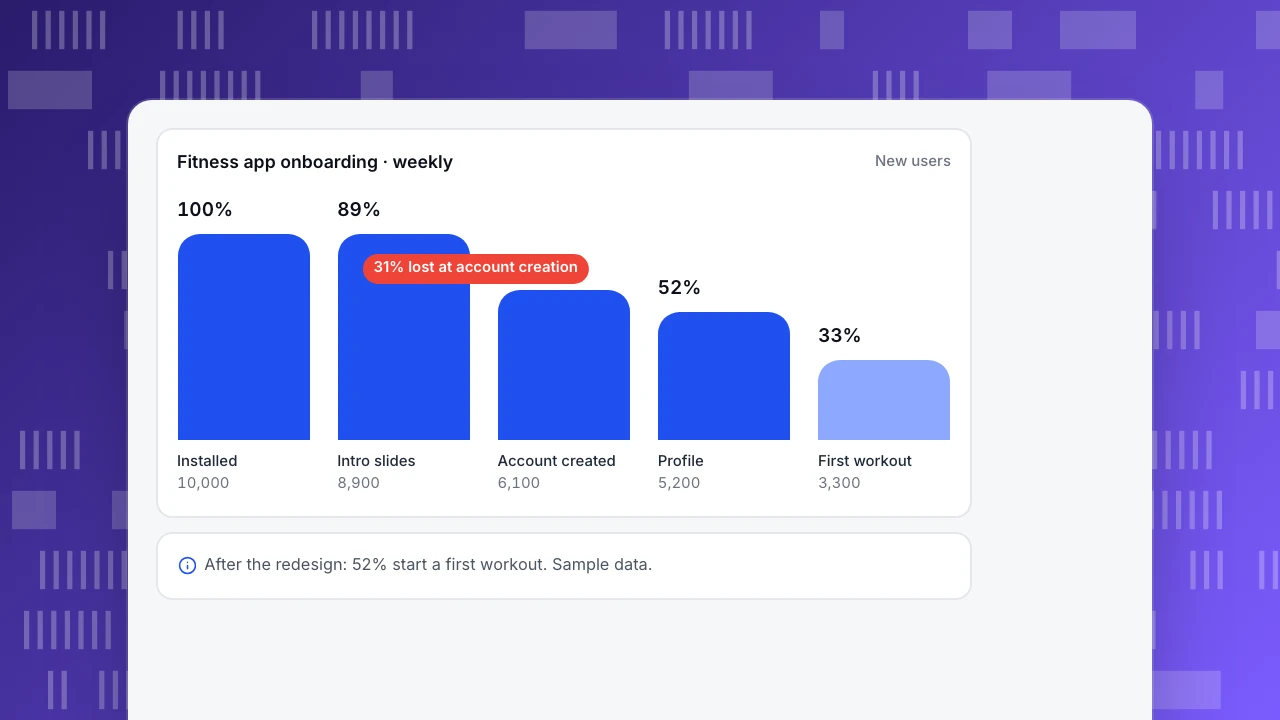
A fitness app (sample data) had a seven-screen onboarding: three intro slides, account creation, five profile questions, a notification prompt and a plan screen. Of 10,000 new users a week:
| Screen | Users remaining |
|---|---|
| Intro slides | 8,900 |
| Account creation | 6,100 |
| Profile questions | 5,200 |
| Notification prompt | 4,900 |
| First workout started | 3,300 |
The team removed the intro slides, moved account creation to after the first workout ("save your progress"), cut the profile to two questions (goal and level), and moved the notification prompt to after the first workout. First-workout starts rose from 33% to 52% of new users, and day-7 retention from 18% to 24%.
Fitness app onboarding · weekly
New usersInstalled
10,000
Intro slides
8,900
Account created
6,100
Profile
5,200
First workout
3,300
Common mistakes
- Feature tours on day one. Users forget them; teach in context instead.
- Asking for every permission at launch. System prompts without context get denied, and on iOS you cannot ask again in-app.
- Requiring an account before any value. Unless the app cannot work without one.
- Measuring only completion. A flow can be completed by people who never return; track activation and retention too.
- Never revisiting onboarding. New features and audiences change what new users need.
Measuring onboarding in TapCub
- Funnels: build an onboarding funnel from screen views and events (for example $app_start → onboarding_step → first_workout) and split it by platform, channel or app version.
- Retention and lifecycle: next-day retention, retention cohorts by first-use date, and new vs returning users.
- Engagement: engaged sessions and screens per session for the first week.
- Stability: crashes during onboarding show up by screen and version in Stability.
- Versions: compare onboarding changes release by release. See track screen views and track app versions.
Related: onboarding metrics, aha moment, activation rate, time to value.
FAQ
How many onboarding screens should an app have? As few as it takes to reach the first moment of value. Many successful apps get users to their core action within one to three screens.
Should users sign up before or after onboarding? After, if the app can show value without an account. Ask when users have progress or data worth saving.
What is a good onboarding completion rate? It depends on the flow's length and audience. Track it against activation and retention; a short flow with high completion but low activation is not working.
When should an app ask for push notification permission? After users see a reason, such as right after they set a goal or finish a first task, with a short explanation before the system prompt.
Sources
- Apple. Human Interface Guidelines: onboarding.
- Apple. Human Interface Guidelines: privacy and permission requests.
- Android Developers. Request runtime permissions.
Was this article helpful?
We use your answers to fix and expand this page.
Couldn’t send. Please try again in a minute.
Thanks for the feedback. We’ll use it to improve this page.You’ve already sent feedback on this page. Thanks.

Product Adoption Consultant
Explores customer onboarding, live conversations, and self-service, turning common usage questions into practical guidance and improvements.