Try it on your own data
Every report in this article is in the free plan. One snippet for web and apps, up to 10 sites.
Start freeTo prevent web scraping, first measure who is fetching your pages, what they fetch and whether it matters. Separate the bots you can identify, stop the ones worth stopping with several layers (rate limits, verification, challenges, logins) and accept the rest. A blanket block usually hits search engines and shared networks before it hits the scraper.
What you will learn
- Combine signals: in the sample, range A made 136 times the median volume, walked 96.2% distinct URLs and loaded no assets
- Count by address range as well as by address: 61,200 requests spread over 254 addresses is about 241 each, under a 300 limit
- robots.txt is a request, not access control; verify anyone claiming to be Googlebot with reverse DNS before you allow or block
Who is visiting, and what do you want from them?
Before you try to prevent web scraping, decide which automated visitors you want gone. A blanket block treats every bot as an enemy, and several of them are visitors you want. Sort them first:
| Visitor type | Example | What it wants | Your default |
|---|---|---|---|
| Search engine crawler | Googlebot, Bingbot | Index your pages so people can find them | Allow, and verify the claim before trusting it |
| AI crawler | GPTBot, ClaudeBot, PerplexityBot | Training data or answers | A policy decision: allow, limit or block through robots.txt |
| SEO tool crawler | AhrefsBot, SemrushBot | Audits and link data, for their customers | Allow or limit; they usually identify themselves and obey robots.txt |
| Content or price scraper | Unnamed script, often with a browser User-Agent | Your catalogue, prices or text, copied elsewhere | Make it expensive, or accept it if the data is low-value |
| Abusive automation | Credential stuffing, scalping | Accounts, stock, access | Needs a separate bot-management approach; this guide only covers reading and copying |
The table is why this guide starts with a question rather than a tool. "Prevent web scraping" means different things for each row. The first three can be managed with a rules file and a verification step. The fourth and fifth are the ones that need layers. For the definitions, see bot, web crawler and AI crawler.
The thesis of this guide is that you cannot protect what you have not measured. Find out who is fetching, what they fetch and whether it matters. Separate what you can tell apart in your data, stop what is worth stopping with layers, and accept the rest. A block that is not based on measurement tends to hit search engines, compliant crawlers and shared office networks before it hits the scraper.
How to tell scraping from normal traffic
No single signal is reliable. Each can be faked or can catch innocent visitors. Use two or more together:
| Signal | What it looks like | How reliable | False-positive risk |
|---|---|---|---|
| Systematic URL walking | Nearly every request is a different URL, in order, with no revisits | Strong; OWASP describes scraping as systematic reading of all accessible paths and parameter values | Low for humans; a legitimate crawler also does it |
| Request volume per IP range | A range far above the median for similar ranges | Strong when combined with others | High on shared IPs such as offices and mobile networks |
| No assets loaded | HTML requested, but no CSS, scripts or images | Medium; many simple scrapers skip assets | Low; but headless browsers load them |
| User-Agent string | Names a tool, library or bot | Weak; it is a header the client chooses | A scraper can claim to be a browser or Googlebot |
| Claimed crawler fails verification | Says Googlebot, but reverse DNS does not end in googlebot.com | Strong; Google documents this check | Very low |
| robots.txt behaviour | Never fetches robots.txt, or fetches pages you disallowed | Medium; separates polite crawlers from the rest | Low |
| Honeypot hit | Requests a URL no human link points to | Strong | Low, if the link is hidden from people and disallowed in robots.txt |
On the verification row, Google's documentation says to run a reverse DNS lookup on the requesting IP and confirm the hostname ends in googlebot.com, then a forward lookup to confirm it resolves back to the same IP. It says this is needed because others can claim to be Google's crawlers, so a User-Agent string alone proves nothing. For other search engines, use the verification method each one publishes.
Worked example: one day of requests
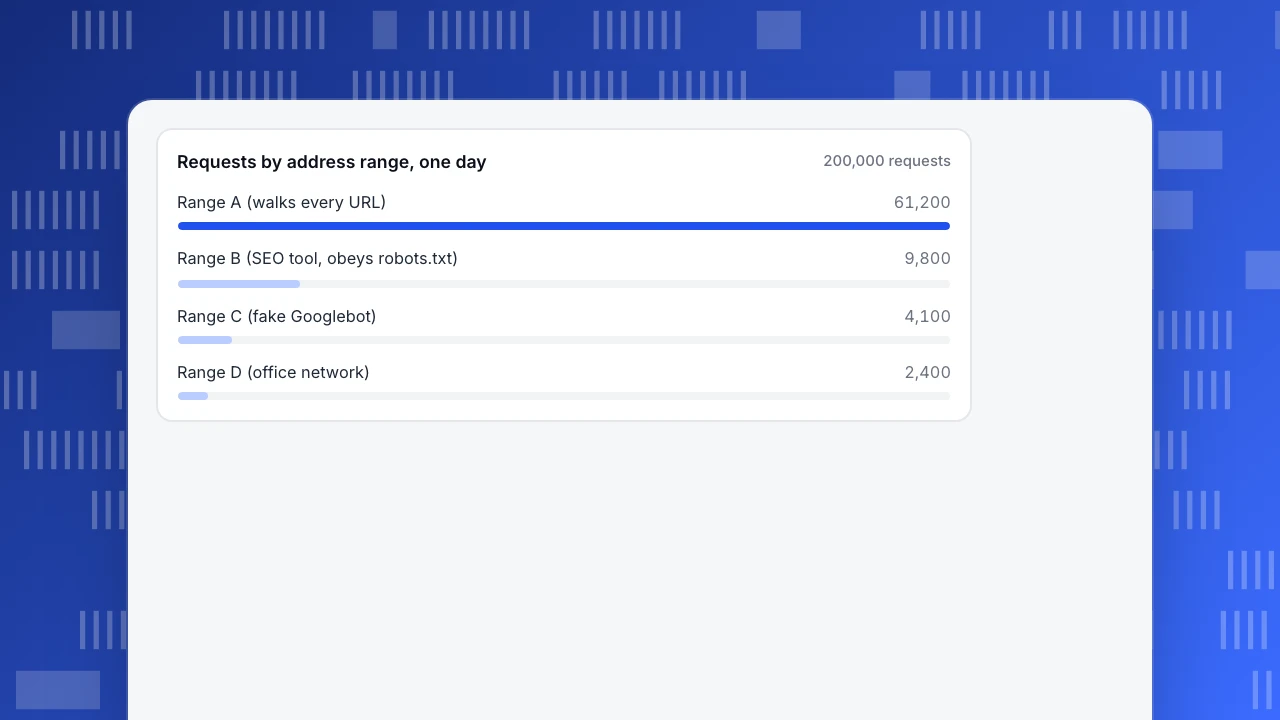
Sample data: a site gets 200,000 requests in one day. The median "human-looking" /24 address range, a block of 254 usable addresses, makes 450 requests. Four ranges stand out. The addresses are placeholders.
| Range | Requests | Distinct URLs | Assets per page | Claims to be | robots.txt | Times the median range |
|---|---|---|---|---|---|---|
| A | 61,200 | 58,900 | 0 | A normal browser | Never fetched | 136 |
| B | 9,800 | 9,700 | 0 | AcmeSEOBot/2.0 | Fetched, obeyed | 21.8 |
| C | 4,100 | 3,900 | 0 | Googlebot/2.1 | Never fetched | 9.1 |
| D | 2,400 | 700 | 2.7 | A normal browser | Not applicable | 5.3 |
Apply a simple two-part rule: flag a range when it makes at least 20 times the median requests and loads fewer than 0.1 assets per page.
- Range A is flagged. 61,200 ÷ 450 = 136 times the median; 58,900 ÷ 61,200 = 96.2% of its requests are distinct URLs, which means it walks the site rather than browsing it; and it loads no assets. It also makes 61,200 ÷ 200,000 = 30.6% of all requests while producing no real sessions. A per-address limit would have missed it: spread over 254 addresses it is 61,200 ÷ 254 = about 241 requests each, below a limit of, say, 300 a day. Counting by range catches what counting by address misses.
- Range B is flagged on volume (9,800 ÷ 450 = 21.8) but it names itself, fetches robots.txt and obeys it. That is a policy decision about an SEO tool, not an attack: allow it, slow it down in robots.txt, or block it by name.
- Range C is not flagged by volume (9.1 times), but it claims to be Googlebot and fails the reverse DNS check. A spoofed crawler is a scraper in disguise, so block it. The rule needs a second check for claimed crawlers.
- Range D is not flagged. It has 2,400 requests, only 5.3 times the median, and loads 1,900 assets for 700 pages, 1,900 ÷ 700 = 2.7 per page, the way a browser does. It looks like an office network where many people share one address. Limiting it by address would lock them out.
The numbers are illustrative; the method is the point. Combine volume with at least one behavioural signal, count by range as well as by address, and run a separate check for anyone who claims to be a search engine.
Requests by address range, one day
200,000 requestsThe layers of defence, and what each one costs
No layer stops a determined scraper alone. Stack them from cheap to expensive, and weigh each one's side effects in the table below:
When you apply rate limiting, return status 429. RFC 6585 defines it as "Too Many Requests", and says the response may carry a Retry-After header telling the client how long to wait. Well-behaved clients slow down when they see it, and you can see in your logs which ones do not.
| Layer | What it does | What it stops | Side effects to weigh |
|---|---|---|---|
| robots.txt | Tells crawlers what to skip | Polite crawlers only | Nothing for the rest; also publishes the paths you list |
| Rate limiting | Slows or rejects clients that send too many requests | Fast, simple scrapers | Shared IPs get limited together; slow scrapers go under the limit |
| Verifying claimed crawlers | Confirms a "Googlebot" really is one | Spoofed search engine names | Needs a lookup you maintain |
| Challenges and JavaScript checks | Asks the client to prove it is a browser | Scripts without a browser engine | Friction for people; accessibility issues; headless browsers pass |
| Login or an API | Puts the data behind an account, or serves it by feed | Anonymous copying at scale | Fewer casual visitors; the API must have its own limits |
| Bot-management service or WAF | Scores each request with many signals | Much automated traffic | Cost; false positives to tune; a vendor in your request path |
| Honeypot links | Hidden URLs only a bot would follow | Crawlers that follow every link | Must be disallowed in robots.txt so good crawlers skip them |
Layers are listed from cheap to expensive; no single layer stops a determined scraper. Rate limiting should return 429 as defined in RFC 6585.
What robots.txt can and cannot do
Robots.txt is the cheapest layer and the most misunderstood. RFC 9309, the standard for it, describes the rules as a request that crawlers are asked to respect, and says plainly that they are not a form of access authorisation. It adds that robots.txt is no substitute for real content security and that listing a path in it makes that path publicly discoverable. If a URL should not be seen, put it behind authentication, not behind a disallow line.
What robots.txt does well: it gives compliant crawlers, including search engines and many SEO and AI crawlers, a clear instruction, and it gives you evidence. A crawler that fetches a disallowed path has ignored an instruction you published, which is the basis for blocking it. For examples of rules, see robots.txt disallow all and, for page-level instructions, X-Robots-Tag. For two crawlers people often ask about, see GPTBot and ClaudeBot.
What it does not do: stop a scraper that never reads it. Most of the scrapers worth worrying about do not.
Do not block the wrong visitors
The cost of an over-broad block is high and easy to miss, because blocked visitors do not complain; they just do not appear. Four checks keep the damage down:
- Never block by User-Agent alone. A scraper simply changes the header, while a real crawler or tool is blocked for good.
- Allow verified search engines first. If you challenge or block Googlebot, your pages drop out of search. Verify with reverse DNS, as above, before adding any rule.
- Treat shared IPs carefully. Offices, universities and mobile networks put many people behind one address. Challenge instead of blocking, and let the challenge expire.
- Test with a real browser and a screen reader after you add a challenge. Check that checkout, login and the forms people actually use still work.
If a rule blocks something it should not, you want to find out from your own numbers before a customer tells you. Watch your human traffic and conversion for a drop after each new rule.
Is it worth blocking at all?
Blocking costs engineering time, adds friction for visitors and invites an arms race. Match the effort to what is at stake:
| If... | Then... |
|---|---|
| The data is public, low-value and cheap to serve | Accept it; monitor volume, and rate-limit only if load is a problem |
| The scraper makes a large share of requests but no sessions (Range A: 30.6%) | Rate-limit by range, challenge, and consider a login or feed for the heavy readers |
| The data is the product, such as prices, listings or reviews | Layer defences, put the most valuable pages behind an account, and watch for rotating IPs |
| A named crawler ignores your robots.txt | Block it by name and at the server, and keep the evidence |
| You are unsure whether copying is lawful or breaches your terms | Ask a lawyer before acting; this guide is not legal advice |
Whether scraping is lawful depends on the country, the data, the terms you publish and what the scraper does with it. That is a legal question, not a technical one.
Common mistakes
- Treating robots.txt as a lock. It is a request to polite crawlers, and the standard says it is not access control.
- Blocking by User-Agent. Scrapers change it in one line. Real crawlers get blocked and the scraper does not.
- Limiting by IP address only. A scraper that rotates addresses in one range, like Range A at 241 requests per address, stays under the limit.
- Challenging search engines. A challenge shown to Googlebot is a page that does not get indexed.
- Counting bots as visitors. Recognised bots mixed into visitor counts distort conversion rate and make a quiet week look busy. Keep them out of the numbers you use for decisions.
- No measurement afterwards. If you never compare request volume and human traffic before and after a rule, you do not know whether it worked or what it broke.
Spotting bot and scraper traffic in TapCub
Take the day of requests above and see what TapCub can and cannot tell you. TapCub identifies and counts bot traffic. It does not block anything: adding a crawler to the exclusion rules only stops TapCub from counting it.
- Open the bot report. In Web analytics › Bots, the All bots tab lists each recognised bot with its operator, purpose, requests, pages visited, most common status code, last seen, trust level, the detection layers it matched and its source channel. Sort by requests to find the heavy readers. Recognised bots go only to this report and, by default, are left out of human visitors, sessions and pageviews.
- Check who rendered pages. The Visits tab covers bots that ran the tracking script, with requests from the same source within 30 minutes counted as one visit. The AI & agents tab shows reads by AI operators in the AI content ledger. Read the bot detection help for how layers combine, and the AI crawler ledger for how to read the ratio.
- Read the trust column carefully. Trust is verified, suspected or unknown, and unknown does not by itself mean a spoof. Only Applebot is checked by DNS reverse lookup; every other bot shows as unverified. So in the example, TapCub would not tell you that Range C fails Googlebot verification; run that lookup yourself.
- Check robots.txt compliance. Monitoring › Crawler compliance fetches your rules file and compares it with real fetches. It reports three violation types: fetched while blocked globally, fetched a disallowed path, and fetched faster than the declared delay. It can draft rules for blocking training crawlers or answer engines, and a block snippet to publish on your server. The file cannot stop a fetch; the page is the evidence.
- Report a wrong label. If a visitor you know is human appears as a bot, report a false positive for a platform admin to review (report a false positive).
Know the limits. With only the page script, you see bots that run JavaScript. A scraper that sends a normal browser User-Agent and runs no scripts will not appear at all, and status codes and response time need server collection or a log import. Finding something like Range A means analysing request rates by range in your server or CDN logs. Use TapCub to see the named and detectable bots and to keep them out of your human numbers, and your server or CDN to rate-limit, challenge or block.
FAQ
How do I prevent web scraping?
Use layers, in order of cost: robots.txt for polite crawlers, rate limiting with a 429 response, verification of claimed search engines, challenges for suspicious clients, and a login or API for valuable data. No single layer stops a determined scraper. Measure first, so you know who you are blocking.
Can robots.txt prevent web scraping?
Only for crawlers that choose to obey it. RFC 9309 says robots.txt is not a form of access authorisation, and listing a path in it makes the path public. It is useful for compliant crawlers and as evidence of who ignores your rules. For sensitive data, use authentication.
How do I know if my website is being scraped?
Look for clients that request nearly every URL once, from one IP range, with no CSS or images loaded, at far above the median volume. Check whether claimed search engines pass reverse DNS verification, and whether anything fetches robots.txt or hits a hidden honeypot URL.
How can I block scrapers without blocking Google?
Verify before you allow or block. Run a reverse DNS lookup on the requesting IP, confirm the hostname ends in googlebot.com, then confirm the hostname resolves back to the same IP, or check Google's published IP ranges. Never rely on the User-Agent, because anyone can send it.
Is web scraping illegal?
There is no single answer. It depends on the country, the kind of data, the terms of the site and what the scraper does with the data. This guide does not give legal advice; talk to a lawyer before acting against, or defending, a specific scraping case.
Sources
- IETF, RFC 9309: Robots Exclusion Protocol (robots.txt is not access authorisation; paths in it are public). Checked 2026-11-17.
- IETF, RFC 6585: Additional HTTP Status Codes (429 Too Many Requests and Retry-After). Checked 2026-11-17.
- Google Search Central, Verifying Googlebot and other Google crawlers. Checked 2026-11-17.
- OWASP, OAT-011 Scraping, Automated Threats to Web Applications. Checked 2026-11-17.
Was this article helpful?
We use your answers to fix and expand this page.
Couldn’t send. Please try again in a minute.
Thanks for the feedback. We’ll use it to improve this page.You’ve already sent feedback on this page. Thanks.

Solutions Engineer
Covers SDKs, API integrations, and data implementation, with an emphasis on validation, system interoperability, and troubleshooting.