Try it on your own data
Every report in this article is in the free plan. One snippet for web and apps, up to 10 sites.
Start freeReducing bounce rate starts with knowing what your tool counts as a bounce and which pages lose the most visitors. This guide shows how to rank landing pages by bounced sessions, diagnose each by source and device, and apply the fix that matches the cause.
What you will learn
- Check the bounce definition: adding events can lower the rate without any real change
- Rank pages by bounced sessions (sessions × bounce rate), not by rate alone
- Split by source and device to tell a speed problem from a mismatch
First, check what counts as a bounce
A bounce is a session in which the visitor viewed one page and did nothing else your tool records. Bounce rate is bounced sessions divided by all sessions. The catch is "nothing else your tool records", which differs between tools.
In TapCub, a bounce is a session with one pageview and no custom event. Automatic events such as outbound clicks and Web Vitals do not count, so a visitor who reads one article and leaves still bounces. If you start sending a custom event for, say, a video play, sessions with that event stop being bounces, and the bounce rate drops without the page changing. That is fine if it reflects real engagement, but note the date, or the "improvement" will fool you later.
Also remember that a bounce is not always bad. Someone who finds your opening hours, or the answer to a question, and leaves happy is a bounce. That is why bounce rate and exit rate need context, and why a single site-wide number says little.
Find the pages that matter
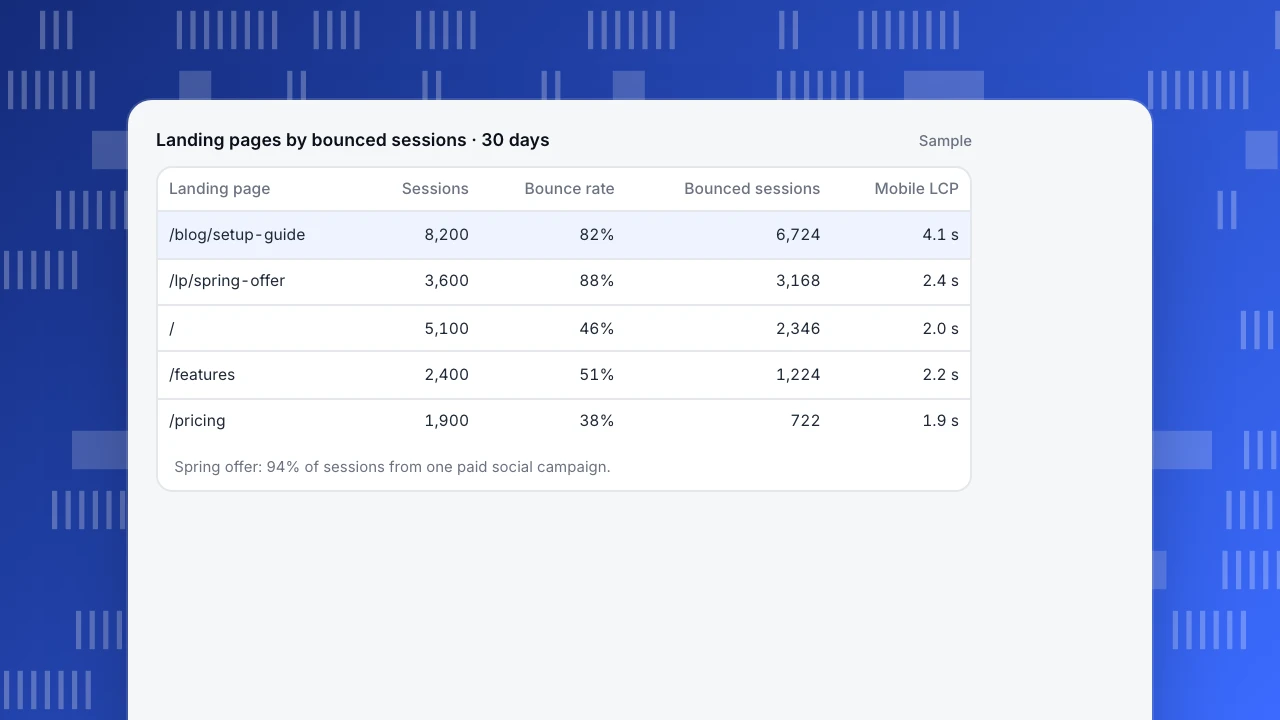
Do not start with the page that has the highest bounce rate. Start with the pages that produce the most bounced sessions: sessions × bounce rate. A page with a 95% bounce rate and 40 sessions is not your problem; a page with 82% and 8,200 sessions is.
In the sample, the top blog guide produces 6,724 bounced sessions, and a paid-social landing page 3,168. The home page bounces less than half its visitors and is not where to start.
Then split each of those pages by source and device. The two pages bounce for different reasons:
- The blog guide bounces 87% on mobile and 64% on desktop, and its mobile Largest Contentful Paint is 4.1 seconds. Visitors from search wait for a slow page, read the answer, and have no obvious next step.
- The spring offer landing page bounces 88%, almost all of it from one paid social campaign, on every device. The ad promised a discount code the page does not show. That is a mismatch, not a speed problem.
Landing pages by bounced sessions · 30 days
Sample| Landing page | Sessions | Bounce rate | Bounced sessions | Mobile LCP |
|---|---|---|---|---|
| /blog/setup-guide | 8,200 | 82% | 6,724 | 4.1 s |
| /lp/spring-offer | 3,600 | 88% | 3,168 | 2.4 s |
| / | 5,100 | 46% | 2,346 | 2.0 s |
| /features | 2,400 | 51% | 1,224 | 2.2 s |
| /pricing | 1,900 | 38% | 722 | 1.9 s |
Spring offer: 94% of sessions from one paid social campaign.
Match the fix to the cause
Each common cause leaves a recognisable signal in the data. The table pairs them with the fix to try first.
| Cause | Signal in the data | Fix to try first |
|---|---|---|
| Slow page | Bounce much higher on mobile; LCP above 2.5 s | Compress images, defer scripts, fix layout shift |
| Ad or search mismatch | High bounce from one campaign or query, on all devices | Match headline and offer to the ad; change the destination |
| No next step | Good time on page, high bounce, low clicks below the fold | Add one relevant next link or call to action |
| Blocking overlays | Bounce rose when a pop-up or banner launched | Delay or shrink the overlay; never cover content on arrival |
| Broken entrance | 404 hits or redirects from old links | Fix or redirect the URL; update the linking page |
| Tracking gap | Bounce near 100% on one template | Check the tag fires and events send on that template |
Start with the page that produces the most bounced sessions.
Changes that usually help
- Answer the query in the first screen. Searchers came for something specific. Put it at the top, then expand.
- Make the page fast on mobile. Aim for a Largest Contentful Paint of 2.5 seconds or less. Compress the hero image, delay non-essential scripts, and avoid layout shifts that push the content away.
- Give a next step that fits the intent. A related guide, a calculator, a short comparison, a sign-up for readers who are ready. One clear link beats ten.
- Make the landing page keep the ad's promise. Same headline, same offer, same image. Check every active campaign's destination.
- Remove what blocks reading. Full-screen pop-ups on arrival, cookie banners that cover the page, auto-playing video with sound.
- Fix broken entrances. 404s and redirects from old links bounce almost everyone. TapCub records not-found pages as an automatic event when the 404 template is marked, so you can see which ones still get traffic.
Measure the result honestly
Compare the same page, the same source and the same device, for two or more weeks before and after, and add an annotation on the day you changed it. Watch the next step too: a lower bounce rate is only a win if more people reach the page you wanted them to reach. Session duration and scroll depth help; see average session duration for their limits.
FAQ
What causes a high bounce rate?
Usually one of: slow loading (especially on mobile), a page that does not match what the visitor expected from the ad or search result, no clear next step, intrusive pop-ups, or broken pages. Tracking can also inflate it, for example if the analytics tag fails on some templates.
Does bounce rate affect SEO?
Search engines do not use your analytics bounce rate directly. The things that cause bounces, such as slow pages and content that does not answer the query, do affect how well a page satisfies searchers.
Can I lower bounce rate by adding events?
Yes, because sessions with a custom event are not counted as bounces. Only do it for events that show real engagement, keep the definition stable, and annotate when you change it.
Is a 70% bounce rate bad?
For a blog article that answers one question, it can be normal. For a pricing or product page, it is high. Judge it against the page's purpose and its own history. See the bounce rate definition.
See also: Improve website engagement.
Was this article helpful?
We use your answers to fix and expand this page.
Couldn’t send. Please try again in a minute.
Thanks for the feedback. We’ll use it to improve this page.You’ve already sent feedback on this page. Thanks.

Product Experience Specialist
Writes about product experience, practical workflows, and growth, turning complex processes into clear steps for everyday decisions.