Try it on your own data
Every report in this article is in the free plan. One snippet for web and apps, up to 10 sites.
Start freeAverage session duration looks like a simple engagement number, but its formula (last event minus first) and a few long sessions can make it misleading. This guide shows how it is calculated, why one-page sessions often count as zero, how the mean compares with the median, and what to report alongside it.
What you will learn
- Session duration is last event minus first event; time after the last event is invisible
- A few long sessions can multiply the mean; report the median or the distribution
- Pair duration with engaged rate and time on page, and read it against the page's purpose
How average session duration is calculated
Average session duration is the total length of all sessions divided by the number of sessions. The length of one session is the time between its first and last recorded event:
session duration = time of last event − time of first event average session duration = sum of session durations ÷ sessions
Two things follow from that formula. Time after the last event is invisible: if someone reads a page for five minutes and closes the tab, those five minutes count only if something was recorded when they left. And a session ends when the visitor is idle for longer than the timeout (commonly 30 minutes), so a tab left open overnight does not become a 12-hour session.
Why so many sessions are zero
A visitor lands on an article, reads it, and leaves. If the only event is the pageview, first and last event are the same, and the session lasts 0 seconds. That is why bounce-heavy sites often show surprisingly low averages, and why two tools can disagree by minutes.
Tools close the gap with a leave event or heartbeat: when the page is hidden or closed, the script sends one more event, and the session ends at that moment instead of at the pageview. Browsers do not always deliver it (a crashed tab, a killed mobile app), so some zeros remain.
Mean vs median
Session lengths are skewed: many short sessions and a few very long ones. Take ten sessions lasting 0, 0, 0, 12 s, 45 s, 1 m 30 s, 2 m 10 s, 3 m, 4 m 20 s and 38 m:
- Mean: 2,997 s ÷ 10 = about 5 minutes.
- Median: halfway between 45 s and 1 m 30 s = about 68 seconds.
- Mean without the 38-minute session: 717 s ÷ 9 = about 80 seconds.
One long session quadrupled the average. Report the median alongside the mean, or show the distribution.
Read the distribution
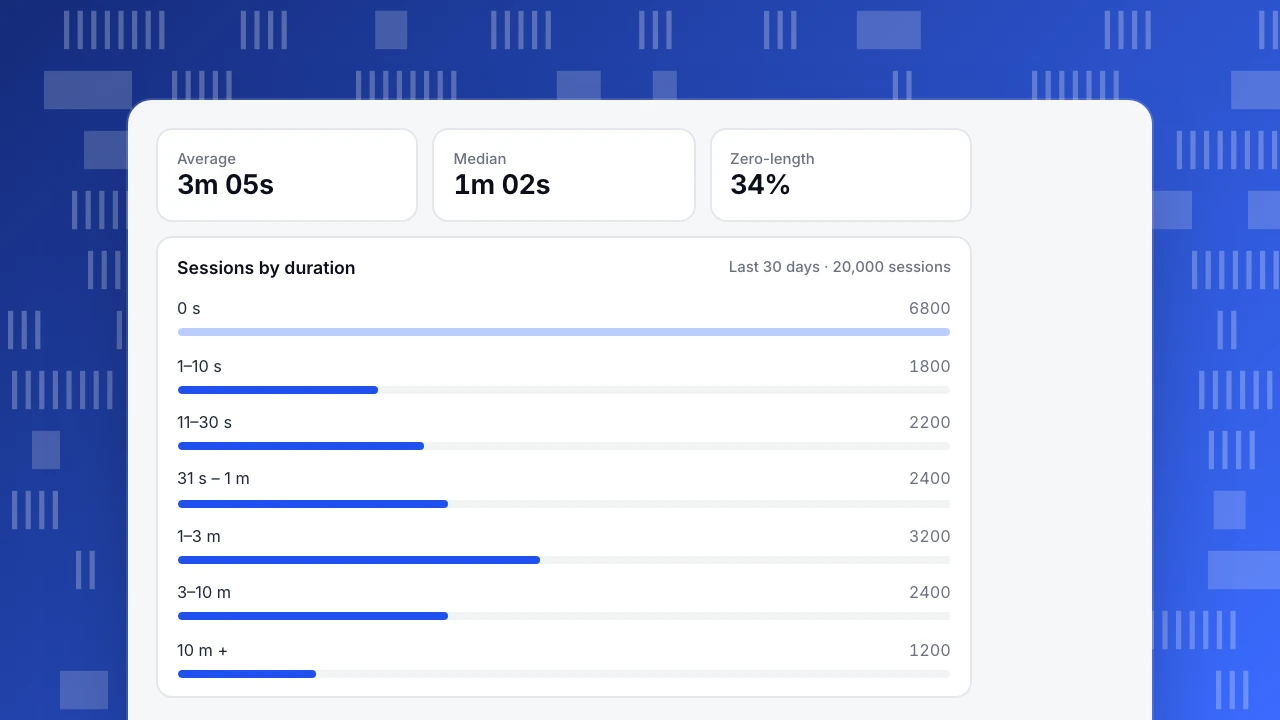
A histogram of session lengths shows what the average hides. In the example, a third of sessions have zero duration, most of the rest are under three minutes, and a small tail runs past ten. Changes worth noticing are shifts in the buckets: fewer zero-length sessions after fixing a slow page, or more sessions in the 1–3 minute range after rewriting an article.
Average
3m 05s
Median
1m 02s
Zero-length
34%
Sessions by duration
Last 30 days · 20,000 sessionsBetter companions
Average session duration rarely stands alone well. The table lists the metrics to put next to it and what each adds. Time on page is the per-page version; engaged rate turns the duration question into a yes/no that is not distorted by outliers. See engagement metrics for the wider set.
| Metric | What it adds | Pitfall |
|---|---|---|
| Average session duration | Overall depth of visits | Skewed by long sessions; zeros pull it down |
| Median session duration | Typical visit length | Hides the tail |
| Share of zero-length sessions | How many visits record a single event | Depends on leave events being delivered |
| Engaged rate | Share of sessions with real interaction | Threshold choice (e.g. 10 s) |
| Time on page | Reading time per page | Last page needs a leave event |
| Pages per session | Breadth of visits | High can mean lost, not engaged |
Read duration next to the page's purpose.
When longer is worse
Longer sessions are not always better. On a checkout, support or settings page, a long session can mean people are stuck. On a help article, a short session followed by no support ticket is a success. Decide what each page is for before setting a target, as in content performance metrics, and compare sessions that reach the goal with those that do not.
Session duration in TapCub
TapCub's average duration is the sum of session durations divided by sessions, where duration is the last event minus the start, in seconds (metrics). Sessions split after 30 minutes idle and last at most 24 hours by default; both can be changed per project (idle 5–720 minutes, cap 1–48 hours), and new rules apply to new events only (sessions).
When the tab is hidden, the route changes or the page closes, the website script sends a leave event with the time on page if the page was open for more than a second (pageviews), so one-page visits are not stuck at zero when the browser delivers it. Engaged rate counts sessions with at least 10 seconds, at least 2 pageviews, or a key event. For leaving behaviour by page, see bounce rate vs exit rate and session.
FAQ
How is average session duration calculated?
Sum of all session durations divided by the number of sessions. Each session's duration is the time from its first to its last recorded event.
Why is my average session duration so low?
Many sessions record only one event, so their duration is zero. A leave event on page hide or close fixes most of them.
What is a good average session duration?
There is no universal benchmark; it depends on page type and audience. Track your own median and distribution over time instead.
What is the difference between session duration and time on page?
Session duration covers the whole visit; time on page covers one page view. A one-page session's duration is close to its time on page only when a leave event is recorded.
Does an idle tab count toward session duration?
Only until the idle timeout. After that, a new event starts a new session.
See also: Session timeout.
Was this article helpful?
We use your answers to fix and expand this page.
Couldn’t send. Please try again in a minute.
Thanks for the feedback. We’ll use it to improve this page.You’ve already sent feedback on this page. Thanks.

Product Experience Specialist
Writes about product experience, practical workflows, and growth, turning complex processes into clear steps for everyday decisions.