Try it on your own data
Every report in this article is in the free plan. One snippet for web and apps, up to 10 sites.
Start freeChecking website traffic means two different things. For your own site you can measure it: install an analytics script and every visit is counted. For someone else's site you can only estimate it from panels and search data. This guide covers both, starting with the five numbers to read on your own site.
What you will learn
- For your own site, install analytics and confirm a test visit shows up in realtime
- Read visitors, visits, pageviews, sources and top pages first
- Traffic numbers for other sites are estimates; compare trends, not exact counts
Two questions in one
When people search for how to check website traffic, they usually mean one of these:
- How many people visit my site? You can measure this exactly with analytics.
- How many people visit another site? You can only estimate this.
The table compares the options for both.
Compare the options
| Option | Works for | Accuracy |
|---|---|---|
| Analytics script on your site | Your own site | Measured; depends on correct install and blockers |
| Hosting or server logs | Your own site | Counts every request, including bots |
| Search engine console | Your own site | Search clicks and impressions only |
| Third-party traffic estimators | Any site | Estimated from panels and search data; rough for small sites |
Use measured data for your site; use estimates only to compare other sites.
Check traffic on your own site
- Install an analytics script. Add the snippet to every page, or through your tag manager or site builder.
- Confirm it works. Open the realtime view and visit your site in another browser. In TapCub a test pageview appears within a few seconds, and "online now" counts anyone with an event in the last five minutes.
- Wait for a full week. Day-of-week patterns are strong, so a single day says little.
- Read five numbers:
- Visitors: how many different people came.
- Visits (sessions): how many separate times they came.
- Pageviews: how many pages they loaded.
- Sources: where visits came from, such as search, direct, referral, social or AI assistants.
- Top pages: which pages people saw most.
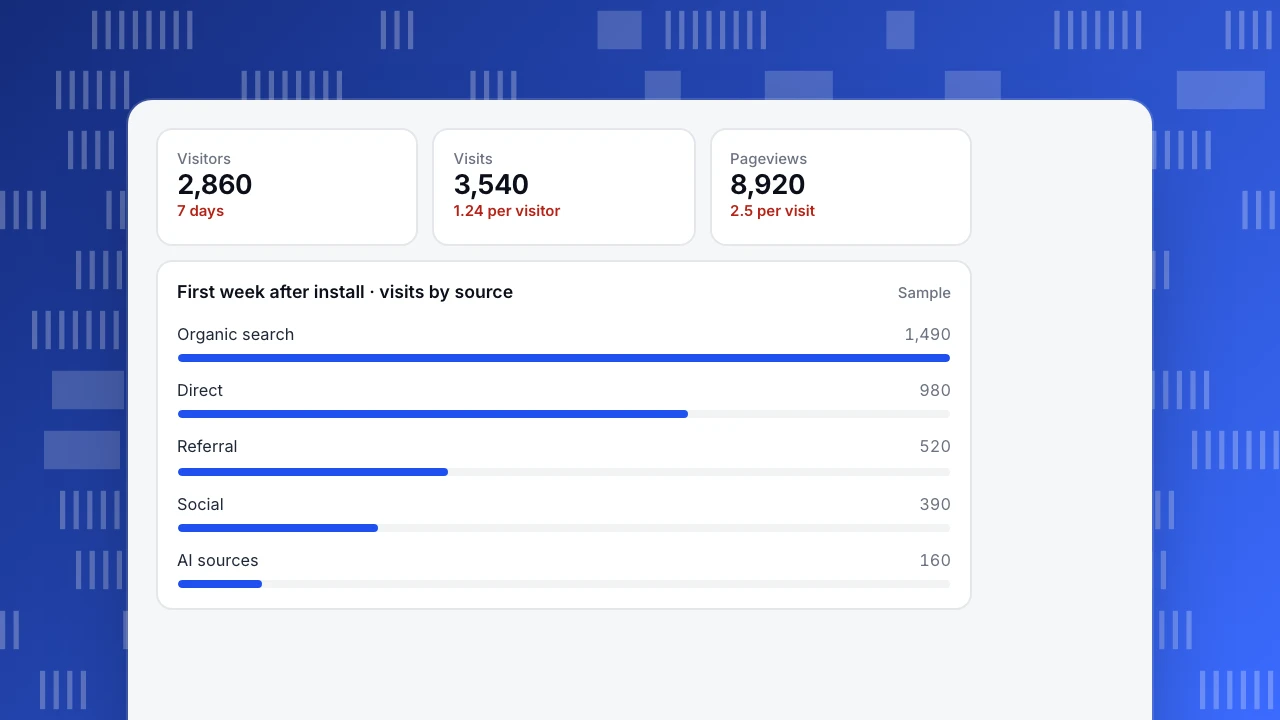
The chart shows a sample first week: 2,860 visitors made 3,540 visits and loaded 8,920 pages, with organic search the largest source.
Visitors
2,860
7 days
Visits
3,540
1.24 per visitor
Pageviews
8,920
2.5 per visit
First week after install · visits by source
SampleWhy tools give different numbers
- Visitor counting. Cookie-based tools count a new visitor when cookies are cleared; TapCub counts visitors without cookies from a server-side hash of IP and browser with a site salt. Neither matches the other exactly. See why UV never matches.
- Blockers and consent. Ad blockers and declined consent hide some visits from some tools.
- Bots. Server logs count crawlers; analytics usually filters known bots.
- Definitions. A session in one tool can split differently in another.
Pick one tool as your source of truth and track trends in it.
Check traffic on another site
Third-party estimators combine browser panels, search rankings and clickstream data to guess a site's visits. They are useful for comparing competitors' size and trend, but:
- Estimates for small sites can be far off.
- They lag by weeks.
- Two estimators rarely agree.
Treat them as a rough range, never as measured numbers.
FAQ
How can I check my website traffic for free?
Install a free analytics plan or check your hosting provider's statistics. Search consoles from search engines are also free and show search clicks.
Can I see exactly how much traffic another website gets?
No. Only the site owner has measured numbers. Outside tools give estimates.
Why does my traffic look lower than my server logs?
Logs record every request, including bots and assets. Analytics counts real page loads by people and filters known bots.
How long until I see traffic data?
Usually seconds for realtime and minutes for reports after the script is installed.
Related: organic traffic and what to check after a sudden traffic drop.
See also: Web analytics, Website analysis.
See also: How to increase website traffic: 14 strategies and how to tell what's working.
Was this article helpful?
We use your answers to fix and expand this page.
Couldn’t send. Please try again in a minute.
Thanks for the feedback. We’ll use it to improve this page.You’ve already sent feedback on this page. Thanks.

Data Analyst
Explores traffic sources, conversion funnels, and retention, using clear metric definitions and concrete examples to explain what the numbers mean.