Try it on your own data
Every report in this article is in the free plan. One snippet for web and apps, up to 10 sites.
Start freeA sudden drop in website traffic is stressful, and the first reaction is often to change content or blame an algorithm update. Start with a short triage instead: confirm the drop is real, find where it sits, then match it to a cause. This guide gives the order of checks, a table of common causes with the evidence for each, and a worked example.
What you will learn
- First rule out tracking: a missing script or consent change looks exactly like a traffic drop
- Isolate the drop by channel, landing page, device and country before guessing the cause
- Set an alert on large period changes so the next drop is caught in a day, not a month
Step 1: Is the drop real?
Before anything else, rule out measurement. A drop in tracked visits is not always a drop in visits.
- Open the site and check realtime. A test visit should appear within seconds. If it does not, the script is missing or broken.
- Check recent releases. A new template, a tag manager change or a consent banner update can remove the script from some pages.
- Compare with another source. Orders, sign-ups or server logs should fall too if people really stopped coming.
If tracking broke, fix it first. The missing days cannot be recovered, so note them on the chart.
Step 2: Where does the drop sit?
Split the drop four ways, comparing the same days of the previous period:
- By channel. Is it organic search, paid, social, referral or direct?
- By landing page. Is it spread across the site or concentrated on a few pages?
- By device and browser. A drop on one browser points to a technical issue.
- By country. A drop in one market points to local search, a local campaign or a blocked region.
Step 3: Match it to a cause
The table lists common causes, what each looks like in the data, and how to confirm it.
| Cause | What you will see | How to confirm |
|---|---|---|
| Tracking broke | All channels fall at once, often to near zero on some pages | Realtime shows nothing on a test visit; script missing in page source |
| Consent or blocker change | Drop on one region or browser | Compare with server logs or sign-up counts |
| Ranking loss | Organic search only, on a few pages | Search console: fewer impressions for those pages |
| Indexing or crawl block | Organic search falls across many pages | robots.txt, noindex tags, crawl errors |
| Campaign ended | Paid, email or social falls | Campaign calendar, UTM report |
| Seasonality | Same dip in the same week last year | Year-over-year comparison |
| Referral lost | One referring site disappears | Referrers tab, before and after |
Work down the table; most drops match one of the first three rows.
A worked example
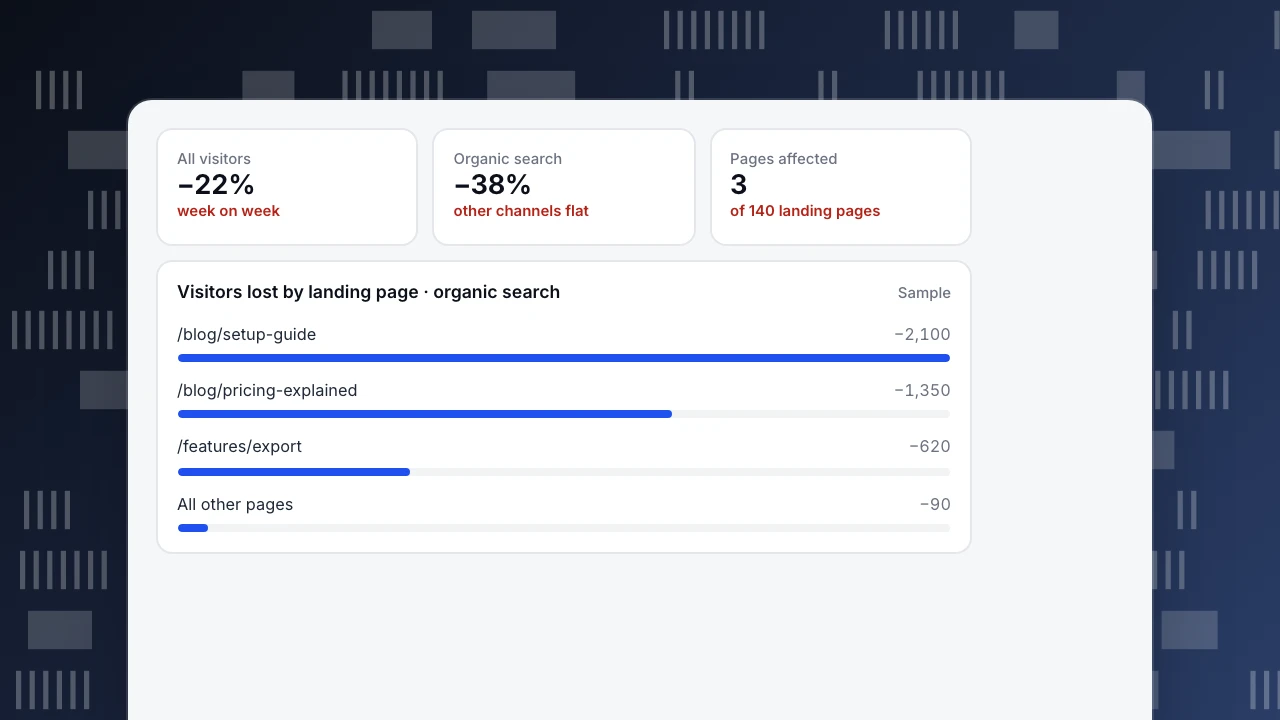
A software company sees visitors fall 22% week on week. Realtime works, and sign-ups also fell, so the drop is real. Splitting by channel, only organic search fell, by 38%. By landing page, three articles account for almost all of it.
In the search console those three pages lost impressions in the same week, while the rest of the site did not. A competitor had published fresher guides on the same topics. The team updated the three articles with current steps and examples. Traffic recovered over the next five weeks.
All visitors
−22%
week on week
Organic search
−38%
other channels flat
Pages affected
3
of 140 landing pages
Visitors lost by landing page · organic search
SampleWhen it is organic search
- Look at impressions and clicks per page in a connected search console. Fewer impressions means ranking or demand fell; steady impressions with fewer clicks means the result looks less appealing.
- Check content decay. TapCub compares each page's latest four weeks of visitors with its peak four weeks over 13 weeks. Under 70% of the peak with a falling trend is decaying; under 40% is severe.
- Check crawl access. A robots.txt change or a stray noindex tag can take many pages out at once.
More on the channel itself is in organic traffic.
Prevent the next surprise
- Set a monitor on visitors that fires on a large change against the previous period.
- Annotate releases and campaign start and end dates on your charts.
- Run a quarterly web analytics audit to catch tracking gaps before they look like traffic drops.
FAQ
Why did my website traffic drop suddenly?
The most common reasons are a tracking change, a ranking or indexing loss on key pages, an ended campaign or a seasonal dip. Check them in that order.
How long does it take to recover from a traffic drop?
A tracking fix shows immediately. Ranking recovery after updating content usually takes weeks.
Can a traffic drop be only in my analytics?
Yes. If sign-ups and orders did not fall, the drop is probably in measurement, not in visits.
See also: Website analysis.
Was this article helpful?
We use your answers to fix and expand this page.
Couldn’t send. Please try again in a minute.
Thanks for the feedback. We’ll use it to improve this page.You’ve already sent feedback on this page. Thanks.

Customer Experience Consultant
Writes about live chat, visitor conversations, and self-service, sharing practical ways to make customer communication clearer and more effective.