Try it on your own data
Every report in this article is in the free plan. One snippet for web and apps, up to 10 sites.
Start freeMobile app conversion rate is the share of users who complete a goal such as a purchase or subscription, but the number depends entirely on its denominator and window. This guide lists six types of app conversion, works through a meditation app from store page to paid, and shows how moving the paywall after the first session raised paid conversions by about 22%.
What you will learn
- Always state the denominator and the window
- Separate store, onboarding, paywall and trial conversion
- Let users experience value before the paywall
- Split iOS and Android
- Count paid conversions, not trials
What is mobile app conversion rate?
Mobile app conversion rate is the share of users who complete a defined goal in an app: a purchase, a subscription, a sign-up, a booking. The formula is simple:
App conversion rate = users who converted ÷ users who could have converted × 100
The hard part is choosing the denominator and the window. "Users who installed in October and subscribed within 14 days" and "active users in October who made a purchase in October" are both valid app conversion rates, but they answer different questions and can differ by a factor of ten.
Types of app conversion
| Conversion | Numerator | Typical denominator | Window |
|---|---|---|---|
| Store conversion | Installs | Store page views | Same day |
| Install to sign-up | Accounts created | New installs | First session / 1 day |
| Trial start | Trials started | New users or paywall views | First 7 days |
| Trial to paid | Paid subscriptions | Trials started | Trial length + grace period |
| Purchase conversion | Users with a purchase | Active users | Calendar period |
| Paywall conversion | Purchases | Paywall views | Same session |
Always report the denominator and window with the number. Comparisons across apps or benchmarks are only meaningful when they match.
| Rate | Value in example |
|---|---|
| Store page → install | 30% |
| Install → onboarding complete | 65% |
| Paywall view → trial | 16% → 20% after test |
| Trial → paid | 40% |
| Install → paid | 3.3% |
Each rate points to a different team and fix.
How to calculate it: an example
A meditation app (sample data) in October:
| Step | Users | Rate |
|---|---|---|
| Store page views | 120,000 | — |
| Installs | 36,000 | 30% store conversion |
| Completed onboarding | 23,400 | 65% of installs |
| Saw the paywall | 18,700 | 80% of onboarded |
| Started a free trial | 2,990 | 16% of paywall viewers |
| Converted to paid | 1,200 | 40% of trials |
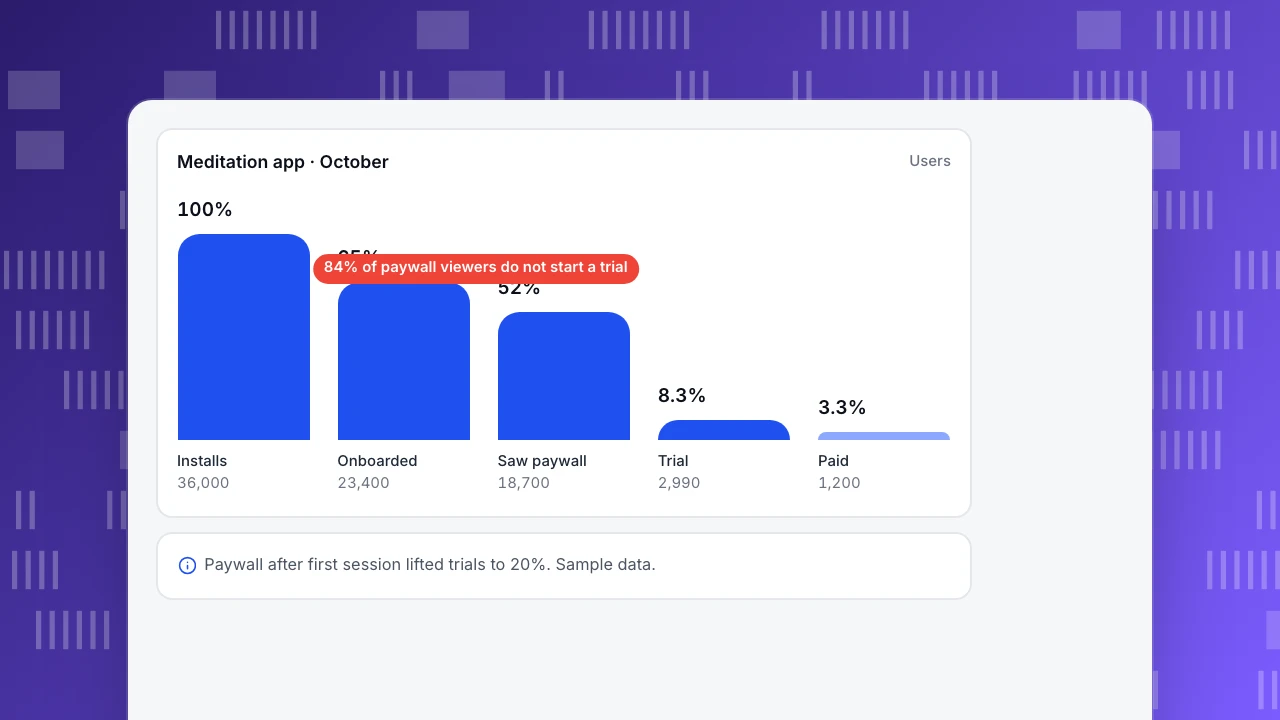
Install to paid conversion: 1,200 ÷ 36,000 = 3.3%. Paywall to trial: 16%. Trial to paid: 40%. Each number leads to different work: store assets, onboarding, paywall design, or the trial experience.
The team tested showing the paywall after the first meditation instead of at the end of onboarding. Paywall views fell slightly (17,900), but trial starts rose to 3,580 (20%) and trial-to-paid held at 41%: paid conversions rose from 1,200 to about 1,470.
Meditation app · October
UsersInstalls
36,000
Onboarded
23,400
Saw paywall
18,700
Trial
2,990
Paid
1,200
How to increase app conversion rate
- Fix stability on the conversion path. Crashes on sign-in or payment screens are the most expensive bugs.
- Show value before asking. Let users experience the core feature before the paywall or sign-up wall.
- Make the paywall clear. Plan comparison, price per period, trial length and cancellation terms visible.
- Reduce payment friction. Use the platform's native purchase flows and wallet payments; restore purchases easily.
- Use the trial well. Onboarding emails and in-app prompts during the trial should drive the habit that makes people pay.
- Time prompts to intent. Offer upgrades when users hit a limit or a premium feature, not at random.
- Segment by platform and channel. iOS and Android payment flows differ; paid and organic users have different intent.
- Test store assets. Use App Store product page optimization and Google Play store listing experiments for store conversion.
Common mistakes
- Comparing rates with different denominators. "3% conversion" means nothing without the base and window.
- Counting trials as conversions. Revenue starts when trials convert.
- Ignoring refunds and cancellations. A paywall that converts more but refunds more is not better.
- Blending platforms. Always split iOS and Android.
- Measuring too early. Trial-to-paid needs the full trial period plus billing retries.
Measuring app conversion in TapCub
- Funnels: build install → onboarding → paywall view → trial → purchase funnels from screen views and events, by person, with a time window, split by platform, version and channel.
- Revenue: send purchase events with amount and currency (or server-side events from your backend) to see revenue, buyers, paying rate and revenue per user. See send server-side events.
- Retention: compare retention of converted and non-converted users.
- Stability: crashes and ANRs on conversion screens, by version.
Related: free trial conversion rate, subscription analytics, mobile app optimization.
FAQ
What is a good mobile app conversion rate? It depends on the definition. Install-to-paid rates for subscription apps are often in the low single digits; trial-to-paid rates are much higher. Compare like with like and track your own trend.
How do I calculate app conversion rate? Divide the users who completed the goal by the users eligible to complete it in the same window, then multiply by 100. State both the denominator and the window.
What is the difference between conversion rate and retention? Conversion measures whether users complete a goal (often once). Retention measures whether they keep coming back.
Should I measure conversion by session or by user? For apps, by user with a time window is usually better, because decisions often span several sessions.
Sources
- Apple Developer. Product page optimization.
- Google Play Console Help. Run store listing experiments.
- Apple Developer. Auto-renewable subscriptions.
Was this article helpful?
We use your answers to fix and expand this page.
Couldn’t send. Please try again in a minute.
Thanks for the feedback. We’ll use it to improve this page.You’ve already sent feedback on this page. Thanks.

Data Engineer
Writes about event design, data quality, and collection workflows, with verifiable implementation methods for reliable analytics.