Try it on your own data
Every report in this article is in the free plan. One snippet for web and apps, up to 10 sites.
Start freeKeyword grouping sorts a long list of search terms into sets so that each set is served by one page. Group by search intent, meaning whether Google shows the same pages for the terms, not by shared words: one page per intent group, not one page per term. Below: three methods, four steps and a 20-term example that falls into six groups, with every overlap count shown.
What you will learn
- Group by SERP overlap, not shared words: in the example 14 of 20 terms contain 'heatmap' yet fall into six different groups
- Choose one overlap threshold (the example uses 4 of 10 shared URLs), write it down and apply it to every term
- After the page is live, check that the group's queries appear for that page and that no two of your pages share one query
What is keyword grouping?
Keyword grouping is sorting a long list of search terms into sets so that each set can be served by one page. The sets are not made by looking at which words the terms share. They are made by asking whether searchers who type those terms want the same thing, and the most direct evidence is whether Google shows the same pages for them. "Heatmap for website" and "website heatmap" share words and results; "how to make a heatmap" shares the word "heatmap" with both but, in the example below, returns a completely different set of pages, because people searching it want a spreadsheet tutorial.
You will also see keyword clustering, which means the same thing in most SEO writing; some authors reserve "clustering" for the automated, SERP-overlap kind. The Wikipedia entry on keyword clustering separates methods based on the words themselves from methods based on search results (SERP-based), and this article mostly uses the second, because it is the one that tells you whether one page can rank for the whole set.
The rule this article argues for: one page per group of terms with the same intent, not one page per term, and groups drawn from the results page rather than from the spelling. The method has four steps, and a 20-term example you can recompute follows them. If two of your pages already compete for the same terms, that is the problem grouping prevents; the repair is in keyword cannibalization.
Why group keywords by intent and not by wording?
Two failure modes show up when a list of 500 terms is turned into a content plan.
Too many pages. A page per term produces near-duplicates: "heatmap for website", "website heatmap" and "heat map website" become three thin pages with the same answer. They split links and clicks between themselves and are the usual cause of cannibalization.
Too few pages. A single page for "everything about heatmaps" is too broad to be the best answer to any of the questions. It tries to explain what a heatmap is, how to make one in Excel and which tools exist, and the result is a page that ranks for none of them.
Grouping by SERP overlap lands between the two. If the pages that rank for two terms mostly overlap, the same page can answer both and they belong together. If they barely overlap, Google already treats them as different questions, and a separate page is justified. This is a test of the search results, not an opinion.
One filter comes before any of this: separate brand terms from the rest, since they usually map to your homepage or product pages and do not need grouping. See branded vs non-branded keywords.
Three ways to group keywords
| Method | Groups terms by | Strength | Weakness | Use it when |
|---|---|---|---|---|
| Literal | Shared words or word stems | Fast, no data needed | Splits synonyms and misses intent; "heat map" and "heatmap" land apart | Quick first pass on a huge list |
| Topical (semantic) | Meaning of the terms, judged by a person or a language model | Handles synonyms and word order | Does not tell you whether Google agrees | Planning a topic area and its sub-pages |
| SERP intent | Overlap of the pages ranking for each term | Tells you directly whether one page can serve both | Needs one result list per term; results change | Deciding page-per-group for the terms that matter |
Most good workflows use all three in order: literal to clean the list, topical to propose groups, SERP overlap to confirm or split them. Spend the SERP step where a wrong call is expensive, such as terms with real volume or terms for pages you are about to write.
How do you group keywords in four steps?
- Collect and clean the list. Gather terms from your keyword tool, from search performance data and from sales or support questions. Remove duplicates, merge obvious spelling variants ("heatmap" and "heat map") and set aside brand terms. Keep the monthly search volume next to each term.
- Record the top 10 results for each term. For each term, write down the URLs of the first ten organic results for the same country and language. Use the same date for every term. Many keyword tools can export this; a manual check works for a short list.
- Measure the overlap and form groups. Take the term with the highest volume as the head of a group. Compare every other term with that head by counting shared URLs among the top 10. If a term shares at least your threshold (the example below uses 4 of 10), it joins the group. If it matches no existing head, it becomes a new head. Process terms from highest to lowest volume.
- Assign one page to each group. Decide whether a page already covers the group, needs expanding or has to be written. Name the head term as the target and list the other terms as secondary terms that the same page should answer, as headings or a FAQ.
The threshold is a choice, not a law. A lower number groups more loosely and gives you fewer, broader pages; a higher number is stricter and gives you more pages. Pick one number for the whole project, record it and use it consistently.
| Shared URLs (of 10) | Jaccard index | Decision in the example |
|---|---|---|
| 0–2 | 0.00–0.11 | Separate pages |
| 3 | 0.18 | Separate, below the threshold; recheck later |
| 4–5 | 0.25–0.33 | Same group |
| 6–8 | 0.43–0.67 | Same group, strong match |
Threshold of 4 shared URLs is a choice for this example, not a rule.
A worked example: 20 terms into 6 groups
Sample data: 20 terms around "heatmap", each with an invented monthly volume and an invented top 10, so that the overlap counts can be rechecked. The rule is the one from step 3: highest volume first, join a group if you share at least 4 of 10 URLs with its head, otherwise start a new group. The overlap measure is also written as the Jaccard index: shared URLs ÷ all distinct URLs in the two lists, so 4 shared of 10 and 10 gives 4 ÷ 16 = 0.25.
| Group (head term) | Volume of head | Other terms and shared URLs with the head | Group volume |
|---|---|---|---|
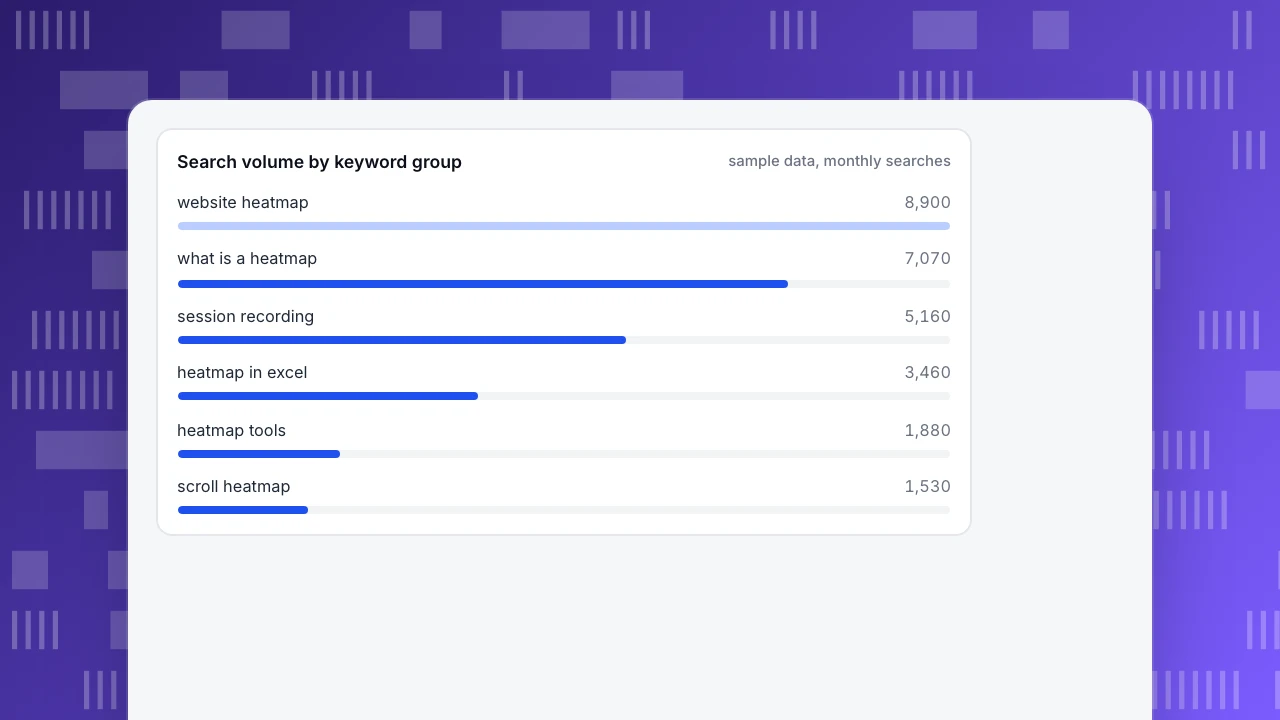
| website heatmap | 5,400 | heatmap for website (7), heat map website (6), click heatmap (5) | 8,900 |
| what is a heatmap | 4,400 | heatmap meaning (7), how to read a heatmap (6), heatmap analysis (5) | 7,070 |
| session recording | 2,900 | session replay (7), user session recording (6), heatmap vs session recording (5) | 5,160 |
| heatmap in excel | 1,900 | how to make a heatmap (8), excel heat map tutorial (6) | 3,460 |
| heatmap tools | 1,400 | heatmap software (6) | 1,880 |
| scroll heatmap | 1,000 | scroll depth heatmap (7), scroll map (6) | 1,530 |
The group volumes add up to 8,900 + 7,070 + 5,160 + 3,460 + 1,880 + 1,530 = 28,000, which is the total volume of the 20 terms, so no term was lost. For example, the first group is 5,400 + 1,900 + 880 + 720 = 8,900.
Four decisions in the example show why the SERP step matters.
- "How to make a heatmap" goes with Excel, not with "website heatmap". Literally it looks like a website-heatmap term, but it shares 0 URLs with "website heatmap" and 8 with "heatmap in excel". The searchers want a spreadsheet tutorial.
- "Heatmap tools" stays separate. It shares 3 URLs with "website heatmap", below the threshold of 4 (Jaccard 3 ÷ 17 = 0.18), because its results are lists of products. It needs its own page type.
- "Scroll heatmap" is a separate group. It shares only 1 URL with "website heatmap". Scroll depth is its own question with its own results.
- "Heatmap vs session recording" joins "session recording". It shares 5 URLs with it (Jaccard 5 ÷ 15 = 0.33) and none with "website heatmap", although it contains the word "heatmap".
Compare with the literal method. Grouping by "contains the word heatmap" puts 14 of the 20 terms in one pile, and splits "heat map website" and "excel heat map tutorial" away from them just because of the space. The SERP method gives six groups of 2 to 4 terms each, and each group is a page brief.
Search volume by keyword group
sample data, monthly searchesWhere should you set the threshold, and what are the edge cases?
The example used 4 of 10. Three situations call for judgment rather than a formula.
Results that change. Rankings move, and so do the overlaps. Re-pull the lists for the terms that sit at 3 or 4 shared URLs before you commit a page to them; a group whose members share 5 or more is less likely to flip.
Mixed-intent results. Some terms return a blend of formats: a few guides, a few product pages, a video. A term whose top 10 overlaps equally with two different groups is a sign of two intents sharing a results page. Assign it to the group where your page type matches, and mention it in the other.
A head that is not the best head. Choosing the highest-volume term as the head is simple and works well, but if it is an odd phrasing, make the clearest term the page's title and keep the head as a secondary term. Grouping decides what belongs together; naming the page is a separate editorial decision.
When a group is large, more than about 10 terms, check whether it hides two intents by comparing its lowest-overlap members with each other, not only with the head.
Common mistakes with keyword grouping
- Grouping by shared words. In the example, the literal rule put 14 terms in one group and would have sent "how to make a heatmap" to a website-heatmap page that does not answer it.
- Using the results from different dates or countries. Overlap is only comparable when every list is pulled for the same market and day.
- Treating the threshold as truth. 4 of 10 is a convention for this example. Choose one, write it down and use it throughout.
- Forgetting brand terms. They distort volume and group poorly; filter them first.
- Never revisiting groups. Results change. Review groups when a page's traffic drops or when you add a new page in the same area.
- Writing a page per term anyway. A group is only useful if it is turned into one page with the secondary terms answered as headings or FAQs.
- Assuming the group decides the title. The group says which terms belong together. The title still has to be written for the reader, and the content audit decides whether an existing page can take the group: see content audit.
How do you check a grouping with search performance data?
Grouping is a prediction: "this one page can rank for all of these terms." Search performance data from Google Search Console shows what actually happens. The performance report lists clicks, impressions, click-through rate and average position, and it can be broken down by query and by page, so each group's page can be compared with its group.
Three checks, after a page has been live for a few weeks:
- Do the group's terms appear for the group's page? Look at the queries that bring impressions to the page. If most of the group's terms are there, the grouping is working. If a term appears only on a different page, its intent may belong with that page instead.
- Do two pages share one term? The same query showing impressions for two of your pages is the signature of cannibalization; merge the pages or sharpen their targets. See keyword cannibalization.
- Is the click-through rate low for a good position? A page in the top 10 whose click-through rate is below normal usually needs a better title or description, not a different group. See organic CTR for what to expect, and the keyword performance report for a way to lay the results out.
How to check a keyword group with TapCub
TapCub is not a keyword research tool: it has no search volumes and no SERP lists, so the four steps above happen elsewhere. What it adds is the check afterwards: each group against real search data and real behavior on the page.
- Connect a search account. Open Monitoring › Search performance and follow the steps to connect Google Search Console or Bing Webmaster. Without a connected account the page shows no clicks or impressions, and that is not the same as zero traffic. Baidu does not offer an API for clicks and impressions, so it cannot be connected this way.
- Read the performance report. It shows clicks, impressions, click-through rate and average position, split by page, query and country, with data usually 1 to 3 days late. The page states the date it is current through.
- Compare the group with its page. Switch between the page split and the query split to see which of the group's terms bring impressions to which page, and whether one query shows up under two pages.
- Find the groups worth tuning first. The rank buckets group queries by average position, weighted by impressions, and the scatter plot draws each page as a point sized by impressions. A page in the top 10 whose click-through rate is below the median is marked: change its title and description before anything else.
- Add behavior. Open the page in Web analytics › Pages to see how visitors behave on it after they arrive. A group can rank well and still disappoint if the page answers a different question than the terms imply.
- Know the boundary. TapCub does not suggest groups, estimate volume or check SERP overlap; it shows how the groups you chose perform.
FAQ
What is keyword grouping in SEO?
Keyword grouping sorts a long list of search terms into sets that one page can serve. Terms belong together when searchers want the same thing, which you can test by whether Google returns largely the same pages for them. It prevents both near-duplicate pages and one page that is too broad.
What is the difference between keyword grouping and keyword clustering?
In most SEO writing they mean the same thing. Some authors use clustering for the automated, SERP-overlap method and grouping for any way of sorting terms, including manual or topical grouping. What matters is the test you use to decide that two terms belong together.
How many keywords should be in a group?
There is no fixed number. In the example, groups had 2 to 4 terms. If a group grows past about 10 terms, check whether it hides two intents by comparing the lowest-overlap terms with each other. The size follows from how many terms share results, not from a target.
How do you group keywords by search intent?
For each term, list the top 10 results, take the highest-volume term as the head and count shared URLs with it. Terms that share at least your chosen threshold, such as 4 of 10, join the group; the rest start a new one. Then assign one page per group.
Do I need a tool to group keywords?
Not for a short list. A spreadsheet with ten URLs per term and a count of shared URLs does the job for 20 or 30 terms, as in the example. For hundreds of terms, a tool that pulls results and clusters automatically saves time, but you still decide the threshold and review the groups.
Sources
- Wikipedia. Keyword clustering — methods for grouping search terms, including SERP-based clustering. Verified 2026-11-18.
- Wikipedia. Jaccard index — shared items divided by all distinct items in two sets, used above to express overlap. Verified 2026-11-18.
- Google Search Console Help. Performance report (Search) — clicks, impressions, CTR and average position, grouped by query and page. Verified 2026-11-18.
Was this article helpful?
We use your answers to fix and expand this page.
Couldn’t send. Please try again in a minute.
Thanks for the feedback. We’ll use it to improve this page.You’ve already sent feedback on this page. Thanks.

Product Experience Specialist
Explores usability, user journeys, and feature adoption through practical examples of onboarding and everyday product use.