Try it on your own data
Every report in this article is in the free plan. One snippet for web and apps, up to 10 sites.
Start freeA CRO audit reviews how well a website turns visitors into customers and why it loses the rest, with every finding tied to a conversion goal and a value. This guide gives a checklist, six steps that start with verifying tracking, and a B2B demo funnel where fixing a Safari form bug and an unnecessary required field lifted form completion from 15% to 22%.
What you will learn
- Verify conversion tracking before analysis
- Audit conversion paths, not single pages
- Size every leak in money terms
- Ship fixes; test hypotheses
- Prioritize with impact, confidence and ease
What is a CRO audit?
A conversion rate optimization (CRO) audit is a structured review of how well a website turns visitors into customers, and why it loses the rest. It checks the conversion data itself, the paths visitors take to convert, the pages and forms on those paths, and the technical problems that block them, then produces a ranked list of changes to test or fix.
It differs from a UX audit in focus: a UX audit looks at usability across tasks, a CRO audit follows the money. Every finding is tied to a conversion goal and an estimate of what it is worth.
When you need a CRO audit
- Conversion rate fell and the cause is not obvious.
- Traffic grew but sign-ups or sales did not.
- A redesign, new checkout or pricing change shipped recently.
- You are about to increase ad spend and want to stop the leaks first.
- You have never checked whether conversion tracking is accurate.
The CRO audit checklist
| Area | What to check | Red flags |
|---|---|---|
| Tracking | Goals fire once, revenue matches backend, bots and internal traffic excluded | Conversions above backend count; sudden drops after releases |
| Funnel | Step-by-step drop-off from landing page to conversion, by device and channel | One step losing most users; mobile far below desktop |
| Landing pages | Message matches the ad or query; clear value and next step above the fold | High bounce on paid landing pages; headline unrelated to the ad |
| Forms | Number of fields, error rate per field, autofill support | Fields with high abandonment; validation errors on common inputs |
| Pricing and offer | Prices, plans, delivery cost and guarantees visible before the decision | Surprise costs late in checkout |
| Trust | Reviews, security, returns and contact options near the CTA | No contact or support option on high-intent pages |
| Speed and errors | Core Web Vitals and JavaScript errors on conversion pages | LCP above 2.5 s on mobile; errors on form submit |
| Support signals | Chat and ticket questions from conversion pages | Repeated "how much / when / does it work with" questions |
| Item type | What to do |
|---|---|
| Fix | Bugs, broken fields, missing info: ship directly and verify |
| Hypothesis | Copy, layout, offer changes: A/B test or measure carefully |
| Investigate | Unclear cause: more replays, support review, interviews |
Fixes usually deliver the fastest gains.
How to run a CRO audit in six steps
1. Verify tracking
Compare one week of goal conversions and revenue in analytics with your backend. Fix gaps before analyzing anything else.
2. Map the conversion paths
List the main entry pages and the steps to each conversion. Build a funnel for each path and split it by device, channel and new vs returning visitors.
3. Size each leak
For every step, estimate value lost = users who drop × the conversion rate after that step × value per conversion. This turns percentages into money and ranks the audit.
4. Diagnose the biggest leaks
Use heatmaps, scroll depth, form analytics, session replays of abandoners and support conversations from those pages. Write the likely cause for each leak.
5. Write hypotheses and fixes
Separate fixes (bugs, broken fields, missing information: ship them) from hypotheses (copy, layout, offer: test them). Each item gets an owner and an expected impact.
6. Prioritize and plan
Score items with a simple model such as ICE (impact, confidence, ease) and plan the first month: fixes first, then the highest-scoring tests.
Worked example: a B2B demo request funnel
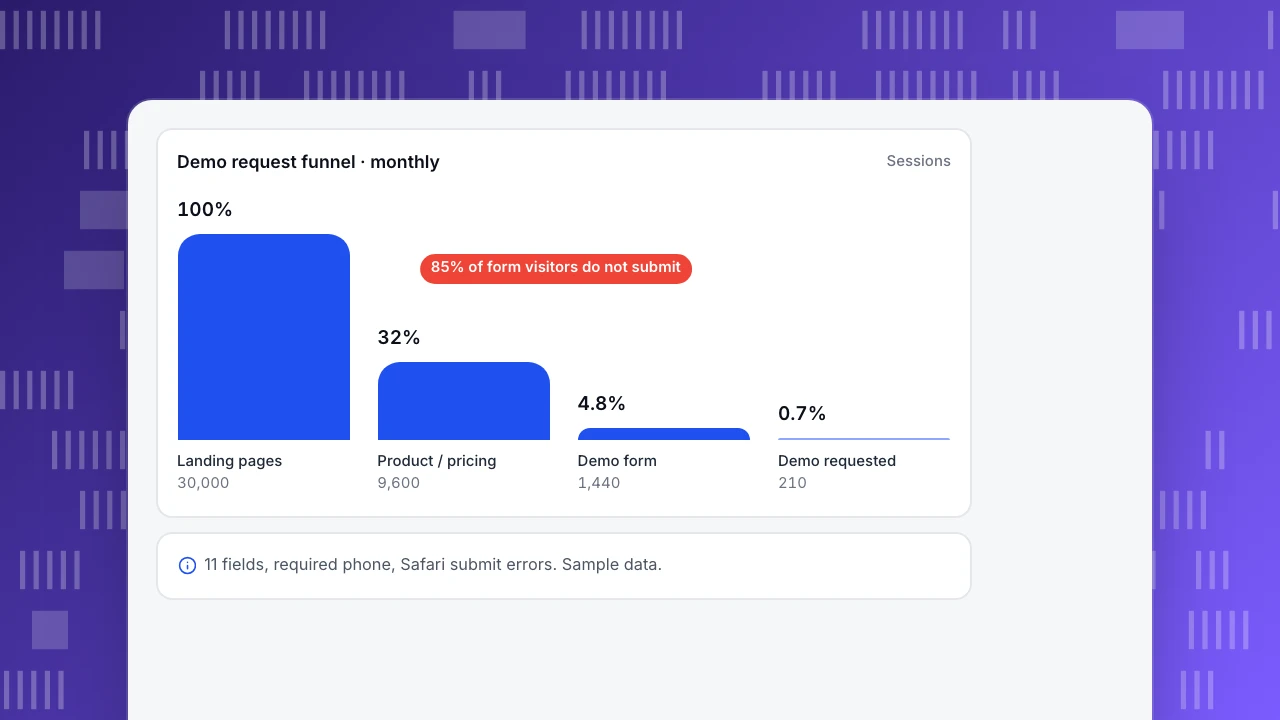
A B2B site (sample data) gets 30,000 sessions a month and 210 demo requests (0.7%). Each request is worth about €400 in pipeline value.
| Step | Sessions | Drop-off | Main finding |
|---|---|---|---|
| Landing pages | 30,000 | 68% leave without a second page | Paid search ads promise "pricing", page has none |
| Product / pricing pages | 9,600 | 85% do not reach the form | Pricing hidden behind "contact us" |
| Demo form | 1,440 | 85% do not submit | 11 fields; "phone" required; 14% submit errors on Safari |
| Demo requested | 210 | — | — |
Fixes first: Safari submit bug and making phone optional. Then tests: adding price ranges to the pricing page, and landing pages that match ad copy. After the fixes alone, form completion went from 15% to 22% (about 100 more requests a month, roughly €40,000 in pipeline).
Demo request funnel · monthly
SessionsLanding pages
30,000
Product / pricing
9,600
Demo form
1,440
Demo requested
210
Common mistakes
- Skipping the tracking check. Many "conversion drops" are tracking changes.
- Auditing pages instead of paths. Visitors convert across several pages.
- Treating every finding as a test. Bugs and missing information should simply be fixed.
- Ignoring segments. Average conversion hides device and channel problems.
- No estimate of value. Without it, the loudest opinion sets priorities.
Running a CRO audit with TapCub
- Tracking check: goals, realtime view and bot filtering; compare with your backend.
- Funnels: build a funnel per conversion path and split it by device and channel; read funnel drop-off.
- Pages: entry and exit pages, bounce and time on page in Web analytics › Pages.
- Diagnosis: click and scroll heatmaps, form analytics, rage clicks, JavaScript errors and session replay (off by default).
- Support signals: chat conversations show which page visitors were on, and chat vs no-chat conversion is reported.
- Speed: real-user Core Web Vitals per page.
TapCub does not run A/B tests. Related: conversion rate optimization, what is a good conversion rate, UX audit.
FAQ
What is the difference between a CRO audit and a UX audit? A UX audit reviews usability across tasks. A CRO audit focuses on conversion goals, sizes each leak in money terms and produces fixes and tests ranked by value.
How long does a CRO audit take? For a typical site with two or three conversion paths, one to two weeks including data checks, analysis and the report.
What should a CRO audit deliver? Verified tracking, funnels per path with drop-off, a list of fixes and hypotheses with evidence, estimated value, and a prioritized plan.
How often should I do a CRO audit? Once or twice a year, and after major redesigns, pricing changes or a sudden drop in conversion.
Sources
- Baymard Institute. Checkout usability research.
- Nielsen Norman Group. Website forms usability: top 10 recommendations.
- web.dev. Web Vitals.
Was this article helpful?
We use your answers to fix and expand this page.
Couldn’t send. Please try again in a minute.
Thanks for the feedback. We’ll use it to improve this page.You’ve already sent feedback on this page. Thanks.

Growth Strategist
Explores acquisition channels, activation, and conversion experiments, turning data insights into actionable growth hypotheses and evaluation methods.