Try it on your own data
Every report in this article is in the free plan. One snippet for web and apps, up to 10 sites.
Start freeBot traffic is any visit made by software instead of a person. This guide covers the three kinds, the signals that reveal them in your analytics, how to verify a crawler, why you should report bots separately rather than delete them, and what actually stops the harmful ones.
What you will learn
- Bot traffic has three kinds that need different handling: search-engine crawlers, AI crawlers, and malicious or scraper bots.
- Detect it by stacking signals (spikes, no JavaScript, hosting networks, request rate); verify claimed search engines with reverse DNS before blocking.
- Report bots separately instead of deleting them, and stop harmful ones with rate limits and a WAF, because robots.txt only works for polite bots.
What is bot traffic?
Bot traffic is any visit to your website made by software instead of a person: search-engine crawlers, AI crawlers, scrapers, uptime monitors and attack scripts. Some bot traffic is useful and some is harmful, but all of it can distort your analytics unless it is detected and reported separately from human visitors.
It is a large share of the web. Imperva's 2026 Bad Bot Report says automated activity made up more than 53% of web traffic in 2025, up from 51% the year before, with human activity down to 47%. Imperva measures its own customer base, so treat it as a strong signal rather than a census. Your own site may sit well above or below that line, which is why you should measure it.
What are the three kinds of bot traffic?
The useful split is not "good" and "bad" but what the bot is for and whether it tells the truth about itself. Our guide to the types of bots lists many more; for analytics three groups matter.
- Search-engine crawlers. Googlebot, Bingbot and similar bots fetch pages so they can appear in search results. You want them. They also create the largest single block of non-human requests on many sites. The web crawler guide explains how they work.
- AI crawlers. Bots that read pages to train models or to answer questions, such as GPTBot, ClaudeBot and PerplexityBot. In Cloudflare's data for May 2024 to May 2025, GPTBot's share of AI and search crawler requests grew from 2.2% to 7.7%, while Googlebot's rose from 30% to 50% (Cloudflare). Whether they send visitors back is a separate question, covered in the AI crawler ledger.
- Malicious, scraper and spam bots. Content scrapers, credential-stuffing scripts, fake-signup and comment-spam bots, and vulnerability scanners. They often hide behind a normal browser user-agent. Imperva reports that 27% of bot attacks in 2025 targeted API endpoints, not pages.
A fourth, quieter group is monitoring and tooling bots (uptime checks, SEO audits, link checkers). Treat them like the first group: expected, but not human.
How do you detect bot traffic in your analytics?
No single signal proves a visit is a bot. Detection works by stacking weak signals, so a visit that trips several is far more likely automated than one that trips one. The most useful ones:
- Sudden spikes with no campaign behind them. Sessions double overnight and no email, post or ad explains it.
- Near-100% bounce and zero-second visits. One page, no scroll, no click.
- Odd geography or networks. A burst of visits from a country you do not serve, or from hosting and cloud networks (data-centre IP ranges) where people rarely browse from. Be careful: people on VPNs and corporate proxies also appear on those networks.
- No JavaScript, no interaction. Many bots fetch HTML and never run your page script. Headless browsers do run it, but often leave traces: a webdriver flag, a tiny or default-size screen, no language list.
- A user-agent that names a bot, or one that does not match the headers. A Chrome user-agent without the headers real Chrome sends is suspicious.
- Request rate no person could produce. Dozens of requests from one address in a minute.
- One page hit repeatedly. Login, search, checkout or pricing pages hammered while the rest of the site is quiet.
The table below turns these signals into a short checklist.
| Signal | What you see | What to check |
|---|---|---|
| Unexplained spike | Sessions jump with no campaign | Compare with email, ads and posts; open the bots report for that day |
| Near-100% bounce | One page, zero seconds, no scroll | Segment by source and country |
| Hosting or odd networks | Bursts from data-centre IPs or a country you do not serve | Check network and country; remember VPN and proxy users |
| No JavaScript or interaction | HTML fetched, page script never runs; or headless traces | Look for webdriver flags, default screen size, missing languages |
| User-agent mismatch | Chrome user-agent without Chrome headers, or a named bot | Verify claimed search bots with reverse and forward DNS |
| Request rate | Dozens of requests from one address in a minute | Rate-limit login, signup, search and checkout |
Any one signal can have an innocent cause; two or three together point to automation.
How can you verify a crawler is who it says it is?
A user-agent is only a claim, and anyone can write "Googlebot" there. Google's documentation on verifying requests from Google crawlers gives two checks. The manual one is a reverse DNS lookup on the IP, confirming the domain is googlebot.com, google.com or googleusercontent.com, followed by a forward lookup on that name to confirm it resolves back to the original IP. The automatic one matches the IP against Google's published JSON lists of crawler ranges, such as common-crawlers.json.
Use this before blocking anything that claims to be a search engine. A fake "Googlebot" from an unrelated network is a scraper; a real one blocked by mistake can cost you crawling.
Should you filter bot traffic or report it separately?
Report it separately. Deleting bots from your data gives you a clean human report, but it also hides information you need:
- Search-engine crawl health. How often Googlebot fetches you, which pages return 404s, and whether crawling dropped after a release.
- AI crawler activity. Who reads your content and whether any visitors come back, which is the evidence for deciding whether to allow or block them.
- Attack patterns. A scraper hitting one URL pattern or a spam bot targeting a form is visible only if you can still see the bot.
- Audit. If a detection rule is wrong, a separate report lets you spot a real customer wrongly flagged. If you silently delete them, the error is invisible.
The practical rule: human reports stay human (visitors, sessions, bounce rate, conversion), and bots get their own report where you can read them by name, purpose and requests.
What does separating bots do to your numbers?
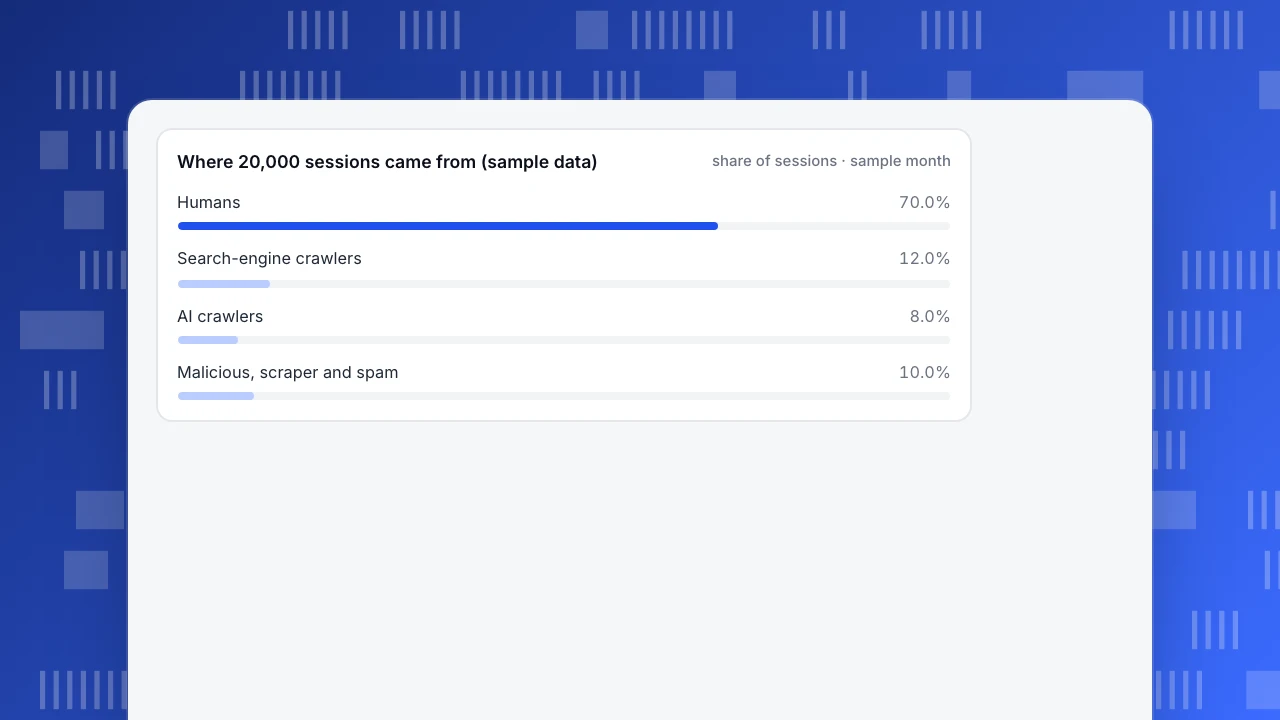
Here is a worked example with sample data (not a real site). A store had 20,000 sessions in 30 days and 420 orders. Bot detection splits the sessions like this:
| Segment | Sessions | Share |
|---|---|---|
| Humans | 14,000 | 70.0% |
| Search-engine crawlers | 2,400 | 12.0% |
| AI crawlers | 1,600 | 8.0% |
| Malicious, scraper and spam | 2,000 | 10.0% |
| Total | 20,000 | 100% |
Unfiltered conversion is 420 / 20,000 = 2.10%. Human-only conversion is 420 / 14,000 = 3.00%. The blended number understates the real rate by (3.00 - 2.10) / 3.00 = 30%. A team reading 2.1% might launch a checkout test to fix a problem that does not exist, or conclude that a campaign flopped when it did not.
The same data shows a second thing a delete-only approach would miss: 2,400 + 1,600 = 4,000 sessions (20.0%) come from crawlers you may actually want, and 2,000 (10.0%) are the ones to deal with.
Where 20,000 sessions came from (sample data)
share of sessions · sample monthHow do you stop harmful bot traffic?
Detection tells you what happened. Stopping it takes controls in front of your site, and it starts with an honest view of what robots.txt can do.
robots.txtonly works for polite bots. The standard says outright that these rules are not a form of access authorization (RFC 9309, September 2022). Cloudflare's analysis likewise notes that compliance is voluntary. Use it for search engines and AI crawlers that follow the rules, not for scrapers.- Rate limits. Cap requests per IP or per session on login, signup, search and checkout. Bursts no person could produce are the easiest bad traffic to stop.
- A web application firewall (WAF) or bot-management service. It can block by network (hosting ranges), challenge suspicious clients, and apply rules before requests reach your application.
- Protect the endpoints, not only the pages. If API calls are a frequent target, require authentication and limit them separately.
- Verify before you block. Check claimed search-engine bots with the method above so you do not block the ones you want.
- Keep an exception list. Partners, monitors and your own tools should be allowed deliberately.
Start with the cheapest control that fits the evidence: a rate limit for bursts, a WAF rule for a network, a form challenge for spam signups.
How does TapCub detect and separate bot traffic?
TapCub's bot detection is built around the same idea as the signal list above, using five layers: user-agent, request headers, client signals, ASN or IP network, and request rate. More than 197 built-in rules cover known bots and AI crawlers by name. A visit is classed as a bot when the combined evidence is strong enough, not on one signal alone.
New projects default to Detect and report separately: recognised bots appear only in the bots report and do not inflate human visitors, sessions or pageviews. You open it under Web analytics › Bots, where you can see search engines, AI crawlers and other bots by name, operator, purpose, requests and pages, plus an AI content ledger that shows which operators read your pages and how many human visitors they sent back. Crawl health compares your robots.txt with what actually crawled you, which is evidence for a blocking decision.
Two honest limits:
- Detection is not perfect. TapCub does not claim 100% accuracy. If a real visitor is flagged, the misclassification can be marked as human.
- The page script only sees bots that run JavaScript. Crawlers that fetch HTML without running it need server collection or a log import to appear.
TapCub reports bots; it does not block them. A "Detect and drop" setting exists, but it only means bot events are not stored; the bot can still reach your site. For blocking, use rate limits and a WAF as above, and use the report as the evidence. See the bots and AI crawlers help guide for the report fields, or the analytics overview for the rest of the product.
FAQ
How much web traffic is bots?
Imperva's 2026 Bad Bot Report puts automated traffic at more than 53% of web traffic in 2025, against 47% human. That is Imperva's customer base; the Cloudflare post cited below quotes Cloudflare Radar at about 30% of global web traffic, so definitions and samples differ and your site will too. Measure yours by splitting bots out of your analytics.
How do I detect bot traffic?
Look for stacked signals: unexplained spikes, near-100% bounce, traffic from hosting networks or unexpected countries, no JavaScript or interaction, bot-like user-agents, and unnaturally fast request rates. Then verify claimed search-engine bots with reverse DNS or published IP ranges. An analytics tool with built-in bot detection does the stacking for you.
Is bot traffic bad for SEO?
Search-engine crawlers are needed for SEO. Harmful bots do not hurt your rankings directly, but they distort metrics, burn server capacity and can slow real visitors. The risk to SEO comes from misreading the data or blocking real crawlers by mistake.
Should I block all bot traffic?
No. Blocking Googlebot or Bingbot removes you from search results. Decide per group: allow search-engine crawlers, make a deliberate choice for AI crawlers based on whether they send visitors back, and block or rate-limit scrapers and attack bots.
Does robots.txt stop bad bots?
No. It is a request that polite crawlers follow, not access control. Scrapers and attack scripts ignore it, so use rate limits, a WAF and authentication for those.
Can bot detection be wrong?
Yes. Any detection will misclassify some visits, in both directions. That is why separate reporting matters, and why TapCub lets you mark a misclassified visitor as human.
See also: AI Referral Traffic: How to Spot and Measure It; Content Analytics: What to Measure and How to Review It
Sources
- Imperva (2026). Bad Bot Report 2026: Bots in the Agentic Age — automated traffic more than 53% of web traffic in 2025 (51% the year before), human 47%; 27% of bot attacks targeted API endpoints. Vendor-run, customer-base data. Verified 2026-11-21.
- Google. Verify requests from Google crawlers and fetchers — reverse and forward DNS check against googlebot.com, google.com, googleusercontent.com; published JSON IP range lists. Verified 2026-11-21.
- Cloudflare (2025). From Googlebot to GPTBot: who's crawling your site in 2025 — May 2024 to May 2025: Googlebot 30% to 50% and GPTBot 2.2% to 7.7% of AI and search crawler traffic; robots.txt compliance is voluntary. Verified 2026-11-21.
- Koster, M. et al. (2022). RFC 9309: Robots Exclusion Protocol — "These rules are not a form of access authorization." Verified 2026-11-21.
Was this article helpful?
We use your answers to fix and expand this page.
Couldn’t send. Please try again in a minute.
Thanks for the feedback. We’ll use it to improve this page.You’ve already sent feedback on this page. Thanks.

Product Experience Specialist
Explores usability, user journeys, and feature adoption through practical examples of onboarding and everyday product use.