Try it on your own data
Every report in this article is in the free plan. One snippet for web and apps, up to 10 sites.
Start freeThe main types of bots are search crawlers, AI crawlers, SEO and monitoring tools, link-preview fetchers, scrapers, credential-stuffing bots, spam bots and click-fraud bots. Imperva puts automated traffic at 51% of web traffic and bad bots at 37%, so sorting them is part of reading any traffic number. This guide gives a ten-row table with user-agent and traffic-pattern signs, a three-signal way to check a bot, and a rule for allowing, limiting or blocking each.
What you will learn
- Sort bots by purpose, then give each a verdict: allow, limit or block; the user-agent alone never proves who is calling
- Verify claimed crawlers with reverse and forward DNS; in the sample, 1,800 of 9,000 Googlebot hits (20%) were fake
- Unfiltered bot sessions understated the sample conversion rate by 20% (1.50% instead of 1.875%); robots.txt asks, the server enforces
How are bots grouped, and how much traffic are they?
Bots are usually sorted by what they are for, not by how they are built: crawlers that index or train, tools that monitor or audit, and programs that attack or scrape. The ten-row table above uses exactly that split. The split matters because the same request line in your logs can be a search engine you want, an AI crawler you may want to limit, or a scraper you should block.
Scale first. Imperva's 2025 Bad Bot Report puts automated traffic at 51% of all web traffic and bad bots at 37% of it. Subtract and you get roughly 14 points for everything else that is automated: search crawlers, monitors, feed fetchers and the like. So on an average site, "human traffic" is less than half of the requests, and bad bots outnumber the useful ones by more than two to one. Your own mix will differ, because a small site with no login rarely attracts credential attacks and a large store attracts a lot of scraping.
Use this three-way verdict when you classify a bot:
- Allow: it helps you get found (search engines) and passes verification.
- Limit: it is legitimate but costs you bandwidth or gives little back (some SEO crawlers, AI training crawlers).
- Block: it is trying to take something it has no right to (credential stuffing, scraping behind a login, form spam, click fraud).
The rest of this guide covers how to tell the types apart in your data, what the verified crawlers say about themselves, what bots do to your numbers, and which control to use for which type.
| Type | User-agent clues | Traffic pattern | Verdict |
|---|---|---|---|
| Search crawler | Names such as Googlebot; verify by DNS | Steady, follows links and sitemap, honours robots.txt | Allow |
| AI training crawler | Own token, e.g. GPTBot | Broad fetching of many pages with few visits sent back | Limit or allow by policy |
| AI search crawler | Own token, e.g. OAI-SearchBot | Fetches pages that may be cited in answers | Allow if you want citations |
| User-triggered AI fetcher | Own token, e.g. ChatGPT-User | Single fetch right after a person asks | Treat like a visitor; robots.txt may not apply |
| SEO tool crawler | Tool name in the string | Large site crawls, bursts on one domain | Allow or rate-limit |
| Uptime monitor | Service name in the string | Same URL at a fixed interval, all day | Allow; exclude from analytics |
| Link-preview fetcher | Platform name in the string | One hit on one URL right after a share | Allow |
| Scraper | Copies a browser string or headless Chrome | Walks list pages fast; skips images and scripts; rotating IPs | Block |
| Credential stuffer | Browser-like string | Many failed logins across many accounts | Block |
| Spam or click-fraud bot | Browser-like or empty string | Form posts with no page view; paid sessions of one second | Block |
Names in the user-agent column are examples from operator documentation; a name is a claim, not proof.
How can you tell a bot from a visitor?
Use three signals, from cheapest to strongest, and never rely on the first one alone.
1. The user-agent string. It is the client's self-reported identity, as the Apache documentation puts it for the User-agent field of the combined log format. Honest bots put their name in it (Googlebot, GPTBot, OAI-SearchBot, ChatGPT-User). Bad bots copy a normal browser string. A name match tells you who claims to be calling, nothing more.
2. The network. Real crawlers run from addresses their operator can prove. Google's documentation gives a two-step check for Googlebot: run a reverse DNS lookup on the IP from your log, confirm the hostname ends in googlebot.com, google.com or googleusercontent.com, then run a forward lookup on that hostname and confirm it returns the original IP. For example, host 66.249.66.1 returns a crawl-66-249-66-1.googlebot.com name, and the forward lookup of that name must return the same address. If either step fails, the request is not Googlebot, whatever its user-agent says.
3. The behaviour. Bots leave patterns that people do not:
| Behaviour | Typical of | Why it gives them away |
|---|---|---|
| Hundreds of pages per minute from one IP or one small range | Scrapers, aggressive crawlers | No person reads a page every 200 ms |
| Exactly the same interval between hits (for example every 60 seconds) | Uptime monitors | Humans are irregular |
| Many failed logins across many accounts from rotating IPs | Credential stuffing | One attempt per account, spread out to avoid lockout |
| Requests that skip images, CSS and scripts | Simple HTTP scrapers | A browser loads all of them |
| One hit on a single URL right after a link is posted | Link-preview fetchers | Triggered by a share, not by browsing |
| Form posts with no preceding page view | Spam bots | A real visitor loads the form first |
Two cautions. First, a bot that runs a full browser (headless Chrome) looks like a person to a page script, so behaviour and network checks matter more for scrapers than the user-agent. Second, a missing signal is not proof: an unrecognised user-agent from an unverified IP is "unknown", not "malicious".
What do search and AI crawlers say about themselves?
Crawlers from big operators publish their names and rules. Read those pages instead of guessing.
Search crawlers. Googlebot is verified with the DNS check above. Google also lists user-triggered fetchers on separate hostname patterns such as gae.googleusercontent.com or google-proxy-...google.com, so a hit from those is a fetch somebody asked for, not routine crawling.
AI crawlers from one operator. OpenAI's bot documentation separates three user-agent tokens, because they do three different jobs:
| Token | What it does | robots.txt effect |
|---|---|---|
GPTBot | Collects content that may train generative AI models | Disallowing it says your content should not be used for training |
OAI-SearchBot | Surfaces sites in ChatGPT's search features | Disallowing it keeps your pages out of ChatGPT search answers (links can still appear); changes take about 24 hours |
ChatGPT-User | Fetches a page when a person asks ChatGPT to, or via GPT Actions | OpenAI says robots.txt rules may not apply, because a user started the action |
That table is the practical lesson: "AI bot" is not one type. Blocking the training crawler is a different decision from blocking the one that decides whether you show up in an AI search answer. Other operators publish similar splits, so check each operator's page.
What robots.txt can and cannot do. The robots exclusion standard (RFC 9309, September 2022) states that its rules "are not a form of access authorization". Compliant crawlers follow them; hostile bots ignore them. The RFC also says crawlers should not use a cached copy for more than 24 hours unless the file is unreachable, and that parsers must handle at least 500 kibibytes. Two practical rules follow: keep the file small and do not expect a change to apply in minutes.
Which bots are harmful, and what do they look like?
Bad bots are defined by intent, so you spot them by what they do:
- Scrapers copy prices, listings or articles. They walk lists page by page, often at night, and may use rotating residential IPs and a browser-like user-agent. In analytics they show up as a spike on category or product pages with no clicks on anything else and a near-100% bounce.
- Credential stuffing tries stolen username and password pairs against your login. The signature is a high rate of failed logins, many distinct accounts, few attempts per account. Your server or auth logs show it; a page script usually does not.
- Spam bots fill comment, contact and signup forms with links. Look for form submissions with no page view, identical text, or a burst of signups with throwaway addresses.
- Click-fraud and fake-impression bots hit paid landing pages. A paid campaign whose sessions last one second, arrive from one data-centre network and never scroll is the classic case.
- Denial-of-service floods are the extreme case: a sudden jump in requests per second, often to one URL.
Cheap defences, in the order to try them: rate limiting per IP, a challenge on login and signup forms, a honeypot field on forms, and blocking by network when one range causes most of the damage. None of them need a vendor, and none of them are analytics, so do them at the server or CDN and use analytics only to see whether they worked.
What do bots do to your analytics numbers?
Three numbers from a made-up site show the damage. All figures here are sample data.
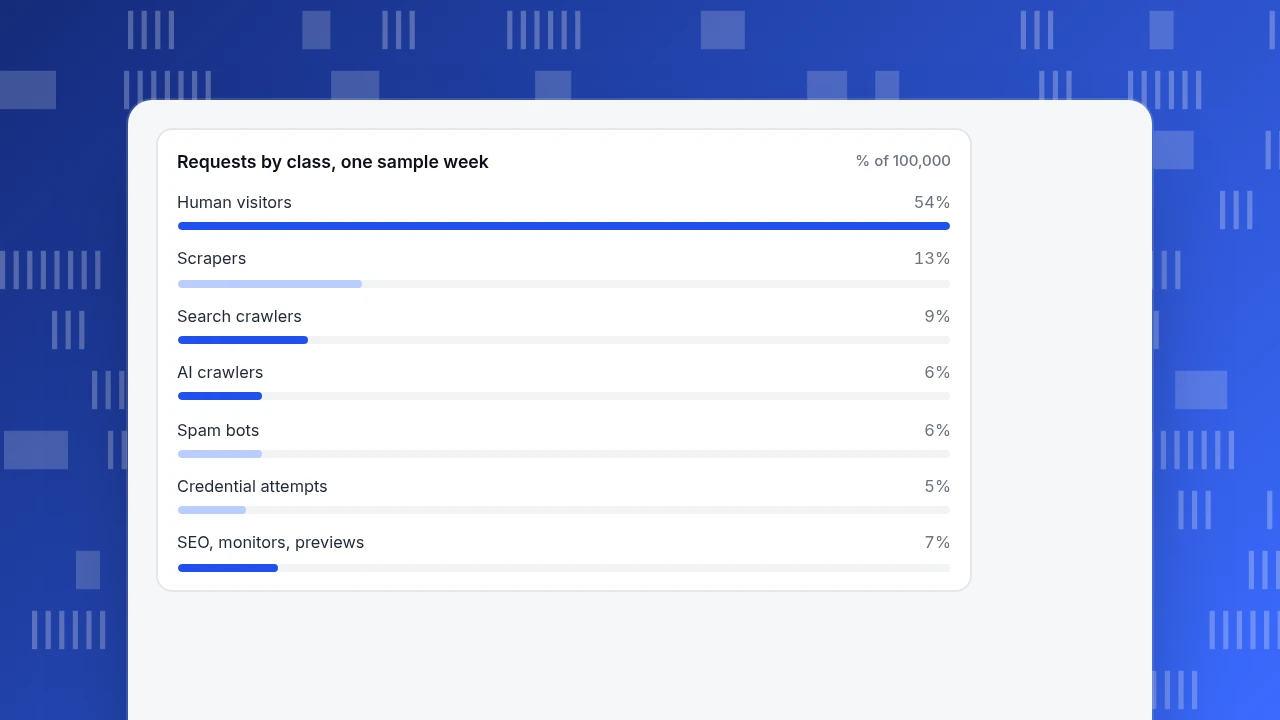
1. Traffic mix. One week, 100,000 requests classified by the methods above: 54,000 human (54%), 13,000 scrapers, 9,000 search crawlers, 6,000 AI crawlers, 6,000 spam, 5,000 credential attempts, 4,000 SEO-tool crawls, 2,000 monitor pings and 1,000 link previews. Automated requests are 46%, the same order of magnitude as Imperva's 51% figure for the web as a whole.
2. Fake Googlebot. The logs contain 9,000 requests claiming to be Googlebot. Running the reverse-then-forward DNS check on every distinct IP verifies 7,200 of them. The other 1,800 (20%) are something else wearing Googlebot's name. If you had allow-listed by user-agent, a fifth of your "trusted" traffic would have been unverified.
3. Conversion rate. The site had 40,000 sessions, 600 conversions and 8,000 sessions from bots that execute JavaScript:
- Unfiltered conversion rate: 600 ÷ 40,000 = 1.50%.
- Human-only: 600 ÷ (40,000 − 8,000) = 600 ÷ 32,000 = 1.875%.
The unfiltered number understates the true rate by 20% (1 − 1.50 ÷ 1.875). A team that sees 1.5% and "improves" the checkout is chasing a gap that bots created. The same distortion inflates bounce rate, depresses pages per session and ruins any per-visitor cost figure.
Requests by class, one sample week
% of 100,000Block, allow or ignore: which control fits which type?
| If the bot is… | Do this | Where |
|---|---|---|
| A verified search crawler | Allow; watch for 404 and 5xx responses it receives | robots.txt, server logs |
| An AI training crawler you do not want | Disallow its token in robots.txt, then check whether requests stop | robots.txt |
| An AI search or answer crawler | Allow if you want citations; track how many visits it sends back | robots.txt, analytics |
| A user-triggered AI fetcher | Treat as a visitor-like fetch; robots.txt may not apply, so use access control if needed | Server or CDN |
| An SEO tool crawler | Allow, or limit the crawl rate if it loads the server | robots.txt, rate limit |
| A monitor you set up | Exclude from analytics | Analytics filter |
| A scraper, credential stuffer or spam bot | Block; robots.txt will not stop it | Server, CDN, form protection |
| Unknown | Do nothing yet; log it for a week and look at behaviour | Logs |
The rule behind the table: robots.txt asks, the server enforces. Use robots.txt to state a preference to operators who comply, and use rate limits, authentication and network blocks for everyone else.
How do you see bots separately in TapCub?
Take the 1.50% versus 1.875% problem above (the detection layers are explained in how bot detection works). In TapCub the first fix is a default: a new project is set to Detect and report separately, so recognised bots go only to the bot report and do not inflate human visitors, sessions or pageviews. Here is how to use that:
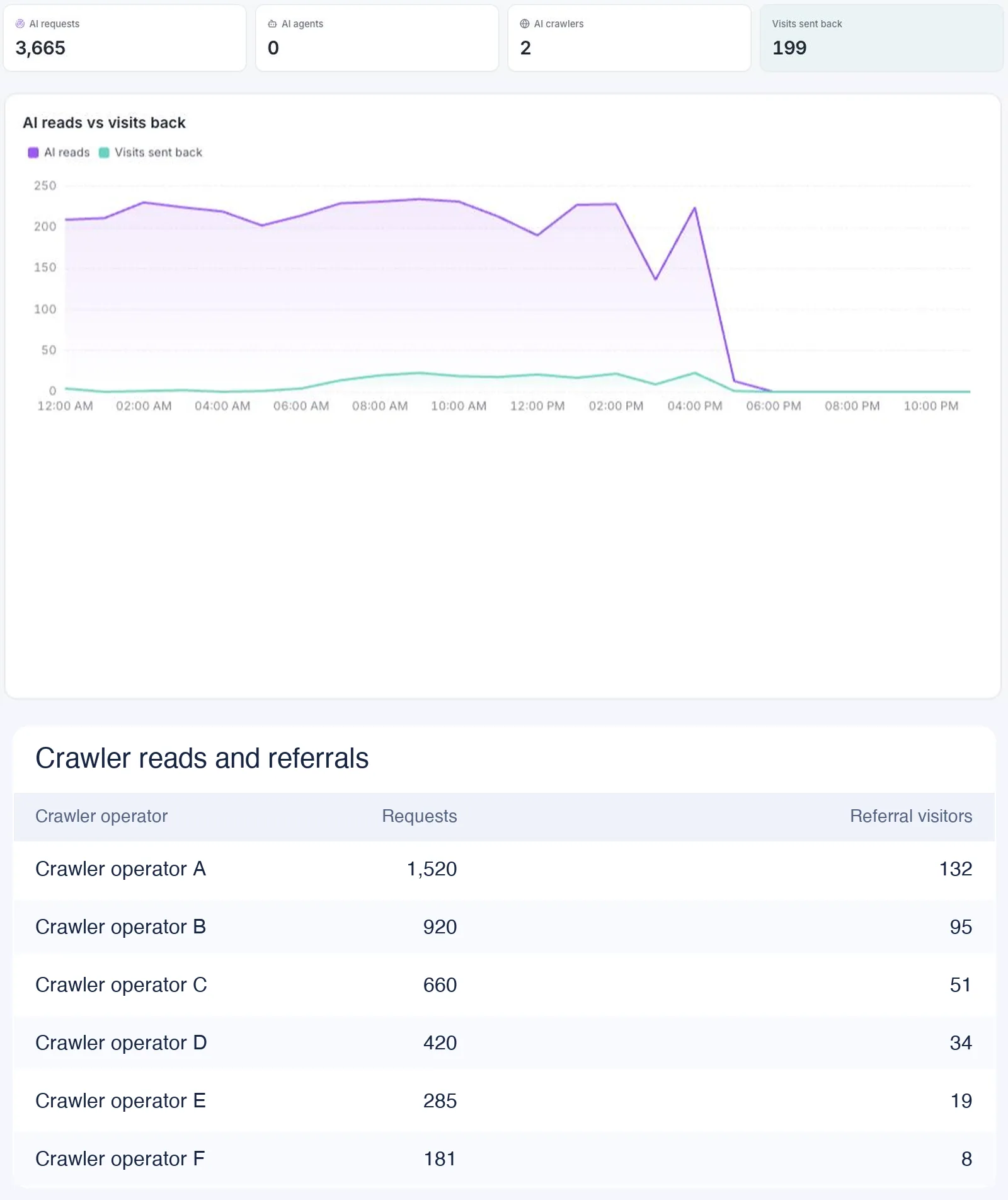
- Open Web analytics › Bots. The AI & agents tab shows AI requests, the AI content ledger (reads per operator, with training crawlers and answer engines in separate columns, and the human visitors each sent back), and the return ratio.
- Open All bots. Each row has the bot name, operator, purpose (search, AI training, AI answer engine, monitoring), requests, pages visited, the most common status code, last seen, a trust level and the detection layers matched. Only Applebot gets a DNS reverse-lookup check; other bots show "unverified", and "unknown" does not by itself mean a bot is fake. If a row is wrong, report a false positive.
- Check search crawlers in the health table: fetches, success rate, 404s and 5xx.
- Watch the limit stated on the page: with only the page script you see bots that run JavaScript. Crawlers that do not run it, and response codes, need server collection: send access records (user-agent and URL) to the server events interface with an API key from Configuration › Settings › API keys. That interface keeps only requests it classifies as bots and drops human ones. The log file import under All-platform analytics › Data › Data import is for page views and skips crawlers, so it will not fill the bot report.
- Compare Web analytics › Realtime: the online count includes only human events, and the live feed is split into people and bots.
TapCub does not block anything. It measures and separates, and you enforce at the server, CDN or robots.txt.
FAQ
What are the main types of bots?
Search engine crawlers, AI crawlers (training, search, user-triggered), SEO and monitoring tools, link-preview fetchers, scrapers, credential-stuffing bots, spam bots and click-fraud bots. The first five are usually legitimate, the last four are not, and AI crawlers depend on your policy.
Are all bots bad?
No. Imperva's 2025 report puts automated traffic at 51% of web traffic and bad bots at 37%, which leaves about 14 points for automation that is not classed as bad. Search crawlers are the clearest example of a bot you want.
Does robots.txt stop bad bots?
No. RFC 9309 says its rules are not a form of access authorization. Compliant crawlers follow it. For bots that ignore it, use rate limits, login requirements, network blocks or a challenge on forms.
How do I check that a visitor claiming to be Googlebot is real?
Run a reverse DNS lookup on the IP, confirm the name ends in googlebot.com, google.com or googleusercontent.com, then run a forward lookup on that name and confirm it returns the same IP.
Does blocking GPTBot remove me from ChatGPT search?
Not by itself. OpenAI says GPTBot covers training, while OAI-SearchBot decides whether you appear in ChatGPT search answers. They are controlled separately in robots.txt.
See also: Bot Traffic: How to Detect, Filter and Report It.
Sources
- Imperva, Bad Bot Report 2025: 51% automated traffic, 37% bad bots (page checked 2026-11-20).
- Google Search Central, Verifying Googlebot: reverse and forward DNS steps and hostname patterns.
- OpenAI, Overview of OpenAI crawlers: GPTBot, OAI-SearchBot and ChatGPT-User.
- IETF, RFC 9309 Robots Exclusion Protocol: September 2022; not an access authorization; 24-hour cache and 500 KiB parse guidance.
- Apache HTTP Server, Log Files: combined log format fields and what the user-agent records.
Was this article helpful?
We use your answers to fix and expand this page.
Couldn’t send. Please try again in a minute.
Thanks for the feedback. We’ll use it to improve this page.You’ve already sent feedback on this page. Thanks.

Data Analyst
Explores traffic sources, conversion funnels, and retention, using clear metric definitions and concrete examples to explain what the numbers mean.