Try it on your own data
Every report in this article is in the free plan. One snippet for web and apps, up to 10 sites.
Start freeTo audit your website, check three layers in order: technical (can pages be found, loaded and used), content (does each page have a purpose) and conversion (do visitors complete the goal). Then rank findings by expected extra conversions per day of work and fix the top ones first. Below: scope rules, a check table per layer and a worked prioritisation.
What you will learn
- Audit in three layers: technical, content, conversion; a page that fails one earns nothing from the others
- Scope to templates and top pages, not every URL, and time-box the first audit
- Rank by affected sessions × baseline conversion × expected lift ÷ days of effort
What does it mean to audit your website?
A website audit is a structured check of how well a site works for search engines and for the people who arrive, ending in a ranked list of fixes. It is not a single tool run. Looking at the site in three layers keeps the work finite and the findings comparable:
| Layer | The question | What you check | Evidence |
|---|---|---|---|
| Technical | Can pages be found, loaded and used? | Indexing, broken pages, redirects, speed, errors, mobile | Search console, real-user performance, error reports |
| Content | Is each page worth keeping, and does it answer what it should? | Purpose, search demand, overlap, age | Search queries, page traffic, a page inventory |
| Conversion | Do visitors do what the site is for? | Goals, funnel, forms, calls to action | Goal and funnel reports, heatmaps |
The thesis of this guide: audit in these three layers, then fix the findings with the biggest effect first. The order matters because a perfect page that is not indexed, or that nobody can complete, earns nothing. Each layer has a deeper guide: web analytics audit for whether your numbers can be trusted, content audit for the content layer and CRO audit for conversion. This article is the overview that ties them together and shows how to rank what you find.
| Layer | The question | Evidence |
|---|---|---|
| Technical | Can pages be found, loaded and used? | Search console, real-user speed, errors |
| Content | Does each page have a purpose and an answer? | Queries, traffic, page inventory |
| Conversion | Do visitors complete the goal? | Goals, funnel, heatmaps |
Each layer has a deeper guide; this one shows how to tie them together.
How do you set the scope before you start?
Without scope an audit turns into a list of five hundred small things. Decide three things first:
- The goal. "Improve sign-ups from search" produces different findings from "stop losing mobile visitors". Write one sentence.
- The page set. Audit templates and your top pages, not every URL. A site with 600 pages often has a handful of templates (home, product, article, form) and a small set of pages bringing most of the traffic. Start with the top 40 by visits and one example of each template.
- The time box. A first audit should take days, not weeks. Anything you cannot check in that time goes on a later list.
Also decide what "fixed" will look like: a number to move, such as organic clicks to the pages you fix, the share of mobile visits on good speed, or the conversion rate of the main goal.
What belongs in the technical layer?
Check that pages can be found and used. Start with what search engines report, because it names the problem rather than guessing. Google's Page indexing report lists reasons pages are not indexed, including "Server error (5xx)", "URL blocked by robots.txt", "URL marked 'noindex'", "Soft 404", "Not found (404)", "Crawled - currently not indexed" and "Duplicate without user-selected canonical". Each reason has a different fix.
| Check | Pass criterion | Why it matters |
|---|---|---|
| Important pages are indexed | Not listed under a "not indexed" reason | Unindexed pages cannot rank |
| Broken pages | Old URLs redirect to the closest equivalent | Visitors and link value hit a dead end |
| Robots and noindex | Nothing blocked or marked noindex by accident | A single stray rule can hide a section |
| Redirects | One hop, to the right page | Chains slow pages and lose visitors |
| Real-user speed | LCP 2.5 s or less, INP 200 ms or less, CLS 0.1 or less at the 75th percentile (web.dev) | Slow pages lose visitors before they read |
| Errors | No script errors on key pages and devices | A broken button looks like a conversion problem |
| Mobile | Same content and a usable layout on a phone | See mobile SEO |
Accessibility belongs here as well: for example, text should resize to 200 percent without losing content or function (WCAG 2.2, 1.4.4).
What belongs in the content layer?
The content layer asks of each page: why does it exist, and is it still doing that? Google's guidance on people-first content puts the central question in plain words: why is this content being created in the first place? Use it as the test.
For each page in your set, record the page's purpose, the queries that bring people to it, its traffic trend and anything that overlaps it. Then choose one action:
| Action | When |
|---|---|
| Keep | It serves a clear purpose, traffic is stable, and nothing overlaps |
| Improve | It ranks or has demand, but the answer is thin or outdated |
| Merge | Two pages answer the same query and compete |
| Remove or redirect | No purpose, no traffic, no links; redirect to the closest page if it has any |
This layer is where most audit time goes. Keep it small by working on the pages that already have impressions in search results: they have shown they can be found.
What belongs in the conversion layer?
A page can be indexed, fast and well written and still not do its job. Check the path from landing to goal:
- Is the goal measured? If the main action is not a defined goal, nothing else can be judged.
- Where does the funnel leak? Use a funnel from landing page to goal and find the largest drop.
- Is the call to action seen? A scroll view shows whether visitors reach it.
- Does the form ask too much? Compare the field count against what you need.
- Does it work on phones? Compare mobile and desktop conversion for the same page.
If conversion is the weak layer, the full method is in CRO audit.
How do you decide what to fix first?
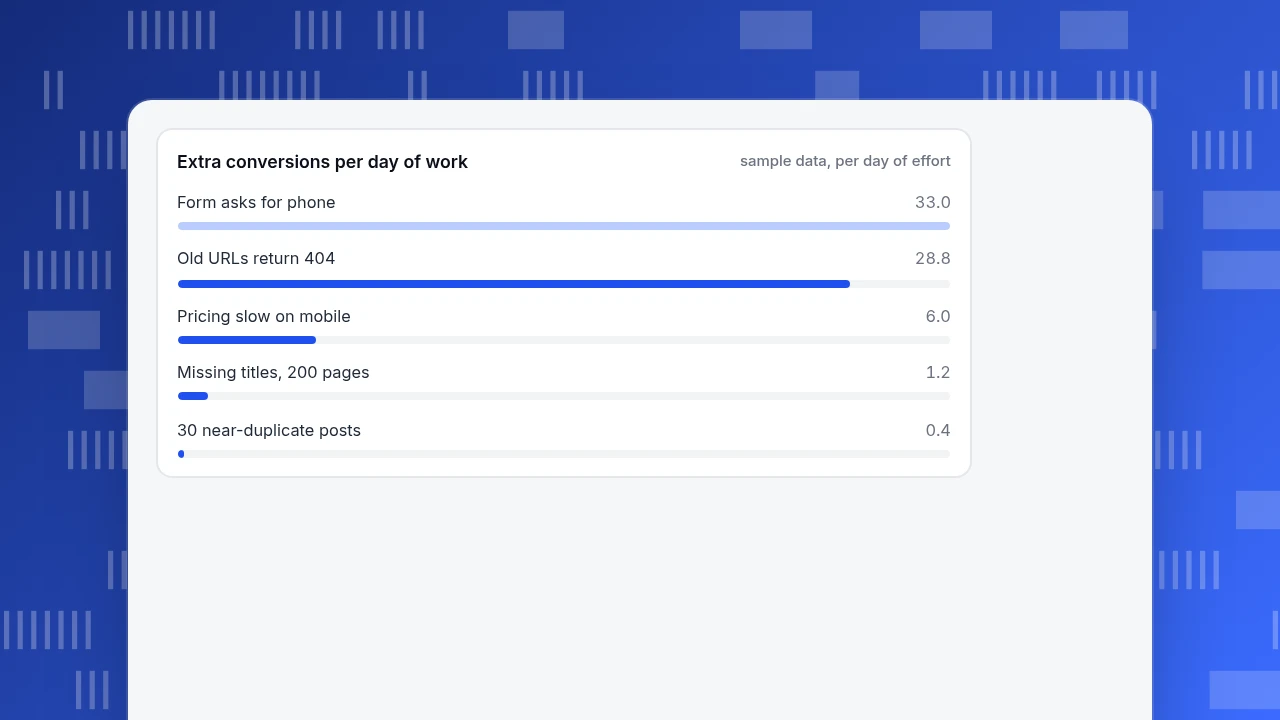
Rank findings by expected extra conversions per day of work. For each finding, estimate: extra conversions a month = affected sessions × baseline conversion rate × expected relative lift. Divide by the effort in days.
Sample data: five findings from an audit. The lifts are assumptions to be replaced by your own judgement.
| Finding | Affected sessions a month | Baseline conversion | Expected lift | Extra conversions | Effort (days) | Per day |
|---|---|---|---|---|---|---|
| Form asks for phone number | 5,000 | 3.0% | 11% | 16.5 | 0.5 | 33.0 |
| Old URLs return 404 | 2,400 | 2.0% | 60% | 28.8 | 1 | 28.8 |
| Pricing page slow on mobile (LCP 3.9 s) | 12,000 | 1.5% | 10% | 18.0 | 3 | 6.0 |
| Missing titles on 200 pages | 6,000 | 2.0% | 2% | 2.4 | 2 | 1.2 |
| 30 near-duplicate posts | 8,000 | 1.0% | 5% | 4.0 | 10 | 0.4 |
The arithmetic for the first row: 5,000 × 0.03 = 150 conversions; × 0.11 = 16.5; ÷ 0.5 days = 33.0 per day. The ranking by value per day is the form, the 404s, the pricing page, the titles and the duplicates. Note that the 404s have the largest absolute effect (28.8) but the form wins because it is a half-day job. The five fixes together are worth about 69.7 conversions a month for 16.5 days of work; the first two alone give 45.3 for 1.5 days, 65% of the total for 9% of the effort. The estimates are rough, but ranking by value per day stops the audit being sorted by how easy each item is to describe.
Extra conversions per day of work
sample data, per day of effortWhat should the audit hand over?
The deliverable is a table, not a deck. One row per finding:
| Finding | Evidence | Affected | Fix | Owner | Due |
|---|---|---|---|---|---|
| Old URLs 404 | Report name and date | 2,400 sessions a month | Redirect to the matching page | Named person | Date |
Add three things: a baseline number for each metric you intend to move, the date of the next audit, and a short list of what you chose not to do and why. Re-run the technical checks after major releases and the content and conversion layers quarterly.
What do people get wrong when auditing a website?
- Starting with a crawler report of 4,000 warnings. Warnings are not findings; connect each to a page set and an effect.
- Auditing every URL. Templates and top pages carry most of the value.
- Fixing in the order found. Rank by effect per day of work.
- Mixing layers. A speed problem and a headline problem need different people.
- Skipping the baseline. Without a starting number you cannot show the audit worked.
- Treating the audit as one-off. Sites change; schedule the next one.
How do you run this audit's measurement side in TapCub?
Take the five findings above. TapCub does not crawl your site, so it will not list broken links or missing titles; that part needs a crawler or search console. It supplies the real-visitor evidence behind the ranking:
- In Monitoring › Performance, read the real-user numbers, switch to P75 and break down by page and device to find slow pages such as pricing on mobile.
- In Monitoring › Errors, check error count, error rate (errors ÷ pageviews) and affected sessions, and expand a group to see the page and device of each occurrence. With 404 collection switched on in the tracking code, the 404 pages real visitors reached appear in Web analytics › Events, which gives you the sessions affected for the redirect row.
- In Monitoring › Crawl health, see how search engine crawlers fared: crawl counts, success rate, 404s and 5xx. Use Monitoring › Search performance for clicks, impressions and position by page.
- In Web analytics › Goals and All-platform analytics › Behavior › Behavior analysis, define the goal and build the funnel; Behavior › Heatmaps shows scroll reach and clicks.
- After fixes ship, add a note in Configuration › Annotations and set a monitor in All-platform analytics › Operations › Monitors on error rate, so a regression notifies you. A monitor only notifies; it does not fix anything.
FAQ
How do I audit my website?
Set a goal and a page set, then check three layers: technical (indexing, broken pages, speed, errors, mobile), content (purpose, queries, overlap) and conversion (goals, funnel, forms). Rank the findings by expected effect per day of work, hand over a table and set the date of the next audit.
How often should I audit my website?
Re-check technical items after every major release and at least quarterly, and run the content and conversion layers quarterly or twice a year. A site that publishes often or changes templates needs more frequent checks than a stable one.
What is the difference between a technical, content and conversion audit?
A technical audit asks whether pages can be found, loaded and used. A content audit asks whether each page has a purpose and answers it. A conversion audit asks whether visitors complete the action the site exists for. A page can pass two layers and fail the third.
What tools do I need to audit a website?
You need a search console for indexing and search data, real-user performance data, a crawler for broken links and on-page issues, and analytics with defined goals. A spreadsheet is enough to hold the findings and rank them. Add replay or heatmaps only for specific questions.
How do I prioritise audit findings?
Estimate extra conversions a month as affected sessions × baseline conversion × expected lift, divide by days of effort and fix the highest per-day items first. The estimates are rough, so use ranges and revisit the ranking once baseline data is in.
Sources
- Google Search Console Help. Page indexing report: the reasons a page is not indexed. Verified 2026-11-19.
- web.dev. Web Vitals: LCP, INP and CLS thresholds at the 75th percentile. Verified 2026-11-19.
- Google Search Central. Creating helpful, reliable, people-first content: the "why" test for content. Verified 2026-11-19.
- W3C. Web Content Accessibility Guidelines 2.2: success criterion 1.4.4 Resize Text. Verified 2026-11-19.
Was this article helpful?
We use your answers to fix and expand this page.
Couldn’t send. Please try again in a minute.
Thanks for the feedback. We’ll use it to improve this page.You’ve already sent feedback on this page. Thanks.

Customer Experience Consultant
Writes about live chat, visitor conversations, and self-service, sharing practical ways to make customer communication clearer and more effective.