Try it on your own data
Every report in this article is in the free plan. One snippet for web and apps, up to 10 sites.
Start freeMost analytics problems build up slowly: untagged campaigns, unexcluded internal visits, renamed events, unused dashboards. These twelve habits, grouped as plan, collect, read and act, each come with a quick check you can run on your own setup.
What you will learn
- Start from decisions and keep one tracking plan
- Exclude internal traffic and tag campaigns the same way
- Annotate changes and prune events and dashboards each quarter
Why habits beat a one-off setup
Most analytics problems are not caused by the tool. They build up slowly: a new landing page without UTM tags, an internal team that is never excluded, an event renamed by a developer, a dashboard nobody opens. An audit finds them once; habits keep them from coming back. The twelve below fall into four groups.
Plan
- Start from questions, not reports. Write down the five or six decisions analytics should inform, and build reports for those.
- Keep a tracking plan. One list of events, properties and owners, with a naming rule. Nothing goes live that is not on it. See tracking plan.
- Define goals once. Agree what counts as a conversion and set it up as a goal, so every report uses the same definition.
Collect
- Exclude internal and test traffic. Office addresses, admin paths, staging hostnames and test devices.
- Separate environments. Staging and production should not report into the same place, or should be filterable by hostname.
- Tag every campaign the same way. A shared UTM convention, lowercase, and a place to look it up.
- Keep personal data out. No emails or names in URLs, page titles or event properties. See GDPR-compliant analytics.
Read
- Compare like with like. Same weekdays, same length, and allow for seasonality before calling a change.
- Segment before you average. Site-wide numbers hide opposite movements by channel, device or country. See segment.
- Annotate changes. Releases, campaigns, tracking changes and outages, so the next person knows why a line moved.
Act
- Let alerts watch for you. Set alerts on the few metrics that matter, including a sudden drop to zero, which usually means broken tracking. See monitor.
- Review and prune each quarter. Delete unused events and dashboards, check that goals still match the business, and re-run a short audit.
The practices at a glance
The table lists the twelve with the reason behind each and a quick check. If you can only start with three, pick internal traffic exclusion, a tracking plan and annotations: they prevent the most confusion for the least effort.
| # | Practice | Why | Quick check |
|---|---|---|---|
| 1 | Start from questions | Reports nobody needs get ignored | Can each dashboard name the decision it serves? |
| 2 | Keep a tracking plan | Prevents duplicate and renamed events | Do live events match the plan? |
| 3 | Define goals once | One definition of conversion | Do all reports use the same goal? |
| 4 | Exclude internal traffic | Team visits inflate engagement | Do your own visits show in real time? |
| 5 | Separate environments | Staging pollutes production | Any staging hostnames in reports? |
| 6 | Consistent UTM tags | Split channels and campaigns | Same campaign in two spellings? |
| 7 | No personal data | Privacy risk | Emails in URLs or properties? |
| 8 | Compare like with like | False alarms | Same weekdays and length? |
| 9 | Segment before averaging | Averages hide opposite moves | Checked by channel and device? |
| 10 | Annotate changes | Unexplained jumps | Last release annotated? |
| 11 | Alerts | Breakage found late | Alert on a drop to zero? |
| 12 | Quarterly pruning | Clutter and drift | Unused events deleted? |
If you start with three: 4, 2 and 10.
A quarterly self-check
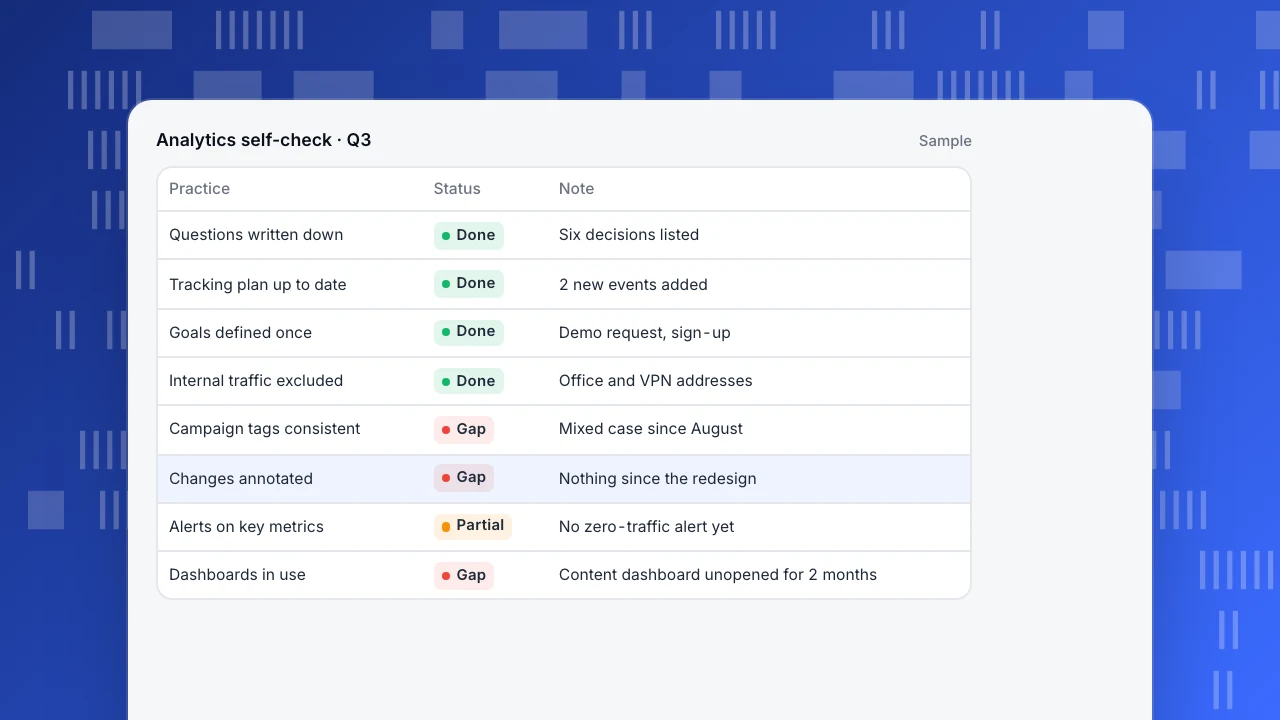
The example shows what a quarterly self-check can look like for a small team. Each practice gets a status and a note on what to fix. Three gaps stand out: no annotations since a redesign, campaign tags that drifted to mixed case, and a dashboard that has not been opened in two months.
Analytics self-check · Q3
Sample| Practice | Status | Note |
|---|---|---|
| Questions written down | Done | Six decisions listed |
| Tracking plan up to date | Done | 2 new events added |
| Goals defined once | Done | Demo request, sign-up |
| Internal traffic excluded | Done | Office and VPN addresses |
| Campaign tags consistent | Gap | Mixed case since August |
| Changes annotated | Gap | Nothing since the redesign |
| Alerts on key metrics | Partial | No zero-traffic alert yet |
| Dashboards in use | Gap | Content dashboard unopened for 2 months |
Following these practices in TapCub
Exclusion rules match by address, path, hostname and user agent on the web (plus device and app version for apps), and Exclude myself stores your current address in one click. Retention can be 30, 90, 365 or 730 days, the query string is not part of the page path, and UTM values are stored as source fields (project settings). Annotations draw a line for a single day or a band for a range on overview and trend charts, and can be added straight from a chart by dragging across dates (annotations). Monitors cover thresholds, period changes, forecast bands, anomalies and collection gaps, with a 30-day dry run before you turn one on.
FAQ
What are web analytics best practices?
Habits that keep data accurate and used: plan from questions, keep a tracking plan, exclude internal traffic, tag campaigns consistently, compare like with like, segment, annotate and review regularly.
How do I exclude internal traffic?
Add exclusion rules for office addresses, admin paths, staging hostnames and test devices, and check that your own visits no longer appear in real time.
How often should I review my analytics setup?
Look at alerts as they come, review dashboards monthly, and prune events and goals each quarter.
What is the most common analytics mistake?
Changing tracking without noting it, so later numbers cannot be compared with earlier ones.
What is the difference between best practices and an audit?
An audit checks a setup once. Best practices are the habits that keep it healthy between audits.
See also: Implementing web analytics, Web analytics report, Web analytics.
Was this article helpful?
We use your answers to fix and expand this page.
Couldn’t send. Please try again in a minute.
Thanks for the feedback. We’ll use it to improve this page.You’ve already sent feedback on this page. Thanks.

Product Experience Specialist
Writes about product experience, practical workflows, and growth, turning complex processes into clear steps for everyday decisions.