Try it on your own data
Every report in this article is in the free plan. One snippet for web and apps, up to 10 sites.
Start freeTraffic sources are the types of places visits come from: direct, organic search, paid search, social, email and referral, plus smaller ones like display and affiliates. A source is not reported by the visitor; your tool assigns it with rules, checked in a fixed order. Write those rules down once, because the same 1,000 visits give a different chart under different rules.
What are the main types of traffic sources?
Most analytics tools sort every visit into one of a handful of types. The six that matter for almost every site are direct, organic search, paid search, social, email and referral. Tools then add a few smaller ones. Google Analytics 4, for example, also has display, affiliates, SMS, mobile push, video and an "AI assistant" channel, plus an "Unassigned" bucket for visits that match no rule.
| Type | What counts | How a tool usually recognises it |
|---|---|---|
| Direct | The visit arrived with no usable referrer and no campaign tags | Source "(direct)" and medium "(not set)" or "(none)" in GA4 |
| Organic search | An unpaid click on a search result | The referring host is a search engine and there is no paid medium |
| Paid search | A click on a search ad | A paid medium such as cpc or ppc, or an ad click ID such as gclid |
| Social | A click from a social network, paid or unpaid | The referring host is a social site, or the medium is social; paid social adds a paid medium |
| A click on a link inside an email | Almost always a tag such as utm_medium=email, because email clients rarely pass a referrer | |
| Referral | A click on a link on some other website | A referring host that is not a search engine or a social network |
| Everything else | Display ads, affiliates, SMS, push, video, AI assistants | Mostly medium values such as display, affiliate, sms |
The point of the table is the third column. A traffic source is not something a visitor reports; it is a label your tool assigns using rules. Change the rules and the same 1,000 visits produce a different chart. That is the core of this guide: the types are easy, but the rules that sort visits into them have to be written down once and applied everywhere, or the numbers cannot be compared between months, teams or tools.
Each type has its own deep dive: direct traffic, organic traffic and referral traffic. This page is about the sorting layer above them. For the term itself, see source / channel.
How does a tool decide which type a visit belongs to?
Every tool runs the same kind of check, in a fixed order, and the first rule that matches wins. The signals, from strongest to weakest, are:
- Campaign tags on the landing URL.
utm_source,utm_mediumandutm_campaignare the ones Google's own documentation says to always set. Whoever built the link decides the channel, and the tool trusts them. - Ad click IDs. Parameters such as
gclidormsclkidare added by ad platforms automatically. A visit that carries one is a paid click even if nobody tagged the link. - The referring host. A host that is a search engine means search, a social network means social, anything else external means referral.
- Your own site. A hop from one of your own pages is internal navigation, not a new arrival.
- Nothing at all. No tags, no click ID, no referrer: direct.
Two details in GA4's published rules show how literal this is. Direct requires the source to equal "(direct)" and the medium to be "(not set)" or "(none)"; referral is simply a medium of "referral", "app" or "link". And Google notes that campaign values are case sensitive: utm_source=google and utm_source=Google are different values. A channel rule is only as good as the spelling of the tags that feed it.
| If the visit has… | It is sorted as… | Why |
|---|---|---|
utm_medium=email | Tags beat the referrer, even when the click came from a webmail site | |
gclid and a Google referrer, no tags | Paid search | The click ID is checked before the referrer |
| Only a Google referrer | Organic search | Search host, no paid signal |
| Only a referrer from a partner's blog | Referral | External host that is neither search nor social |
| No tags, no referrer | Direct | Nothing left to match |
Rule order is also why two tools disagree on the same site. If tool A checks the referrer before the click ID, its paid search visits will show up as organic. Look up the order in your tool's documentation before comparing anything.
Why do referrers go missing, and what does that do to direct traffic?
When you click a link, the browser can send the address of the page you came from in the Referer header. Whether it does, and how much of the address it includes, is controlled by the referrer policy. In current browsers the default is strict-origin-when-cross-origin: a click to another site sends only the origin, such as https://example.com/, not the page path. And if the click goes from an HTTPS page to an HTTP page, no referrer is sent at all.
That has three practical consequences:
- You usually see the site, not the page, that sent a visitor. For finding the exact article that linked to you, you need the referrer plus your own landing-page data.
- Links with no referrer fall into direct. Clicks from many mobile apps, some email clients, documents and messaging apps carry no referrer. Unless the link is tagged, the visit is counted as direct.
- Direct is therefore partly a bucket of unknowns. It contains people who typed your address or used a bookmark, and also people whose origin was lost. A rising direct line does not by itself mean a stronger brand. The longer discussion is in direct traffic.
The fix is not a tool setting; it is tagging. Any link you place yourself, in an email, a newsletter, a social bio or a partner post, should carry utm_medium and utm_source so the visit never depends on a referrer. Naming conventions for the tags are covered in the UTM entry and in the UTM naming guide.
What does a clean set of rules change? A worked example
Sample data: a site gets 1,000 sessions in a month. The true mix of arrival signals is below. The only difference between the two columns of results is whether the sorting rules are tidy.
| Arrival signal | Sessions |
|---|---|
Links tagged utm_medium=Email (capital E) | 40 |
Links tagged utm_medium=email | 60 |
Links tagged utm_medium=e-mail | 20 |
Tagged utm_medium=cpc from Google | 70 |
| Google Ads clicks with only a click ID, referrer google.com | 50 |
| Google referrer, no tags, no click ID | 260 |
| Social referrer, no tags | 90 |
| Other external referrer, no tags | 60 |
| No referrer, no tags | 350 |
| Total | 1,000 |
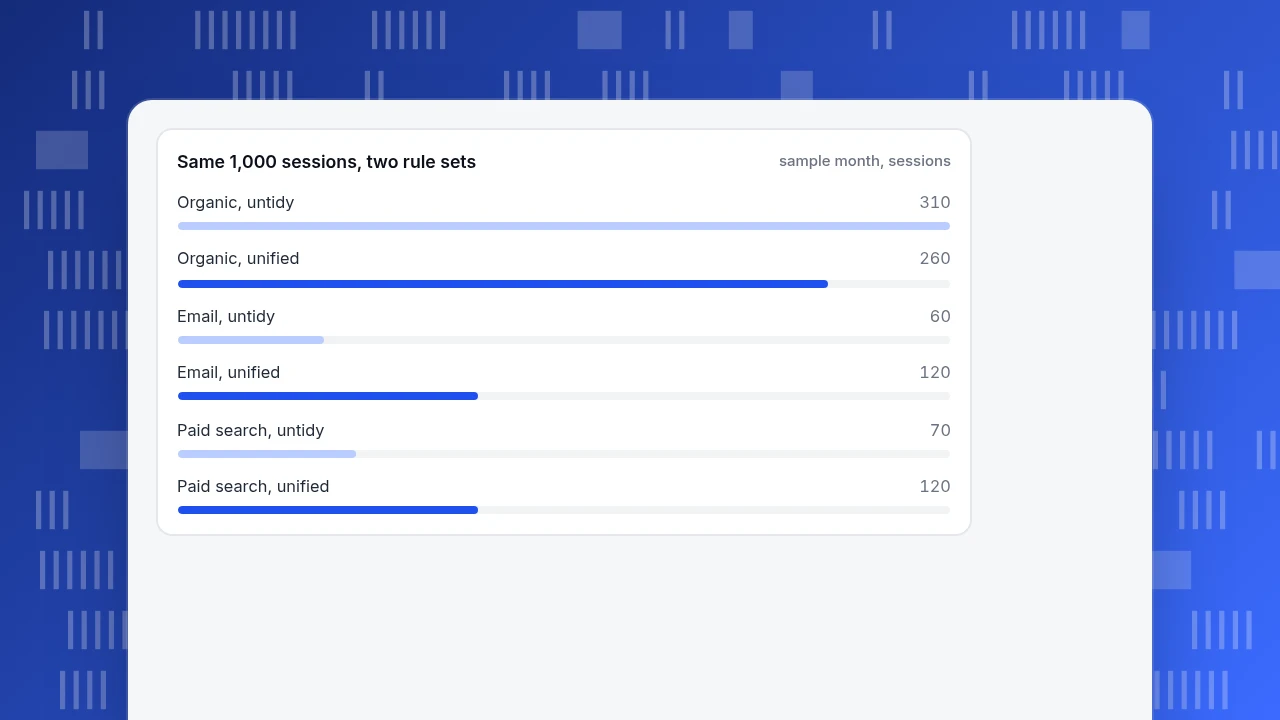
Untidy rules. Medium matching is case sensitive and only knows email; click IDs are not read, so the referrer decides. Result: email 60 (the Email and e-mail tags, 60 sessions, fall into "unassigned"), paid search 70, organic search 260 + 50 = 310, social 90, referral 60, direct 350, unassigned 60.
Unified rules. Medium values are lower-cased and e-mail is mapped to email; click IDs are read before the referrer. Result: email 40 + 60 + 20 = 120, paid search 70 + 50 = 120, organic search 260, social 90, referral 60, direct 350.
| Channel | Untidy rules | Unified rules |
|---|---|---|
| Organic search | 310 (31.0%) | 260 (26.0%) |
| Paid search | 70 (7.0%) | 120 (12.0%) |
| 60 (6.0%) | 120 (12.0%) | |
| Social | 90 (9.0%) | 90 (9.0%) |
| Referral | 60 (6.0%) | 60 (6.0%) |
| Direct | 350 (35.0%) | 350 (35.0%) |
| Unassigned | 60 (6.0%) | 0 |
Nothing about the visitors changed, yet organic search is overstated by 50 sessions, and email and paid search are both understated. It also changes money decisions: with $1,200 of paid search spend in the month, cost per session is $1,200 ÷ 70 = $17.14 under the untidy rules and $1,200 ÷ 120 = $10.00 under the unified ones. A team reading the first number might cut a channel that is working.
One more thing the table shows: 350 sessions, or 35.0%, sit in direct under both rule sets. No amount of rule tidying removes it, because those visits genuinely arrived without a signal. Only tagging links you control shrinks it.
Same 1,000 sessions, two rule sets
sample month, sessionsWhich rules should you write down before you trust the report?
A short rule book is enough. Each line below is a decision that, left implicit, makes two analysts produce two different channel reports.
| Decision | A workable default | Why it matters |
|---|---|---|
| Case and spelling of tags | All lower case; one spelling per medium | Email and email are different values |
| Medium vs source | Medium is the type (email, cpc, social); source is the place (newsletter, google) | Keeps channels and sources from blurring |
| Order of checks | Tags, then ad click IDs, then referrer, then own site, then direct | Same order everywhere makes tools comparable |
| Your own domains | List every domain and subdomain you own as internal | Otherwise a hop from your blog to your shop becomes a "referral" |
| Payment and sign-in returns | Exclude them as arrivals | Coming back from a payment page is not a new visit from a partner |
| Partner domains | Map each named partner to referral, or to a custom channel if you track them | Otherwise partner traffic is lumped with random links |
| Changes | Date every rule change and re-process history or mark the break | Otherwise trend lines jump on the day of the edit |
The last row is the one teams skip. If you change a rule in March and do not recompute earlier months, the March-versus-February comparison is partly a comparison of two rule sets.
| Decision | A workable default | Why it matters |
|---|---|---|
| Case and spelling of tags | All lower case; one spelling per medium | Email and email are different values |
| Medium vs source | Medium is the type; source is the place | Keeps channels and sources from blurring |
| Order of checks | Tags, click IDs, referrer, own site, direct | Same order everywhere makes tools comparable |
| Your own domains | List every domain and subdomain you own as internal | Otherwise blog-to-shop hops become referrals |
| Partner domains | Map each named partner to referral or a custom channel | Otherwise partner traffic mixes with random links |
| Changes | Date every rule change and recompute history or mark the break | Otherwise trend lines jump on the day of the edit |
Write the rule book once and apply it to every report and tool.
What mistakes make traffic source reports misleading?
- Treating direct as a measure of brand strength. As shown above, direct also holds visits that lost their referrer. Tag your own links first; read direct afterwards.
- Calling every social click organic. Paid social uses the same referring host as organic social. Only the medium separates them, so untagged boosted posts land in organic social.
- Comparing channel totals across tools without comparing rules. The 35.0% direct share in one tool and 28% in another may differ only in how they treat click IDs, internal hops and bots.
- Letting tag spelling drift. Three spellings of one medium produce three table rows and a lost total.
- Counting bots as a channel. Automated visits can arrive with no referrer and inflate direct, or with a search host and inflate organic. Keep recognised bots out of the human totals before you read the sources.
- Reading source and conversion separately. A channel with few visits and a high conversion rate is a different decision from one with many visits and a low rate. Look at both together.
How to see and tidy your traffic sources in TapCub
Take the example above and run it through TapCub.
- Open the report. Go to Web analytics › Sources. The first tab, Channels, groups visits by channel type, with visitors, sessions, pageviews, bounce, duration and conversions for each row. The other tabs split the same visits by referrer, search engine, AI source, UTM and search terms.
- Know the rule order. TapCub sorts a visit by UTM tags first, then ad click IDs, then the referring host (search, social, AI assistant, other external), then your own site, and finally direct. A hop from your own site is internal and never counts as acquisition. The full order is in how channels are decided. Ad click IDs such as
gclidare read automatically, so the 50 click-ID-only sessions in the example would land in paid search without any tags. - Add your own rules. In Web analytics › Configuration › Web settings, channel rules you add are matched before the defaults. This is where you would map a partner's domain to referral or a custom medium to the channel it belongs to, and where you can recompute history so old visits follow the new grouping.
- Choose how to count. Channels and Referrers can switch between First source of session, the default, and Every arrival. Under Every arrival, one visitor can appear under several sources, so rows can add up to more than the total.
- Add cost. For paid channels, All-platform analytics › Business › Channel ROI accepts spend by day, channel, source or campaign and gives cost per click as spend ÷ sessions, which is the $1,200 ÷ 120 calculation above.
TapCub does not write or tag your links and does not run your campaigns; it reads the tags you already have. It also keeps recognised bots out of the human reports by default, so they do not inflate direct or organic.
FAQ
How many types of traffic sources are there?
Six cover most sites: direct, organic search, paid search, social, email and referral. Tools add smaller ones such as display, affiliates, SMS and AI assistants, so a count of 6, 8 or 11 depends on the tool's rules. Pick the list your tool uses, write it down, and keep it stable across reports.
What is the difference between a traffic source and a medium?
A medium is the type of channel, such as email, cpc or social. A source is the specific place within it, such as newsletter or google. A common convention is to keep medium to a short controlled list and let source vary. The two together decide which channel a tagged visit is sorted into.
Is direct traffic really direct?
Not entirely. Direct means no usable referrer and no tags. It includes typed addresses and bookmarks, and also clicks from apps, some email clients and documents that send no referrer. Tagging links you place yourself moves the second group out of direct and into the channel it belongs to.
Why do I see "unassigned" or "other" in my sources?
The visit matched none of the rules. In practice it is usually a tag that is spelled differently from what the rules expect, such as e-mail instead of email. Open the row, find the raw medium and source, and either fix the tag at its origin or add a rule that maps it.
Is social media traffic organic or paid?
It can be either. Both arrive from a social host, and only the medium tells them apart. Links you boost or run as ads need a paid medium such as paid-social or cpc; otherwise they will be reported as organic social.
See also: Website Traffic Analysis: A 3-Pass Method With a Worked Example.
Sources
- Google. Default channel group, Analytics Help. The rules for Direct, Referral, Email, Organic Search, Paid Search, Organic Social, Display and the other channels. Checked 2026-11-19.
- Google. URL builders: Collect campaign data with custom URLs, Analytics Help. Required UTM parameters and case sensitivity. Checked 2026-11-19.
- MDN Web Docs. Referer header. What the header carries and when it is omitted. Checked 2026-11-19.
- MDN Web Docs. Referrer-Policy header. The default
strict-origin-when-cross-originpolicy. Checked 2026-11-19.
Was this article helpful?
We use your answers to fix and expand this page.
Couldn’t send. Please try again in a minute.
Thanks for the feedback. We’ll use it to improve this page.You’ve already sent feedback on this page. Thanks.

Product Experience Specialist
Writes about product experience, practical workflows, and growth, turning complex processes into clear steps for everyday decisions.