Try it on your own data
Every report in this article is in the free plan. One snippet for web and apps, up to 10 sites.
Start freeIn a single-page app, every view is created in the browser, so URLs, titles, status codes and pageviews all need deliberate work. This guide lists the seven requirements, explains hash vs history routing and soft 404s, and walks through a migration where indexed pages grew from 15 to 271 while pages per session jumped for a different reason: it was finally measured.
What you will learn
- Give every public view a real URL with history routing
- Ship content, title and canonical in the first HTML response
- Return real 404s; client-side "Not found" pages are soft 404s
- Paginate infinite lists so every item has a crawlable URL
- Track one pageview per route change and annotate migrations
What makes single-page application SEO different?
A single-page application (SPA) loads one HTML document and then swaps content in the browser with JavaScript as the user navigates, instead of requesting a new page from the server for every click. React, Vue, Angular and Svelte apps are usually built this way. SPA SEO is the set of practices that makes each of those client-side "pages" behave, for crawlers and analytics, like a real page: its own URL, its own HTML content and metadata, its own status code and its own pageview.
General rendering and crawling concerns are covered in JavaScript SEO. This guide focuses on the problems specific to SPAs: routing, per-route metadata, status codes, infinite lists and analytics.
The seven SPA SEO requirements
| # | Requirement | What goes wrong in a default SPA | Fix |
|---|---|---|---|
| 1 | A real URL per view | Views share one URL or use /#/ fragments | History API routing (/pricing, not /#/pricing) |
| 2 | Content in the first HTML response | <div id="root"></div> and nothing else | SSR, static generation or prerendering for public routes |
| 3 | Unique title, description, canonical per route | Every route keeps the index.html title | Set head tags per route on the server (Next.js metadata, Nuxt useHead, Angular Meta/Title with SSR) |
| 4 | Correct status codes | Unknown routes render "Not found" with HTTP 200 | Server returns 404 for unknown paths, 301 for moved ones |
| 5 | Crawlable links | Navigation via onClick handlers | <a href> elements (router Link components render them) |
| 6 | Paginated, not only infinite, lists | Items beyond the first batch never get a URL | Paginated URLs (?page=2) linked from the list |
| 7 | A pageview per route change | Analytics records one pageview per visit | Track History API changes as pageviews |
| Requirement | Fix |
|---|---|
| Real URL per view | History API routing |
| Content in first HTML | SSR, SSG or prerender |
| Unique head tags | Per-route metadata on the server |
| Correct status codes | Server 404 / 301 |
| Crawlable links | elements |
| Paginated lists | ?page=N URLs |
| Pageview per route | Track History API changes |
Hash routes (/#/) are one URL to search engines.
Routing: history mode vs hash mode
Hash routing (example.com/#/pricing) works without server configuration, which is why many SPAs start with it. For search, everything after # is a fragment of the same document, so Google treats /#/pricing and /#/features as one URL. Use history mode (example.com/pricing) and configure the server to return the right document and status for each path. Keep hash routing only for views that should never be indexed (an internal tool, a logged-in dashboard).
Status codes and soft 404s
In a client-only SPA the server returns the same index.html with HTTP 200 for every path, including /products/does-not-exist. The app then shows "Not found", but crawlers see a 200 page with thin content, which Google reports as a soft 404 and which wastes crawl budget.
Fixes, in order of preference:
- With SSR, return
404(or410for permanently removed items) from the server when the data lookup fails. - Without SSR, keep a server-side allowlist of valid route patterns and return 404 for anything else.
- As a last resort, add
<meta name="robots" content="noindex">on the not-found view, which Google will honor when it renders. It does not fix the status for other crawlers.
Redirects in SPAs often happen in JavaScript (router.push). Replace permanent ones with server-side 301s, and avoid redirect chains.
Worked example: an SPA migration, before and after
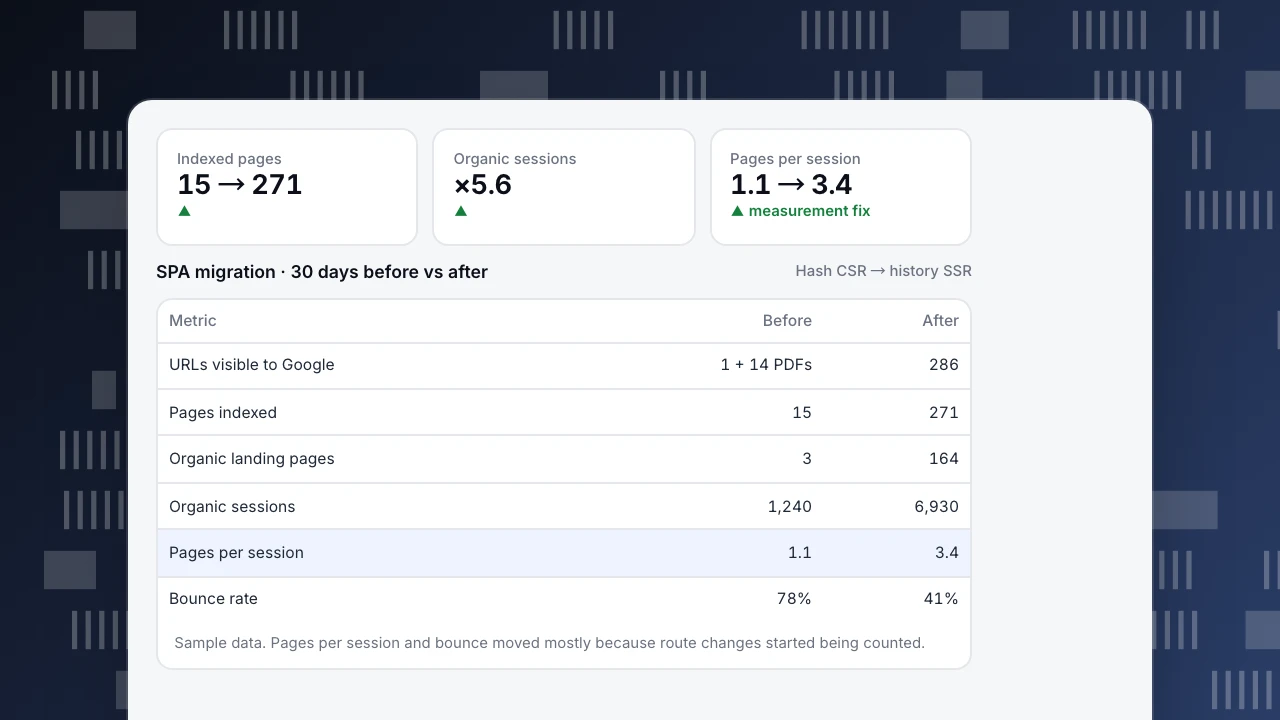
A SaaS marketing site and help center ran as one client-rendered Vue app with hash routing (sample data, 30 days each):
| Metric | Before (hash routing, CSR) | After (history routing, SSR) |
|---|---|---|
| URLs Google could see | 1 (/) plus 14 linked PDFs | 286 |
| Pages indexed | 15 | 271 |
| Unknown paths returning 200 | All | 0 (now 404) |
| Organic landing pages with traffic | 3 | 164 |
| Organic sessions | 1,240 | 6,930 |
| Recorded pages per session | 1.1 | 3.4 |
| Recorded bounce rate | 78% | 41% |
Two different things changed. The SEO change created indexable URLs, so organic traffic grew 5.6×. The analytics change (pageviews on route changes) fixed measurement: before, a visitor who read five help articles was recorded as one pageview and a bounce. Pages per session and bounce rate moved mainly because they were measured correctly, not because behavior changed. When you migrate, annotate the release so nobody reads the jump as a real improvement.
Indexed pages
15 → 271
▲
Organic sessions
×5.6
▲
Pages per session
1.1 → 3.4
▲ measurement fix
SPA migration · 30 days before vs after
Hash CSR → history SSR| Metric | Before | After |
|---|---|---|
| URLs visible to Google | 1 + 14 PDFs | 286 |
| Pages indexed | 15 | 271 |
| Organic landing pages | 3 | 164 |
| Organic sessions | 1,240 | 6,930 |
| Pages per session | 1.1 | 3.4 |
| Bounce rate | 78% | 41% |
Sample data. Pages per session and bounce moved mostly because route changes started being counted.
Analytics for single-page apps
- Track a pageview on every route change, including the page title and full path after the route resolves, not before.
- Do not double count. Some routers fire several history events per navigation; dedupe identical consecutive URLs.
- Keep the referrer chain. Each virtual pageview's referrer should be the previous route.
- Watch engagement time. In SPAs the tab stays open across many views; time is split per route on route change.
- Measure real-user performance per route. Soft navigations do not trigger a new page load; first-load LCP applies to the landing route, while later routes depend on INP and data fetching.
SPA SEO checklist
- [ ] Public routes use history mode, not
#fragments - [ ] Raw HTML of each public route contains its main content, title, description and canonical
- [ ] Router links render as
<a href> - [ ] Unknown paths return 404; removed items return 404 or 410; moved items return 301
- [ ] Sitemap lists every indexable route; no logged-in routes in it
- [ ] Infinite lists have paginated URLs
- [ ] robots.txt does not block JS, CSS or API paths needed for rendering
- [ ] Analytics records a pageview per route change, once
SPAs in TapCub
TapCub's script sends the first pageview when the document is ready and hooks later URL changes made with the History API, so React Router, Vue Router, Next.js and Nuxt routes are tracked without extra code; the same URL is not sent twice in a row. For hash routing, add data-hash="true" on the script tag. To control timing yourself, set data-auto-track="false" and call tapcub.pageview() after each route resolves. See installing on single-page apps, plus the React, Vue, Next.js and Nuxt guides. After a routing change, mark it with a chart annotation.
See also: Indexability, Soft 404.
Sources
- Google Search Central. Understand JavaScript SEO basics (History API, soft 404s in SPAs).
- MDN Web Docs. History API.
- Google Search Central. Fix lazy-loaded content.
Was this article helpful?
We use your answers to fix and expand this page.
Couldn’t send. Please try again in a minute.
Thanks for the feedback. We’ll use it to improve this page.You’ve already sent feedback on this page. Thanks.

Customer Experience Consultant
Writes about live chat, visitor conversations, and self-service, sharing practical ways to make customer communication clearer and more effective.