Try it on your own data
Every report in this article is in the free plan. One snippet for web and apps, up to 10 sites.
Start freeIn-app feedback is a question or comment channel inside your product, so answers are tied to what the person just did. Ask after a finished task, a failure, a milestone or a cancellation; keep it to one question; then join the answer to a behavior segment. In the sample, weighting by user type moves an average of 3.94 down to 3.46.
What you will learn
- Ask right after a meaningful action or failure, and make the prompt specific to that moment
- Responders skew enthusiastic: in the sample the naive average of 3.94 falls to 3.46 once weighted to the real user mix
- Record the answer as an event and compare low and high raters on retention, not just the average
What is in-app feedback, and which kinds are there?
In-app feedback is a question or comment channel that appears inside your product while someone is using it, so the answer is tied to what they just did. Five formats cover almost every case:
| Format | What the user sees | Best for | Weak at |
|---|---|---|---|
| Rating prompt | One tap: stars, thumbs, emoji | Quick pulse after a task | Telling you why |
| Micro-question | One short question with 3–5 choices | Reasons and priorities | Open-ended discovery |
| Open comment box | A text field with a short prompt | Surprises, wording, bugs | Counting; every answer is different |
| Bug report or "something is wrong" button | A form with page context | Defects | Measuring sentiment |
| Chat or conversation | A message window | Questions in the moment, follow-ups | Large-scale comparison |
Pick the lightest format that answers your question. The aim is not a feedback score; it is a question about the product that you can answer with behavior data: did the people who said it was hard actually drop off? The broader practice is covered in how to collect user feedback, the question list in feedback questions, and the definition in the user feedback glossary entry.
When should you ask for feedback inside the product?
Ask when the person has just finished something, failed at something, or is about to leave, because that is when they know what they think. Six trigger moments, with a sample prompt and the behavior segment to compare the answers against:
| Trigger moment | Sample prompt | Behavior segment to compare |
|---|---|---|
| First success (activation), such as the first project created | "How easy was it to get started?" 1–5 | Users who reached the milestone within 1 day vs after 7 |
| After using a feature a third time | "Did this do what you needed?" Yes / Partly / No | Users with 1 use vs 3+ uses of the feature |
| After a failure (error, empty search result, repeated clicks) | "What were you trying to do?" free text | Sessions with an error vs none on the same page |
| Cancellation or downgrade flow | "What is the main reason?" 4–5 choices + other | Cancelled vs retained at 30 days |
| Milestone (for example, 10 active days) | "What would you miss most if this went away?" | Power users vs light users |
| After a support conversation | "Did this solve it?" Yes / No | Resolved vs came back within 7 days |
Make the prompt specific to the moment ("How was exporting your report?") rather than generic ("How are we doing?"). A moment-specific question gets answers you can act on; a general one gets a mood.
| Rating group | Responders | 30-day retention |
|---|---|---|
| Low (1–2) | 50 | 22% |
| Middle (3) | 130 | 50% |
| High (4–5) | 220 | 60% |
Sample data. A gap shows who leaves, not that the rating caused it; read the comments to find the cause.
How do you time prompts so they do not annoy people?
Four rules, taken from the guidance platforms give for rating prompts and from common sense:
- Wait until the person has done enough to have an opinion. Google's guidance for in-app review prompts says to trigger the flow only after a user has experienced enough of the app to give useful feedback.
- Do not interrupt a task. Wait for a natural pause: a finished export, a closed dialog, the end of a session.
- Cap frequency. Google Play enforces a quota, and calling its review flow more than once in a short period (for example less than a month) may not show a dialog. Apply the same discipline to your own prompts: one prompt per person per moment, and a gap of weeks between prompts.
- Never ask a leading question before the prompt. Platform rules say not to ask "Do you like the app?" before showing a rating prompt; apply it to yours.
Rating prompts for an app store are a different job from product feedback: the first collects public reviews, the second collects private information for you. Keep the two separate and check the current policy of the store you use before filtering who sees a review prompt.
How many people will answer, and can you trust it?
Expect a minority. The question is who answers. Sample data: you show a prompt to 5,000 users after the export feature, and 400 answer (8%). Of the responders, 280 are power users (3+ exports) and 120 are light users. The user base is 30% power users, so the prompt reached 1,500 power users and 3,500 light users: response rates are 280 ÷ 1,500 = 18.7% for power users and 120 ÷ 3,500 = 3.4% for light users.
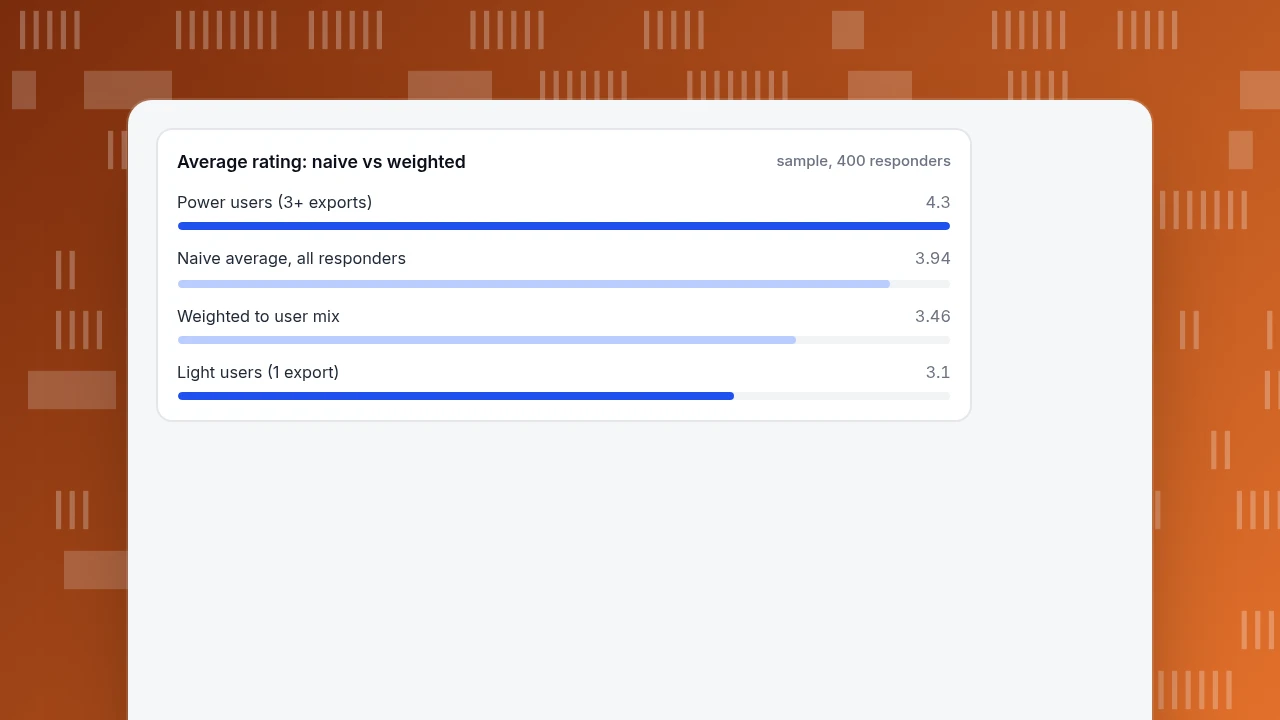
Average rating: power users 4.3, light users 3.1.
- Naive average over the 400 responders: (280 × 4.3 + 120 × 3.1) ÷ 400 = 3.94
- Reweighted to the user base (30% power, 70% light): 0.3 × 4.3 + 0.7 × 3.1 = 3.46
The naive number is 0.48 points too high because the people who answered were more enthusiastic users. Survey researchers see the same pattern: Pew Research reported that its average telephone response rate was 9% in 2012 (36% in 1997) and that a low response rate by itself does not mean a survey is wrong, but that remaining differences between responders and non-responders can mostly be corrected by weighting on known characteristics. The product equivalent is to weight by the behavior segment you know for everyone.
If you cannot weight, report both numbers and say who answered. A rating of 3.94 from power users only is still useful; it just describes them.
Average rating: naive vs weighted
sample, 400 respondersHow do you tie answers to behavior data?
A rating alone is a feeling. Joined to behavior it becomes a decision.
- Record the answer as an event with the moment and rating, for example
feedback_submittedwithmoment = export_doneandrating = 2, tied to the same user id as the rest of your data. - Define segments from the rating: low (1–2), middle (3) and high (4–5).
- Compare the segments on what happened next: retention after 30 days, feature use, funnel completion, repeat purchases.
- Read the comments of the low group first, since that is where a fixable cause is most likely.
Sample data from the 400 responders: 50 rated 1–2, 130 rated 3 and 220 rated 4–5. Thirty-day retention: low 11 ÷ 50 = 22%, middle 65 ÷ 130 = 50%, high 132 ÷ 220 = 60%. The gap says low raters are much more likely to leave. It does not say the rating caused it (people who struggle both rate low and leave), which is why you read the comments to find the specific struggle and fix that.
What do you do with open-text comments?
Do not read them one by one and react to the loudest. Tag each with a short topic label ("export format", "slow", "pricing"), count the tags per moment and segment, and ship fixes for the largest counts first. A comment that appears in only one place can still matter if the person is from a high-value segment, so keep the segment next to the tag. See feedback analysis for a tagging routine.
What are the common mistakes?
- Asking on first load, before the person has done anything.
- Asking too many questions. One question with an optional follow-up beats a five-field form.
- Stopping at the average. The score is a start; the segment comparison is the answer.
- Ignoring non-responders, who are most users.
- Not closing the loop. If a user reports a bug and never hears back, the next prompt gets an angry answer. A short "fixed, thanks" message is enough.
- Prompting every user. Target a segment with a reason to answer, such as users who just hit an error.
How do you do this in TapCub?
TapCub measures behavior and offers a chat widget; it does not include surveys or NPS questionnaires. The working split is: your product (or a survey tool you already use) shows the prompt, and TapCub holds the behavior data you compare against.
- Send the answer as an event. Call
tapcub.track('feedback_submitted', { moment: 'export_done', rating: 2 })when someone answers. Events keep up to 20 properties of text, number or true/false values, and appear under Web analytics › Events. - Identify the person. After sign-in call
tapcub.login, so the answer sits on the same profile as the person's behavior timeline under All-platform analytics › Users › People. - Build segments from the answers. Under All-platform analytics › Users › Segments & tags, create a rule segment "did
feedback_submittedwith rating 2 or lower in 30 days", then apply it to funnels and retention to compare the low raters with everyone else. - Find the failure moments to ask about. Monitoring › Errors and All-platform analytics › Behavior › Session replay (off by default, with input masking) show where people hit errors or repeat clicks; those pages are good places for a prompt.
- Let people write to you. The chat widget works inside a web app and opens from your own button; the visitor's source and recent pages sit beside the message. TapCub's chat is a web widget and standalone chat page, not a native in-app chat for mobile apps.
TapCub does not ask the questions, score them or send a survey; it joins the answer you collect to behavior you already measure. For a closer look at the chat channel, see in-app live chat.
FAQ
What is in-app feedback?
Feedback collected inside the product, while the person is using it: a rating, a short question, a comment box, a bug report or a chat. Its advantage is context, because the answer is tied to the action the person just took.
When is the best time to ask for in-app feedback?
Right after a meaningful action or failure, at a natural pause: finishing a task, an error, a cancellation flow or a milestone. Avoid first launch and avoid interrupting work.
What is a feedback app?
A feedback app is a tool or widget that collects opinions from users, either as a standalone app or as a component inside a product. Choose the lightest format that answers your question, and join the answers to behavior data.
How many questions should an in-app prompt have?
One question, with an optional comment. Add a second question only when the first answer is negative and the follow-up changes what you will do.
How do I know if in-app feedback is biased?
Compare the share of responders in each behavior segment with that segment's share of all users. If power users are over-represented, reweight or report the numbers separately.
Sources
- Google. In-app reviews, Android developers. When to request a review, the guidance against asking leading questions first, and the quota on how often the dialog shows. Checked 2026-11-23.
- Pew Research Center. The challenges of polling when fewer people are available to be polled, 21 July 2015. 9% average response rate in 2012, 36% in 1997; weighting for nonresponse. Checked 2026-11-23.
Was this article helpful?
We use your answers to fix and expand this page.
Couldn’t send. Please try again in a minute.
Thanks for the feedback. We’ll use it to improve this page.You’ve already sent feedback on this page. Thanks.

Technical Engineer
Focuses on tracking code, SDKs, and API integrations, with practical guidance on implementation checks and troubleshooting.