Try it on your own data
Every report in this article is in the free plan. One snippet for web and apps, up to 10 sites.
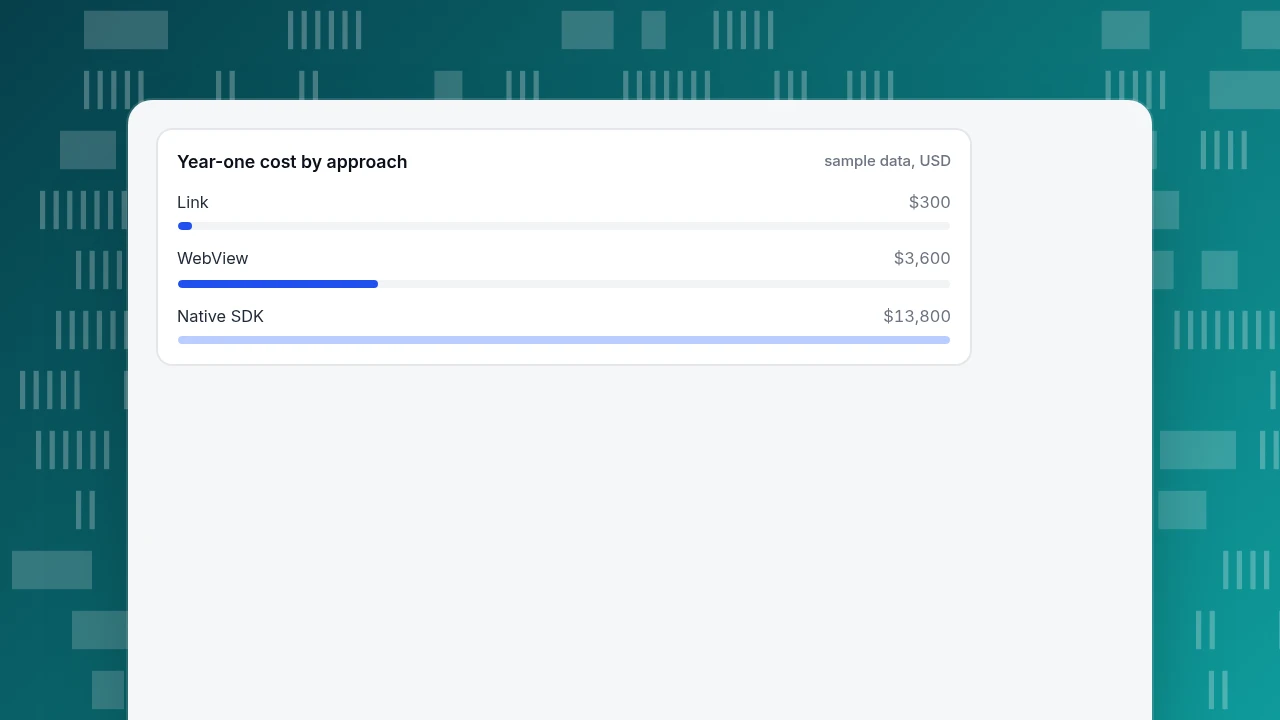
Start freeIn-app live chat is a chat window that opens inside your mobile app, and you can build it three ways: a link to a hosted chat page, a WebView that shows that page in your own screen, or a native SDK. The link takes hours, the WebView days and the native SDK weeks; in the sample year that is $300, $3,600 and $13,800. Pick the lightest one that gives you the one thing you need, then measure before moving up.
What you will learn
- Start with a link: it costs hours, adds no native code and cannot move your crash rate
- Choose a native SDK only when replies must arrive as push or users chat on poor connections
- Divide extra cost by the value of one resolved chat to find the break-even volume before building
What counts as in-app live chat?
In-app live chat is a conversation window that opens from inside your mobile app, so a user can message your support or sales team without leaving the screen they are on. That is the whole definition; what differs is how the window is built. There are only three ways to build it, and each one trades build effort against how native it feels:
- A link that hands the user to a chat page in the system browser.
- A WebView that shows a chat page inside your own app screen.
- A native SDK that draws the conversation with the app's own UI components and talks to a chat service over its API.
Everything else you read about in-app chat, such as push notifications for replies or showing the user's plan inside the conversation, is a feature layered on top of one of those three. Picking the approach first keeps the later decisions small. The rest of this guide compares the three on cost, store rules, identity and measurement, then shows how to do the lightest version with TapCub. If your chat lives on a website rather than in an app, start with how to add live chat to a website instead.
How do the link, WebView and native SDK approaches compare?
| Link to a chat page | WebView | Native SDK | |
|---|---|---|---|
| What the user sees | The system browser or an in-app browser tab opens on the chat page | A chat page inside a screen of your app, with your own header | Native screens, keyboard behaviour and animations |
| Build effort | Hours: one button and one URL | Days: a screen, JavaScript settings, back handling, error states | Weeks: chat screens, state, reconnects, attachments, push |
| Who keeps it working | The chat vendor's page | You, for every OS and WebView update | You, plus the vendor's SDK releases |
| Identity of the user | Not passed unless you add it to the URL | You can pass it through the page's own script | Passed through the SDK's login call |
| Push notification for a reply | Not from the page | Not from the page | Possible, with push set up in the app |
| Offline behaviour | Browser error page | You must draw an error state | You can queue messages |
| Risk to your crash and ANR numbers | None | Memory use from the web engine | New native code in your process |
The table is a summary of the mechanisms, not a ranking. The right-hand column is the only one that gives users a fully native experience, and it is also the only one that adds third-party native code to your app.
Two facts from the platform owners explain the effort gap. Android's WebView is an extension of the standard view class that shows a page, and "does not include the features of a fully developed web browser, such as navigation controls or an address bar" (Android developer documentation). JavaScript is disabled in a WebView by default, so a chat page that needs scripts will show nothing until your code enables it. And because a WebView runs on a Chromium-based engine, its baseline memory use is higher than ordinary Android views, which is why Android asks you to remove it from its parent and call destroy() when you are done with it.
| Approach | Build effort | Best when |
|---|---|---|
| Link to a chat page | Hours | No one can build or maintain a screen |
| WebView | Days | A web help area already lives inside the app |
| Native SDK | Weeks | Replies must arrive as push or users are often offline |
Effort figures are estimates; the cost section shows how to turn them into dollars.
Which approach should you pick?
Use these rules in order and stop at the first one that applies.
- If you have no one to build or maintain a screen, use a link. A "Chat with us" row in the help screen that opens a chat URL is a real in-app entry point. It is the only option that costs less than a day.
- If you already have a web-based help centre or account area inside a WebView, put chat there. The page and the app screen already exist, so the extra cost is a few days of testing.
- If replies must arrive as push notifications, or users chat from a poor connection often, use a native SDK. A page in a WebView cannot be woken by the operating system when your agent answers; a native client can.
- If your app is a thin shell around a website, think twice about adding more web content. Apple's App Review Guidelines say your app "should include features, content, and UI that elevate it beyond a repackaged website" (guideline 4.2). One chat screen will not trigger that rule on its own, but it is a reason to keep the native parts of the app strong.
- If none of the above fits, start with the link and move up only when you see the numbers. The measurement section below says which numbers to look at.
The same decision, put as a rule of thumb: the native SDK buys you push, offline queueing and polish; the WebView buys you reuse; the link buys you speed. If you cannot say which of those three you need today, you need the link. For a longer comparison of SDKs and web widgets as such, see chat SDK vs widget.
What does each approach cost over a year?
Sample data: a support team compares the three approaches for an app with one iOS and one Android build, using a developer cost of $600 a day. The effort numbers are assumptions you should replace with your own estimates; the arithmetic is what matters.
| Approach | Build (days) | Upkeep over 12 months (days) | Total days | Cost at $600/day |
|---|---|---|---|---|
| Link | 0.5 | 0 | 0.5 | $300 |
| WebView | 4 | 2 | 6 | $3,600 |
| Native SDK | 15 | 8 | 23 | $13,800 |
The upkeep line is where estimates go wrong. For the WebView, 2 days means one retest per major OS release plus one fix; for the native SDK, 8 days means roughly two SDK upgrades and two OS releases with regression tests on both platforms. Neither number includes the chat vendor's subscription, which is the same whichever approach you pick.
To decide whether the extra spend is justified, divide the cost difference by the value of one resolved conversation. If a chat conversation saves $4 of agent time compared with an email thread, the WebView needs $3,600 ÷ $4 = 900 more resolved conversations than the link to break even, and the native SDK needs $13,800 ÷ $4 = 3,450. If the native SDK would take your reply time from hours to minutes through push, count that as a separate benefit and write it down; do not assume it.
Year-one cost by approach
sample data, USDWhat will the app stores say about it?
Three rules are worth checking before you build, all from the platform owners' own documents.
- Apple, guideline 2.5.6: apps that browse the web must use the appropriate WebKit framework and WebKit JavaScript. A chat page in a WebView on iOS therefore runs on WebKit, not a bundled engine, which is also what you should test on.
- Apple, guideline 5.1.1(vii): if you use SafariViewController, it must be visibly presented, may not be hidden or obscured by other views, and may not be used to track users without their knowledge and consent. A link that opens a chat page in SafariViewController is allowed; a hidden one that does work in the background is not.
- Android notification permission: on Android 13 (API level 33) and higher, notifications from a newly installed app are off by default until the user grants the
POST_NOTIFICATIONSpermission. If your plan depends on push replies, your chat needs a moment in the app where you ask for that permission in context, for example after the user sends their first message.
None of these stops you from using any of the three approaches. They decide what you must test and how you word the permission prompt.
What goes wrong at the edges?
These are the failures that cause chat to look broken even when the chat service is fine.
- The user's identity does not follow them. In a link or WebView, the chat page does not know who is logged in to the app unless you pass it. If you cannot pass it, ask for an order number or email inside the conversation, and say so in the greeting.
- A WebView swallows links. By default Android opens tapped links in a browser; if you override that so links load inside the WebView, a user can wander away from the chat page. The Android docs recommend letting the default browser open foreign links and not letting the user navigate within the WebView to pages that are not yours, particularly if you expose native code with
addJavascriptInterface. - The back button. In a WebView you must handle back yourself: check whether the view can go back, and otherwise close the screen. If you skip it, the first back press exits the whole chat.
- A crash you introduced. Google Play's Android vitals treat an app as having bad behaviour if its user-perceived crash rate is above 1.09% of daily users overall (8% for a single device model), and its user-perceived ANR rate above 0.47% (8% per model). If your app is already at 0.80% and a new SDK adds 0.10 points, you are at 0.90%; the headroom to 1.09% is now 0.19 points, which is easy to use up. Release a native SDK to a small share of users first and watch the number.
- A chat page that needs a cookie. Custom Tabs on Android share the user's browser state, including cookies, while WebViews do not. A user who is already signed in to the vendor's page in their browser may be signed out inside your WebView, which matters if your chat page expects a session.
How do you measure whether in-app chat is worth it?
Measure three things for four weeks before you choose a heavier approach.
- Entry rate: chat opens per 100 active app users. Fire an app event when the button is tapped, so you count intent even when the chat page fails to load.
- Completion rate: conversations where the user sent at least one message, divided by chat opens. A low number points to a load or identity problem, not to a lack of demand.
- Outcome: among users who chatted, how many finished the action they were stuck on, compared with similar users who did not chat. A raw comparison overstates the effect, because people who open chat are already motivated; use it as an upper bound. Which other numbers belong on the same dashboard is covered in mobile app KPIs.
Sample data: 20,000 monthly active users, 1,200 chat opens, 840 conversations with a message. Entry rate: 1,200 ÷ 20,000 × 100 = 6.0 per 100 users. Completion: 840 ÷ 1,200 = 70%. If the native SDK is expected to lift completion from 70% to 80%, that is 1,200 × 0.10 = 120 more conversations a month, worth 120 × $4 = $480 at the sample $4 each; against $13,800 of year-one cost that is 29 months to pay back on that benefit alone. The WebView case, at $3,600, pays back in 7.5 months. These are assumptions, but the shape of the answer is the point: the heavier approach needs a large user base or a push-dependent use case to pay back.
How to do it with TapCub
The example above, the lightest version, is the one TapCub supports directly. TapCub does not ship a native in-app chat SDK. What it provides is a standalone chat page with a URL of the form https://chat.askcub.com/YOUR_SITE_KEY, plus the on-site chat bubble for websites. TapCub documents that page as a full-screen chat meant for places like email signatures and QR codes; opening it from a button in your app is the "link" approach in the table above.
- In Live chat › Chat settings › Appearance, turn on Enable live chat and set the brand name and colour. Visitors see these on the standalone page.
- In Live chat › Chat settings › Install, copy the standalone chat page URL. Put it behind a "Chat with us" row in your app's help screen.
- Track the tap in your app with a custom event (for example
help_chat_opened), so you have the entry rate even before the conversation starts. Create it in the app SDK you already use for analytics. - Open Live chat › Inbox. New conversations appear under Waiting; in Live chat › Chat settings › Offline messages you can let people leave an email and question when no one is online.
- After a month, compare chat opens from your event with conversations in Live chat › Reports to get the completion rate from the measurement section.
TapCub does not document passing the app user's identity into the standalone page, so plan to ask for an order number or email in the conversation. And TapCub does not decide which approach is right for your app; it supplies the page and the report. A WebView around that page is possible, but it is your build, not a TapCub feature, so apply the checklist above if you go that way.
FAQ
What is the easiest way to add live chat to a mobile app?
Add a "Chat with us" button that opens your chat vendor's hosted page by URL. It takes hours rather than days, needs no new native code and cannot affect your crash rate. You lose push notifications for replies and the user's login identity, so ask for an email or order number in the conversation.
Should I use a WebView or a native SDK for in-app chat?
Use a WebView if you already have web content inside the app and no push requirement; use a native SDK if replies must arrive as push notifications or users chat on poor connections. In the sample, the WebView costs $3,600 over a year and the native SDK $13,800, so the native route needs a clear benefit to justify it.
Can I put a website chat widget inside a WebView?
Often, yes: it is just a web page. You must enable JavaScript in the WebView, handle the back button and test on each OS. Apple requires apps that browse the web to use WebKit, so test on iOS with the system WebKit engine, not a desktop browser.
Does in-app chat need push notifications?
Not to be useful, but without push a user must reopen the app to see a reply. On Android 13 and higher, notifications are off for a new install until the user grants permission, so ask at a moment when the benefit is clear, such as right after they send their first message.
Will Apple or Google reject an app for adding a WebView chat?
A single chat screen in a WebView is not what Apple's repackaged-website rule targets; the rule is about apps with no features beyond a website. Check guidelines 4.2, 2.5.6 and 5.1.1(vii) before submitting, and keep any SafariViewController visible and unhidden.
Sources
- Apple. App Review Guidelines — guidelines 4.2, 2.5.6 and 5.1.1(vii) quoted above. Checked 2026-11-20.
- Android Developers. WebView — default JavaScript setting, link handling,
addJavascriptInterfacewarning, memory use. Checked 2026-11-20. - Chrome for Developers. Custom Tabs — shared browser state compared with WebView. Checked 2026-11-20.
- Android Developers. Notification runtime permission — off by default from Android 13. Checked 2026-11-20.
- Google Play Console Help. Android vitals bad behavior thresholds — 1.09% crash and 0.47% ANR user-perceived rates. Checked 2026-11-20.
Was this article helpful?
We use your answers to fix and expand this page.
Couldn’t send. Please try again in a minute.
Thanks for the feedback. We’ll use it to improve this page.You’ve already sent feedback on this page. Thanks.

Product Analyst
Focuses on event analysis, conversion funnels, and retention, using clear metric definitions and structured analysis to explain product performance.