Try it on your own data
Every report in this article is in the free plan. One snippet for web and apps, up to 10 sites.
Start freeThe most useful ecommerce SEO tips come in priority order: first make sure crawlers can reach and tell apart your category and product pages by handling filter, sort and out-of-stock URLs, then improve category and product content, and judge the result by orders from organic landing pages, not by rankings.
What you will learn
- Fix crawling and duplicate URLs before content: in the sample, 8,800 of 10,000 crawled URLs (88%) should not compete for the index
- Decide once per URL type: sort orders, empty and thin filter combinations, and the at most 1,200 states worth indexing
- Keep out-of-stock pages that will return, and judge SEO by orders: 3,000 sessions at 3.0% beat 12,000 at 0.9% on efficiency, and nearly match on orders (90 vs 108)
Where to start: the priority order
Most ecommerce SEO advice is a flat list of twelve tips with equal weight. That hides the one thing that decides where your time goes: a store's biggest SEO problems are usually technical, and they come before content. A store with 10,000 near-identical filter pages and a hundred empty ones will not be rescued by better product descriptions.
Work in this order, and stop to measure after each step:
| Priority | Area | What to check first | Signal that it needs work |
|---|---|---|---|
| 1 | Crawlable and distinct pages | Filter and sort parameters, duplicate URLs, empty categories, out-of-stock pages | Search Console shows thousands of crawled-but-not-indexed or duplicate URLs; crawlers spend most requests on parameter URLs |
| 2 | Category pages | One page per way shoppers search, with a title, intro and working internal links | Top-10 category pages with a low click-through rate; categories with no organic entries |
| 3 | Product pages | Unique title and description, one URL per product, variants handled, structured data | Manufacturer text copied across many stores; several URLs for one product |
| 4 | Content | Buying guides and comparison pages for questions shoppers ask before buying | Questions in chat and search queries with no page that answers them |
| 5 | Links | Internal links to the pages that sell, then outside links | Best sellers reachable only through search or deep in the menu |
Priority 1 comes first because it limits everything else. Google judges the importance of a page largely by how many internal links point at it, and a crawler that spends its visits on parameter URLs has fewer left for the pages that sell. The rest of this guide covers the priorities in that order, then how to tell whether any of it worked. It stays on structure and measurement. For turning organic visitors into orders once they arrive, see ecommerce CRO, and for a general plan when the team is small, SEO for startups.
Why filters and sort orders cause the most damage
Faceted navigation, the filters for colour, size, brand and price plus sort orders, can turn a hundred category pages into tens of thousands of URLs. Google's documentation on faceted navigation says plainly what that costs: crawlers can waste a lot of resources fetching large numbers of filter combinations before they realise those URLs are useless, which leaves less capacity for discovering new and useful pages.
Three kinds of URL cause the damage:
- Sort and view parameters such as
?sort=priceor?view=48. They change the order, not the content, so they are duplicates of the base page. - Filter combinations such as
?color=black&size=9&brand=acme. Some match what people search for. Most do not, and many return no products at all. - Session and tracking parameters appended by the site or by campaigns. Google's URL structure guidance says not to link to temporary parameters like session IDs and tracking codes, and to use stable URLs.
Google lists the options for the URLs you do not want crawled, and they are not equal. A robots.txt disallow on the filter parameters is the stronger one, as long as category and product pages stay crawlable. A canonical tag pointing filtered URLs at the unfiltered version may gradually reduce crawling of the duplicates, but Google describes it as less reliable over time than robots.txt. Adding nofollow to links only helps if every link to that URL carries it. Filters placed after a # have no effect on crawling at all, because Google generally ignores fragments.
For the combinations you do want indexed, Google's advice is to use the standard & separator, keep filter order in the path consistent, and return a 404 status for combinations with no results rather than redirecting them to a generic page. For the reasoning behind parameter URLs, read dynamic URL. The table below turns this into a decision for each type of URL. Apply it to each type once, not to each URL.
What to do with each type of URL
The table gives a default treatment for each URL type. The right answer for a given store depends on search demand, so check the last column before applying it.
| URL type | Example | Treatment | Check before applying |
|---|---|---|---|
| Sort and view parameters | ?sort=price | Canonical to the base page, or disallow the parameter in robots.txt | None; they have no content of their own |
| Session and tracking parameters | ?sid=…, ?utm_source=… | Do not link to them; keep stable URLs in internal links | Which links generate them |
| Filter combination with demand | ?color=black&brand=acme | Index it: self-referencing canonical, in the sitemap, & separator and consistent order | People search for it and it lists three or more products |
| Filter combination, thin | One or two products | noindex, or canonical to the parent category | Whether the parent already covers the query |
| Filter combination, empty | No products | Return 404; do not redirect to a generic page | Whether internal links still point to it |
| Filter placed after a # | #color=black | Do not rely on it: Google generally ignores fragments | If it must be crawlable, use a real parameter or path |
| Variant with its own URL | /shoe-black | Canonical to the main product URL | Same URL form in links, sitemap and canonical |
Treatments follow Google Search Central guidance on faceted navigation and ecommerce URL structure; which combinations deserve indexing depends on your own search demand.
Worked example: 10,000 URLs, 1,200 worth indexing
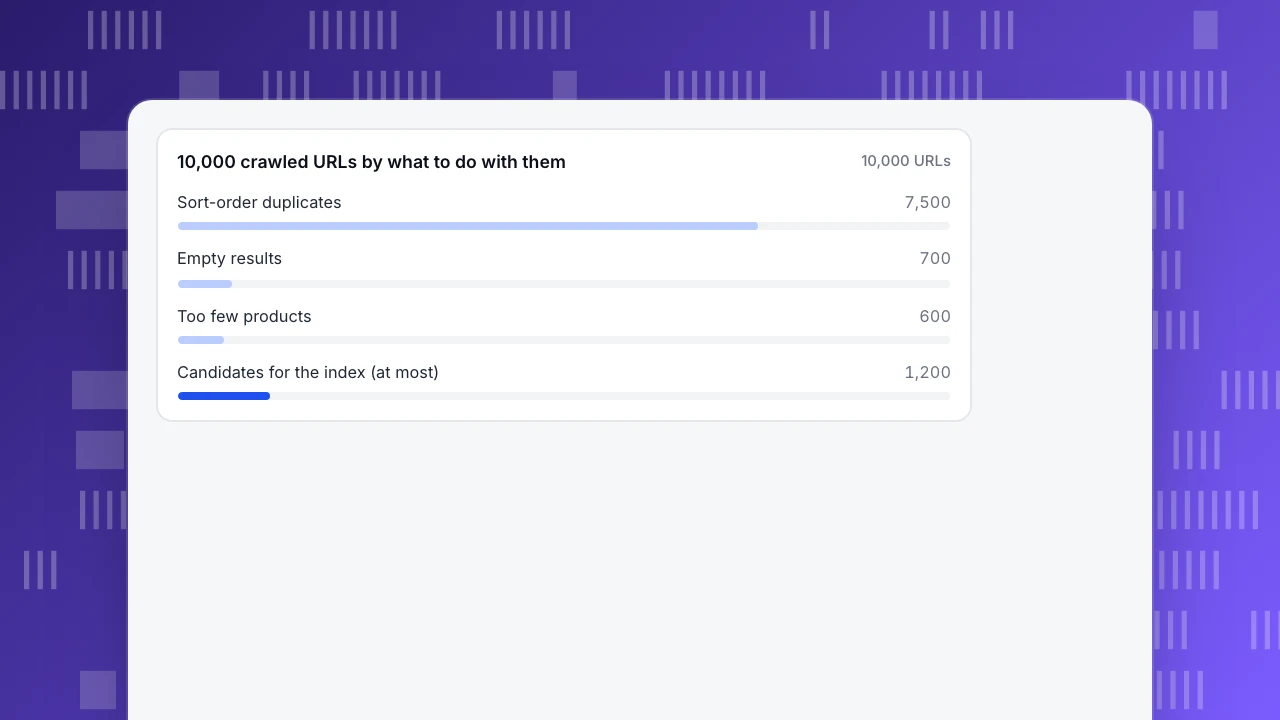
Sample data: a store has 20 categories. Each category has three filters: colour with 4 values, brand with 4 and size with 4. Each filter can also be left unset, so each category has (4 + 1) × (4 + 1) × (4 + 1) = 125 filter states, and 20 × 125 = 2,500 states in total, including the 20 plain category pages. Every state can be sorted 4 ways, so a crawl finds 2,500 × 4 = 10,000 URLs.
Apply the rules from the table:
- Sort variants. For each state, the default order is the real page and the other three sort orders are duplicates. That is 2,500 × 3 = 7,500 URLs with no content of their own.
- Empty results. Of the 2,500 states, 700 return no products. They should return a 404 or not be linkable.
- Thin results. A further 600 return only one or two products. Treat them as not worth indexing, with a canonical to the parent or a
noindex. - What is left. 2,500 − 700 − 600 = 1,200 states have three or more products, including the 20 category pages.
The partition adds up: 7,500 + 700 + 600 + 1,200 = 10,000. Only 1,200 URLs, 12% of what a crawler finds, are candidates for the index, and 8,800, or 88%, should be consolidated, blocked or removed. The 1,200 is a ceiling, not a target: of those states, keep only the ones that match something shoppers actually search, such as "black running shoes" or "acme size 9", and give those a self-referencing canonical and a place in the sitemap. The numbers are illustrative. The method is the point: classify every URL pattern by type, count each type and decide once.
10,000 crawled URLs by what to do with them
10,000 URLsCategory pages
Category pages usually carry more organic traffic than any single product, because they match broad searches like "women's running shoes". Three things matter most:
- One page per search intent. If shoppers search for "trail running shoes" and "road running shoes" separately, they need separate pages with their own titles and intros, not a single page with a filter.
- A title and a short intro that say what the page lists. Skip the long block of keyword text at the bottom; it helps nobody.
- Crawlable links. Google recommends ordinary links in the page markup rather than click handlers, and linking menu to category to subcategory to product, so that every product you want indexed is reachable. Products found only through the site's own search box can be missed. If you cannot link everything, a sitemap or a Merchant Center feed helps.
Do not let two categories compete for the same query either. If "running shoes" and "jogging shoes" both have pages with nearly identical lists, see keyword cannibalization.
Product pages and variants
Product pages win on specifics: the exact product name, a model number, a size. Keep four rules:
- One URL per product. Google's ecommerce URL guidance says variants such as colour or size can have their own URLs, but if they do, the canonical should point at the main product URL. Use the same URL form in internal links, sitemaps and canonicals.
- Write your own title and description for the products that sell. Copy supplied by a manufacturer appears on every store that sells the item, so there is nothing to tell your page apart. Rewrite the top 50 sellers, not all 10,000.
- Add Product structured data with a price and availability so the page can be understood as a product and show current stock.
- Answer the question that stops the purchase near the buy button: delivery time, returns, sizing. That is both a conversion and a content fix, and it stops the question reaching your support inbox.
Out-of-stock and discontinued products
What you do with a page that cannot be bought depends on whether the product is coming back:
| Situation | Treatment | Why |
|---|---|---|
| Out of stock for now | Keep the page live, mark it out of stock in the page and in structured data | Google's guidance on pausing a business says it is better to keep the page and mark it out of stock; shoppers and links keep their destination |
| Discontinued, a close replacement exists | 301 redirect to the replacement | The visitor and the link value both land somewhere useful |
| Discontinued, no replacement | Return 404 (or 410) | Google treats 404 and 410 alike and removes the URL gradually |
| Seasonal, back next year | Keep the page and mark it out of stock | Keeps its history and avoids rebuilding it |
| Empty category | 404, or noindex while empty | Google advises against indexing empty or low-value pages |
A soft 404, a page that shows an error or "not found" message but returns a success status, can be flagged in Search Console. Do not use noindex on a page you will relist in a month, and do not redirect every discontinued product to the home page, which sends the visitor somewhere unrelated.
Content and links, in proportion
Content and links come fourth and fifth for a reason: they do not fix structure. Once the crawl is clean and category and product pages are sound, they are worth the time:
- Buying guides that answer questions shoppers ask before they buy. Find them in your chat transcripts, support inbox and search queries, and link them to the category they help sell.
- Internal links from guides and the home page to best sellers. This is cheap and quick.
- Outside links from sites that matter in your niche, through guides, reviews and partnerships. This is the slowest and least controllable lever, so it should not hold up the rest.
Skip writing for keywords nobody searches. A page that no query, link or shopper question needs is one more URL to maintain.
Judge it by orders, not ranking
A higher ranking is a means, not the result. Two sample landing pages show why:
| Landing page | Organic sessions | Conversion rate | Orders |
|---|---|---|---|
| A: broad category | 12,000 | 0.9% | 108 |
| B: specific product | 3,000 | 3.0% | 90 |
Page A has four times the traffic, but page B produces nearly as many orders from a quarter of the visits. If you celebrated A's rise from position 8 to position 5 and ignored B, you would have chosen the wrong page to work on. Together the two pages bring in 108 + 90 = 198 orders. Track at least three things for each landing page: organic sessions, conversion rate and orders. The wider set of store metrics is in ecommerce analytics.
When you ship a change, compare equal periods of four weeks before and after, and note the date on your charts. A parameter clean-up usually takes weeks to show in search, so judge it by the crawl and by the count of indexed duplicate URLs first, and by orders later.
Common mistakes
- Noindexing every filter page. A few combinations match real searches and deserve to be indexed; sorting out which ones takes counting, not a blanket rule.
- Believing canonical blocks crawling. A canonical consolidates signals, and Google says it reduces crawling of the duplicates less reliably than robots.txt does. If the crawl itself is the problem, block the parameters.
- Deleting out-of-stock pages that will return. You lose the history and the links, and shoppers who find the page get an error.
- Rewriting 10,000 descriptions before fixing 10,000 URLs. Fix the crawl first, then write for the top sellers.
- Chasing rankings for terms that do not convert. A broad term may bring traffic with no orders. Count orders by landing page.
- Counting bot visits as demand. Crawlers and scrapers can inflate sessions and distort conversion rate. Keep them out of the numbers you decide on.
Finding the cleanup priorities in TapCub
Take the 10,000-URL store above and use TapCub to check where it stands. TapCub measures what search and crawlers do; it is not a crawler or a site audit, and it does not change your robots rules, canonicals or noindex tags. Those stay on your store platform.
- Connect search data. In Monitoring › Search performance, connect Google Search Console or Bing Webmaster. You then see clicks, impressions, click-through rate and average position by page, query and country. Pages in the top 10 whose click-through rate is below the median are marked, because changing the title and description pays off first there. Search data runs 1 to 3 days late, and with no account connected, empty clicks mean no data, not zero traffic.
- See what crawlers fetch. Monitoring › Crawl health shows fetches, success rate, distinct pages, 404s and 5xx by engine, and if you set your sitemap URL it compares the sitemap with what was fetched. In the example, that comparison shows whether the 1,200 pages are being fetched. It needs server-side records, because the page script cannot provide a status code; see the crawl health help. Crawler 404s are separate from visitor 404s in the Web analytics › Pages 404 tab, which lists hits and the previous page. Fix paths that appear in both first.
- Know what the Pages report hides. When TapCub records a page it drops the query string, so every filter and sort variant appears under the same path in Web analytics › Pages. That keeps traffic readable, but it also means the report cannot show a parameter explosion. Use Search Console and crawl records for that. UTM tags are stored as source fields and appear in Web analytics › Sources.
- Measure orders by landing page. Define a goal on your order event with Track revenue on, and open Web analytics › Goals. The breakdown splits conversions by source, entry page, country or device: use the source split to see how organic search converts and the entry-page split to see which landing pages do. Humans and bots are counted separately by default, so recognised crawlers do not inflate sessions or dilute conversion rate. For multi-visit journeys, All-platform analytics › Behavior › Behavior analysis attribution can credit purchases to the landing page of earlier sessions within a 30-day window by default.
FAQ
What are the most important ecommerce SEO tips?
Fix crawling and duplicate URLs first, then category pages, then product pages, then content and links. Filter and sort parameters, empty categories and out-of-stock pages cause the biggest structural problems on most stores. Measure results by orders from organic landing pages rather than by ranking alone.
How do you do SEO for an ecommerce site?
Start with a clean crawl: consolidate or block parameter URLs, return 404 for empty combinations, and give each product one URL. Then write category pages for each way shoppers search, give top sellers their own titles and descriptions, add Product structured data, and track organic orders by landing page.
Should you noindex filtered pages?
Not all of them. Filter combinations that match real searches and have enough products can be indexed with a self-referencing canonical. Sort orders, empty results and thin combinations should be consolidated, blocked or removed. Count each type before deciding; a blanket noindex also removes the useful ones.
What should you do with out-of-stock product pages?
If the product is coming back, keep the page and mark it out of stock in the page and structured data. If it is discontinued and has a close replacement, 301 redirect to the replacement. If there is no replacement, return a 404 or 410. Do not redirect everything to the home page.
How long does ecommerce SEO take to work?
Technical clean-up shows first in crawl and index reports, often within weeks, while rankings and orders take longer. Compare equal periods before and after a change, such as four weeks each, and judge a parameter fix by the number of crawled duplicate URLs before judging it by sales.
Sources
- Google Search Central, Managing crawling of faceted navigation URLs. Checked 2026-11-17.
- Google Search Central, Designing a URL structure for ecommerce sites. Checked 2026-11-17.
- Google Search Central, Help Google understand your ecommerce site structure. Checked 2026-11-17.
- Google Search Central, Temporarily pause or disable a website (keeping out-of-stock pages). Checked 2026-11-17.
- Google Search Central, HTTP status codes, network and DNS errors (404 and 410 treated alike; soft 404). Checked 2026-11-17.
Was this article helpful?
We use your answers to fix and expand this page.
Couldn’t send. Please try again in a minute.
Thanks for the feedback. We’ll use it to improve this page.You’ve already sent feedback on this page. Thanks.

Customer Experience Consultant
Writes about live chat, visitor conversations, and self-service, sharing practical ways to make customer communication clearer and more effective.